Average Ratings 0 Ratings
Average Ratings 0 Ratings
Similar Products
-
ESET PROTECT AdvancedESET Protect Advanced offers a comprehensive cybersecurity solution for businesses of any size. It offers advanced endpoint security against ransomware and zero-day threats. It also includes full disk encryption to ensure legal compliance and data security. The solution uses adaptive scanning, cloud sandboxing and behavioral analysis for proactive cloud-based threats defense. Mobile threat protection secures Android and iOS with anti-malware and anti-theft. It also offers cloud app security, mail server protection, vulnerability and patch management, and cloud app protection. Multi-factor authentication and extended detection and reaction (XDR) improve threat detection and response. The solution provides a single pane of glass remote management to provide visibility into threats and users. It also offers advanced reporting and customized notifications.
-
OvermonitorOvermonitor is cloud-based infrastructure, website, and endpoint monitoring built for teams that want fast setup, clear alerts, and practical visibility without the complexity or cost of enterprise monitoring suites. Monitor websites, servers, endpoints, processes, Windows services, event logs, uptime, response time, SSL certificates, and internal network health from one easy dashboard. At the core of Overmonitor is a small, lightweight server agent that installs quickly, pairs with your account, and reports a heartbeat every minute from inside your network. This gives you visibility beyond public uptime checks, helping detect server outages, stalled services, failing processes, internal connectivity problems, and endpoint health issues before they become customer-facing downtime. Overmonitor supports city-level geotargeted monitoring, practical maintenance windows that reduce alert noise, push notifications for alerts, audible dashboard alerts for operations screens, process monitor rollups, embeddable performance graphs, and flexible à la carte pricing so you only pay for the monitoring you need. Designed for SaaS operators, IT teams, MSPs, developers, and small businesses, Overmonitor helps you track availability, analyze website performance, monitor infrastructure health, and improve end-user experience without being locked into a bloated monitoring platform.
-
FilerevFilerev is a powerful tool that helps you easily find and manage hidden files, duplicate files, large files, and oversized folders, ensuring a streamlined and clutter-free digital workspace. Key features include advanced scanning technology that identifies the unorganized files taking up the most space and cluttering your Google Drive. Filerev enhances productivity by saving time and reducing the frustration of manual file organization. The custom filters and bulk delete tool give you complete control over finding and removing unwanted files in your account. The storage analyzer lets you browse your folders by size to see where the space is being used in your Google Drive. Whether you're an individual, a small business, or a large enterprise, Filerev offers robust solutions tailored to your needs. Visit filerev.com to discover how Filerev can transform your Google Drive experience and boost efficiency.
-
Secure EraserSecure Eraser: Secure Data Deletion, Shredders Your Files & Folders. Just because it has been removed from your hard drive doesn't mean that it is gone forever. Anyone can restore the information as long as it was not overwritten. It becomes more difficult if the computer has been resold, or given away. Secure Eraser employs the most well-known method of data disposal. It overwrites sensitive information so that it cannot be recovered even with specialized software. Our award-winning solutions for permanently destroying data eliminate cross-references that may leave traces of deleted files within the allocation table of your hard disk. This Windows software is easy to use and can overwrite sensitive data up to 35 times, regardless of whether they're files, folders or drives, recycle bins, or traces of surfing. You can also delete files that you have already deleted but not for good.
-
MobiOfficeMobiOffice (formerly OfficeSuite) is an easy-to-use office suite alternative, used by over 250 million users across 195 countries. Available on Windows, Android, iOS, and macOS, MobiOffice includes MobiDocs, MobiSheets, and MobiSlides. MobiOffice helps you manage text documents, spreadsheets, and presentations with ease. It's compatible with all major file formats including Microsoft Office (DOCX, ODT, PPTX), Google (Docs, Sheets, Slides), Apple iWork, and more. Explore each component: MobiDocs: Create and modify documents with comprehensive formatting options. MobiSheets: Simplify data management and analysis to visualize insights and generate reports effortlessly. MobiSlides: Craft impressive presentations with customizable templates and multimedia capabilities. MobiOffice integrates with MobiDrive, MobiSystems’ cloud storage solution for easy document saving and synchronization. Try it free for 7 days to see how this office suite meets your needs. Optimized for all major platforms, MobiOffice’s components - MobiDocs, MobiSheets, and MobiSlides - are available as a complete suite or as standalone apps on Windows, delivering tailored and affordable solutions that suit individual needs.
-
Files.com6,000+ companies trust Files.com to automate and secure business critical transfers. We obsess about security, compliance, reliability, and performance so your critical business processes just work every time. Easily manage any transfer flow without writing scripts or code, and onboard workloads and partners effortlessly. We support standard file transfer protocols (FTP, SFTP, AS2) for working with external partners and also provide native apps for high performance internal transfers. As a fully Cloud-Native SaaS, there are no servers for you to buy or maintain, there is no installation required, and high availability and redundancy are built in and free. Our InfoSec Program is audited annually by Kirkpatrick Price, a leading information security CPA firm. Our audit covers the scope of the entire Files.com business (not just datacenter operations) and names Files.com specifically. Beware of smaller competitors who try to pass off someone else’s audit as their own. Technical capabilities include encryption at-rest and in-transit, four types of two-factor authentication, nine enterprise identity (SSO) integrations, configurable password and session policies, and a perfect “A+” score from Qualys SSL Labs.
-
AdmiralAdmiral is the top adblock recovery platform for publishers, helping recover millions of dollars in advertising revenue lost to adblockers, privacy tools, DNS filtering, VPNs, network-level blocking, and other forms of monetization disruption. Trusted by thousands of publishers and backed by more than a decade of expertise, Admiral pioneered Full Spectrum Adblock Recovery—combining multiple recovery approaches to maximize total adblock revenue. As the creator of Visitor Relationship Management (VRM), Admiral extends beyond ad recovery to help publishers recover and grow revenue through subscriptions, registrations, consent management, first-party data, email acquisition, social audience growth, donations, and other visitor monetization strategies. By combining recovery and revenue-growth approaches in one platform, Admiral helps publishers reduce revenue leakage, increase visitor lifetime value, and maximize monetization across the audience lifecycle. Admiral VRM delivers: * Industry-leading Full Spectrum Adblock Recovery * Paid subscriptions, paywalls, and donation campaigns * Visitor Copilot conversational AI for engagement and revenue growth * Registration walls, user accounts, and first-party data * Email, social audience, and app growth * GDPR and CCPA consent management Admiral also provides analytics, journey shaping, visitor segmentation, targeting, testing, and optimization. Publishers can add Admiral's free tag in minutes for immediate visibility into adblock rates and revenue recovery potential.
-
ManageEngine Endpoint CentralManageEngine Endpoint Central is a unified endpoint management and security platform designed for IT teams managing diverse and distributed device environments eliminating the need for multiple disconnected products for patching, remote access, mobile management, and security. The platform supports Windows, macOS, Linux, iOS, Android, and Chrome OS. Automated patch deployment covers OS and 1,000+ third-party applications with scheduling, testing, rollback, and compliance reporting. Software can be deployed, updated, or removed across thousands of endpoints simultaneously. OS imaging workflows provision new devices quickly, while continuous asset inventory supports license compliance and audit readiness. Security capabilities are built directly into the platform. Vulnerability assessment identifies and prioritizes endpoint weaknesses by severity. Application control prevents unauthorized software execution. Device control governs USB and peripheral access. Endpoint privilege management removes unnecessary admin rights. EDR delivers behavioral threat detection and incident response, while NGAV blocks malware, ransomware, and zero-day threats. BitLocker and FileVault encryption enforces disk protection across Windows and macOS. Built-in remote desktop allows technicians to connect instantly without third-party software. Integrated MDM covers iOS and Android enrollment, app management, and remote wipe for corporate and BYOD environments. DEX monitoring gives IT teams real-time visibility into device performance enabling proactive issue resolution before productivity is impacted. Available as cloud or on-premises across Free, Professional, Enterprise, UEM, and Security editions.
-
Nutrient SDKNutrient provides an extensive solution for all your PDF requirements, delivering tools that seamlessly operate PDF features across any platform. 1. SDK: Incorporate advanced PDF functionality into iOS, Android, Windows, web, or any cross-platform technology, supplying abilities like PDF viewing, annotation, collaboration, and beyond. 2. Libraries: Employ our powerful .NET and Java libraries to enhance your backend applications with batch processing of redactions and PDF forms, OCR'd scanned text, and PDF document editing, all directly from your application server. 3. Processor: Our agile PDF microservice, Processor, enables rapid generation of PDFs from HTML, including HTML forms, as well as Office-to-PDF conversions, OCR, redaction, and XFDF combining and exporting. 4. PDF API: Take advantage of our hosted PDF API to generate, convert, and alter PDF documents in your workflows. We handle the development and server management, freeing you up to concentrate on your business. At Nutrient, we're not just a tool; we're a committed ally in your success. Gain direct contact with our engineers for expert guidance, utilize comprehensive examples to simplify integration, and make the most of our top-tier documentation.
-
ShiftShift puts you in control of your browser. Arrange apps, bars, and controls exactly where you want them, building a personalized workspace that works around you — not the other way around. Connect over 1,500 web apps, jump between dedicated Spaces for work, side hustles, and personal browsing, and manage multiple accounts without ever logging in and out. As a pioneer in carbon-neutral browsing, Shift is committed to rethinking what a browser can be — for the people who use it and the world they live in. Started in Victoria, British Columbia in 2016, Shift is a Certified B Corp and proud member of the Redbrick portfolio. What you can do with Shift: - Build your browser: Design a layout tailored to how you use the internet. - Create Spaces: Keep work, side hustles, and passion projects in their own lane. - Integrate Apps: Bring your favorite web apps together in one place. - Templates: Pick from 6 ready-made layouts to get started fast. - Shift AI: A built-in AI assistant that helps you get more done across every tab and app.
Description
Macrorit Partition Expert Free Edition is an effective and free disk partitioning tool that enables users to create, extend, and format partitions while also addressing issues related to low disk space and efficiently managing storage on both MBR and GPT disks. This completely free utility is crafted for home users and is compatible with 32/64 bit Windows operating systems, including Windows XP, Vista, Windows 7/8/10, and the most recent Windows 11. In addition to its fundamental disk partitioning features, it stands out as the sole free software for disk management that incorporates advanced capabilities such as power-off protection and data recovery from disasters, functioning similarly to a partition recovery wizard. Consequently, users can execute partition operations without the anxiety of experiencing data loss, making it an invaluable tool for anyone looking to manage their disk space effectively. The user-friendly interface further enhances its appeal, ensuring that even those with limited technical knowledge can navigate and utilize its features with ease.
Description
Your computer desktop is cluttered and confusing. The files and applications you need are not always in reach.
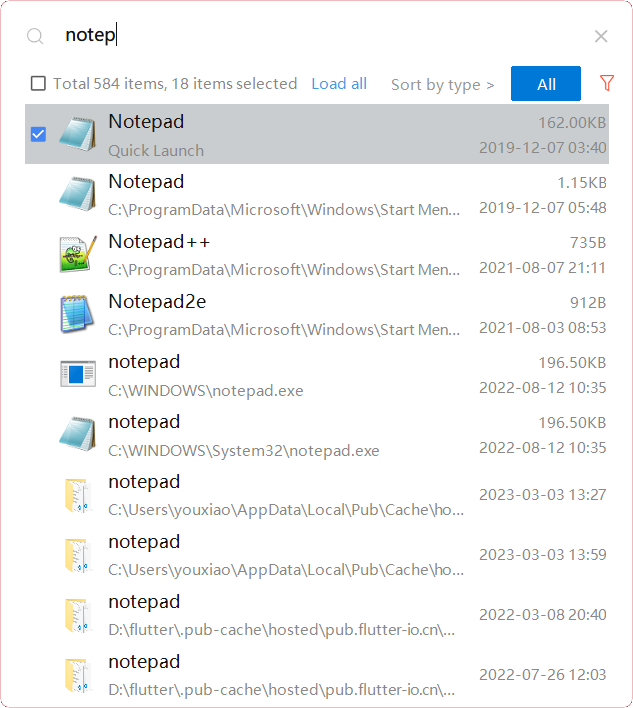
YXFile allows you to tagging file and search file as well as launch apps.
Tag Any File:
YXFile can tag every file type on any file system. The tagging is stored in a data base. YXFile will not alter your file names or create hidden files on your hard disk. You can move or rename files under the same partition. The tags won't be lost
Search for everything:
Search files and folders using their names. as well as file tags, launch items, and file tags.
Launch Apps
Launch App is a favorite feature of YXFile users. You can either type the name of the application or program you wish to open or use a shortcode. Click return and YXFile will open the program.
API Access
Has API
No
API Access
Has API
No



Integrations
Windows 10
Yes
Windows 11
Yes
Windows 7
Yes
Windows Vista
Yes
Windows XP
Yes
Integrations
Windows 10
No
Windows 11
No
Windows 7
No
Windows Vista
No
Windows XP
No
Pricing Details
$39.99 per license
Free Trial
No
Free Version
Yes
Pricing Details
$39/user
One-time payment for lifetime access to Yfile
Free Trial
Yes
Free Version
No
Deployment
Web-Based
No
On-Premises
No
iPhone App
No
iPad App
No
Android App
No
Windows
Yes
Mac
No
Linux
No
Chromebook
No
Deployment
Web-Based
No
On-Premises
No
iPhone App
No
iPad App
No
Android App
No
Windows
Yes
Mac
No
Linux
No
Chromebook
No
Customer Support
Business Hours
Yes
Live Rep (24/7)
No
Online Support
Yes
Customer Support
Business Hours
Yes
Live Rep (24/7)
No
Online Support
No
Types of Training
Training Docs
Yes
Webinars
No
Live Training (Online)
No
In Person
No
Types of Training
Training Docs
Yes
Webinars
No
Live Training (Online)
No
In Person
No
Vendor Details
Company Name
Macrorit
Founded
2012
Country
United States
Website
macrorit.com/partition-magic-manager/free-edition.html
Vendor Details
Company Name
ousaa
Founded
2016
Country
China
Website
yxfile.cc/
