
Average Ratings 0 Ratings
Average Ratings 0 Ratings
Similar Products
-
ParasoftParasoft's mission is to provide automated testing solutions and expertise that empower organizations to expedite delivery of safe and reliable software. A powerful unified C and C++ test automation solution for static analysis, unit testing and structural code coverage, Parasoft C/C++test helps satisfy compliance with industry functional safety and security requirements for embedded software systems.
-
QA WolfQA Wolf helps engineering teams achieve 80% automated test coverage end-to-end in just four months. Here's an overview of what you get in the box, whether it's 100 or 100,000 tests. • Automated end-to-end testing for 80% of the user flows in 4 months. The tests are written in Playwright, an open-source tool (no vendor lock-in; you own the code). • Test matrix and outline in the AAA framework. • Unlimited parallel testing on any environment of your choice. • We host and maintain 100% parallel-run infrastructure. • Maintenance of flaky and broken test for 24 hours. • Guaranteed 100% reliable results -- zero flakes. • Human-verified bugs sent via your messaging app as a bug report. • CI/CD Integration with your deployment pipelines and issue trackers. • Access to full-time QA Engineers at QA Wolf 24 hours a day.
-
BoozangIt works: Codeless testing Give your entire team the ability to create and maintain automated tests. Not just developers. Meet your testing demands fast. You can get full coverage of your tests in days and not months. Our natural-language tests are very resistant to code changes. Our AI will quickly repair any test failures. Continuous Testing is a key component of Agile/DevOps. Push features to production in the same day. Boozang supports the following test approaches: - Codeless Record/Replay interface - BDD / Cucumber - API testing - Model-based testing - HTML Canvas testing The following features makes your testing a breeze - In-browser console debugging - Screenshots to show where test fails - Integrate to any CI server - Test with unlimited parallel workers to speed up tests - Root-cause analysis reports - Trend reports to track failures and performance over time - Test management integration (Xray / Jira)
-
GearsetGearset is a full‑featured Salesforce DevOps solution built for the enterprise, giving teams the tools to adopt best practices across every stage of the DevOps lifecycle. From metadata and CPQ deployments to CI/CD, testing, code analysis, sandbox seeding, backups, archiving, and observability, Gearset gives teams unmatched insight and control over their Salesforce workflows. Over 3,000 organizations — including names like McKesson and IBM — rely on Gearset to deliver with security and scale in mind. With advanced governance, detailed audit trails, SOX/ISO/HIPAA support, multi‑team pipelines, integrated security checks, and adherence to ISO 27001, SOC 2, GDPR, CCPA/CPRA, and HIPAA, Gearset combines enterprise‑ready compliance with rapid onboarding and an intuitive interface — all in one platform. Leading firms in finance, healthcare, and tech trust Gearset to power their DevOps initiatives without adding complexity.
-
MuukTestYou know that you could be testing more to catch bugs earlier, but QA testing can take a lot of time, effort and resources to do it right. MuukTest can get growing engineering teams up to 95% coverage of end-to-end tests in just 3 months. Our QA experts create, manage, maintain, and update E2E tests on the MuukTest Platform for your web, API, and mobile apps at record speed. We begin exploratory and negative tests after achieving 100% regression coverage within 8 weeks to uncover bugs and increase coverage. The time you spend on development is reduced by managing your testing frameworks, scripts, libraries and maintenance. We also proactively identify flaky tests and false test results to ensure the accuracy of your tests. Early and frequent testing allows you to detect errors in the early stages your development lifecycle. This reduces the burden of technical debt later on.
-
qTestSoftware testing must be centrally managed and visible from conception to production in order to make software releases more secure and faster. Tricentis qTest enables teams to collaborate and ship faster, with less risk, by unifying, managing, and scaling testing across the enterprise. Robust testing includes a variety of testing tools, teams, test types, and testing methods. Tricentis qTest combines them all so that teams can release more confidently and reduce risk. It also helps identify opportunities to move faster - collectively. Automate more testing, increase the release velocity, and bring together teams throughout the software development process. Native DevOps integrations such as Jira, Jenkins and GitHub keep QA and development in sync. With a full audit trail, trace defects and tests back to development and requirements. Align teams with cross-project reporting.
-
UptimeRobotThe ultimate uptime monitoring service. Get 50 monitors with 5-minute checks completely free. Set up in seconds and stay informed about your website’s health at all times. Website monitoring: Get instant alerts when your website goes down. Reliable and accurate monitoring helps you fix issues before they affect users and prevent revenue loss. SSL certificate monitoring: Avoid losing visitors due to expired SSL certificates. Get notified 30 days before expiration so you can renew in time. Ping and port monitoring: Check if your server is online or if your email service is running on port 465. Monitor any port you need with real-time alerts. Cron job monitoring: Track scheduled tasks with heartbeat monitoring. We verify if the request arrives on time, making sure server-side jobs and internet-connected devices are running properly. Status pages: Create up to 100 branded status pages, protect them with a password, and allow subscribers to receive updates. Stay informed with email, SMS, voice calls, push notifications, or integrations with Slack, Zapier, PagerDuty, Telegram, Discord, Microsoft Teams, Google Chat, and more. Maintenance windows: Pause monitoring when you schedule downtime to avoid unnecessary alerts
-
JetBrains JunieJetBrains Junie is an innovative AI coding assistant that works inside many JetBrains IDEs to streamline programming efforts and boost efficiency. This agent leverages advanced AI to help developers write, test, and inspect code without leaving their familiar development environment. Junie offers both code execution and interactive collaboration, allowing programmers to switch between automated code writing and brainstorming sessions for features and improvements. By deeply understanding the codebase, Junie identifies the best ways to tackle tasks and ensures all changes meet quality standards through syntax and semantic checks. It also runs tests to minimize errors and keep the project healthy, freeing developers from routine tasks. Many developers have successfully built complex applications and games using Junie, highlighting its flexibility across different languages and frameworks. The AI adapts to each task’s complexity and workflow, making coding less tedious and more focused on creativity. Whether you are building a simple web app or a complex game, Junie offers smart support throughout the development cycle.
-
Monitask🚀 Supercharge Your Team's Productivity! 🚀 Introducing the ultimate productivity hack for the modern workforce. Whether your squad is crushing it in the office, remote, or rocking that hybrid life, we've got you covered. 📊 What's in the box? Smart Time Tracking: Auto clock-in/out. No more "I forgot" excuses! Random Screenshots: Catch those Insta-scrolling moments Web Detective: Know if they're coding or... "coding" 😉 Real-time Mission Control: See who's winning at work Ninja Mode: Stealth monitoring for the win Perfect for: Startups, agencies, outsourcing pros, and corporate giants 💡 Why it's awesome: Turn productivity data into team superpowers Spot workflow kryptonite and zap it Keep it ethical: Privacy for employees, insights for you 🕵️ Ninja Mode: Psst! Our stealth feature lets you observe natural work habits. It's like having a productivity crystal ball! 🔒 Fort Knox-level security included. Because we're paranoid, so you don't have to be. Ready to transform your team into productivity superheroes? Let's go! 🦸♂️🦸♀️
-
Uptime.comUptime.com website monitoring solutions provide unmatched visibility and availability, empowering engineering, operations and SRE teams to monitor & respond to their most essential services. Simple & intuitive industry leading Enterprise-grade features delivered at a fair price, that are continuously improving. G2, Sourceforge and TechRadar Pro have recognized us as one of the world’s best uptime monitors for several consecutive years, including this one. Try 100% free.
Description
All-in-one cloud testing platform for performance testing, load testing, website speed testing and website UI testing. Mobile applications and API endpoints are all covered.
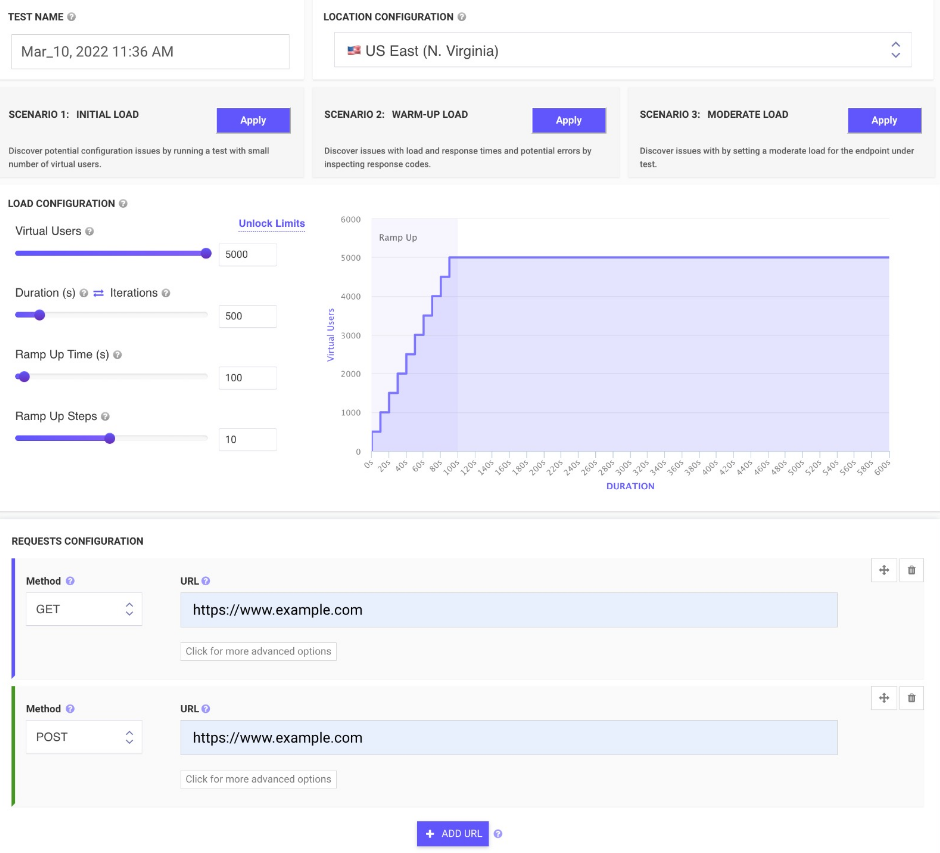
JMeter testing is easy from multiple cloud locations, with thousands of users. Apache JMeter allows you to see real-time performance metrics of your website and APIs from the cloud.
You can monitor changes over time and receive advice on how to speed up page loading times. We run your tests on cloud instances at set times and notify you if anything goes wrong.
To find rendering issues, invalid HTML, missing or incorrect CSS, load your web pages and websites in mobile emulators. In seconds, schedule runs and inspect the rendered images on all devices. Simulate your site on different screen sizes and resolutions.
Take screenshots of two websites in seconds. To check for differences, you can compare the generated screenshots using a threshold.
Description
Software for continuous performance testing to automate API load and application testing. For complex applications, you can design code-free performance tests. Script performance tests in automated pipelines for API test. You can design, maintain, and run performance tests in code. Then analyze the results within continuous integration pipelines with pre-packaged plugins for CI/CD tools or the NeoLoad API. You can quickly create test scripts for large, complex applications with a graphical user interface. This allows you to skip the tedious task of manually coding new or updated tests. SLAs can be defined based on the built-in monitoring metrics. To determine the app's performance, put pressure on it and compare SLAs with server-level statistics. Automate pass/fail triggers using SLAs. Contributes to root cause analysis. Automatic test script updates make it easier to update test scripts. For easy maintenance, update only the affected part of the test and re-use any remaining.
API Access
Has API
API Access
Has API



Integrations
Jenkins
AWS CodeBuild
Appium
Azure DevOps
Bamboo
Bitbucket
Chrome DevTools
Digital.ai Release
Dynatrace
Git
Integrations
Jenkins
AWS CodeBuild
Appium
Azure DevOps
Bamboo
Bitbucket
Chrome DevTools
Digital.ai Release
Dynatrace
Git
Pricing Details
$24 per month
Free Trial
Free Version
Pricing Details
No price information available.
Free Trial
Free Version
Deployment
Web-Based
On-Premises
iPhone App
iPad App
Android App
Windows
Mac
Linux
Chromebook
Deployment
Web-Based
On-Premises
iPhone App
iPad App
Android App
Windows
Mac
Linux
Chromebook
Customer Support
Business Hours
Live Rep (24/7)
Online Support
Customer Support
Business Hours
Live Rep (24/7)
Online Support
Types of Training
Training Docs
Webinars
Live Training (Online)
In Person
Types of Training
Training Docs
Webinars
Live Training (Online)
In Person
Vendor Details
Company Name
LoadFocus
Founded
2014
Country
United Kingdom
Website
loadfocus.com
Vendor Details
Company Name
Tricentis
Founded
2007
Country
United States
Website
www.tricentis.com/products/performance-testing-neoload/
Product Features
Automated Testing
Hierarchical View
Move & Copy
Parameterized Testing
Requirements-Based Testing
Security Testing
Supports Parallel Execution
Test Script Reviews
Unicode Compliance
Load Testing
API Load Testing
Database Load Testing
Load Test Performance Reporting
Mail Load Testing
Multilocation Load Testing
Multiple Protocol Support
Test Script Customization
Web Application Testing
Performance Testing
API Testing
Benchmarking
Cross Browser Testing
Debugging
Historical Reporting
Load Testing
Mobile Testing
Parallel Testing
Regression Testing
UI Testing
Web Testing
Website Monitoring
Availability Testing
Event Logs
Event-Based Notifications
FTP Monitoring
Mail Server Monitoring
Maintenance Scheduling
Performance Metrics
Real Time Monitoring
Transaction Monitoring
Uptime Reporting
Product Features
API Testing
Functional Testing
Fuzz Testing
Load Testing
Penetration Testing
Runtime and Error Detection
Security Testing
UI Testing
Validation Testing
Automated Testing
Hierarchical View
Move & Copy
Parameterized Testing
Requirements-Based Testing
Security Testing
Supports Parallel Execution
Test Script Reviews
Unicode Compliance
Functional Testing
Automated Testing
Interface Testing
Regression Testing
Reporting / Analytics
Sanity Testing
Smoke Testing
System Testing
Unit Testing
Load Balancing
Authentication
Automatic Configuration
Content Caching
Content Routing
Data Compression
Health Monitoring
Predefined Protocols
Redundancy Checking
Reverse Proxy
SSL Offload
Schedulers
Load Testing
API Load Testing
Database Load Testing
Load Test Performance Reporting
Mail Load Testing
Multilocation Load Testing
Multiple Protocol Support
Test Script Customization
Web Application Testing
Mobile App Testing
Functional Testing
Installation Testing
Interruption Testing
Memory Testing
Performance Testing
Usability Testing
Performance Testing
API Testing
Benchmarking
Cross Browser Testing
Debugging
Historical Reporting
Load Testing
Mobile Testing
Parallel Testing
Regression Testing
UI Testing
Web Testing
Software Testing
Automated Testing
Black-Box Testing
Dynamic Testing
Issue Tracking
Manual Testing
Quality Assurance Planning
Reporting / Analytics
Static Testing
Test Case Management
Variable Testing Methods
White-Box Testing

