Average Ratings 0 Ratings
Average Ratings 0 Ratings
Similar Products
-
Secure EraserSecure Eraser: Secure Data Deletion, Shredders Your Files & Folders. Just because it has been removed from your hard drive doesn't mean that it is gone forever. Anyone can restore the information as long as it was not overwritten. It becomes more difficult if the computer has been resold, or given away. Secure Eraser employs the most well-known method of data disposal. It overwrites sensitive information so that it cannot be recovered even with specialized software. Our award-winning solutions for permanently destroying data eliminate cross-references that may leave traces of deleted files within the allocation table of your hard disk. This Windows software is easy to use and can overwrite sensitive data up to 35 times, regardless of whether they're files, folders or drives, recycle bins, or traces of surfing. You can also delete files that you have already deleted but not for good.
-
FilerevFilerev is a powerful tool that helps you easily find and manage hidden files, duplicate files, large files, and oversized folders, ensuring a streamlined and clutter-free digital workspace. Key features include advanced scanning technology that identifies the unorganized files taking up the most space and cluttering your Google Drive. Filerev enhances productivity by saving time and reducing the frustration of manual file organization. The custom filters and bulk delete tool give you complete control over finding and removing unwanted files in your account. The storage analyzer lets you browse your folders by size to see where the space is being used in your Google Drive. Whether you're an individual, a small business, or a large enterprise, Filerev offers robust solutions tailored to your needs. Visit filerev.com to discover how Filerev can transform your Google Drive experience and boost efficiency.
-
Curtain MonGuard Screen WatermarkCurtain MonGuard Screen Watermark is an enterprise solution for displaying screen watermarks that administrators can enable on users' computers. This screen watermark can display various user information, such as the computer name, username, and IP address. The purpose of this watermark is to effectively grab the user's attention and serve as a reminder before they take a screenshot or photograph the screen to share the information with others. The key benefit of Curtain MonGuard is that it encourages users to "think before sharing" sensitive information. If the content being shared contains confidential company data, the watermark can help trace the source of the leaked information back to the user responsible. This allows organizations to hold users accountable and mitigate the consequences of data breaches or unauthorized information sharing. Key features: - On-screen watermark - Full screen-watermark - Application screen-watermark - Supports over 500 Applications - Self-defined content of watermark - Screen-watermark by condition - Central administration - Integration with Active Directory - Uninstall password for client - Password management - Admin delegation - Self protection for the software
-
DOP SoftwareStreamline Waste Operations with DOP Software DOP Software is a user-friendly, dynamic solution designed for the waste industry. Boost efficiency, speed up accounts receivables, optimize routes, and grow your customer base. Built to evolve with your business, offering all-inclusive features, ongoing updates, and cloud services. Suitable for businesses of any size or stage, DOP Software simplifies waste management. Make your operations smoother and more productive with DOP Software.
-
DbVisualizerDbVisualizer is a universal database client for anyone who works with data, from indie developers and startups to professional teams managing complex database environments, including developers, DBAs, analysts, and data engineers working across relational and NoSQL databases. Key features: - SQL editor with intelligent autocomplete, visual query builders, variables, and execution tools - AI Assistant for answering questions, explaining errors, and analyzing code - Git integration for managing SQL scripts and team collaboration - Customizable layouts, key bindings, and UI themes - Favorites for frequently used scripts and database objects - Configurable security settings for organizational requirements Connects via JDBC to MySQL, PostgreSQL, SQL Server, Oracle, Snowflake, SQLite, Cassandra, BigQuery, and more. Runs on Windows, macOS, and Linux. Nearly 7 million downloads, with Pro users in 150 countries, scaling from solo projects to enterprise database management.
-
Gemini Enterprise Agent PlatformGemini Enterprise Agent Platform is Google Cloud’s next-generation system for designing and managing advanced AI agents across the enterprise. Built as the successor to Vertex AI, it unifies model selection, development, and deployment into a single scalable environment. The platform supports a vast ecosystem of over 200 AI models, including Google’s latest Gemini innovations and popular third-party models. It offers flexible development tools like Agent Studio for visual workflows and the Agent Development Kit for deeper customization. Businesses can deploy agents that operate continuously, maintain long-term memory, and handle multi-step processes with high efficiency. Security and governance are central, with features such as agent identity verification, centralized registries, and controlled access through gateways. The platform also enables seamless integration with enterprise systems, allowing agents to interact with data, applications, and workflows securely. Advanced monitoring tools provide real-time insights into agent behavior and performance. Optimization features help refine agent logic and improve accuracy over time. By combining automation, intelligence, and governance, the platform helps organizations transition to autonomous, AI-driven operations. It ultimately supports faster innovation while maintaining enterprise-grade reliability and control.
-
OvermonitorOvermonitor is cloud-based infrastructure, website, and endpoint monitoring built for teams that want fast setup, clear alerts, and practical visibility without the complexity or cost of enterprise monitoring suites. Monitor websites, servers, endpoints, processes, Windows services, event logs, uptime, response time, SSL certificates, and internal network health from one easy dashboard. At the core of Overmonitor is a small, lightweight server agent that installs quickly, pairs with your account, and reports a heartbeat every minute from inside your network. This gives you visibility beyond public uptime checks, helping detect server outages, stalled services, failing processes, internal connectivity problems, and endpoint health issues before they become customer-facing downtime. Overmonitor supports city-level geotargeted monitoring, practical maintenance windows that reduce alert noise, push notifications for alerts, audible dashboard alerts for operations screens, process monitor rollups, embeddable performance graphs, and flexible à la carte pricing so you only pay for the monitoring you need. Designed for SaaS operators, IT teams, MSPs, developers, and small businesses, Overmonitor helps you track availability, analyze website performance, monitor infrastructure health, and improve end-user experience without being locked into a bloated monitoring platform.
-
FuelCloudFuelCloud is a fuel technology company building the future of Fuel Management Systems for monitoring and managing bulk fuel supplies. By combining four generations of fuel industry knowledge with the latest innovations in cloud computing and mobile technology, FuelCloud's Fuel Management Systems deliver cardlock-level control at backyard prices. The result is a powerful yet affordable Fuel Management System that protects fuel from loss and theft, streamlines reporting and management, and puts you in control of your fuel. The heart of FuelCloud's system is the cloud-based web portal. From the web portal, managers can track transactions and tank volumes, control who can access fuel (and how much they can have), and automate creating and delivering reports The web portal also integrates your bulk fuel data with your other fleet and business management software, helping to create a complete data picture of your fleet operations from tank to tailpipe.
-
ScreencaptScreencapt allows you to record the entire screen or a selected area. You can also record a specific window. Screencapt is the ideal screen recorder because of its flexibility. Using the integrated audio recording you can also add your commentary or system sound directly into the screen recording. This is particularly useful when creating explanation videos or presentations. Screencapt's ability to record a webcam is a special feature. You can now add your comments and reactions to the video. This makes your screen recordings more personal and professional. Screencapt offers advanced options to record the cursor. You can choose to hide the cursor or add special effects to highlight specific actions. This is especially useful for software tutorials and demonstrations where a clear cursor view is required.
-
TrafficGuardWith TrafficGuard, you can put an end to the worry of polluted traffic disrupting your campaign success. Our advanced ML/AI-powered technology identifies and blocks both simple and complex fraudulent traffic in real time, ensuring your ad spend targets genuine, high-quality clicks and conversions. This leads to better campaign outcomes and an enhanced return on ad spend (ROAS). This robust solution safeguards every dollar of your advertising budget, allowing you to concentrate on reaching your marketing objectives without stress. Let TrafficGuard handle ad fraud protection, so you can confidently manage your: Google Search (PPC) campaigns Mobile user acquisition campaigns Affiliate spending Social media advertising In addition to our technology, we provide expert campaign management and exceptional customer support, making us a reliable partner for all your ad fraud protection needs.
Description
FCleaner is a comprehensive freeware tool designed for cleaning and optimizing Windows disks and registries. It effectively eliminates unnecessary files and incorrect registry entries that consume disk space and hinder system performance, enhancing the overall speed of your Windows experience. Moreover, FCleaner prioritizes your privacy by allowing you to clear your internet history and remove cookies left by websites. With just a single click, you can wipe away all traces of your online activities, making it user-friendly for individuals without any technical expertise. While FCleaner is available for free, it is completely devoid of spyware or adware, ensuring a safe experience. Additionally, it includes a robust 'uninstaller' feature for managing software installations, allowing you to uninstall, repair, or update applications easily. The 'startup manager' feature grants you control over which programs launch at Windows startup, providing greater customization of your system's performance. Furthermore, FCleaner works in conjunction with RAMRush to optimize memory usage and with RecycleBinEx to enhance the management of your Windows Recycle Bin, making it a versatile tool for system efficiency. Ultimately, FCleaner is an excellent choice for anyone looking to maintain their computer's health without technical difficulties.
Description
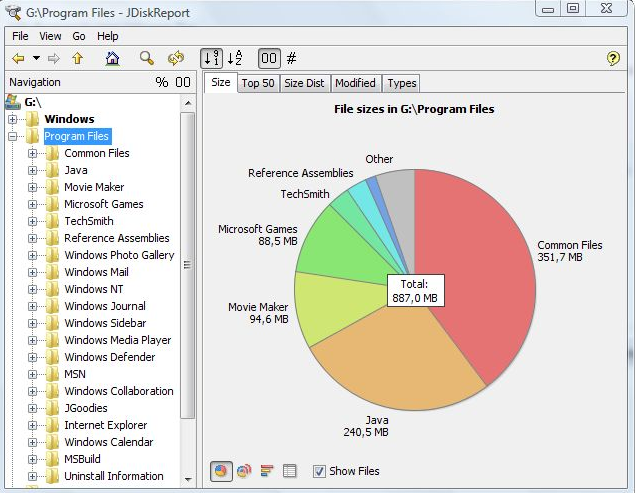
JDiskReport is a useful application that allows users to comprehend the amount of disk space consumed by files and directories while also aiding in the identification of outdated files and folders. The software analyzes your disk drives and compiles various statistics, which can be displayed as summary charts and detailed tables for easier interpretation. It is a completely free, ad-free program that does not have any limitations or expiration dates. This versatile tool is compatible with Windows, Mac, Linux, and other platforms, provided that Java is installed beforehand. Users should ensure that they have Java properly set up prior to installing JDiskReport. The application has been validated across Windows, Mac, and Linux systems, and it is also functional on Solaris and other operating systems that support Java. Additionally, an early version of JDiskReport 2 is currently accessible, which, while less polished than its predecessors from JGoodies, offers a different experience. Although this version is lacking certain features, such as the ability to click on the size pie chart, it can function as a cron job in the background, supplies more detailed information, and showcases a refreshed visual design. As a result, users looking for a robust analysis tool for their disk space management will find JDiskReport to be an invaluable asset.
API Access
Has API
API Access
Has API


Integrations
Java
Pricing Details
Free
Free Trial
Free Version
Pricing Details
Free
Free Trial
Free Version
Deployment
Web-Based
On-Premises
iPhone App
iPad App
Android App
Windows
Mac
Linux
Chromebook
Deployment
Web-Based
On-Premises
iPhone App
iPad App
Android App
Windows
Mac
Linux
Chromebook
Customer Support
Business Hours
Live Rep (24/7)
Online Support
Customer Support
Business Hours
Live Rep (24/7)
Online Support
Types of Training
Training Docs
Webinars
Live Training (Online)
In Person
Types of Training
Training Docs
Webinars
Live Training (Online)
In Person
Vendor Details
Company Name
FCleaner
Website
www.fcleaner.com
Vendor Details
Company Name
JGoodies
Country
Germany
Website
www.jgoodies.com/freeware/jdiskreport/
