Average Ratings 1 Rating
Average Ratings 0 Ratings
Similar Products
-
RetoolRetool is a modern AI-native application development platform designed to help teams build internal software quickly and efficiently. It enables users to create agents, workflows, dashboards, and full-stack apps using natural language prompts and visual tools. Retool connects directly to databases, APIs, vector stores, and AI models to ensure applications work seamlessly with existing systems. The platform allows teams to transform raw data into actionable tools such as dashboards, admin panels, and monitoring systems. With drag-and-drop UI building, code-level customization, and AI-assisted generation, Retool supports multiple development styles. Built-in workflows automate complex processes while maintaining auditability and security. Retool fits naturally into standard engineering stacks with support for CI/CD and version control. Enterprise-grade permissions and hosting options ensure sensitive data stays protected. Used by thousands of companies worldwide, Retool helps teams ship AI-powered software faster. It bridges the gap between idea and production with speed and control.
-
CodemagicCodemagic’s macOS build environments facilitate the smooth creation of hybrid applications, bolstered by an extensive array of preinstalled software. You can efficiently configure your Cordova Android and iOS application builds and workflows through a single codemagic.yaml file. To maintain the performance of your Android and iOS applications, Codemagic provides automated testing on simulators, emulators, and actual devices, ensuring you receive prompt feedback on your build outcomes. Integration with the Apple Developer Portal streamlines iOS code signing, enabling seamless deployment to App Store Connect and Google Play. Similarly, you can also set up your React Native app builds and workflows in one straightforward codemagic.yaml file. With multiple versions of Xcode, Android SDK, and npm preinstalled, Codemagic’s macOS build machines are designed for effortless Android and iOS builds. Moreover, Codemagic simplifies the automation of testing for your React Native applications across a variety of testing platforms. This comprehensive approach not only boosts productivity but also enhances the overall development experience.
-
JotformTrusted by over 25 million users worldwide, Jotform is an all-in-one platform that simplifies data collection, workflow automation, and online sales, all without coding. With Jotform’s drag-and-drop Form Builder, businesses can create customized forms and surveys to collect leads, contact information, payments, appointments, and e-signatures with ease. Choose from over 10,000 templates for everything from feedback surveys to registration forms, or build your own from scratch. Jotform's advanced features, such as conditional logic, autoresponders, and over 200 integrations, further streamline processes. In addition, Jotform's AI-powered Agents offer real-time customer support by guiding users through the form submission process, answering questions, and ensuring a smooth experience, all while reducing the need for manual intervention. With Jotform’s Store Builder, you can also set up an online store, sell products, services, and subscriptions, collect donations, and receive payments through 30+ supported payment gateways. Finally, Jotform’s tools like Approvals, PDF Editor, and Report Builder help businesses transform collected data into actionable insights and automate workflows for even greater efficiency.
-
Resco Mobile App Development ToolkitResco Mobile App Development Toolkit is a no-code platform for building custom mobile business applications designed to enhance Microsoft Dynamics 365, Power Platform, Business Central, and Salesforce. Ideal for partners and ISVs, it enables you to create white-labeled, scalable apps for industries like utilities, energy, construction, and field service. With offline functionality and secure data synchronization, you can build mobile solutions tailored for inspections, asset management, work orders, and more. The drag-and-drop interface streamlines customization, allowing you to design workflows, forms, and dashboards without coding expertise. This toolkit empowers you to create verticalized mobile solutions that extend CRM and ERP capabilities while addressing the specific needs of frontline workers. Deliver branded apps, modernize field operations, and generate new revenue streams by equipping clients with reliable, industry-specific mobile technology. Unlock the potential to scale your business with Resco's flexible and robust toolkit.
-
IntellimasIntellimas is a no code/low code software platform with a spreadsheet and form UI. Intellimas allows you to build web apps that can completely align with your business process. Intellimas is built for fast data entry, analytics, exception management, and easy retrieval of live data from other systems. The grid UI allows for an easy transition from spreadsheets. This comprehensive view, along with our form view, provide you with the flexibility to handle unlimited use cases. Intellimas can be deployed on premise or on our cloud platform. Customers typically find many uses for Intellimas after the first rollout. Intellimas comes with configurable dashboards and a full reporting tool so the intelligence is at your fingertips. Revision history, configurable alerts, comprehensive workflow, and much more is available in the configuration engine for building out apps. Bring your simple and complex use cases and build them in Intellimas. It is a top software to replace your mega-spreadsheets and fill enterprise system gaps. Contact us for a demo and ask us about our free trial!
-
TitanPartnering with Salesforce, Titan Forms and Apps are a game-changer in the industry, making the world’s number #1 CRM accessible, and effortless for anyone to use. At the touch of a button, and with zero code, experience strength, speed, and agility for Salesforce Forms and your business processes. Slash time to market, nuke code, and tackle any use case on a single platform. Our best-of-breed forms and applications for Salesforce cater to any industry and it’s our mission to provide custom solutions for difficult problems. Build beautiful web portals, sign documents, generate docs, send surveys, automate contracts, fill out Salesforce forms, and so much more in just a few simple clicks. No code required and with our new AI assistant you can build even faster and with fewer errors. We are the only product on the market that empowers you to send data to Salesforce and pull it back in real-time without any development or added expense. Our customers and partners are the heartbeat of Titan. If you need a feature, simply request it via our Titan X Lab and we will consider it for our roadmap! So what’s stopping you? Schedule a demo today.
-
TelemetryOSTelemetryTV is a powerful platform for digital signage that allows organizations to connect with audiences, generate awareness and give voice to their communities and teams. TelemetryTV lets you broadcast dynamic content by streaming video, images and social feeds to all your displays, wherever they may be. TelemetryTV powers internal communications and marketing at Starbucks, Amazon and Stanford University. Our success is based on being flexible, open to communication, collaborative, and open to collaboration. We believe in continuous learning, challenging the status-quo, and listening to customers. We are moving towards a world in which our walls will eventually talk. This begs the question: What do you want them saying?
-
Auth0Auth0 takes a modern approach to Identity and enables organizations to provide secure access to any application, for any user. Auth0 is highly customizable, and simple yet flexible. Safeguarding billions of login transactions each month, Auth0 delivers convenience, privacy, and security so customers can focus on innovation. With Auth0, you can rapidly integrate authentication and authorization for web, mobile, and legacy applications, with new Fine Grained Authorization (FGA) that goes beyond role-based access control.
-
FusionAuthFusionAuth is the authentication and authorization platform engineered for developers who demand flexibility and control. Built from the ground up to integrate with any stack, every feature — from user registration to MFA and SSO — is exposed via a modern, well-documented API. Support for every major identity protocol is included out of the box: OIDC, SAML, OAuth2, JWT, passwordless login, social sign-on, and more. Whether you’re building a greenfield app or retrofitting auth into a legacy system, FusionAuth adapts to your use case — not the other way around. Need compliance? FusionAuth helps you meet GDPR, HIPAA, and COPPA standards quickly and reliably. Deploy it your way: install on Linux, Windows, macOS, Docker, or Kubernetes — or go with FusionAuth Cloud, our managed SaaS hosting. No black boxes. No vendor lock-in. Just powerful, customizable auth that works the way you do.
-
Planview AdaptiveWorkPlanview AdaptiveWork, previously known as Clarizen, empowers PMOs and professional services teams of various sizes to achieve instant visibility across their operations, streamline workflows, proactively address potential risks, and enhance overall business outcomes. By aligning with the company’s strategic objectives, organizations can maximize workforce effectiveness, ensuring that teams concentrate on delivering the most critical tasks timely. It facilitates the tracking, management, and prioritization of work requests, guaranteeing that each request automatically encompasses all necessary information for execution. With bi-directional integration with your CRM and custom triggers in place, opportunity details can be effortlessly captured to aid in planning client projects. The platform automates and governs the various phases of the request lifecycle, including submission, scoring, prioritization, routing, and approval, thereby streamlining the pathway for converting requests into actionable projects, tasks, or work items. This comprehensive approach not only boosts efficiency but also fosters a culture of accountability and transparency within the organization.
Description
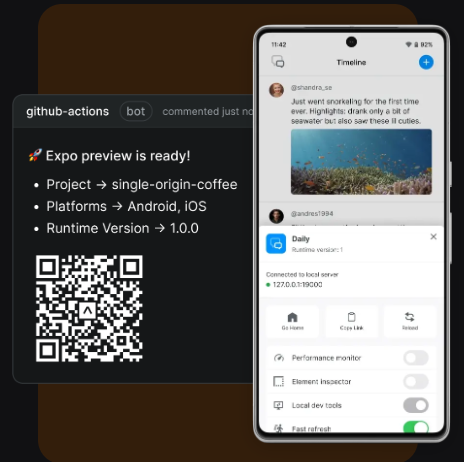
Expo is a versatile open-source platform that allows developers to craft universal native applications using React. It encompasses an extensive suite of tools and services aimed at simplifying the processes of development, review, and deployment. With Expo, developers can either start fresh with new projects or incorporate existing React Native applications, taking advantage of features such as file-based routing and TypeScript support to create stack and modal screens with minimal setup. Its fast refresh functionality enables real-time updates on devices through the Expo Go app, enhancing the development experience. Additionally, developers have the option to utilize any library, SDK, or write custom native code, providing unrestricted access to device APIs. Furthermore, Expo promotes collaboration among team members by allowing role-based access, generating QR codes for feature previews, and integrating seamlessly with GitHub to facilitate efficient pull request reviews. This combination of features not only accelerates the development workflow but also enhances communication and productivity within teams.
Description
Radon is an extension for Visual Studio Code and Cursor that transforms a standard code editor into a fully-fledged integrated development environment (IDE) specifically designed for React Native and Expo applications. By integrating features like previews, debugging tools, navigation, logging, network analysis, component inspection, device management, and AI support directly within the editor, Radon enables developers to enhance their app-building process efficiently. This tool facilitates the operation of both the iOS Simulator and Android emulator within the Visual Studio Code or Cursor environment, allowing developers to view their applications in close proximity to their code rather than having to toggle between different windows. With its intuitive preview feature, Radon allows for the isolated development of components, while the element inspector enables users to click on an element within the preview and be taken straight to the corresponding file containing the React Native component's definition. The debugging capabilities are streamlined as well, supporting React Native breakpoints seamlessly within Visual Studio Code, detecting runtime exceptions automatically, and pinpointing the exact line of code where issues arise. Furthermore, this integration significantly accelerates the development workflow by minimizing context switching and enhancing productivity for developers.
API Access
Has API
Yes
API Access
Has API
No


Integrations
CatDoes
Yes
Cursor
No
Expo
No
GitHub
Yes
JavaScript
Yes
OnSpace AI
Yes
Radon
Yes
React Native
No
TypeScript
Yes
Visual Studio Code
No
Integrations
CatDoes
No
Cursor
Yes
Expo
Yes
GitHub
No
JavaScript
No
OnSpace AI
No
Radon
No
React Native
Yes
TypeScript
No
Visual Studio Code
Yes
Pricing Details
$99 per month
Free Trial
No
Free Version
Yes
Pricing Details
$21 per month
Free Trial
Yes
Free Version
Yes
Deployment
Web-Based
Yes
On-Premises
No
iPhone App
Yes
iPad App
Yes
Android App
Yes
Windows
Yes
Mac
Yes
Linux
Yes
Chromebook
No
Deployment
Web-Based
No
On-Premises
No
iPhone App
No
iPad App
No
Android App
No
Windows
Yes
Mac
Yes
Linux
Yes
Chromebook
No
Customer Support
Business Hours
No
Live Rep (24/7)
No
Online Support
Yes
Customer Support
Business Hours
No
Live Rep (24/7)
No
Online Support
Yes
Types of Training
Training Docs
Yes
Webinars
No
Live Training (Online)
No
In Person
No
Types of Training
Training Docs
Yes
Webinars
No
Live Training (Online)
No
In Person
No
Vendor Details
Company Name
Expo.dev
Country
United States
Website
expo.dev/
Vendor Details
Company Name
Software Mansion
Founded
2012
Country
Poland
Website
radon.swmansion.com
Product Features
App Makers
Collaboration Tools
No
Compatibility Testing
No
Deployment Management
No
Drag & Drop
No
For eCommerce
No
Forms Creation
No
Iteration Management
No
Mobile Apps
No
No-Code
No
Pre-Built Templates
No
Visual Modeling
No
Web Apps
No
Workflow Management
No
Product Features
IDE
Code Completion
No
Compiler
No
Cross Platform Support
No
Debugger
No
Drag and Drop UI
No
Integrations and Plugins
No
Multi Language Support
No
Project Management
No
Text Editor / Code Editor
No
