Average Ratings 0 Ratings
Average Ratings 0 Ratings
Similar Products
-
UnFormUnForm is a powerful enterprise document management and process automation solution that seamlessly integrates with any application. Our platform-independent, fully browser-based solutions provide the ability to create, deliver, capture, index, route, and store documents from start to finish so that a transaction’s entire life cycle can be accessed with one easy search. Our data extraction and workflow capabilities enable the automation of data entry-intensive processes. UnForm.Cloud, a hosting service for UnForm Document Management, is a perfect fit for those who are running cloud-based ERP systems or looking for a solution with no hardware to purchase, manage, or maintain. Implementing UnForm has never been easier. Backed by a proven hosting vendor, Oracle, you have the peace of mind knowing your data is safe and secure with well-managed data centers and cross-region backups, ensuring reliable and continues access to your data when you need it.
-
MobiPDFMobiPDF (formerly PDF Extra) is an intuitive reader and editor that allows you to read, edit, create, OCR, organize, annotate, fill and sign, convert, and share any PDF. This makes MobiPDF an excellent choice for users seeking a budget-friendly alternative to Adobe Acrobat Pro. HERE’S WHAT YOU GET WITH MOBIPDF: Multiple Page View Modes: Enjoy a distraction-free "Read Mode". Advanced Editing Tools: Experience a Word-like PDF editing environment. Two-Way Conversions: Convert PDFs to and from Word, Excel, PowerPoint, or image formats. OCR Support: Make scanned documents searchable. Markup Tools: Highlight, comment, strikethrough, stamp, and more to enhance your documents. Effortless PDF Organizer: Reorder, compress, split, and combine PDFs with ease. Sign & Secure: Add signatures, create and fill forms, and protect your PDFs with passwords, encryption, and digital certificates. Offline Mode: Work freely on your projects, even offline. Seamless translation: One-click translate any PDF into 50+ languages.
-
CrowdinGet quality translations for your app, website, game, supporting documentation, and on. Invite your own translation team or work with professional translation agencies within Crowdin. Features that ensure quality translations and speed up the process • Glossary – create a list of terms to get consistent translations • Translation Memory (TM) – no need to translate identical strings • Screenshots – tag source strings to get context-relevant translations • Integrations – set up integration with GitHub, Google Play, API, CLI, Android Studio, and on • QA checks – make sure that all the translations have the same meaning and functions as the source strings • In-Context – proofreading within the actual web application • Machine Translations (MT) – pre-translate via translation engine • Reports – get insights, plan and manage the project Crowdin supports more than 30 file formats for mobile, software, documents, subtitles, graphics and assets: .xml, .strings, .json, .html, .xliff, .csv, .php, .resx, .yaml, .xml, .strings and on.
-
3Q3Q is an API-first video infrastructure for developers and engineering teams who want direct control over their media backend. A REST video API and native player SDKs give you programmatic access to hosting, ingestion, encoding, live streaming, video-on-demand, and delivery, so you can build video portals, streaming apps, or OTT backends on a single European platform. The stack is transparent by design. 3Q supports adaptive bitrate streaming over HLS and DASH with mixed HEVC and AVC codecs and automatic Live-to-VoD. Delivery runs over a proprietary global CDN, encryption, and HTTP/2 over TLS 1.3. The Cookie- and Consent-free HTML5 Video Player is barrier-free in accordance with WCAG 2.1/BITV 2.0 and needs no consent layer. Video AI exposes speech-to-text transcription, automatic subtitles, translation, and chapter markers through the same API, and integration fits your existing pipeline and video workflows. What sets 3Q apart is ownership. 3Q runs on its own independent European video infrastructure, so your data stays in the EU and under German jurisdiction. 3Q is GDPR-compliant and all processes are ISO/IEC 27001 certified, with modular pay-as-you-go pricing and 24/7 support from real video experts.
-
Thinfinity WorkspaceThinfinity Workspace 7.0's Technical Highlights: - Progressive Web App (PWA) technology for a seamless user experience - Integrated Thinfinity VNC, VirtualUI, and z/Scope for maximum versatility - HTML5 terminal emulation supporting DEC terminals, TN 5220, and TN 3270 protocols - Robust enterprise-grade audit logs for security and compliance management - Proprietary VNC protocol for real-time monitoring and troubleshooting IMPROVE USER EXPERIENCE - Deliver business-critical apps, desktops and files from a single web portal. - Provide simplified remote browser access for your users, while confining them to only the resources that they need. SIMPLIFY IT AND AVOID VPNs - Forget traditional VPN deployments and complexities. - Enable access from Chromebooks, mobile devices or any computer with a Web Browser. Zero setup. KEEP YOUR BUSINESS SECURE - Use enterprise-grade encrypted connections. - Integrate with your existing and external identity platforms. - Apply 2FA or MFA policies with all identity providers.
-
LegalEdgeLegalEdge is a purpose-built legal case management system for public sector legal professionals. It provides specialized products for prosecutor offices, public defenders, and government agencies handling legal matters. The platform centralizes case information, people records, and supporting documentation in one secure system. LegalEdge is entirely web-based, making it accessible on desktops, tablets, and smartphones without additional software. Built-in mobile support allows legal teams to stay productive in the field or while working remotely. Integration features connect LegalEdge with other justice and government systems to eliminate repetitive data entry. Agencies can choose turnkey installations or flexible service bundles based on their needs. The software has evolved over many years to reflect real-world legal workflows. LegalEdge emphasizes reliability, scalability, and long-term usability. It delivers enterprise-level functionality at a cost-conscious price point.
-
RAD PDFInstall-free PDF editing, form filling, redaction, signing, viewing, and more on your website with RAD PDF! Packaged as an easy to use library / WebControl (compatible with .NET 3.5+, .NET Core, and .NET 5+), RAD PDF can be used with just about any flavor of ASP.NET including MVC, Razor, Blazor, WebForms, and more. RAD PDF is compatible with 99% of internet browsers, including those on Linux, Mac OS X, Microsoft Windows, and mobile. No plugins. No Adobe Reader. RAD PDF is more than a PDF to HTML converter. It natively supports all the most common PDF features including annotations, bookmarks, form fields, page labels, and more. With advanced PDF options, RAD PDF allows you to selectively enable and disable features not available with Adobe Acrobat Reader, like protecting a PDF from being downloaded while still viewable online. RAD PDF users can use PDF form fields directly from the web browser by enabling PDF form filling and PDF form saving without having to install any software. Integrating directly with ASP.NET, RAD PDF allows your web application to capture input data, build custom workflows, and provide an intuitive graphical user interface (GUI) for just about any online PDF interaction imaginable!
-
Proton DriveProton Drive is the secure workspace for storing sensitive data and collaborating with confidence across teams, clients, and external partners. With full end-to-end encryption, you can share files, contracts, and business documents securely — and stay in control at all times. Set passwords, expiration dates, or revoke access instantly. Files are encrypted on your device before upload, and only you and your collaborators can access them. Even Proton can’t see your data. Each user gets 1 TB of storage, and you can scale as your organization grows. Proton Drive is developed in Switzerland by the makers of Proton Mail. We’re independent, built on privacy-first principles, and free from Big Tech surveillance, lock-in, or monetization of user data. We offer more than secure storage: - Real-time collaboration with Proton Docs - Granular sharing controls for external and internal access - File recovery for peace of mind - Cross-device access, including Windows, macOS, iOS, and Android We also help you meet compliance requirements out of the box. Proton Drive supports: - GDPR, HIPAA, DORA, NIS2, and ISO 27001 - Independently audited SOC 2 Type II compliance - No complex setup or third-party integrations required. By choosing Proton Drive, you show your clients, partners, and regulators that privacy and security are built into your workflows — not an afterthought.
-
PaligoPaligo supports teams working with complex technical documentation that needs to grow, adapt, and stay consistent over time. Built specifically for structured content at scale, Paligo enables organizations to treat documentation as a long-term business asset—powered by reuse, automation, and strong content governance. Paligo’s cloud-based CCMS is designed around modular content. Teams can write once, reuse components across multiple outputs, and keep documentation aligned across products, formats, and languages. This reduces manual effort, speeds up updates, and cuts translation overhead, allowing teams to publish faster while minimizing errors. The platform pairs advanced structured authoring capabilities with a modern, approachable interface. This makes Paligo effective for experienced documentation specialists while remaining accessible to contributors across the organization. From creation and collaboration to translation and multichannel delivery, Paligo brings the entire documentation workflow into one controlled environment. Paligo’s purpose is to help organizations move past static, fragmented documentation practices and build content operations that support continuous growth. With Paligo, teams stay in control of complexity and deliver documentation that evolves alongside their business.
-
Source DefenseSource Defense is an essential element of web safety that protects data at the point where it is entered. Source Defense Platform is a simple, yet effective solution to data security and privacy compliance. It addresses threats and risks that arise from the increased use JavaScript, third party vendors, and open source code in your web properties. The Platform offers options for securing code as well as addressing an ubiquitous gap in managing third-party digital supply chains risk - controlling actions of third-party, forth-party and nth-party JavaScript that powers your website experience. Source Defense Platform provides protection against all types of client-side security incidents, including keylogging, formjacking and digital skimming. Magecart is also protected. - by extending the web security beyond the browser to the server.
Description
ECM, known as the ETCETERA® (ETC) module, serves as a comprehensive solution for online document and file management across various applications. As an advanced and adaptable fourth-generation product, ECM eliminates the need for a Windows client and allows users to scan documents directly in their browser at optimal speeds, while also supporting the storage and retrieval of over 300 file types through an HTML5-compatible Scalable Vector Graphics (SVG) viewer accessible on mobile devices. This robust technology platform facilitates the organization, acquisition, cataloging, and retrieval of diverse documents and files. Users can configure applications within ECM based on their specific needs, organizing them into custom-defined document classes. By simplifying content acquisition and accessibility, ECM enables users to effortlessly access materials sourced from multiple origins within a single interface, while also integrating with other applications like corporate ERP systems through content-enabled Enterprise Performance Management (EPM). All of these functionalities are executed seamlessly in three straightforward steps, illustrating the user-friendly nature of the platform.
Description
Your computer desktop is cluttered and confusing. The files and applications you need are not always in reach.
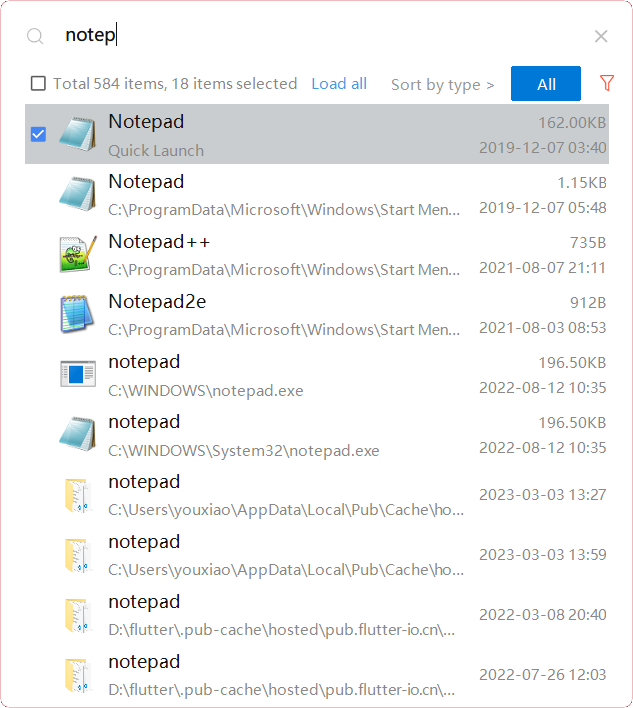
YXFile allows you to tagging file and search file as well as launch apps.
Tag Any File:
YXFile can tag every file type on any file system. The tagging is stored in a data base. YXFile will not alter your file names or create hidden files on your hard disk. You can move or rename files under the same partition. The tags won't be lost
Search for everything:
Search files and folders using their names. as well as file tags, launch items, and file tags.
Launch Apps
Launch App is a favorite feature of YXFile users. You can either type the name of the application or program you wish to open or use a shortcode. Click return and YXFile will open the program.
API Access
Has API
No
API Access
Has API
No



Integrations
No details available.
Integrations
No details available.
Pricing Details
No price information available.
Free Trial
No
Free Version
No
Pricing Details
$39/user
One-time payment for lifetime access to Yfile
Free Trial
Yes
Free Version
No
Deployment
Web-Based
Yes
On-Premises
No
iPhone App
No
iPad App
No
Android App
No
Windows
Yes
Mac
No
Linux
No
Chromebook
No
Deployment
Web-Based
No
On-Premises
No
iPhone App
No
iPad App
No
Android App
No
Windows
Yes
Mac
No
Linux
No
Chromebook
No
Customer Support
Business Hours
Yes
Live Rep (24/7)
No
Online Support
Yes
Customer Support
Business Hours
Yes
Live Rep (24/7)
No
Online Support
No
Types of Training
Training Docs
Yes
Webinars
No
Live Training (Online)
Yes
In Person
No
Types of Training
Training Docs
Yes
Webinars
No
Live Training (Online)
No
In Person
No
Vendor Details
Company Name
ScerIS
Founded
1993
Country
United States
Website
www.sceris.com
Vendor Details
Company Name
ousaa
Founded
2016
Country
China
Website
yxfile.cc/
Product Features
Document Management
Access Controls
Yes
Archiving & Retention
Yes
Collaboration Tools
Yes
Compliance Tracking
Yes
Document Archiving
Yes
Document Assembly
Yes
Document Capture
No
Document Conversion
Yes
Document Delivery
Yes
Document Indexing
Yes
Document Retention
Yes
Electronic Signature
Yes
Email Management
Yes
File Recovery
Yes
File Type Conversion
Yes
Forms Management
Yes
Full Text Search
Yes
Offline Access
Yes
Optical Character Recognition
Yes
Print Management
No
Version Control
No
