Average Ratings 0 Ratings
Average Ratings 0 Ratings
Similar Products
-
ScreencaptScreencapt allows you to record the entire screen or a selected area. You can also record a specific window. Screencapt is the ideal screen recorder because of its flexibility. Using the integrated audio recording you can also add your commentary or system sound directly into the screen recording. This is particularly useful when creating explanation videos or presentations. Screencapt's ability to record a webcam is a special feature. You can now add your comments and reactions to the video. This makes your screen recordings more personal and professional. Screencapt offers advanced options to record the cursor. You can choose to hide the cursor or add special effects to highlight specific actions. This is especially useful for software tutorials and demonstrations where a clear cursor view is required.
-
SiteKioskSiteKiosk Online is a turnkey, secure kiosk and digital signage software solution for Windows and Android devices. The company's easy-to-use and scalable application such as SiteKiosk helps protect the browser and operating system against manipulations and provides 24/7 maintenance-free operation.
-
AdRem NetCrunchNetCrunch is commercial, self-hosted, agentless network and IT infrastructure monitoring software for Windows Server. It monitors network devices, servers, virtualization platforms, cloud services, applications, websites, logs, telemetry, and network traffic across distributed environments. NetCrunch supports 680+ monitoring targets and provides 270+ ready-to-use Monitoring Packs for devices, applications, and operating systems. Policy-based monitoring automatically applies monitoring settings, Monitoring Packs, thresholds, and alerts to matching devices and systems. Licensing is based on monitored nodes and network interfaces rather than individual sensors, checks, or metrics. NetCrunch provides real-time dashboards and automatic Layer 2 and routing topology maps for visibility into network status and performance. Network traffic analysis supports NetFlow, sFlow, IPFIX, and other flow technologies. Its alerting system supports event correlation, dependency-aware suppression, predictive thresholds, escalation, and 40+ automated response actions, including scripts, notifications, API calls, and integrations with external systems. Distributed Monitoring Probes extend monitoring to remote and isolated locations. NetCrunch also provides a REST API for integration and automation with external IT management, service management, and operational systems. NetCrunch is self-hosted on Windows Server and can monitor on-premises, air-gapped, cloud, and hybrid IT environments.
-
JAMS SchedulerJAMS is an automation orchestration and job scheduling solution that runs, monitors, and manages critical IT processes from a single console. JAMS automates jobs across Windows, Linux, UNIX, IBM i, z/OS, and OpenVMS, with native integrations for the databases, BI tools, and ERP systems already running your business. Jobs run on any schedule or trigger off other events, with dependency management keeping workflows in order and an audit trail logging every execution. JAMS includes two AI capabilities at no additional cost. JAX is an AI agent built into the JAMS Web Client: ask it a question in plain language, and it finds a job, troubleshoots a failure, or looks up how to do something, grounded in JAMS documentation. It acts only when asked, and every change waits for your approval. JAMS MCP brings JAMS into the AI coding tools teams already use, including Cursor, Claude Code, GitHub Copilot, and Claude Desktop. For teams managing thousands of jobs across SQL Server, ADF, Airflow, SAP, JDE, and Banner, this cuts tribal knowledge and middle-of-the-night troubleshooting. Knowledge that once lived in one person's head becomes something any team member can ask about directly. The AI lives in the product, not in the support queue. Support is staffed by humans JAMS will never outsource, based in the United States, the United Kingdom, and Australia. New tickets go to long-tenured engineers, and every JAMS customer has the CEO's cell phone number. JAMS' mission is to reduce the operational burden of critical automation, so teams spend more time on the work automation was meant to free them for.
-
UptimeRobotThe ultimate uptime monitoring service. Get 50 monitors with 5-minute checks completely free. Set up in seconds and stay informed about your website’s health at all times. Website monitoring: Get instant alerts when your website goes down. Reliable and accurate monitoring helps you fix issues before they affect users and prevent revenue loss. SSL certificate monitoring: Avoid losing visitors due to expired SSL certificates. Get notified 30 days before expiration so you can renew in time. Ping and port monitoring: Check if your server is online or if your email service is running on port 465. Monitor any port you need with real-time alerts. Cron job monitoring: Track scheduled tasks with heartbeat monitoring. We verify if the request arrives on time, making sure server-side jobs and internet-connected devices are running properly. Status pages: Create up to 100 branded status pages, protect them with a password, and allow subscribers to receive updates. Stay informed with email, SMS, voice calls, push notifications, or integrations with Slack, Zapier, PagerDuty, Telegram, Discord, Microsoft Teams, Google Chat, and more. Maintenance windows: Pause monitoring when you schedule downtime to avoid unnecessary alerts
-
Bitdefender Ultimate Small Business SecurityBitdefender Small Business Security provides robust, enterprise-level cyber-defense tailored for smaller companies, ensuring protection across various platforms including Windows, macOS, iOS, and Android. With a centralized management system that is user-friendly, it allows organizations lacking dedicated IT personnel to efficiently implement and oversee their security measures from a single interface. The solution features a multi-layered approach to endpoint protection, incorporating machine learning, behavioral analysis, real-time monitoring, process termination, and rollback capabilities to safeguard against both known and emerging threats. Additionally, it includes ransomware prevention and remediation strategies that detect unusual encryption activities and facilitate file recovery from backups. Users are also protected against fileless attacks, with measures like memory and back-injection interference as well as script blocking. The software further enhances security by preventing phishing and fraud through the blocking of malicious websites and alerting users accordingly, while offering advanced exploit protection with real-time shields for common applications such as browsers, Office software, and Adobe Reader, thus ensuring all-encompassing endpoint security. This comprehensive suite of features makes it an ideal choice for small businesses seeking to fortify their cybersecurity defenses.
-
FusionAuthFusionAuth is the authentication and authorization platform engineered for developers who demand flexibility and control. Built from the ground up to integrate with any stack, every feature — from user registration to MFA and SSO — is exposed via a modern, well-documented API. Support for every major identity protocol is included out of the box: OIDC, SAML, OAuth2, JWT, passwordless login, social sign-on, and more. Whether you’re building a greenfield app or retrofitting auth into a legacy system, FusionAuth adapts to your use case — not the other way around. Need compliance? FusionAuth helps you meet GDPR, HIPAA, and COPPA standards quickly and reliably. Deploy it your way: install on Linux, Windows, macOS, Docker, or Kubernetes — or go with FusionAuth Cloud, our managed SaaS hosting. No black boxes. No vendor lock-in. Just powerful, customizable auth that works the way you do.
-
OvermonitorOvermonitor is cloud-based infrastructure, website, and endpoint monitoring built for teams that want fast setup, clear alerts, and practical visibility without the complexity or cost of enterprise monitoring suites. Monitor websites, servers, endpoints, processes, Windows services, event logs, uptime, response time, SSL certificates, and internal network health from one easy dashboard. At the core of Overmonitor is a small, lightweight server agent that installs quickly, pairs with your account, and reports a heartbeat every minute from inside your network. This gives you visibility beyond public uptime checks, helping detect server outages, stalled services, failing processes, internal connectivity problems, and endpoint health issues before they become customer-facing downtime. Overmonitor supports city-level geotargeted monitoring, practical maintenance windows that reduce alert noise, push notifications for alerts, audible dashboard alerts for operations screens, process monitor rollups, embeddable performance graphs, and flexible à la carte pricing so you only pay for the monitoring you need. Designed for SaaS operators, IT teams, MSPs, developers, and small businesses, Overmonitor helps you track availability, analyze website performance, monitor infrastructure health, and improve end-user experience without being locked into a bloated monitoring platform.
-
ManageEngine ADManager PlusADManager Plus is an effortless and user-friendly solution for managing and reporting on Windows Active Directory (AD), designed to assist both AD administrators and help desk staff with their daily operations. Featuring a centralized and user-friendly web interface, this software addresses a range of intricate tasks, including the bulk management of user accounts and various AD objects, delegation of role-based access to help desk personnel, and the generation of a comprehensive array of AD reports, many of which are critical for compliance audit purposes. Additionally, this Active Directory tool provides mobile applications that enable AD administrators and technicians to carry out essential user management functions from their smartphones or tablets while on the go. It simplifies the process of creating multiple users and groups in Office 365, managing licenses, establishing Exchange mailboxes, migrating existing mailboxes, setting storage limits, and adding proxy addresses, thereby enhancing overall efficiency. With its robust features, ADManager Plus stands out as a vital asset for organizations aiming to streamline their AD management processes.
-
OptiSignsOptiSigns, your friendly digital signage software! Designed with simplicity and ease in mind, it's the perfect harmony of affordable software and usage with any hardware in the market. Pick from 140+ Apps, Thousands of Templates, and formats like images & videos, playlists, Google Slides, Weather, Instagram, Twitter, YouTube – you name it! Level up your business and start engaging your audience. For just $10/month per screen, use any display to capture your audiences attention! Remotely manage it all from one central portal. Indulge in features, images, videos, playlists, and schedules. Jazz it up with apps like Google Slides, Weather, Instagram, Facebook, Twitter, and more. Oh, and did we mention? We play nice with the most hardware and operating systems in the market like Fire TV Stick, Android, Chrome, Raspberry Pi, Roku, Windows, Linux, and MacOS. Time to unleash your business potential!
Description
Utilize DisplayFusion's window management capabilities to effortlessly transfer windows across your multiple monitors. You can choose between the straightforward middle-click method or opt for the more sophisticated maximized window dragging feature, making desktop window management remarkably convenient. Tooltips can be displayed while moving or resizing windows, aiding in precise positioning. Furthermore, the software automatically relocates child dialogs and windows to the same monitor as their parent window. The mouse management features enable you to scroll through inactive windows using the mouse wheel, seamlessly wrap your cursor at the edges of the screen, and avoid snagging on misaligned monitor borders. By left-clicking a maximized window's title bar, you can drag it to your desired monitor, with DisplayFusion providing a helpful monitor selector for your convenience. You will no longer need to restore a window, manually drag it to a different monitor, and re-maximize it; simply click and drag to complete the process efficiently. DisplayFusion efficiently handles all the intricacies involved, allowing you to focus on your tasks without interruption. In this manner, your workflow can become significantly smoother and more productive.
Description
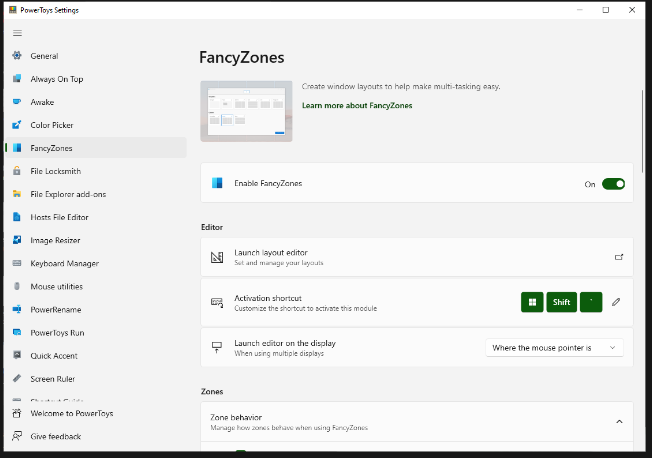
FancyZones serves as a window management tool designed to help users arrange and snap their application windows into optimized layouts, enhancing workflow efficiency and allowing for quick restoration of these layouts. This utility empowers you to specify a series of designated zones on your desktop where windows can be directed. By dragging a window into a predetermined zone or using a designated keyboard shortcut, the respective window automatically resizes and relocates to occupy that zone completely. Additionally, if you have the "Use non-primary mouse button to toggle zone activation" option activated, you can enter zone selection mode by simply clicking the secondary mouse button. When two zones are positioned next to each other, a window can be adjusted to span the combined area of both zones, effectively rounding up to the smallest rectangle that encompasses the two. As you maneuver the mouse cursor close to the shared boundary of two zones, both zones become active at the same time, giving you the flexibility to drop the window into either or both. Moreover, you can drag the window until it activates one zone and then, by pressing and holding the control key while continuing to drag, select multiple zones to expand your layout options. This feature significantly streamlines the process of organizing your desktop workspace efficiently.
API Access
Has API
No
API Access
Has API
No


Integrations
No details available.
Integrations
No details available.
Pricing Details
$34 one-time payment
Free Trial
No
Free Version
No
Pricing Details
Free
Free Trial
No
Free Version
Yes
Deployment
Web-Based
No
On-Premises
No
iPhone App
No
iPad App
No
Android App
No
Windows
Yes
Mac
No
Linux
No
Chromebook
No
Deployment
Web-Based
No
On-Premises
No
iPhone App
No
iPad App
No
Android App
No
Windows
Yes
Mac
No
Linux
No
Chromebook
No
Customer Support
Business Hours
No
Live Rep (24/7)
No
Online Support
Yes
Customer Support
Business Hours
Yes
Live Rep (24/7)
No
Online Support
Yes
Types of Training
Training Docs
Yes
Webinars
No
Live Training (Online)
No
In Person
Yes
Types of Training
Training Docs
Yes
Webinars
Yes
Live Training (Online)
No
In Person
Yes
Vendor Details
Company Name
Binary Fortress Software
Country
Canada
Website
www.displayfusion.com/Features/WindowManagement/
Vendor Details
Company Name
Microsoft
Country
United States
Website
learn.microsoft.com/en-us/windows/powertoys/fancyzones