Average Ratings 0 Ratings
Average Ratings 0 Ratings
Similar Products
-
FilerevFilerev is a powerful tool that helps you easily find and manage hidden files, duplicate files, large files, and oversized folders, ensuring a streamlined and clutter-free digital workspace. Key features include advanced scanning technology that identifies the unorganized files taking up the most space and cluttering your Google Drive. Filerev enhances productivity by saving time and reducing the frustration of manual file organization. The custom filters and bulk delete tool give you complete control over finding and removing unwanted files in your account. The storage analyzer lets you browse your folders by size to see where the space is being used in your Google Drive. Whether you're an individual, a small business, or a large enterprise, Filerev offers robust solutions tailored to your needs. Visit filerev.com to discover how Filerev can transform your Google Drive experience and boost efficiency.
-
SynchredibleSynchredible makes it easy to synchronize, copy, and back up individual folders or entire drives with just a single click. Its intuitive assistant guides you step by step in setting up tasks that can be scheduled, triggered by changes (real-time monitoring), or executed automatically when an external storage device is connected. Keep your data synchronized effortlessly and manage it seamlessly! With years of proven technology, Synchredible not only transfers data from A to B but also supports bidirectional synchronization. It automatically detects changes and reliably syncs the most recently edited files. Thanks to advanced duplicate detection, Synchredible saves valuable time by skipping unchanged files, enabling fast synchronization of large datasets in seconds! Synchredible is highly versatile, supporting local folder synchronization, network and USB device synchronization, as well as synchronization with cloud storage.
-
Secure EraserSecure Eraser: Secure Data Deletion, Shredders Your Files & Folders. Just because it has been removed from your hard drive doesn't mean that it is gone forever. Anyone can restore the information as long as it was not overwritten. It becomes more difficult if the computer has been resold, or given away. Secure Eraser employs the most well-known method of data disposal. It overwrites sensitive information so that it cannot be recovered even with specialized software. Our award-winning solutions for permanently destroying data eliminate cross-references that may leave traces of deleted files within the allocation table of your hard disk. This Windows software is easy to use and can overwrite sensitive data up to 35 times, regardless of whether they're files, folders or drives, recycle bins, or traces of surfing. You can also delete files that you have already deleted but not for good.
-
pCloud BusinesspCloud Business is a cloud storage and file synchronization platform designed for teams that need controlled access, cross-platform compatibility, and predictable storage allocation. It provides centralized file management with granular permissions and optional client-side encryption. Founded in 2013 in Switzerland, pCloud operates under EU-aligned privacy standards and offers data residency in Luxembourg (EU) and Dallas, Texas (US). The platform supports over 23 million users globally. Core Functionality : - Per-User Storage Allocation : 1 TB or 2 TB per user, suitable for small to mid-sized teams and distributed environments. - Virtual File System (pCloud Drive) : Mounts as a local drive on Windows, macOS, and Linux. Files are streamed on demand, reducing local disk usage. - File Sync & Sharing : Folder-level sync, link-based sharing, and permission control (view/edit/manage). Supports password-protected and time-limited links. - Admin & Access Control : Centralized user management, role assignment, and storage distribution via admin console. - Versioning & File History : File versioning with up to 180 days retention, enabling rollback and recovery. - Cross-Platform Support : Native clients for Windows, macOS, Linux, iOS, Android, plus web interface. - Client-Side Encryption (Optional) : Zero-knowledge encryption via pCloud Encryption for sensitive data; encryption keys are not stored server-side. Technical Positioning: - Swiss jurisdiction; GDPR-aligned processing - No file size limits - Works without mandatory ecosystem lock-in (no bundled office suite required) - Compatible with heterogeneous environments (Linux included) Trial : 30-day free trial available for up to 10 users.
-
Rocket z/Assure VAPYour mission-critical systems carry the weight of your entire organization. Protecting them shouldn't leave you guessing about hidden vulnerabilities or compliance risks. Rocket® z/Assure™ Vulnerability Analysis Program (VAP) is a specialized mainframe security solution built to proactively scan and safeguard your most valuable environments. By identifying system-level risks before they become active threats, we partner with you to ensure your infrastructure remains locked down, resilient, and fully compliant. We understand the responsibility of managing enterprise security, and our tool gives you the exact insights you need to confidently eliminate weak points. Key benefits for your security team: - Identify and resolve hidden vulnerabilities with deep, automated scanning. - Protect your mission-critical data from evolving external and internal threats. - Streamline compliance reporting with clear, actionable security insights. Take control of your mainframe security. Partner with Rocket Software to protect your digital foundation today.
-
BranditScanBranditScan is an advanced platform utilizing artificial intelligence for safeguarding brands and monitoring online content, mainly serving digital creators and businesses to identify and eliminate unauthorized materials. This tool is particularly popular among content creators and influencers active on platforms like OnlyFans or Fansly, as it helps them fight against piracy and impersonation effectively. By leveraging this technology, users can maintain their brand integrity and ensure their work is protected from misuse.
-
CloudFilerCloudFiler provides filing and searching in both New and Classic Outlook on all phones & tablets, all popular browsers, Macs and ARM based devices. Created Microsoft's new web Add-in technology by the architect of the Oasys email management system previously owned by Arup Group Ltd and the Excitech Mail system owned by Symetri and latterly Pentagon. File to: the cloud, Windows folders, SharePoint, OneDrive, Egnyte, Autodesk Forma, Bentley ProjectWise, etc. Favoured by the biggest businesses globally.
-
PostScan MailPostScan Mail is a virtual mailbox service that provides individuals and businesses with a convenient and secure way to manage their postal mail online. With PostScan Mail, users can access their physical mail from anywhere in the world through their digital devices. The service allows users to view and manage their mail, receive notifications of new mail items, forward mail to any address, scan and shred unwanted mail, and even deposit checks remotely. PostScan Mail eliminates the need for physical mailboxes and offers a practical solution for people who are always on the go or live in multiple locations. It is a modern and efficient way to manage your postal mail, making your life easier and more streamlined.
-
Files.com6,000+ companies trust Files.com to automate and secure business critical transfers. We obsess about security, compliance, reliability, and performance so your critical business processes just work every time. Easily manage any transfer flow without writing scripts or code, and onboard workloads and partners effortlessly. We support standard file transfer protocols (FTP, SFTP, AS2) for working with external partners and also provide native apps for high performance internal transfers. As a fully Cloud-Native SaaS, there are no servers for you to buy or maintain, there is no installation required, and high availability and redundancy are built in and free. Our InfoSec Program is audited annually by Kirkpatrick Price, a leading information security CPA firm. Our audit covers the scope of the entire Files.com business (not just datacenter operations) and names Files.com specifically. Beware of smaller competitors who try to pass off someone else’s audit as their own. Technical capabilities include encryption at-rest and in-transit, four types of two-factor authentication, nine enterprise identity (SSO) integrations, configurable password and session policies, and a perfect “A+” score from Qualys SSL Labs.
-
IPVanishIPVanish VPN protects personal data in the face of privacy threats. Protect your connection over hotspots or unsecured networks today. We have the solution for you, whether you need a Wi Fi hotspot shield or safe file access. IPVanish VPN and storage solutions simplify online security for the entire home. There are setups for mobile, desktop, consoles, routers, and routers. VPN privacy can protect your internet activity. You can also pair VPN + storage to provide complete online protection. To go incognito, you need more than a private internet browser. Our anonymous IP addresses will keep your internet activity secretive and help keep hackers, ISPs and advertisers away from your connection. VPN can protect your Wi-Fi connection as well as your location data. The best data defense combines security and convenience. Secure your most valuable files with remote wiping, automated syncing and encrypted backup.
Description
Diskaroo serves as a powerful desktop disk-space analyzer compatible with macOS, Windows, and Linux operating systems. It effectively scans designated folders, home directories, or entire drives, and illustrates storage usage through engaging visuals such as treemaps, sunbursts, and a list of the largest files. Users can explore folders in detail, customize the color scheme based on folder or file type, apply filters based on names or extensions, revisit previous scans, and easily locate selected files within their file management system. Additionally, an exact-duplicate finder assesses file contents during scans to identify redundancy. Files marked for deletion can be organized in the Collector for batch review before being moved to the Trash or Recycle Bin, with a confirmation step required for final deletion. To conduct a comprehensive scan of a Mac, users must grant Full Disk Access. Diskaroo caters to users who seek to analyze and optimize their local storage on desktop machines. Moreover, individuals can obtain a lifetime Diskaroo Pro license by creating a free Bravely Account, enhancing their storage management experience.
Description
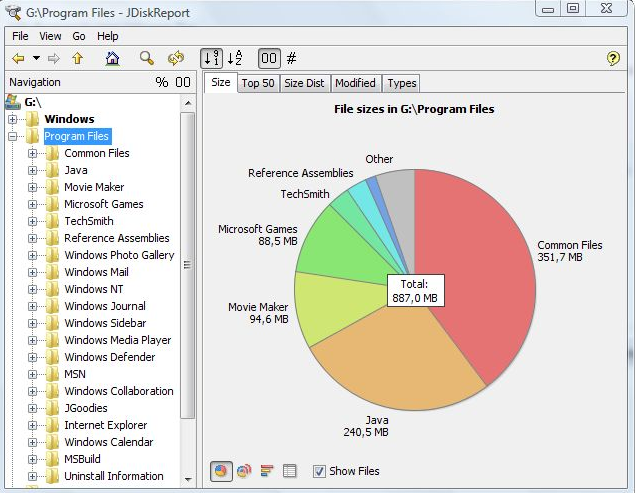
JDiskReport is a useful application that allows users to comprehend the amount of disk space consumed by files and directories while also aiding in the identification of outdated files and folders. The software analyzes your disk drives and compiles various statistics, which can be displayed as summary charts and detailed tables for easier interpretation. It is a completely free, ad-free program that does not have any limitations or expiration dates. This versatile tool is compatible with Windows, Mac, Linux, and other platforms, provided that Java is installed beforehand. Users should ensure that they have Java properly set up prior to installing JDiskReport. The application has been validated across Windows, Mac, and Linux systems, and it is also functional on Solaris and other operating systems that support Java. Additionally, an early version of JDiskReport 2 is currently accessible, which, while less polished than its predecessors from JGoodies, offers a different experience. Although this version is lacking certain features, such as the ability to click on the size pie chart, it can function as a cron job in the background, supplies more detailed information, and showcases a refreshed visual design. As a result, users looking for a robust analysis tool for their disk space management will find JDiskReport to be an invaluable asset.
API Access
Has API
No
API Access
Has API
No


Integrations
Java
No
Pricing Details
$0
Diskaroo Pro is free with a Bravely Account. No payment card, subscription, or trial period is required.
Free Trial
No
Free Version
Yes
Pricing Details
Free
Free Trial
No
Free Version
Yes
Deployment
Web-Based
No
On-Premises
No
iPhone App
No
iPad App
No
Android App
No
Windows
Yes
Mac
Yes
Linux
Yes
Chromebook
No
Deployment
Web-Based
No
On-Premises
No
iPhone App
No
iPad App
No
Android App
No
Windows
Yes
Mac
Yes
Linux
Yes
Chromebook
No
Customer Support
Business Hours
No
Live Rep (24/7)
No
Online Support
Yes
Customer Support
Business Hours
Yes
Live Rep (24/7)
No
Online Support
Yes
Types of Training
Training Docs
Yes
Webinars
No
Live Training (Online)
No
In Person
No
Types of Training
Training Docs
Yes
Webinars
No
Live Training (Online)
No
In Person
Yes
Vendor Details
Company Name
Bravely Studios
Country
United States
Website
bravely.dev/diskaroo
Vendor Details
Company Name
JGoodies
Country
Germany
Website
www.jgoodies.com/freeware/jdiskreport/
