Average Ratings 0 Ratings
Average Ratings 0 Ratings
Similar Products
-
JS7 JobSchedulerJS7 JobScheduler, an Open Source Workload Automation System, is designed for performance and resilience. JS7 implements state-of-the-art security standards. It offers unlimited performance for parallel executions of jobs and workflows. JS7 provides cross-platform job execution and managed file transfer. It supports complex dependencies without the need for coding. The JS7 REST-API allows automation of inventory management and job control. JS7 can operate thousands of Agents across any platform in parallel. Platforms - Cloud scheduling for Docker®, OpenShift®, Kubernetes® etc. - True multi-platform scheduling on premises, for Windows®, Linux®, AIX®, Solaris®, macOS® etc. - Hybrid cloud and on-premises use User Interface - Modern GUI with no-code approach for inventory management, monitoring, and control using web browsers - Near-real-time information provides immediate visibility to status changes, log outputs of jobs and workflows. - Multi-client functionality, role-based access management - OIDC authentication and LDAP integration High Availability - Redundancy & Resilience based on asynchronous design and autonomous Agents - Clustering of all JS7 Products, automatic fail-over and manual switch-over
-
Google Cloud RunFully managed compute platform to deploy and scale containerized applications securely and quickly. You can write code in your favorite languages, including Go, Python, Java Ruby, Node.js and other languages. For a simple developer experience, we abstract away all infrastructure management. It is built upon the open standard Knative which allows for portability of your applications. You can write code the way you want by deploying any container that listens to events or requests. You can create applications in your preferred language with your favorite dependencies, tools, and deploy them within seconds. Cloud Run abstracts away all infrastructure management by automatically scaling up and down from zero almost instantaneously--depending on traffic. Cloud Run only charges for the resources you use. Cloud Run makes app development and deployment easier and more efficient. Cloud Run is fully integrated with Cloud Code and Cloud Build, Cloud Monitoring and Cloud Logging to provide a better developer experience.
-
Kasm WorkspacesKasm Workspaces streams your workplace environment directly to your web browser…on any device and from any location. Kasm is revolutionizing the way businesses deliver digital workspaces. We use our open-source web native container streaming technology to create a modern devops delivery of Desktop as a Service, application streaming, and browser isolation. Kasm is more than a service. It is a platform that is highly configurable and has a robust API that can be customized to your needs at any scale. Workspaces can be deployed wherever the work is. It can be deployed on-premise (including Air-Gapped Networks), in the cloud (Public and Private), or in a hybrid.
-
Bacula EnterpriseBacula Enterprise provides backup and recovery for enterprise, HPC, defense, government and research environments. Developed by Switzerland-based Bacula Systems, it protects physical, virtual, container, database, SaaS and cloud workloads from one platform. Support data sovereignty with on-premises deployment without mandatory cloud control planes, call-home licensing or continuous internet access. Retain control over backup location, infrastructure, encryption keys and recovery procedures. Strengthen ransomware resilience with physically air-gapped tape, offline copies, immutable storage options, encryption, MFA, access controls and file integrity verification. For petabyte-scale HPC datasets, HPC Accelerator, parallel processing and Lustre, GPFS and ZFS integrations help protect large file populations. Use disk, tape, object storage and cloud targets, with no licensing charges based on protected data volume. VM coverage includes VMware vSphere/ESXi, Hyper-V, Proxmox, Nutanix AHV, XenServer, XCP-ng, KVM, QEMU, Libvirt, Red Hat Virtualization, OpenStack, Amazon EC2 and Azure VMs. Protect Kubernetes, OpenShift and Docker containers. Database coverage includes Oracle, SQL Server, PostgreSQL, MySQL, Percona for MySQL, MariaDB, SAP HANA, Sybase ASE, IBM Db2, MongoDB and InterSystems IRIS, plus Amazon RDS integration. Other workloads include Hadoop HDFS, Microsoft 365 and Google Workspace. BWeb administration, scheduling, monitoring, reporting, deduplication and compression simplify operations. Restore files, application data, VMs and supported bare-metal systems. Its open-core architecture combines Bacula's open-source foundation with enterprise-only plugins, security features, management tools and commercial support.
-
ManageEngine Endpoint CentralManageEngine Endpoint Central is a unified endpoint management and security platform designed for IT teams managing diverse and distributed device environments eliminating the need for multiple disconnected products for patching, remote access, mobile management, and security. The platform supports Windows, macOS, Linux, iOS, Android, and Chrome OS. Automated patch deployment covers OS and 1,000+ third-party applications with scheduling, testing, rollback, and compliance reporting. Software can be deployed, updated, or removed across thousands of endpoints simultaneously. OS imaging workflows provision new devices quickly, while continuous asset inventory supports license compliance and audit readiness. Security capabilities are built directly into the platform. Vulnerability assessment identifies and prioritizes endpoint weaknesses by severity. Application control prevents unauthorized software execution. Device control governs USB and peripheral access. Endpoint privilege management removes unnecessary admin rights. EDR delivers behavioral threat detection and incident response, while NGAV blocks malware, ransomware, and zero-day threats. BitLocker and FileVault encryption enforces disk protection across Windows and macOS. Built-in remote desktop allows technicians to connect instantly without third-party software. Integrated MDM covers iOS and Android enrollment, app management, and remote wipe for corporate and BYOD environments. DEX monitoring gives IT teams real-time visibility into device performance enabling proactive issue resolution before productivity is impacted. Available as cloud or on-premises across Free, Professional, Enterprise, UEM, and Security editions.
-
ISL Light Remote DesktopISL Light is a remote desktop software that is easy to use for security-conscious users. It offers great value-performance. ISL Light is a powerful tool for IT staff and support personnel to solve problems remotely via remote support, unattended access, or screen-sharing from mobile devices. It is cross-platform and provides 256-bit encrypted sessions, all the standard remote access features, as well as session recording, chat, videocall and multi-monitor support, file transfers, reporting, and many other important extras. Users can choose between cloud and on-premise services. ISL Online license doesn't limit the number or workstations of clients, users, and users you can support. It is a reliable, highly secure software that can be used in all industries, including banks, hospitals, government institutions, and insurances.
-
Google Cloud PlatformGoogle Cloud is an online service that lets you create everything from simple websites to complex apps for businesses of any size. Customers who are new to the system will receive $300 in credits for testing, deploying, and running workloads. Customers can use up to 25+ products free of charge. Use Google's core data analytics and machine learning. All enterprises can use it. It is secure and fully featured. Use big data to build better products and find answers faster. You can grow from prototypes to production and even to planet-scale without worrying about reliability, capacity or performance. Virtual machines with proven performance/price advantages, to a fully-managed app development platform. High performance, scalable, resilient object storage and databases. Google's private fibre network offers the latest software-defined networking solutions. Fully managed data warehousing and data exploration, Hadoop/Spark and messaging.
-
pCloud BusinesspCloud Business is a cloud storage and file synchronization platform designed for teams that need controlled access, cross-platform compatibility, and predictable storage allocation. It provides centralized file management with granular permissions and optional client-side encryption. Founded in 2013 in Switzerland, pCloud operates under EU-aligned privacy standards and offers data residency in Luxembourg (EU) and Dallas, Texas (US). The platform supports over 23 million users globally. Core Functionality : - Per-User Storage Allocation : 1 TB or 2 TB per user, suitable for small to mid-sized teams and distributed environments. - Virtual File System (pCloud Drive) : Mounts as a local drive on Windows, macOS, and Linux. Files are streamed on demand, reducing local disk usage. - File Sync & Sharing : Folder-level sync, link-based sharing, and permission control (view/edit/manage). Supports password-protected and time-limited links. - Admin & Access Control : Centralized user management, role assignment, and storage distribution via admin console. - Versioning & File History : File versioning with up to 180 days retention, enabling rollback and recovery. - Cross-Platform Support : Native clients for Windows, macOS, Linux, iOS, Android, plus web interface. - Client-Side Encryption (Optional) : Zero-knowledge encryption via pCloud Encryption for sensitive data; encryption keys are not stored server-side. Technical Positioning: - Swiss jurisdiction; GDPR-aligned processing - No file size limits - Works without mandatory ecosystem lock-in (no bundled office suite required) - Compatible with heterogeneous environments (Linux included) Trial : 30-day free trial available for up to 10 users.
-
Bitdefender Ultimate Small Business SecurityBitdefender Small Business Security provides robust, enterprise-level cyber-defense tailored for smaller companies, ensuring protection across various platforms including Windows, macOS, iOS, and Android. With a centralized management system that is user-friendly, it allows organizations lacking dedicated IT personnel to efficiently implement and oversee their security measures from a single interface. The solution features a multi-layered approach to endpoint protection, incorporating machine learning, behavioral analysis, real-time monitoring, process termination, and rollback capabilities to safeguard against both known and emerging threats. Additionally, it includes ransomware prevention and remediation strategies that detect unusual encryption activities and facilitate file recovery from backups. Users are also protected against fileless attacks, with measures like memory and back-injection interference as well as script blocking. The software further enhances security by preventing phishing and fraud through the blocking of malicious websites and alerting users accordingly, while offering advanced exploit protection with real-time shields for common applications such as browsers, Office software, and Adobe Reader, thus ensuring all-encompassing endpoint security. This comprehensive suite of features makes it an ideal choice for small businesses seeking to fortify their cybersecurity defenses.
-
ScreenMeetScreenMeet offers a suite of secure, browser-based remote support and screen-sharing tools designed to enhance customer service and IT support. With capabilities like remote desktop access, live voice and video support, co-browsing, and asynchronous screen recording, ScreenMeet allows agents to assist customers or employees seamlessly. It integrates with major ITSM, CRM, and contact center platforms such as ServiceNow, Salesforce, and Microsoft Dynamics 365, providing a unified support experience. Designed for enterprises, ScreenMeet ensures high security, scalability, and flexibility, making it ideal for businesses aiming to improve support efficiency and customer satisfaction.
Description
DeskMGR is a web-based Docker management tool that can be self-hosted using Docker. It offers a user-friendly desktop-like interface for interacting with a Docker engine, allowing users to list, inspect, start, and stop containers, as well as create and modify Docker Compose stacks and manage images, volumes, and networks. Additionally, users can access logs, open terminals, browse files, transfer files, manage registry credentials, and monitor live resource charts. Available as a container image or as standalone binaries for Linux and macOS, DeskMGR also supports Docker Desktop on both Windows and macOS platforms. This application is designed for administrators and technical teams responsible for managing Docker environments on personal machines or servers. It does not require any account or license key for either personal or commercial use, and it includes an option to disable the daily anonymous usage report via the Settings menu. Furthermore, DeskMGR streamlines the management of Docker resources, making it an efficient choice for developers and system administrators alike.
Description
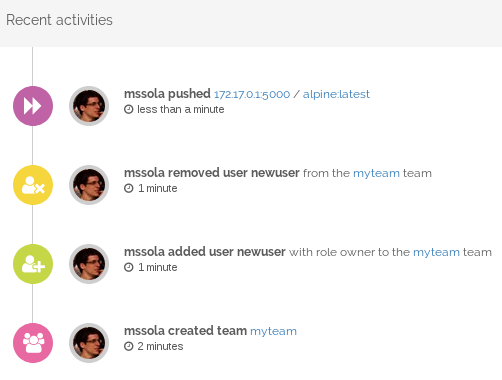
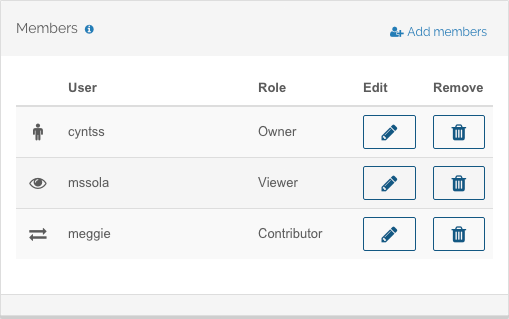
Portus introduces a modern authorization framework as outlined in the most recent Docker registry version, enabling detailed management of your images. This system empowers you to determine which individuals and teams have the authority to either upload or download images. You can structure your organization within Portus, create numerous teams, and easily manage user memberships. Additionally, Portus offers a user-friendly interface that gives you a comprehensive view of your private registry's contents. It includes a robust search functionality that accelerates the process of locating images. The system consistently respects user permissions, ensuring they are upheld while navigating the repository or conducting searches. Maintain oversight with Portus, which automatically logs all significant events for administrative review, while also allowing non-admin users to track important updates. Moreover, this logging feature fosters transparency and accountability within your organization.
API Access
Has API
No
API Access
Has API
Yes



Integrations
Docker
No
Pricing Details
$0
Free for personal and commercial use; no license key or account is required.
Free Trial
No
Free Version
Yes
Pricing Details
No price information available.
Free Trial
No
Free Version
No
Deployment
Web-Based
No
On-Premises
Yes
iPhone App
No
iPad App
No
Android App
No
Windows
Yes
Mac
Yes
Linux
Yes
Chromebook
No
Deployment
Web-Based
Yes
On-Premises
No
iPhone App
No
iPad App
No
Android App
No
Windows
No
Mac
No
Linux
No
Chromebook
No
Customer Support
Business Hours
No
Live Rep (24/7)
No
Online Support
Yes
Customer Support
Business Hours
No
Live Rep (24/7)
No
Online Support
Yes
Types of Training
Training Docs
Yes
Webinars
No
Live Training (Online)
No
In Person
No
Types of Training
Training Docs
Yes
Webinars
No
Live Training (Online)
No
In Person
No
Vendor Details
Company Name
ScriptGain
Country
United States
Website
scriptgain.com/products/desk-mgr
Vendor Details
Company Name
Portus
Website
port.us.org
Product Features
Container Management
Access Control
No
Application Development
No
Automatic Scaling
No
Build Automation
No
Container Health Management
No
Container Storage
No
Deployment Automation
No
File Isolation
No
Hybrid Deployments
No
Network Isolation
No
Orchestration
No
Shared File Systems
No
Version Control
No
Virtualization
No
