Average Ratings 0 Ratings
Average Ratings 0 Ratings
Similar Products
-
ManageEngine ADManager PlusADManager Plus is an effortless and user-friendly solution for managing and reporting on Windows Active Directory (AD), designed to assist both AD administrators and help desk staff with their daily operations. Featuring a centralized and user-friendly web interface, this software addresses a range of intricate tasks, including the bulk management of user accounts and various AD objects, delegation of role-based access to help desk personnel, and the generation of a comprehensive array of AD reports, many of which are critical for compliance audit purposes. Additionally, this Active Directory tool provides mobile applications that enable AD administrators and technicians to carry out essential user management functions from their smartphones or tablets while on the go. It simplifies the process of creating multiple users and groups in Office 365, managing licenses, establishing Exchange mailboxes, migrating existing mailboxes, setting storage limits, and adding proxy addresses, thereby enhancing overall efficiency. With its robust features, ADManager Plus stands out as a vital asset for organizations aiming to streamline their AD management processes.
-
CloudFilerCloudFiler provides filing and searching in both New and Classic Outlook on all phones & tablets, all popular browsers, Macs and ARM based devices. Created Microsoft's new web Add-in technology by the architect of the Oasys email management system previously owned by Arup Group Ltd and the Excitech Mail system owned by Symetri and latterly Pentagon. File to: the cloud, Windows folders, SharePoint, OneDrive, Egnyte, Autodesk Forma, Bentley ProjectWise, etc. Favoured by the biggest businesses globally.
-
PostScan MailPostScan Mail is a virtual mailbox service that provides individuals and businesses with a convenient and secure way to manage their postal mail online. With PostScan Mail, users can access their physical mail from anywhere in the world through their digital devices. The service allows users to view and manage their mail, receive notifications of new mail items, forward mail to any address, scan and shred unwanted mail, and even deposit checks remotely. PostScan Mail eliminates the need for physical mailboxes and offers a practical solution for people who are always on the go or live in multiple locations. It is a modern and efficient way to manage your postal mail, making your life easier and more streamlined.
-
GoAnywhere MFTGoAnywhere MFT offers secure file transfer for businesses. GoAnywhere MFT software can be deployed on-premise, in cloud or hybrid environments. It allows organizations to securely exchange data between employees, customers, trading partners, and systems. GoAnywhere MFT won the Cybersecurity Excellence Award in Secure File Transfer.
-
BYDFiBYDFi, previously known as BitYard, stands out as the premier cryptocurrency contracts exchange based in Singapore. We offer secure, user-friendly, and rapid trading services for crypto assets across more than 150 nations. Committed to the principle of “Complex Contracts Simple Trade,” BYDFi strives to deliver the most streamlined trading experience possible for its clients. Our platform features a diverse selection of trading pairs encompassing Crypto, Forex, and Commodities. Users can effortlessly create an account using either their email or mobile number, accessible through both desktop and mobile platforms. Currently, we have over 500,000 users engaging in trading activities from various countries. The platform supports multiple languages, including English, Traditional Chinese, Russian, Japanese, Vietnamese, Korean, Indonesian, and Portuguese. With just 30 seconds needed to initiate trading, you have the flexibility to trade anytime and anywhere. BYDFi is not just a trading platform; it is a comprehensive solution for all your digital asset needs. Join us today and experience the future of trading.
-
BrandMailBrandMail®, created by BrandQuantum, is an innovative software tool that integrates seamlessly with Microsoft Outlook, enabling all employees within the organization to automatically generate emails that consistently reflect the brand through an easy-to-use toolbar that grants access to brand guidelines and the most current pre-approved materials. With this solution, email signatures are crafted according to your branding requirements, ensuring a uniform appearance regardless of the device or platform used to view them. These signatures are secure and managed from a central location, providing peace of mind regarding their integrity. Notably, users can view their signatures, banners, and surveys when composing, replying to, or forwarding emails. Unlike other solutions, BrandMail does not redirect emails through external servers nor does it modify the rules within your exchange environment, functioning entirely within Microsoft Outlook. By utilizing BrandMail, organizations can turn every email into a branding opportunity while also reducing the security vulnerabilities linked to the manipulation of HTML signatures, thereby enhancing both brand consistency and cybersecurity. This not only streamlines communication but also reinforces the brand identity across all employee interactions.
-
P3SourceP3Source is a cost-effective, and user-friendly print procurement and resale platform, meticulously designed for corporate, educational, and non-profit print buyers. P3Source also offers features for brokers, print management firms, inplants and print manufacturers to manage and resell work. Crafted by industry-savvy print enthusiasts, P3Source operates as an efficient print procurement management system, revitalizing the conventional 'Bid and Buy' RFQ process commonly used in the Printing and Marketing Services Industry. As a project management hub, P3Source capably handles dozens of simultaneous projects, bringing together all the details, files, approvals, notes, and historical data in one easy-to-search place. It archives completed projects for future access and detailed reporting. P3source's web portals tie together the supply chain. Customers can submit requests, approve projects and upload production files. Suppliers can effortlessly submit quotes, accept orders, post shipment data, and even present their invoices. This streamlined approach ensures quick, hassle-free transactions for all parties. Celebrate the future of print management with P3Source - easy, efficient, and made with you in mind.
-
InboxAllyInboxAlly is email deliverability software that moves your messages out of spam and promotions and into the primary inbox. It builds and protects sender reputation, warms new domains and IPs automatically, verifies inbox placement across the major mailbox providers, and monitors blacklists in real time. It layers onto any ESP or SMTP setup without changing how you send. Every plan carries a REST API, a dedicated customer success manager and 24/7 live support. Used by marketers, agencies, cold outreach teams and deliverability consultants.
-
CEX.IOCEX.IO is a licensed and versatile cryptocurrency exchange that was founded in 2013 and has since established offices in various countries, including the UK, US, Ukraine, Cyprus, and Gibraltar. With a user base exceeding 3 million worldwide, CEX.IO ensures dependable services through cold storage of cryptocurrencies, robust financial health, top-notch security measures, and adherence to KYC/AML regulations. Notably, CEX.IO was among the pioneer platforms to facilitate easy fiat-to-crypto transactions by allowing customers to make payments via credit cards and bank transfers. Presently, the exchange offers a diverse range of trading options for cryptocurrencies such as Bitcoin, Bitcoin Cash, Ethereum, Ripple, Stellar, Litecoin, and Tron, among others, which can be traded for fiat currencies like USD, EUR, GBP, and RUB. Understanding the importance of accessibility, CEX.IO has developed trading capabilities through its website and mobile applications for both iOS and Android, as well as through WebSocket and REST API to cater to different user preferences. This commitment to adaptability ensures that clients can engage in trading activities anytime and anywhere.
-
FilerevFilerev is a powerful tool that helps you easily find and manage hidden files, duplicate files, large files, and oversized folders, ensuring a streamlined and clutter-free digital workspace. Key features include advanced scanning technology that identifies the unorganized files taking up the most space and cluttering your Google Drive. Filerev enhances productivity by saving time and reducing the frustration of manual file organization. The custom filters and bulk delete tool give you complete control over finding and removing unwanted files in your account. The storage analyzer lets you browse your folders by size to see where the space is being used in your Google Drive. Whether you're an individual, a small business, or a large enterprise, Filerev offers robust solutions tailored to your needs. Visit filerev.com to discover how Filerev can transform your Google Drive experience and boost efficiency.
Description
The EDB Repair Tool is designed to effectively repair and restore dismounted or corrupted Exchange EDB user mailbox databases. This software also provides the capability to recover deleted emails, along with associated contacts, notes, calendars, journals, and tasks from inaccessible MS Exchange server mailboxes. With the repair EDB Software, users can select EDB files from any storage group and retrieve all connected Exchange mailboxes within it. The application features a variety of advanced options that enable users to save their Exchange mailbox data in a customized format. Additionally, it is essential to have Outlook installed on the system alongside the Exchange server to ensure a seamless data export process without errors. The EDB Repair Tool also supports the repair and recovery of EDB files found in both public and private folders. By utilizing this application, users can effortlessly access the exchange Priv.edb and exchange pub.edb folders while ensuring no data is lost in the process, thus enhancing the overall reliability of email management.
Description
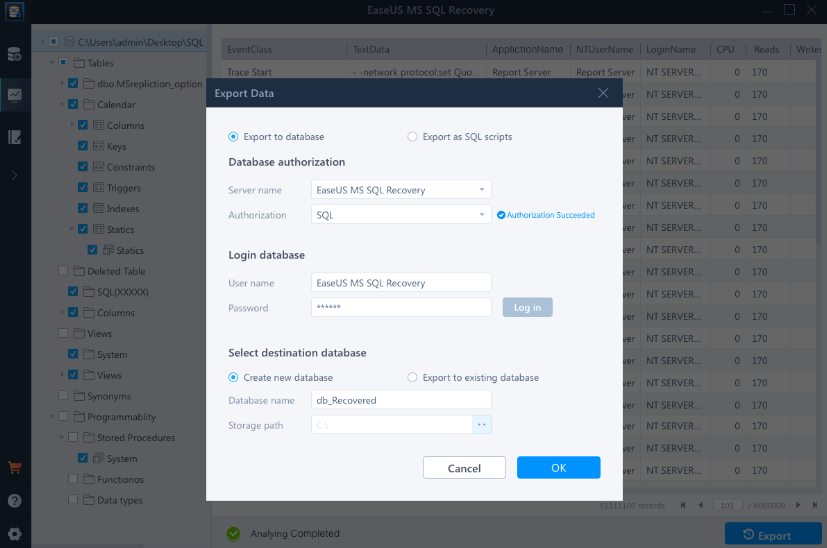
Advanced database repair solutions designed for enterprise settings effectively mend damaged MDF and NDF SQL Server databases, addressing a wide array of SQL database issues. This software proficiently recovers essential database elements such as tables, triggers, indexes, keys, rules, and stored procedures, while also allowing for the deletion of records from the SQL database. It accommodates various versions of MS SQL Server, including 2019, 2017, 2016, 2014, 2012, 2008, and even earlier iterations. When corruption occurs, it typically impacts both primary data (.mdf) and secondary data files (.ndf), but this tool thoroughly scans, identifies, and rectifies affected data files, ensuring that the database is returned to full functionality. Additionally, issues stemming from a corrupted transaction log file (.ldf) can lead to numerous database errors, but EaseUS MS SQL Recovery automatically repairs the damaged log file alongside the rest of the database. After completion, the restored transaction log is conveniently saved in the same directory as the other recovered components, ensuring a seamless recovery process. This comprehensive approach to database repair enhances operational reliability and minimizes downtime for enterprises.
API Access
Has API
No
API Access
Has API
No



Pricing Details
No price information available.
Free Trial
No
Free Version
No
Pricing Details
$299 per year
Free Trial
Yes
Free Version
No
Deployment
Web-Based
No
On-Premises
No
iPhone App
No
iPad App
No
Android App
No
Windows
Yes
Mac
No
Linux
No
Chromebook
No
Deployment
Web-Based
No
On-Premises
No
iPhone App
No
iPad App
No
Android App
No
Windows
Yes
Mac
No
Linux
No
Chromebook
No
Customer Support
Business Hours
No
Live Rep (24/7)
No
Online Support
Yes
Customer Support
Business Hours
No
Live Rep (24/7)
Yes
Online Support
Yes
Types of Training
Training Docs
Yes
Webinars
No
Live Training (Online)
No
In Person
No
Types of Training
Training Docs
Yes
Webinars
No
Live Training (Online)
No
In Person
No
Vendor Details
Company Name
CubexSoft
Founded
2016
Country
India
Website
www.cubexsoft.com/sql-database-recovery/
Vendor Details
Company Name
EaseUS
Founded
2004
Country
United States
Website
www.easeus.com/data-recovery-software/ms-sql-recovery.html
Product Features
Data Recovery
Web Access / Restoration
No
Backup Log
No
Backup Scheduling
No
Compression
No
Continuous Backup
No
Encryption
No
Incremental Backup
No
Local Server Options
No
Multiple System Support
No
Remote Server Options
No
Secure Data Storage
No
Product Features
Data Recovery
Web Access / Restoration
No
Backup Log
No
Backup Scheduling
No
Compression
No
Continuous Backup
No
Encryption
No
Incremental Backup
No
Local Server Options
No
Multiple System Support
No
Remote Server Options
No
Secure Data Storage
No
