Average Ratings 0 Ratings
Average Ratings 0 Ratings
Similar Products
-
All in One AccessibilityAn AI based accessibility tool enables websites to be accessible among people with hearing or vision impairments, motor impaired, color blind, dyslexia, cognitive & learning impairments, seizure & epileptic, ADHD, elderly, and Parkinson. It installs in just 2 minutes. It reduces the risk of time-consuming accessibility lawsuits by improving accessibility compliance for the standards WCAG 2.0, 2.1, 2.2, ADA, Section 508, European EAA EN 301 549, Canada ACA, California Unruh, Israeli Standard 5568, Australian DDA, UK Equality Act, Ontario AODA, Indian RPD Act, GIGW 3.0, France RGAA, German BITV, Brazilian Inclusion law LBI 13.146/2015, Spain UNE 139803:2012, JIS X 8341, Italian Stanca Act, Switzerland DDA & more. It supports GDPR, HIPAA, CCPA, SOC Type 2, ISO 9001:2015, & ISO 27001:2022. It supports 190+ languages. It is a cornerstone of improving web accessibility through its ease of use for companies of all sizes and with the help of paid add-ons like manual accessibility audit, remediation, PDF accessibility remediation, VPAT/ ACR, white label subscription, and live site translation, SkynetAccessibility Scanner add-on. Top features of the All in One Accessibility: - AI Screen Reader - Accessibility statement - Accessibility interface for UI design fixes - Free Accessibility Statement Generator - Voice Navigation - Talk & Type - Libras (Brazilian Portuguese) Sign Language - Dashboard Automatic accessibility score - AI based Image Alternative Text remediation - AI based Text to Speech Screen Reader - Select Screen Reader Voice - Auto-detect language - Keyboard navigation adjustments - Content, Color, Contrast, and Orientation Adjustments - Custom widget color, position, icon size, and type - Dedicated email support
-
MobiPDF (formerly PDF Extra)MobiPDF (formerly PDF Extra) is an intuitive reader and editor that allows you to read, edit, create, OCR, organize, annotate, fill and sign, convert, and share any PDF. This makes MobiPDF an excellent choice for users seeking a budget-friendly alternative to Adobe Acrobat Pro. HERE’S WHAT YOU GET WITH MOBIPDF: Multiple Page View Modes: Enjoy a distraction-free "Read Mode". Advanced Editing Tools: Experience a Word-like PDF editing environment. Two-Way Conversions: Convert PDFs to and from Word, Excel, PowerPoint, or image formats. OCR Support: Make scanned documents searchable. Markup Tools: Highlight, comment, strikethrough, stamp, and more to enhance your documents. Effortless PDF Organizer: Reorder, compress, split, and combine PDFs with ease. Sign & Secure: Add signatures, create and fill forms, and protect your PDFs with passwords, encryption, and digital certificates. Offline Mode: Work freely on your projects, even offline. Seamless translation: One-click translate any PDF into 50+ languages.
-
RAD PDFInstall-free PDF editing, form filling, redaction, signing, viewing, and more on your website with RAD PDF! Packaged as an easy to use library / WebControl (compatible with .NET 3.5+, .NET Core, and .NET 5+), RAD PDF can be used with just about any flavor of ASP.NET including MVC, Razor, Blazor, WebForms, and more. RAD PDF is compatible with 99% of internet browsers, including those on Linux, Mac OS X, Microsoft Windows, and mobile. No plugins. No Adobe Reader. RAD PDF is more than a PDF to HTML converter. It natively supports all the most common PDF features including annotations, bookmarks, form fields, page labels, and more. With advanced PDF options, RAD PDF allows you to selectively enable and disable features not available with Adobe Acrobat Reader, like protecting a PDF from being downloaded while still viewable online. RAD PDF users can use PDF form fields directly from the web browser by enabling PDF form filling and PDF form saving without having to install any software. Integrating directly with ASP.NET, RAD PDF allows your web application to capture input data, build custom workflows, and provide an intuitive graphical user interface (GUI) for just about any online PDF interaction imaginable!
-
EmtrainOur online training (via our LXP or xAPI to your LMS) provides online training employees actually appreciate plus skills assessments and risk benchmarking. Compliance courses for Preventing Workplace Harassment, Cybersecurity, Global Data Privacy, AI Governance, and more. Content is written by lawyers with decades of expertise preventing workplace harassment & motivating business compliance. Our flagship anti-harassment courses meet all relevant laws (CA, NY, IL, UK, AUS, CAN, IND, MEX, etc.) Emtrain courses include binge-worthy workplace video, interactive scenarios, skill building techniques, reflection questions, completion certificates, and litigation-ready reports. 100+ microlessons for continued learning OR to remediate disrespectful or non-compliant behaviors. Clients include Cisco, Degreed, Genentech, Glassdoor, Google, Instacart, NPR, Whirlpool. Partners: Workday Cloud Connect; Udemy Business; Ninjio Don't just check the compliance box. Your co-workers deserve more!
-
Adobe Experience ManagerAdobe Experience Manager is an enterprise content management platform designed to power seamless digital experiences across web, mobile, apps, and other channels. Experience Manager Sites enables teams to create, manage, and optimize content efficiently while ensuring high performance and rapid delivery. Experience Manager Assets provides a robust digital asset management system with automation tools to source, adapt, and distribute content at scale. AI-driven Experience Platform Agents enhance productivity by automating tasks such as high-volume page updates, content migration, governance enforcement, and content optimization. Forms capabilities allow organizations to create responsive digital forms with secure e-signature workflows for streamlined customer interactions. Adobe Learning Manager integrates training and development directly into brand ecosystems, while Experience Manager Guides supports scalable documentation through a cloud-native CCMS. Built-in governance tools ensure compliance, brand consistency, and permission control across digital properties. By combining automation, AI, and centralized management, Adobe Experience Manager accelerates time-to-market and enhances customer engagement.
-
KnakKnak is the enterprise-grade, no-code solution that transforms how marketing teams build emails and landing pages — without relying on developers or agencies. With a robust modular design system, real-time collaboration, and native integrations with platforms like Marketo, SFMC, and Eloqua, Knak eliminates production bottlenecks while preserving brand governance. Empower your team to deliver high-performance assets quickly, securely, and at scale — no code required. Trusted by global brands to streamline campaign execution and accelerate time-to-market.
-
Bitdefender Ultimate Small Business SecurityBitdefender Small Business Security provides robust, enterprise-level cyber-defense tailored for smaller companies, ensuring protection across various platforms including Windows, macOS, iOS, and Android. With a centralized management system that is user-friendly, it allows organizations lacking dedicated IT personnel to efficiently implement and oversee their security measures from a single interface. The solution features a multi-layered approach to endpoint protection, incorporating machine learning, behavioral analysis, real-time monitoring, process termination, and rollback capabilities to safeguard against both known and emerging threats. Additionally, it includes ransomware prevention and remediation strategies that detect unusual encryption activities and facilitate file recovery from backups. Users are also protected against fileless attacks, with measures like memory and back-injection interference as well as script blocking. The software further enhances security by preventing phishing and fraud through the blocking of malicious websites and alerting users accordingly, while offering advanced exploit protection with real-time shields for common applications such as browsers, Office software, and Adobe Reader, thus ensuring all-encompassing endpoint security. This comprehensive suite of features makes it an ideal choice for small businesses seeking to fortify their cybersecurity defenses.
-
YodeckNext-generation technology for digital signage professionals Yodeck, a cloud-based digital signage platform, is unbeatable. It powers your screen with dynamic content that instantly engages your target audience. Yodeck makes it easy to create, schedule, and design content from the web. To get your message across to those who matter most to you, use attention-grabbing media such as videos, images and PDF files, Office documents, data dashboards, and social media. It provides enterprise-grade security and control. Yodeck's drag-and-drop editing feature allows users to be creative in organizing content into interesting layouts. Yodeck is proud to offer a unique digital signage solution for businesses of all sizes. This includes local diners as well as global leaders like Delta Airlines, Autodesk and Adobe.
-
RegDeskRegDesk is the most comprehensive AI-enabled RIMS platform for Medical Devices, Pharmaceuticals, and IVD companies. • Our proprietary Regulatory Intelligence for over 120+ countries is translated and accessible in a standard format. In addition, it provides alerts on evolving regulatory changes • Our AI-powered Application Builder allows RA teams to prepare and publish global applications in 1/10th of the time • Our Change Assessment capability helps RA teams understand the impact of the change(s) on an existing product(s) and the action required • Our Distributor Collaboration provides seamless workflow solutions to interact, communicate, and share documents with external business partners • Our Standards Management makes it easy for RA teams to search and manage not only international but also country-specific standards • Our Tracking & Reporting functionality allows teams to track regulatory projects across the globe, receive renewal notifications, and generate reports on KPIs within seconds For more information, visit our website.
-
DATABASICS Time & ExpenseDATABASICS strives to solve the most difficult Time and Expense management problems for large and small enterprises with distributed workforces. We combine two world-class tracking systems into one system, allowing us to address two critical business processes in one solution. Our system integrates seamlessly with any software or program you already use, so it is easy to configure and report. You can have your solution customized to meet your needs in just a month.
Description
CommonLook PDF stands out as the top plugin for Adobe Acrobat dedicated to PDF remediation, allowing users to effectively test, repair, and generate reports for accessible PDF documents. Tackling the complexities of accessibility compliance within the PDF sector requires adhering to intricate standards such as WCAG, PDF/UA, and Section 508. Although Adobe Acrobat boasts a range of robust features, it often falls short in guaranteeing complete PDF accessibility. Without an appropriate solution, the process of manual remediation can be laborious and susceptible to mistakes. Many organizations face challenges in developing their internal capabilities and grasping the nuances of accessibility standards. Furthermore, the task of creating thorough reports and fulfilling documentation needs for regulatory bodies like HHS can be overwhelming, especially when confronted with intricate document layouts that complicate validation. Enter CommonLook PDF, an innovative plugin for Adobe Acrobat that simplifies the compliance process with WCAG, PDF/UA, HHS, and Section 508 accessibility requirements, making it easier for organizations to meet these critical standards efficiently and effectively. This tool not only enhances accessibility but also empowers users to take proactive steps toward inclusivity in their documents.
Description
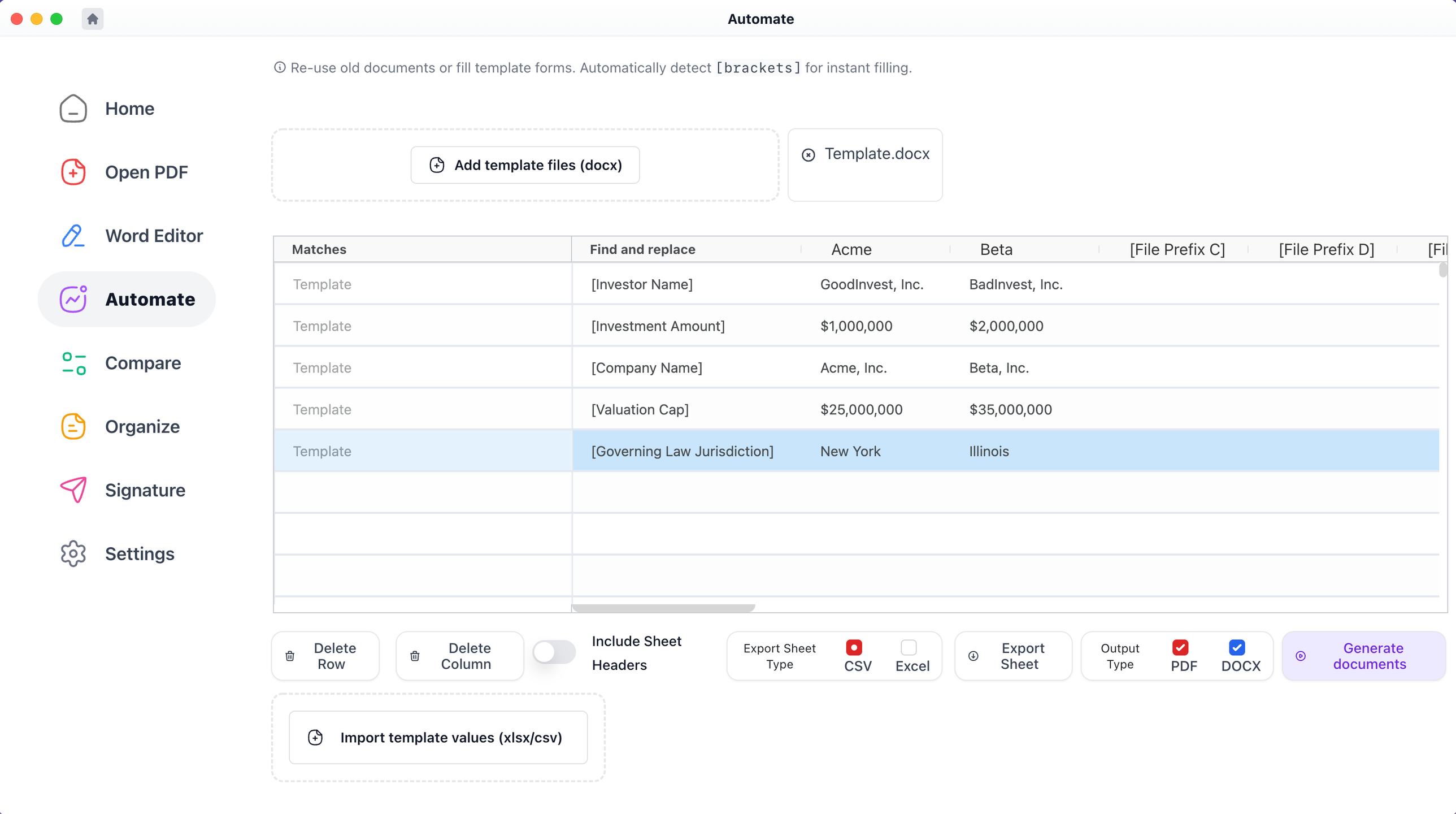
With Macro, users can effortlessly click on any defined term, section, chapter, or clause to access immediate context. You can also compare various files, merge edits from multiple Word and PDF documents into a single version, produce bulk blacklines, and make comparisons with templates. It allows for the generation of files from templates, creating one or several documents simultaneously from a spreadsheet, and enables the combination of PDF and Word files. This service is available for free on both Windows and Mac platforms. From an IT and support standpoint, Macro closely resembles the desktop versions of Adobe Acrobat and Microsoft Word, but it includes extra features tailored for financial and legal processes. This IT documentation unfolds in a chronological order. Additionally, when you click on any defined term highlighted in blue, a popup appears displaying the definition as outlined within the document, and you can access nested popups that facilitate an in-depth understanding of your document without limitation. This functionality significantly enhances user experience, making document navigation more intuitive and efficient.
API Access
Has API
API Access
Has API


Pricing Details
No price information available.
Free Trial
Free Version
Pricing Details
$49 per user per month
Free Trial
Free Version
Deployment
Web-Based
On-Premises
iPhone App
iPad App
Android App
Windows
Mac
Linux
Chromebook
Deployment
Web-Based
On-Premises
iPhone App
iPad App
Android App
Windows
Mac
Linux
Chromebook
Customer Support
Business Hours
Live Rep (24/7)
Online Support
Customer Support
Business Hours
Live Rep (24/7)
Online Support
Types of Training
Training Docs
Webinars
Live Training (Online)
In Person
Types of Training
Training Docs
Webinars
Live Training (Online)
In Person
Vendor Details
Company Name
Allyant
Founded
2022
Country
Canada
Website
allyant.com/commonlook-accessibility-suite/cl-pdf/
Vendor Details
Company Name
Macro
Founded
2020
Country
United States
Website
www.macro.com
Product Features
Product Features
Document Generation
Batch Processing
Collaboration
Digital Signature
Interaction Tracking
Multiple Output Formats
Templates
PDF Editors
Access Controls / Permissions
Annotations
Commenting / Notes
Compare Side-by-Side
Customizable Branding
Delete Pages
Electronic Signature
Forms Management
Full Text Search
Merge / Append
Offline Access
Optical Character Recognition (OCR)
Rearrange Pages
Rotate Pages
Watermarking
