Average Ratings 0 Ratings
Average Ratings 0 Ratings
Similar Products
-
RetoolRetool is a modern AI-native application development platform designed to help teams build internal software quickly and efficiently. It enables users to create agents, workflows, dashboards, and full-stack apps using natural language prompts and visual tools. Retool connects directly to databases, APIs, vector stores, and AI models to ensure applications work seamlessly with existing systems. The platform allows teams to transform raw data into actionable tools such as dashboards, admin panels, and monitoring systems. With drag-and-drop UI building, code-level customization, and AI-assisted generation, Retool supports multiple development styles. Built-in workflows automate complex processes while maintaining auditability and security. Retool fits naturally into standard engineering stacks with support for CI/CD and version control. Enterprise-grade permissions and hosting options ensure sensitive data stays protected. Used by thousands of companies worldwide, Retool helps teams ship AI-powered software faster. It bridges the gap between idea and production with speed and control.
-
Aikido SecurityAikido is the all-in-one security platform for development teams to secure their complete stack, from code to cloud. Aikido centralizes all code and cloud security scanners in one place. Aikido offers a range of powerful scanners including static code analysis (SAST), dynamic application security testing (DAST), container image scanning, and infrastructure-as-code (IaC) scanning. Aikido integrates AI-powered auto-fixing features, reducing manual work by automatically generating pull requests to resolve vulnerabilities and security issues. It also provides customizable alerts, real-time vulnerability monitoring, and runtime protection, enabling teams to secure their applications and infrastructure seamlessly.
-
Google AI StudioGoogle AI Studio is an all-in-one environment designed for building AI-first applications with Google’s latest models. It supports Gemini, Imagen, Veo, and Gemma, allowing developers to experiment across multiple modalities in one place. The platform emphasizes vibe coding, enabling users to describe what they want and let AI handle the technical heavy lifting. Developers can generate complete, production-ready apps using natural language instructions. One-click deployment makes it easy to move from prototype to live application. Google AI Studio includes a centralized dashboard for API keys, billing, and usage tracking. Detailed logs and rate-limit insights help teams operate efficiently. SDK support for Python, Node.js, and REST APIs ensures flexibility. Quickstart guides reduce onboarding time to minutes. Overall, Google AI Studio blends experimentation, vibe coding, and scalable production into a single workflow.
-
GearsetGearset is a full‑featured Salesforce DevOps solution built for the enterprise, giving teams the tools to adopt best practices across every stage of the DevOps lifecycle. From metadata and CPQ deployments to CI/CD, testing, code analysis, sandbox seeding, backups, archiving, and observability, Gearset gives teams unmatched insight and control over their Salesforce workflows. Over 3,000 organizations — including names like McKesson and IBM — rely on Gearset to deliver with security and scale in mind. With advanced governance, detailed audit trails, SOX/ISO/HIPAA support, multi‑team pipelines, integrated security checks, and adherence to ISO 27001, SOC 2, GDPR, CCPA/CPRA, and HIPAA, Gearset combines enterprise‑ready compliance with rapid onboarding and an intuitive interface — all in one platform. Leading firms in finance, healthcare, and tech trust Gearset to power their DevOps initiatives without adding complexity.
-
Kasm WorkspacesKasm Workspaces streams your workplace environment directly to your web browser…on any device and from any location. Kasm is revolutionizing the way businesses deliver digital workspaces. We use our open-source web native container streaming technology to create a modern devops delivery of Desktop as a Service, application streaming, and browser isolation. Kasm is more than a service. It is a platform that is highly configurable and has a robust API that can be customized to your needs at any scale. Workspaces can be deployed wherever the work is. It can be deployed on-premise (including Air-Gapped Networks), in the cloud (Public and Private), or in a hybrid.
-
Thinfinity WorkspaceThinfinity Workspace 7.0's Technical Highlights: - Progressive Web App (PWA) technology for a seamless user experience - Integrated Thinfinity VNC, VirtualUI, and z/Scope for maximum versatility - HTML5 terminal emulation supporting DEC terminals, TN 5220, and TN 3270 protocols - Robust enterprise-grade audit logs for security and compliance management - Proprietary VNC protocol for real-time monitoring and troubleshooting IMPROVE USER EXPERIENCE - Deliver business-critical apps, desktops and files from a single web portal. - Provide simplified remote browser access for your users, while confining them to only the resources that they need. SIMPLIFY IT AND AVOID VPNs - Forget traditional VPN deployments and complexities. - Enable access from Chromebooks, mobile devices or any computer with a Web Browser. Zero setup. KEEP YOUR BUSINESS SECURE - Use enterprise-grade encrypted connections. - Integrate with your existing and external identity platforms. - Apply 2FA or MFA policies with all identity providers.
-
DbVisualizerDbVisualizer is a universal database client for anyone who works with data, from indie developers and startups to professional teams managing complex database environments, including developers, DBAs, analysts, and data engineers working across relational and NoSQL databases. Key features: - SQL editor with intelligent autocomplete, visual query builders, variables, and execution tools - AI Assistant for answering questions, explaining errors, and analyzing code - Git integration for managing SQL scripts and team collaboration - Customizable layouts, key bindings, and UI themes - Favorites for frequently used scripts and database objects - Configurable security settings for organizational requirements Connects via JDBC to MySQL, PostgreSQL, SQL Server, Oracle, Snowflake, SQLite, Cassandra, BigQuery, and more. Runs on Windows, macOS, and Linux. Nearly 7 million downloads, with Pro users in 150 countries, scaling from solo projects to enterprise database management.
-
NMI PaymentsNMI Payments gives developers, SaaS builders, ISVs and ISOs a simple path to embedded payments. As a full-stack processor, acquirer, and technology partner, NMI enables you to integrate, brand, and manage payment acceptance within your platform—without becoming a PayFac or building complex infrastructure. The platform combines flexibility, scalability, and speed, offering white-labeled payments infrastructure that keeps your brand front and center. With omnichannel support for in-store, online, in-app, and unattended payments, you can deliver a consistent merchant experience across every touchpoint. NMI also manages onboarding, compliance, and risk, freeing your team to focus on innovation and customer growth. Developer-First Experience NMI’s developer-first environment puts full control in your hands. Build, test, and launch payments in a modern sandbox with clear documentation and ready-to-use code snippets. Guided onboarding flows and API recipes simplify integration, while low-code and no-code tools accelerate deployment. Business users can evaluate monetization options with instant revenue calculators and self-service sign-up. Whether you’re embedding payments for the first time or scaling across channels, NMI helps you go live faster, stay compliant, and grow with confidence
-
Bright DataBright Data holds the title of the leading platform for web data, proxies, and data scraping solutions globally. Various entities, including Fortune 500 companies, educational institutions, and small enterprises, depend on Bright Data's offerings to gather essential public web data efficiently, reliably, and flexibly, enabling them to conduct research, monitor trends, analyze information, and make well-informed decisions. With a customer base exceeding 20,000 and spanning nearly all sectors, Bright Data's services cater to a diverse range of needs. Its offerings include user-friendly, no-code data solutions for business owners, as well as a sophisticated proxy and scraping framework tailored for developers and IT specialists. What sets Bright Data apart is its ability to deliver a cost-effective method for rapid and stable public web data collection at scale, seamlessly converting unstructured data into structured formats, and providing an exceptional customer experience—all while ensuring full transparency and compliance with regulations. This commitment to excellence has made Bright Data an essential tool for organizations seeking to leverage web data for strategic advantages.
-
Checksum.aiEngineering teams shipping with AI have a new bottleneck: validation. Code output has accelerated. Quality hasn't. Checksum closes the gap. Checksum is a continuous quality platform with a suite of AI agents that handle testing end-to-end, at every stage of the development lifecycle. Where most tools wait for a human to trigger them, Checksum runs autonomously in the background, generating tests, executing them, and repairing failures without manual intervention. Seventy percent of test failures are resolved automatically through real-time auto-recovery. The platform covers every layer: end-to-end UI flows via Playwright, API endpoint chains, and targeted CI tests scoped to exactly what changed in a PR. All tests land as real code in your repository and are delivered as standard Playwright, owned by your team. Checksum is fine-tuned on 1.5+ million test runs and integrates natively with Cursor, Claude Code, and 100+ AI coding agents. Type /checksum and your coding agent's output gets tested before it ever reaches review. Generation and healing happen on Checksum's cloud infrastructure which means no LLM tokens consumed, no local resources required. The result: test suites that stay green as the product evolves, fewer regressions reaching production, and release confidence that scales alongside AI output.
Description
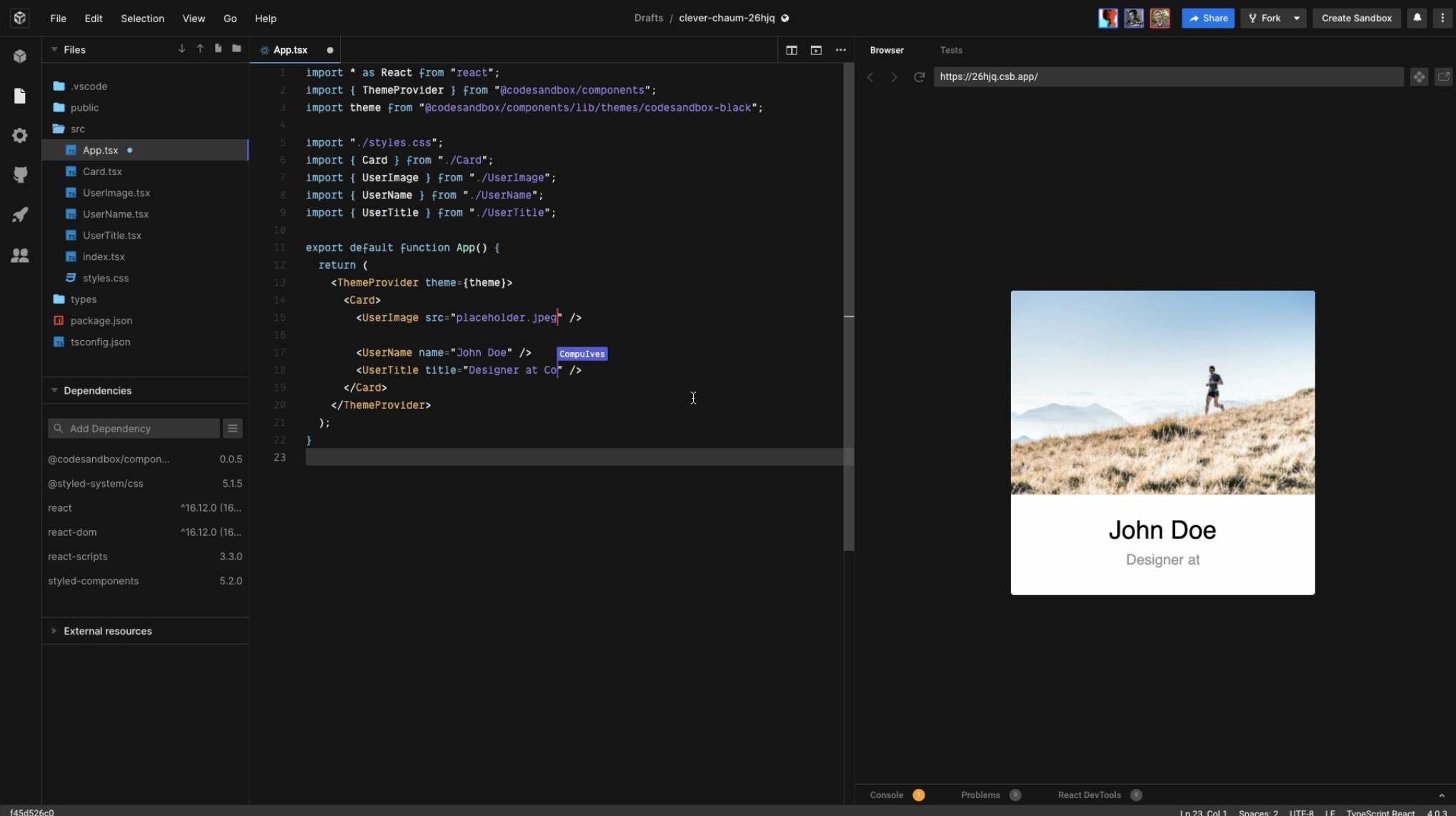
CodeSandbox aims to make it easier for you to express your ideas with code, and to validate them. It also removes the hassles of setting up development tooling and sharing your project. Join us to help build the future of web coding.
Over 4M developers use the platform each month. This includes organizations like Shopify and Atlassian. Since its launch, creators have created over 35M apps. It's used in thousands of open-source projects like React, Vue and Babel.
You can invite your friends, colleagues, or team to join you or simply view your creation by using a URL. Use any of 1M+ packages for building real, powerful applications quickly and efficiently. Import and run repos directly from GitHub or choose from hundreds of templates to start in seconds.
Boxy, CodeSandbox's AI-powered coding assistant, is now available to all Pro subscriptions.
Description
Void is a fork of VS Code that serves as an open-source AI code editor and an alternative to Cursor, designed to give developers enhanced AI support while ensuring complete data control. It facilitates smooth integration with various large language models, including DeepSeek, Llama, Qwen, Gemini, Claude, and Grok, allowing direct connections without relying on a private backend. Among its core functionalities are tab-triggered autocomplete, an inline quick edit feature, and a dynamic AI chat interface that supports standard chat, a restricted gather mode for read/search-only tasks, and an agent mode that automates operations involving files, folders, terminal commands, and MCP tools. Furthermore, Void provides exceptional performance capabilities, including rapid file application for documents containing thousands of lines, comprehensive checkpoint management for model updates, native tool execution, and the detection of lint errors. Developers can effortlessly migrate their themes, keybindings, and settings from VS Code with a single click and choose to host models either locally or in the cloud. This unique combination of features makes Void an attractive option for developers seeking powerful coding tools while maintaining data sovereignty.
API Access
Has API
Yes
API Access
Has API
No




Integrations
C#
Yes
Go
Yes
HTML
Yes
Java
Yes
JavaScript
Yes
PHP
Yes
Python
Yes
Rust
Yes
TypeScript
Yes
Visual Studio Code
Yes
Integrations
C#
Yes
Go
Yes
HTML
Yes
Java
Yes
JavaScript
Yes
PHP
Yes
Python
Yes
Rust
Yes
TypeScript
Yes
Visual Studio Code
Yes
Pricing Details
$12 per month
Free Trial
Yes
Free Version
Yes
Pricing Details
Free
Free Trial
No
Free Version
Yes
Deployment
Web-Based
Yes
On-Premises
Yes
iPhone App
Yes
iPad App
Yes
Android App
No
Windows
No
Mac
No
Linux
No
Chromebook
Yes
Deployment
Web-Based
No
On-Premises
No
iPhone App
No
iPad App
No
Android App
No
Windows
Yes
Mac
Yes
Linux
Yes
Chromebook
No
Customer Support
Business Hours
No
Live Rep (24/7)
No
Online Support
Yes
Customer Support
Business Hours
No
Live Rep (24/7)
No
Online Support
Yes
Types of Training
Training Docs
Yes
Webinars
No
Live Training (Online)
No
In Person
No
Types of Training
Training Docs
Yes
Webinars
No
Live Training (Online)
No
In Person
No
Vendor Details
Company Name
CodeSandbox
Founded
2017
Country
Netherlands
Website
codesandbox.io
Vendor Details
Company Name
Void Editor
Country
United States
Website
voideditor.com
Product Features
Code Collaboration
Audio Conferencing
Yes
Chat / Messaging
Yes
Code Review
Yes
Discussion Threads
Yes
IDE Integration
Yes
Remote Control
No
Remote Pair Programming
Yes
Screen Sharing
No
Video Conferencing
No
Code Editors
API
Yes
Auto-Complete
Yes
Code Folding
Yes
Column Editing
Yes
Customizable Themes
Yes
Debugging
Yes
Formatting / Table Editing
Yes
Keyboard Shortcuts
Yes
Multi-Monitor Editing
Yes
Syntax Highlighting
Yes
WYSIWYG
No
IDE
Code Completion
Yes
Compiler
Yes
Cross Platform Support
Yes
Debugger
Yes
Drag and Drop UI
No
Integrations and Plugins
Yes
Multi Language Support
Yes
Project Management
No
Text Editor / Code Editor
Yes
Product Features
Code Editors
API
No
Auto-Complete
No
Code Folding
No
Column Editing
No
Customizable Themes
No
Debugging
No
Formatting / Table Editing
No
Keyboard Shortcuts
No
Multi-Monitor Editing
No
Syntax Highlighting
No
WYSIWYG
No
IDE
Code Completion
No
Compiler
No
Cross Platform Support
No
Debugger
No
Drag and Drop UI
No
Integrations and Plugins
No
Multi Language Support
No
Project Management
No
Text Editor / Code Editor
No
