Average Ratings 0 Ratings
Average Ratings 0 Ratings
Similar Products
-
RunnRunn is a real-time resource management platform with integrated time tracking and powerful forecasting capabilities. Intuitively plan projects and schedule resources with allocations, project phases, milestones, and time off. Flick between monthly, quarterly and half-yearly views to plan for the short and long term. Get a dynamic bird’s-eye view of your entire organization to manage capacity, workload and availability changes as you create your plans. Runn makes resource management dynamic and visual from a single, shared view. Drill into different roles, teams and tags to compare trends and understand which groups are overbooked. Plan out tentative projects to see how plans might change if work gets confirmed. Track projects, view forecasts, and get relevant metrics within Runn. Get insights like utilization, project variance, and overall financial performance. Use Runn’s built-in timesheets to monitor project progress. Runn integrates with Harvest, WorkflowMax, and Clockify. With the API, build your own integrations to connect Runn with your favorite tools.
-
DeskTimeDeskTime is a high-performance, 100% automated time tracking and productivity management solution designed for modern IT teams, software houses, and remote organizations. Unlike traditional trackers that rely on manual "Start/Stop" timers, DeskTime runs silently in the background, logging computer activity from the moment of boot-up to ensure zero data loss and absolute payroll accuracy. ⏱️ 🚀 Key Technical Features: ✅ Fully Automated Tracking: Eliminate manual timesheets. DeskTime captures arrival, departure, and total work hours automatically based on device activity. ⚡ ✅ Productivity Profiling: Categorize URLs, applications, and document titles as Productive, Unproductive, or Neutral. Calculate real-time efficiency scores for individuals and teams. 📈 ✅ Advanced Resource Management: Integrated Shift Scheduling and an Absence Calendar allow HR and team leads to manage leave, vacations, and staffing within a single interface. 📅 ✅ Project & Cost Analysis: Track billable hours at the project and task level. Monitor budget burn rates and export precise reports for client invoicing or CapEx/OpEx accounting. 💸 ✅ Offline Time Logging: Capture time spent in meetings or on-site visits via manual entries or the dedicated mobile app for Android and iOS. 📱 ✅ Enterprise-Grade Security: DeskTime is GDPR compliant and ISO 27001 certified. Features include two-factor authentication (2FA), data encryption at rest and in transit, and optional blurred screenshots to protect employee privacy. 🔒 🛠️ Built for Integration: Seamlessly sync your workflow with top-tier project management and communication tools, including: ⚙️Jira, GitLab, Trello, and Asana. ⚙️Google and Outlook Calendars. ⚙️Custom API for bespoke internal tool integration.
-
Premier Construction SoftwarePremier Construction Software is an AI-powered cloud ERP built for growing general contractors who need tight control over job costs, WIP, and cash flow across multiple projects and entities. It unifies construction accounting, project management, and field operations so GCs can eliminate spreadsheets, speed up billing, and protect margins with real-time financial visibility. How we help GCs win more work and protect margin: • Construction cloud ERP built for general contractors, owners, and developers managing multi-project, multi-entity portfolios. • Advanced construction accounting with detailed job costing, real-time WIP reporting, and cash-flow forecasting to spot issues before they hit the P&L. • Integrated project and field management with RFIs, subcontracts, drawings, and change orders tied directly to the budget and schedule. • Automated billing, approvals, and payroll workflows (including subcontractor and pay app portals) to reduce manual entry and speed up collections. • Native AI and predictive intelligence that surface risks, recommend next actions, and provide executive-ready dashboards for owners and project leaders. • Unlimited entities, consolidated reporting, and role-based dashboards so finance and operations see the same numbers in real time. Trusted by GCs and Land Developers globally, Premier saves time, cuts risk, and helps you move forward with clarity. With Premier, you’re not just adopting software, you’re partnering with a trusted leader committed to your success.
-
TimeControlTimeControl is a timesheet system that can be used for both finance and project management. TimeControl was designed to serve multiple purposes at once. TimeControl tracks time task-bytask and project-byproject. Despite its project-based controls it is still a financial timesheet that meets all the requirements of payroll, human resource, billing, and finance. TimeControl is available for subscription in the cloud and for purchase for an installation on-premise. It includes both a browser interface as well as the TimeControl Mobile App for iOS or Android.
-
Planview ProjectAdvantagePlanview ProjectAdvantage brings clarity, control, and scalability to enterprise project management by unifying project data, resources, and performance insights in one platform. Built for growing PMOs and complex organizations, it eliminates silos and inefficiencies by connecting teams through a single source of truth. Users can monitor resource allocation, track workloads, and forecast capacity with precision using dynamic dashboards. ProjectAdvantage’s portfolio scoring tools and sandbox environments make it easy to prioritize initiatives and align them with company strategy. Its flexibility supports any methodology—Agile, hybrid, or Waterfall—making it ideal for diverse industries and workflows. Seamless integrations with leading enterprise systems like Jira, ServiceNow, and Microsoft Teams enable cross-functional collaboration and real-time visibility. Backed by AI-driven analytics, Planview Projectadvantage helps accelerate project delivery, improve performance tracking, and ensure continuous strategic alignment. Designed for agility, it’s a transformative solution that turns project chaos into structured, measurable success.
-
KonstructIQKonstructIQ is an innovative platform that integrates artificial intelligence to serve the needs of residential general contractors, remodeling companies, and home builders by streamlining both construction and financial management. This comprehensive tool covers the entire project lifecycle, encompassing fast and professional estimates, budgeting, invoicing, payment processing, change-order management, cost tracking, subcontractor coordination, and real-time reporting, all within a unified interface. Its estimating feature allows contractors to create precise bids swiftly, utilizing customizable cost codes and the ability to calculate markups or margins, as well as accommodating both cost-plus and fixed-price pricing models. Upon approval of an estimate, it transforms into the project budget, ensuring that every bill, invoice, or change order automatically reflects on the budget, enabling contractors to maintain precise job costing and oversight of profitability. Additionally, the platform facilitates payments to subcontractors or suppliers, supporting various methods such as ACH transactions, checks, debit and credit cards, virtual cards, or Zelle, while also enabling clients to pay invoices directly through a user-friendly portal, which accelerates cash flow significantly. This holistic approach not only simplifies administrative tasks but also enhances financial transparency for contractors, ultimately contributing to more efficient project completion.
-
FloatFloat is the #1 rated resource management software that gives 4,500+ teams the essential data and context they need when resourcing client work. Success in professional services isn’t just about assigning work: it’s building the high-performing teams who deliver it. With Float, you can make smarter resourcing decisions and adapt work as it shifts to build a winning team for every job. The world’s top teams don’t just wing it. They resource client work the right way with Float. You should, too. Try for free at float.com.
-
WERXWerx delivers powerful construction management tools at a price contractors love—starting at just $49/month. Built for small to midsized businesses, Werx simplifies your workflow with features like flexible estimating, AIA-Style billing, QuickBooks syncing, and labor tracking. Speed up payments with Stripe-powered online billing. Try Werx free for 30 days and see the difference! Tailored for contractors of all trades, Werx helps you save time, reduce stress, and boost profits. From managing schedules to tracking time in the field and creating polished invoices, Werx brings everything together in one easy-to-use platform. Affordable, reliable, and built to help your business grow—Werx is the smart choice for contractors.
-
ALMobileGet ready for AI! Keep your field data accurate, organized, and prepared for action. ALMobile simplifies and unifies your field data tracking and payroll processes, ensuring seamless connectivity across your project team. Effortlessly track employee time, attendance, and project details—whether in the field or at the home office. Eliminate the chaos of scattered data and focus on what truly matters with ALMobile’s advanced reporting tools, which are fully integrated with your primary accounting system. Access real-time, customizable project and employee insights that are accurate and easy to analyze. Work smarter and faster with ALMobile—ditch the paper, spreadsheets, and outdated systems for good!
-
Total ETOTotal ETO is a Totally Better ERP / MRP for Custom Machine Builders, providing better efficiency, accuracy, and profitability. Our system was designed by engineers to match the unique workflow of Engineer To Order manufacturers, including Integrators, Panel Shops & OEMs. Our solution will: -Increase efficiency in engineering by integrating with your CAD. -Allow designers to cost out the BOM before purchases are made. -Track changes to the BOM at any stage of the project and ensure the information is shared across departments. -Save time & money in procurement with your newly Dynamic BOMs. -Capture change order information, including labor, material, and sales price changes so they aren't omitted or forgotten. -Improve accuracy through out your organization, including sales estimates. -Route parts between various tasks, tracking both internal and external processes. -Help ensure parts are inspected and know who completed the inspection. You'll be able to record and follow up on quality issues on the shop floor, from engineering, or for purchased parts with embedded Non-Conformance Reports.
Description
Automate your time tracking. Automated time tracking will allow you to focus on what is important, while saving you time. Track and visualize all your projects. You can also export your data to connect with your timesheet and billing tools. Code Time is an analytics and time tracking plugin that provides detailed reports on your code time per project. Visualize all your projects, daily progress and work schedule in one place. Upgrade to simplify project billing and reporting. Export your data and have it packaged up by branch or project. You can create your own dashboards and reports using your favorite analytics tool. Software integrates with over 15 of the most popular IDEs and code editors. You can track your hours and generate reports directly from your code editor.
Description
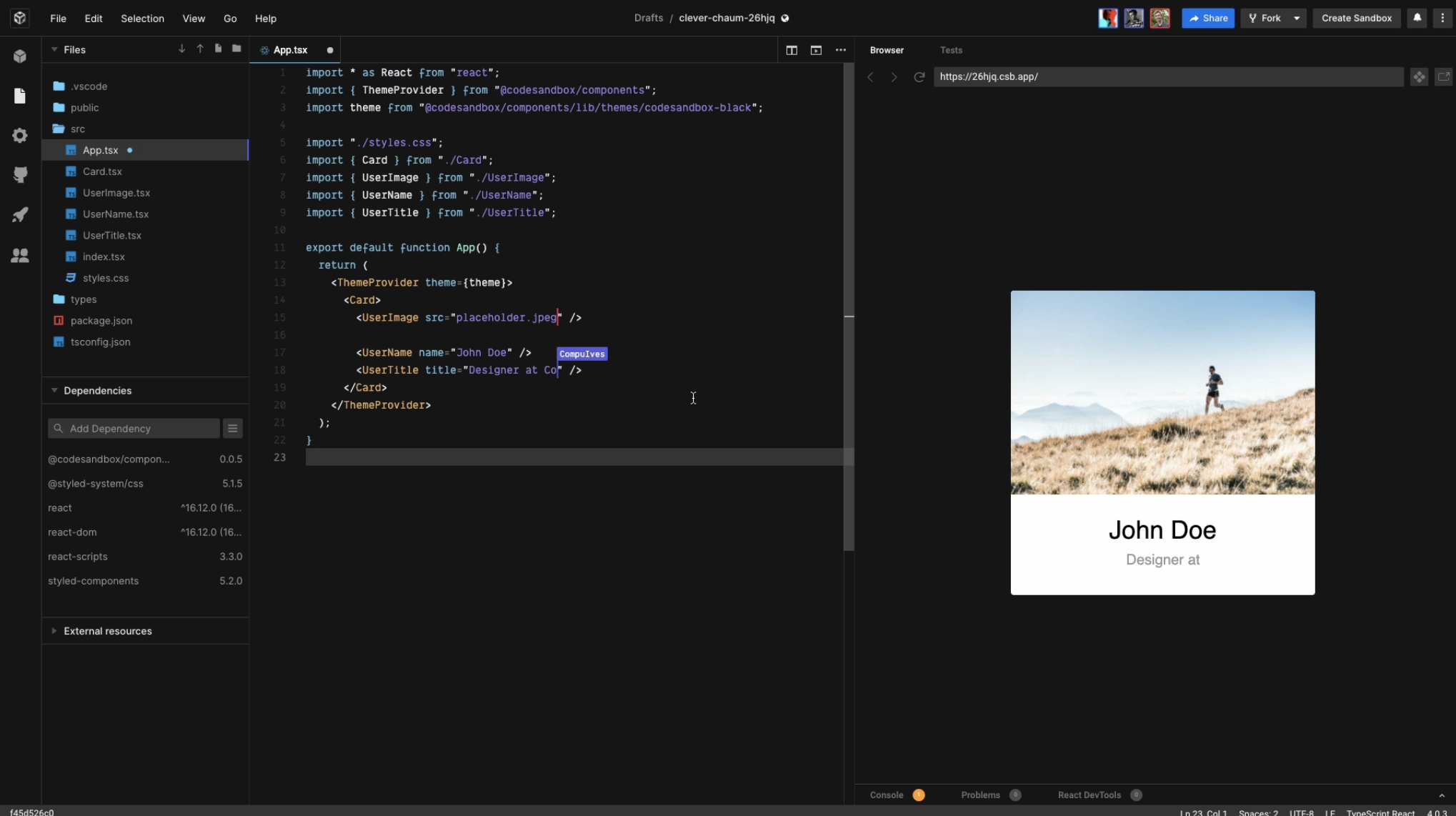
CodeSandbox aims to make it easier for you to express your ideas with code, and to validate them. It also removes the hassles of setting up development tooling and sharing your project. Join us to help build the future of web coding.
Over 4M developers use the platform each month. This includes organizations like Shopify and Atlassian. Since its launch, creators have created over 35M apps. It's used in thousands of open-source projects like React, Vue and Babel.
You can invite your friends, colleagues, or team to join you or simply view your creation by using a URL. Use any of 1M+ packages for building real, powerful applications quickly and efficiently. Import and run repos directly from GitHub or choose from hundreds of templates to start in seconds.
Boxy, CodeSandbox's AI-powered coding assistant, is now available to all Pro subscriptions.
API Access
Has API
No
API Access
Has API
Yes



Integrations
Visual Studio Code
Yes
Angular
No
AppCode
Yes
Atom
Yes
C#
No
Docsie
No
Elixir
No
GitHub
No
GoLand
Yes
Google Calendar
Yes
Integrations
Visual Studio Code
Yes
Angular
Yes
AppCode
No
Atom
No
C#
Yes
Docsie
Yes
Elixir
Yes
GitHub
Yes
GoLand
No
Google Calendar
No
Pricing Details
No price information available.
Free Trial
Yes
Free Version
No
Pricing Details
$12 per month
Free Trial
Yes
Free Version
Yes
Deployment
Web-Based
Yes
On-Premises
No
iPhone App
No
iPad App
No
Android App
No
Windows
No
Mac
No
Linux
No
Chromebook
No
Deployment
Web-Based
Yes
On-Premises
Yes
iPhone App
Yes
iPad App
Yes
Android App
No
Windows
No
Mac
No
Linux
No
Chromebook
Yes
Customer Support
Business Hours
No
Live Rep (24/7)
No
Online Support
Yes
Customer Support
Business Hours
No
Live Rep (24/7)
No
Online Support
Yes
Types of Training
Training Docs
Yes
Webinars
No
Live Training (Online)
No
In Person
No
Types of Training
Training Docs
Yes
Webinars
No
Live Training (Online)
No
In Person
No
Vendor Details
Company Name
Software.com
Founded
2017
Country
United States
Website
www.software.com/code-time
Vendor Details
Company Name
CodeSandbox
Founded
2017
Country
Netherlands
Website
codesandbox.io
Product Features
Code Editors
API
No
Auto-Complete
No
Code Folding
No
Column Editing
No
Customizable Themes
No
Debugging
No
Formatting / Table Editing
No
Keyboard Shortcuts
No
Multi-Monitor Editing
No
Syntax Highlighting
No
WYSIWYG
No
Product Features
Code Collaboration
Audio Conferencing
Yes
Chat / Messaging
Yes
Code Review
Yes
Discussion Threads
Yes
IDE Integration
Yes
Remote Control
No
Remote Pair Programming
Yes
Screen Sharing
No
Video Conferencing
No
Code Editors
API
Yes
Auto-Complete
Yes
Code Folding
Yes
Column Editing
Yes
Customizable Themes
Yes
Debugging
Yes
Formatting / Table Editing
Yes
Keyboard Shortcuts
Yes
Multi-Monitor Editing
Yes
Syntax Highlighting
Yes
WYSIWYG
No
IDE
Code Completion
Yes
Compiler
Yes
Cross Platform Support
Yes
Debugger
Yes
Drag and Drop UI
No
Integrations and Plugins
Yes
Multi Language Support
Yes
Project Management
No
Text Editor / Code Editor
Yes
