Average Ratings 0 Ratings
Average Ratings 0 Ratings
Similar Products
-
EcholoNEcholoN is a flexible platform for IT Service Management (ITSM), Enterprise Service Management (ESM), Service Desk, Help Desk, Customer Service and Field Service Management. It helps organizations manage service processes, workflows, assets, knowledge and business information in one integrated environment. A key component is the EcholoN Enterprise Application Framework. It enables companies to configure workflows, forms, data structures, roles and business logic and to create individual business applications on the same platform. This allows EcholoN to support requirements beyond traditional ticketing and service management. The platform covers Incident, Request, Problem and Change Management, Service Catalogs, Knowledge Management, IT Asset and Configuration Management, customer and contract processes, complaint management, quality processes, maintenance and technical field service. Workflow automation, rules, notifications, escalations, dashboards and reporting help standardize processes, improve transparency and reduce manual effort. EcholoN can be used across IT and other departments such as customer service, technical service, facilities, HR and quality management. With its modular architecture, integration capabilities and Enterprise Application Framework, EcholoN provides a scalable foundation for ITSM, ESM, Field Service, process automation and custom enterprise applications.
-
FreshserviceFreshservice is the right choice if you are looking for an IT service desk solution with simplicity. Freshservice is an easy-to-use ITIL service desk from Freshworks that helps businesses modernize IT and other business functions without the complexity and cost. Freshservice provides everything teams need to manage proactive IT services, including asset management, ticketing, configuration management, enhanced impact analysis, robust incident management functions, and more.
-
ServiceaideServiceaide is an intuitive service management solution which can be implemented within weeks and not months. You will see a real ROI with low administration costs and rapid implementation. Flexible platform that can be used on-premises or in the cloud. Serviceaide is built on ITIL best practice and has all the components that your team requires. You can select the environment that suits your technology, infrastructure, and compliance needs. Serviceaide is a comprehensive and affordable solution that provides IT staff the tools they need to manage everything, from tickets to incident, change, and asset management. Serviceaide features a virtual agent, self service portals, and AI-based functions to support analyst and user productivity. Automate processes in technical workflows, business processes and services to increase business agility.
-
EZO AssetSonarAssetSonar is a comprehensive IT asset management platform that provides real-time visibility into your entire digital infrastructure. Track and optimize hardware, software, and license management to reduce risks, control IT spend, and improve compliance. AssetSonar is an IT asset management and IT service management platform that provides real-time visibility across your entire digital infrastructure. With native ITSM capabilities, AssetSonar helps track and optimize hardware, software, licenses, and service workflows, reducing risks, controlling IT expenditures, and enhancing compliance. The platform features real-time asset context via its IT Graph, which links tickets, assets, software, and users, enabling faster issue resolution and improved decision-making. With integrated patch management, software governance, and automated workflows, AssetSonar streamlines IT operations, enhances service delivery, and supports more efficient offboarding processes.
-
ServoDeskEasy to use, award-winning Help Desk software for service teams that need to do more with less. Simplisys Service Desk provides flexible solutions for support teams of any size. - Manage multiple data channels with one interface Roles-based access to tickets - Email integration that creates and acknowledges tickets automatically. - Features rich reporting tool and dynamic dashboards. - Roles based Customer Portal - Simple to use business rules and workflows to drive automated processes. - API's for integration with third party software. We offer unparalleled support and market-leading service. Don't waste your time looking through thousands of documents online. Give us a call.
-
SuperOpsSuperOps is the AI-native unified platform for modern MSPs and internal IT teams. It replaces the typical four-to-six-tool IT operations stack - PSA, RMM, helpdesk, MDM, asset tracking, network monitoring, patch management and IT documentation - with a single, built-as-one platform on a shared data layer. That architectural choice is what makes the rest of the platform work, particularly its agentic AI. Monica AI, SuperOps' intelligence layer, was designed alongside the platform from day one. It triages tickets, surfaces patch and CVE risks, drafts worklogs, suggests knowledge base articles, and increasingly handles fully autonomous workflows for routine work. SuperOps supports Windows, macOS, Linux, iOS, iPadOS and Android, integrates with the IT and MSP ecosystem (Slack, Teams, Azure AD, Okta, QuickBooks, Xero, Bitdefender, SentinelOne and more), and bundles Splashtop and ISL Online remote access free. Transparent pricing, fast deployment, founder-led product investment.
-
ZendeskZendesk serves as a robust customer service platform aimed at optimizing support processes and improving the overall experience for customers. With an extensive array of features such as automated AI tools, messaging, live chat, and customizable workflows, it empowers companies to deliver tailored and effective support through various channels. The platform also integrates effortlessly with other applications and offers real-time analytics, enabling organizations to make informed, data-backed choices. Designed to accommodate businesses of any scale—from emerging startups to established corporations—Zendesk prioritizes scalability, security, and the satisfaction of its users. Ultimately, its versatile solutions ensure that companies can adapt their customer service approach to meet evolving demands efficiently.
-
ISL Light Remote DesktopISL Light is a remote desktop software that is easy to use for security-conscious users. It offers great value-performance. ISL Light is a powerful tool for IT staff and support personnel to solve problems remotely via remote support, unattended access, or screen-sharing from mobile devices. It is cross-platform and provides 256-bit encrypted sessions, all the standard remote access features, as well as session recording, chat, videocall and multi-monitor support, file transfers, reporting, and many other important extras. Users can choose between cloud and on-premise services. ISL Online license doesn't limit the number or workstations of clients, users, and users you can support. It is a reliable, highly secure software that can be used in all industries, including banks, hospitals, government institutions, and insurances.
-
AuvikAuvik Network Management is a network management and monitoring software designed to empower IT professionals with deep visibility, automation, and control over their network infrastructure. This innovative platform is trusted by businesses of all sizes to streamline network operations, enhance security, and optimize performance. One of Auvik's standout features is its real-time network mapping and discovery capabilities. It automatically generates interactive, visual maps of your network topology, allowing you to easily identify devices, connections, and potential bottlenecks. This invaluable insight helps in planning and optimizing network architecture for maximum efficiency.
-
PipefyPipefy is a low-code Business Orchestration and Automation Technologies (BOAT) platform designed to act as a modern middleware layer for the enterprise stack. Rather than replacing existing Systems of Record (SORs) like SAP, Oracle, or Salesforce, Pipefy wraps them in an agile orchestration layer. This architecture allows technical teams to modernize legacy operations and extend the life of core systems without the risks associated with "rip and replace" projects. Pipefy provides the infrastructure to sanitize data inputs, manage complex business logic, and orchestrate API calls between fragmented endpoints. Technical & Architectural Highlights: • Adaptive Governance Framework: Pipefy solves the "Shadow IT" problem by establishing IT-sanctioned "Safe Zones." Business users can build workflows within these guardrails, while IT retains control over critical data, integrations, and permissions via a centralized console. • Agentic AI Engine (BYOLLM): The platform features a governable AI Agent Studio. Unlike "black box" solutions, Pipefy supports a Bring Your Own LLM approach, allowing enterprises to integrate preferred models (Azure OpenAI, AWS Bedrock) securely to automate document analysis (OCR) and decision-making. • Robust Connectivity: Built with an API-first philosophy, Pipefy offers a GraphQL API, Webhooks, and enterprise-grade iPaaS capabilities to ensure seamless data interoperability across the stack. • Security & Compliance: Engineered for regulated industries, the platform is ISO 27001, ISO 27701, and SOC2 Type II certified, supporting compliance with GDPR and SOX standards. Pipefy empowers IT leaders to eliminate technical debt and clear development backlogs by safely delegating low-complexity builds to business units.
Description
Introducing a comprehensive portal that unifies service desk ticketing, asset management, task scheduling, and monitoring capabilities. This solution addresses every aspect of IT system management and adheres closely to ITIL guidelines. It is an economical choice suitable for organizations of any scale, offered in both Private Cloud and On-Premise configurations. Each client benefits from a dedicated virtual server hosting a private instance in their preferred location, ensuring complete isolation of all elements including the portal, database, and system. Maintenance windows are arranged by mutual consent, allowing for software updates to be timed appropriately, and clients have the option to postpone or skip maintenance periods if they do not wish to disrupt their operations. This platform provides everything necessary within a single ITSM software solution. The Cockpit IT Service Manager consolidates all key IT tools into a single product, boasting an extensive array of features such as an intuitive Service Desk, IT Asset Management, and a robust Monitoring System, along with additional user-friendly tools for assessing and enhancing IT performance. Furthermore, it ensures that users can efficiently manage their IT resources while improving overall productivity.
Description
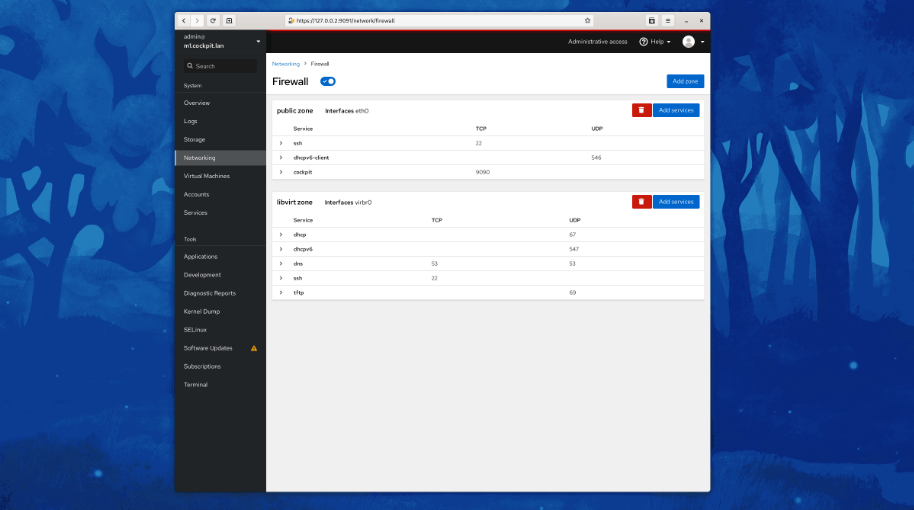
Cockpit serves as a user-friendly web-based graphical interface designed for server management, catering to everyone from beginners to seasoned Linux administrators. By leveraging system APIs and commands, Cockpit allows an entire team of administrators to manage systems in their preferred manner, whether that involves using the command line or various utilities alongside the Cockpit interface. With Cockpit, users can access their servers through a web browser and execute system tasks effortlessly using a mouse. It simplifies operations such as initiating containers, managing storage, configuring networks, and reviewing logs. Essentially, Cockpit acts like a graphical "desktop interface" tailored specifically for individual servers. If you have preferred applications or command-line tools for server management, you can continue utilizing those alongside Cockpit without any disruptions. Since Cockpit operates using the same system tools as the command line, you can seamlessly switch between Cockpit and your other preferred methods. This flexibility ensures that you can efficiently manage your servers while still maintaining your usual workflow.
API Access
Has API
No
API Access
Has API
No



Integrations
Ansible
No
CentOS
No
Debian
No
Fedora
No
Fedora CoreOS
No
Red Hat Enterprise Linux
No
Ubuntu
No
openSUSE Tumbleweed
No
Integrations
Ansible
Yes
CentOS
Yes
Debian
Yes
Fedora
Yes
Fedora CoreOS
Yes
Red Hat Enterprise Linux
Yes
Ubuntu
Yes
openSUSE Tumbleweed
Yes
Pricing Details
€39 per operator per month
Free Trial
No
Free Version
No
Pricing Details
No price information available.
Free Trial
No
Free Version
Yes
Deployment
Web-Based
Yes
On-Premises
No
iPhone App
Yes
iPad App
Yes
Android App
Yes
Windows
Yes
Mac
No
Linux
No
Chromebook
No
Deployment
Web-Based
No
On-Premises
No
iPhone App
No
iPad App
No
Android App
Yes
Windows
Yes
Mac
Yes
Linux
Yes
Chromebook
No
Customer Support
Business Hours
Yes
Live Rep (24/7)
No
Online Support
Yes
Customer Support
Business Hours
No
Live Rep (24/7)
No
Online Support
Yes
Types of Training
Training Docs
No
Webinars
No
Live Training (Online)
Yes
In Person
No
Types of Training
Training Docs
Yes
Webinars
No
Live Training (Online)
No
In Person
No
Vendor Details
Company Name
Cockpit ITSM
Founded
2005
Country
France
Website
www.cockpit-itsm.com
Vendor Details
Company Name
Cockpit
Website
cockpit-project.org
Product Features
ITSM
Asset Tracking
Yes
Availability Management
Yes
Change Management
Yes
Configuration Management
Yes
Contract/License Management
Yes
Dashboard
Yes
Incident Management
Yes
Problem Management
Yes
Project Management
Yes
Release & Deployment Management
Yes
Self Service Portal
Yes
Product Features
Server Management
CPU Monitoring
No
Credential Management
No
Database Servers
No
Email Monitoring
No
Event Logs
No
History Tracking
No
Patch Management
No
Scheduling
No
User Activity Monitoring
No
Virtual Machine Monitoring
No
