Average Ratings 1 Rating
Average Ratings 0 Ratings
Similar Products
-
ScalaHosting• The #1 hosting provider on Trustpilot • Effortless website management with our SPanel control panel, a complimentary alternative to cPanel/WHM. • Enjoy hassle-free migration at no extra cost – we seamlessly transfer all your websites and mailboxes without any downtime. • Benefit from our unconditional anytime money-back guarantee, a testament to our confidence in the quality of our services. • Access our 24/7/365 expert support team for any inquiry through instant live chat or a swift 15-minute response ticket system. • Experience unparalleled website speed with the latest technology. Our use of All-NVMe storage and the newest Intel Xeon Gold 6444Y processors in all cloud clusters ensures top-tier website performance. • Discover the ideal solution for your online store with our Ecommerce-ready Managed Cloud hosting – offering a comprehensive suite of tools and features at no additional charge. • The only VPS provider endorsed by Joomla's founder, Brian Teeman.
-
gPanelAdministrators have visibility and control over all user data and settings through gPanel's central user management interface. It offers security features that provide peace of mind and security. gPanel's intuitive interface makes it easy to use. This means you can spend less time looking and more time doing. Our advanced administration makes it easy to add, delete, suspend, and de-provision users. Just a click away, you can easily control docs, groups and sites, as well as email settings. Google Workspace does not provide much administrative power for documents within Google Drive. However, gPanel gives admins full text searching and text rights over any document in Drive owned or created by users in their domain. It also allows them to transfer ownership of Google Docs. Administrators have the ability to manage their domain with confidence using gPanel. Admins can save time with gPanel by automating repetitive, monotonous processes.
-
Cerberus FTP ServerCerberus FTP Server provides a secure and reliable file transfer solution for the demanding IT professional. Supporting SFTP and SCP, FTP/S, and HTTP/S, Cerberus is able to authenticate against Active Directory and LDAP, run as a Windows service, has native x64 support, includes a robust set of integrity and security features and offers an easy-to-use manager for controlling user access to files and file operations.
-
BoosteroBoostero is a social media marketing (SMM) panel, a single dashboard where creators, brands, and agencies grow across 23+ platforms including Instagram, TikTok, YouTube, Facebook, X, Spotify, Telegram and LinkedIn. Followers, likes, views and engagement are ordered from one place instead of one network at a time. Operating since 2020 from Delaware, Boostero has delivered over 12 million orders for 211,000 registered users in 125+ countries, across 1,600 services, with localized pages for 19 markets and 16 languages plus English. What separates it is what is visible before you pay: the price per 1,000, the minimum and maximum order, the refill terms and an average delivery time computed from completed orders are all shown on the service itself, not promised site-wide. Ordering needs a public link or username, never a password. Key features: 23+ platforms and 1,600 services in one dashboard Service quality tiers and refill terms stated on each service before checkout Average delivery time shown per service, computed from completed orders REST API with ten documented calls and examples in PHP, Python, Node and curl White-label child panels for agencies and resellers Payments: cards, PayPal, cryptocurrency, Payoneer 24/7 support via Telegram, email and the ticket system Encrypted checkout, no password required
-
InMotion HostingInMotion Hosting is a performance-first infrastructure provider trusted by agencies, developers, and growing businesses since 2001. With more than 170,000 customers worldwide, we design, own, and operate our own hardware, network, and data centers. There is no third-party cloud underneath your environment. No resellers. No abstraction layers between your workload and the people responsible for it. That ownership gives us something most hosting providers cannot offer: direct control over performance, reliability, and response time. When something needs attention, our engineers are working on infrastructure they built and manage themselves. Every support interaction is handled by trained technical staff, available 24/7. No scripts, no bots, no first-tier deflection. We are founder-led, privately held, and not backed by private equity. That independence means we invest in long-term infrastructure and long-term partnerships, not quarterly growth targets. Products and Services: - Web Hosting (Shared, WordPress, cPanel) - Managed VPS Hosting - Dedicated Servers - Reseller Hosting with WHMCS - Managed Hosting Services - Large Server Deployments - Domain Services and Business Email - Professional Website Services For technical teams and infrastructure-dependent businesses, the provider behind your stack matters as much as the stack itself. InMotion Hosting gives you performance, accountability, and direct access to the people running your environment.
-
ISL Light Remote DesktopISL Light is a remote desktop software that is easy to use for security-conscious users. It offers great value-performance. ISL Light is a powerful tool for IT staff and support personnel to solve problems remotely via remote support, unattended access, or screen-sharing from mobile devices. It is cross-platform and provides 256-bit encrypted sessions, all the standard remote access features, as well as session recording, chat, videocall and multi-monitor support, file transfers, reporting, and many other important extras. Users can choose between cloud and on-premise services. ISL Online license doesn't limit the number or workstations of clients, users, and users you can support. It is a reliable, highly secure software that can be used in all industries, including banks, hospitals, government institutions, and insurances.
-
1Password1Password is a password manager that's secure, scalable, easy-to-use, and trusted by some of the most prestigious companies in the world. 1Password makes it easy to keep your employees safe online with its simple interface. Good security habits will become second nature once 1Password is a part of your employees' workflow. 1Password Advanced Protection now available with 1Password Business You can set Master Password policies, enforce two factor authentication across the entire team, limit access with firewall rules, review sign in attempts, and require that your team use the latest version 1Password. 1Password for Agents is a secure identity and credential access platform designed to help personal AI agents authenticate to websites and perform authorized tasks without handling sensitive login information. Our award-winning apps can be downloaded for Mac, iOS and Linux as well as Windows, Android, and Windows. 1Password syncs seamlessly between devices so that your employees have access to their passwords at all times. Your risk is reduced and your productivity increases when everyone uses 1Password.
-
Google Cloud SQLCloud SQL is a fully managed relational database service that supports MySQL, PostgreSQL, and SQL Server. It includes rich extensions, configuration flags, and developer ecosystems. Cloud SQL offers $300 in credits for new customers. You won't pay until you upgrade. Reduce maintenance costs by using fully managed MySQL, PostgreSQL, and SQL Server databases. The SRE team provides 24/7 support for reliable and secure services. Data encryption in transit and at rest ensures the highest level of security. Private connectivity with Virtual Private Cloud, user-controlled network access, and firewall protection add an additional layer of safety. Compliant with SSAE 16, ISO 27001, PCI DSS, and HIPAA, you can trust your data to be protected. Scale your database instances with a single API request, whether you are just testing or need a highly available database in production. Standard connection drivers and integrated migration tools let you create and connect to a database in a matter of minutes. Transform your database management with AI-driven support in Gemini, currently available in preview on Cloud SQL. It enhances development, optimizes performance, and simplifies fleet management, governance, and migration.
-
SiteDocsYour Safety & Compliance Made Simple! Businesses that operate in the construction, oil & gas, mining, manufacturing, electrical, plumbing, heating, and excavating industries know all too well how important it is to comply with all mandatory documentation. It is also important to know how a company organizes everything. SiteDocs is an interactive safety management system that transforms organizations from pen-and paper archiving to a fully cloud-based, digital workspace. The system is accessible from any device running iOS or Android and features allow users to work remotely, on mobile, or offline. Employees can now sign and upload photos, add comments, and acknowledge receipt of important documentation. Administrators can also ensure that records, reports and certifications of staff are automatically updated by using the web-based panel's system parameters.
-
ESET PROTECT AdvancedESET Protect Advanced offers a comprehensive cybersecurity solution for businesses of any size. It offers advanced endpoint security against ransomware and zero-day threats. It also includes full disk encryption to ensure legal compliance and data security. The solution uses adaptive scanning, cloud sandboxing and behavioral analysis for proactive cloud-based threats defense. Mobile threat protection secures Android and iOS with anti-malware and anti-theft. It also offers cloud app security, mail server protection, vulnerability and patch management, and cloud app protection. Multi-factor authentication and extended detection and reaction (XDR) improve threat detection and response. The solution provides a single pane of glass remote management to provide visibility into threats and users. It also offers advanced reporting and customized notifications.
Description
CloudPanel serves as a complimentary server management interface tailored for PHP, designed specifically for cloud environments to enhance both performance and security. This contemporary control panel simplifies and enriches the experience of managing PHP applications in the cloud. There are no binding contracts, concealed fees, or usage limitations to worry about. It features lightweight components such as NGINX, PHP-FPM, and MySQL to ensure optimal performance. Users can easily obtain free SSL certificates for all domains, which are automatically renewed with just a single click. The platform is equipped with several PHP versions, allowing users to switch or run a different PHP version for their applications effortlessly. It boasts a user-friendly and organized interface, making it efficient to accomplish tasks quickly. Additionally, a command-line tool is available for executing commands related to database backups, restoring, and managing two-factor authentication among other functionalities. With support for more than ten languages, including English, German, Spanish, and Chinese, it caters to a diverse user base. Moreover, the integration of two-factor authentication adds an extra layer of security, ensuring a safe login experience for CloudPanel users. This combination of features makes CloudPanel an excellent choice for developers and administrators looking for a reliable cloud server management solution.
Description
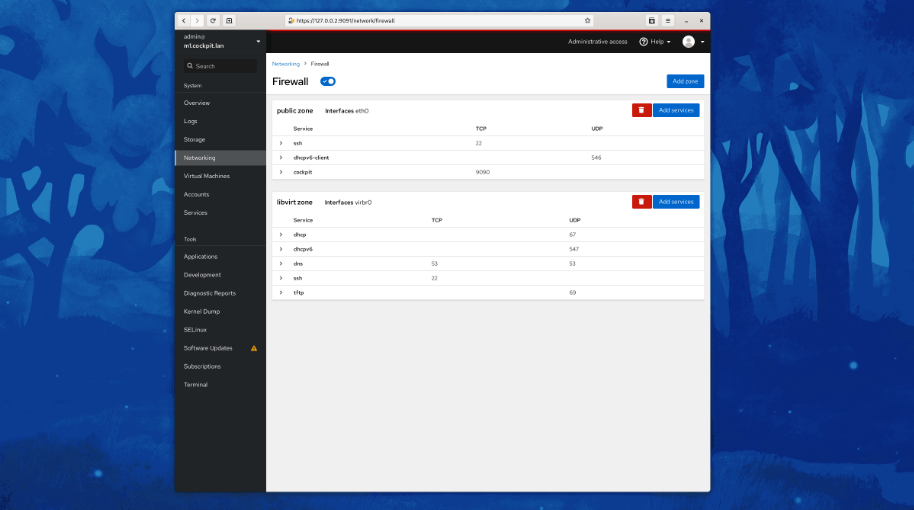
Cockpit serves as a user-friendly web-based graphical interface designed for server management, catering to everyone from beginners to seasoned Linux administrators. By leveraging system APIs and commands, Cockpit allows an entire team of administrators to manage systems in their preferred manner, whether that involves using the command line or various utilities alongside the Cockpit interface. With Cockpit, users can access their servers through a web browser and execute system tasks effortlessly using a mouse. It simplifies operations such as initiating containers, managing storage, configuring networks, and reviewing logs. Essentially, Cockpit acts like a graphical "desktop interface" tailored specifically for individual servers. If you have preferred applications or command-line tools for server management, you can continue utilizing those alongside Cockpit without any disruptions. Since Cockpit operates using the same system tools as the command line, you can seamlessly switch between Cockpit and your other preferred methods. This flexibility ensures that you can efficiently manage your servers while still maintaining your usual workflow.
API Access
Has API
No
API Access
Has API
No



Integrations
Amazon Web Services (AWS)
Yes
Ansible
No
AtlasFlare
Yes
Debian
No
DigitalOcean
Yes
Drupal
Yes
Fedora CoreOS
No
Google Cloud Platform
Yes
Joomla!
Yes
Kamatera
Yes
Integrations
Amazon Web Services (AWS)
No
Ansible
Yes
AtlasFlare
No
Debian
Yes
DigitalOcean
No
Drupal
No
Fedora CoreOS
Yes
Google Cloud Platform
No
Joomla!
No
Kamatera
No
Pricing Details
No price information available.
Free Trial
No
Free Version
Yes
Pricing Details
No price information available.
Free Trial
No
Free Version
Yes
Deployment
Web-Based
Yes
On-Premises
No
iPhone App
No
iPad App
No
Android App
No
Windows
No
Mac
No
Linux
No
Chromebook
No
Deployment
Web-Based
No
On-Premises
No
iPhone App
No
iPad App
No
Android App
Yes
Windows
Yes
Mac
Yes
Linux
Yes
Chromebook
No
Customer Support
Business Hours
No
Live Rep (24/7)
No
Online Support
Yes
Customer Support
Business Hours
No
Live Rep (24/7)
No
Online Support
Yes
Types of Training
Training Docs
Yes
Webinars
No
Live Training (Online)
No
In Person
No
Types of Training
Training Docs
Yes
Webinars
No
Live Training (Online)
No
In Person
No
Vendor Details
Company Name
CloudPanel
Country
United States
Website
www.cloudpanel.io
Vendor Details
Company Name
Cockpit
Website
cockpit-project.org
Product Features
Product Features
Server Management
CPU Monitoring
No
Credential Management
No
Database Servers
No
Email Monitoring
No
Event Logs
No
History Tracking
No
Patch Management
No
Scheduling
No
User Activity Monitoring
No
Virtual Machine Monitoring
No
