Average Ratings 0 Ratings
Average Ratings 0 Ratings
Similar Products
-
SafeticaSafetica Intelligent Data Security protects sensitive enterprise data wherever your team uses it. Safetica is a global software company that provides Data Loss Prevention and Insider Risk Management solutions to organizations. ✔️ Know what to protect: Accurately pinpoint personally identifiable information, intellectual property, financial data, and more, wherever it is utilized across the enterprise, cloud, and endpoint devices. ✔️ Prevent threats: Identify and address risky activities through automatic detection of unusual file access, email interactions, and web activity. Receive the alerts necessary to proactively identify risks and prevent data breaches. ✔️ Secure your data: Block unauthorized exposure of sensitive personal data, trade secrets, and intellectual property. ✔️ Work smarter: Assist teams with real-time data handling cues as they access and share sensitive information.
-
ManageEngine ADAudit PlusADAudit Plus enhances the security and compliance of your Windows Server environment by delivering comprehensive insights into all operational activities. It offers a detailed overview of modifications made to Active Directory (AD) resources, encompassing AD objects and their respective attributes, group policies, and more. By conducting thorough AD audits, organizations can identify and mitigate insider threats, misuse of privileges, and other signs of potential security breaches, thereby bolstering their overall security framework. The tool enables users to monitor intricate details within AD, including entities such as users, computers, groups, organizational units (OUs), group policy objects (GPOs), schemas, and sites, along with their associated attributes. Furthermore, it tracks user management activities like the creation, deletion, password resets, and alterations in permissions, providing insights into the actions taken, the responsible individuals, the timing, and the originating locations. Additionally, it allows organizations to monitor the addition or removal of users from security and distribution groups, ensuring that access privileges are kept to the necessary minimum, which is critical for maintaining a secure environment. This level of oversight is vital for proactive security management and compliance adherence.
-
Orca SecurityOrca Security is the pioneer of agentless cloud security that is trusted by hundreds of enterprises globally. Orca makes cloud security possible for enterprises moving to and scaling in the cloud with its patented SideScanning™ technology and Unified Data Model. The Orca Cloud Security Platform delivers the world's most comprehensive coverage and visibility of risks across AWS, Azure, Google Cloud and Kubernetes.
-
TitanPartnering with Salesforce, Titan Forms and Apps are a game-changer in the industry, making the world’s number #1 CRM accessible, and effortless for anyone to use. At the touch of a button, and with zero code, experience strength, speed, and agility for Salesforce Forms and your business processes. Slash time to market, nuke code, and tackle any use case on a single platform. Our best-of-breed forms and applications for Salesforce cater to any industry and it’s our mission to provide custom solutions for difficult problems. Build beautiful web portals, sign documents, generate docs, send surveys, automate contracts, fill out Salesforce forms, and so much more in just a few simple clicks. No code required and with our new AI assistant you can build even faster and with fewer errors. We are the only product on the market that empowers you to send data to Salesforce and pull it back in real-time without any development or added expense. Our customers and partners are the heartbeat of Titan. If you need a feature, simply request it via our Titan X Lab and we will consider it for our roadmap! So what’s stopping you? Schedule a demo today.
-
StackAIStackAI is an enterprise AI automation platform that allows organizations to build end-to-end internal tools and processes with AI agents. It ensures every workflow is secure, compliant, and governed, so teams can automate complex processes without heavy engineering. With a visual workflow builder and multi-agent orchestration, StackAI enables full automation from knowledge retrieval to approvals and reporting. Enterprise data sources like SharePoint, Confluence, Notion, Google Drive, and internal databases can be connected with versioning, citations, and access controls to protect sensitive information. AI agents can be deployed as chat assistants, advanced forms, or APIs integrated into Slack, Teams, Salesforce, HubSpot, ServiceNow, or custom apps. Security is built in with SSO (Okta, Azure AD, Google), RBAC, audit logs, PII masking, and data residency. Analytics and cost governance let teams track performance, while evaluations and guardrails ensure reliability before production. StackAI also offers model flexibility, routing tasks across OpenAI, Anthropic, Google, or local LLMs with fine-grained controls for accuracy. A template library accelerates adoption with ready-to-use workflows like Contract Analyzer, Support Desk AI Assistant, RFP Response Builder, and Investment Memo Generator. By consolidating fragmented processes into secure, AI-powered workflows, StackAI reduces manual work, speeds decision-making, and empowers teams to build trusted automation at scale.
-
CloudflareCloudflare is the foundation of your infrastructure, applications, teams, and software. Cloudflare protects and ensures the reliability and security of your external-facing resources like websites, APIs, applications, and other web services. It protects your internal resources, such as behind-the firewall applications, teams, devices, and devices. It is also your platform to develop globally scalable applications. Your website, APIs, applications, and other channels are key to doing business with customers and suppliers. It is essential that these resources are reliable, secure, and performant as the world shifts online. Cloudflare for Infrastructure provides a complete solution that enables this for everything connected to the Internet. Your internal teams can rely on behind-the-firewall apps and devices to support their work. Remote work is increasing rapidly and is putting a strain on many organizations' VPNs and other hardware solutions.
-
Securden Password Vault for EnterprisesSecurden Password Vault is an enterprise-grade password management solution that allows you to securely store, organize, share, manage, and keep track of all human and machine identities. With a sleek access management system, Securden lets your IT teams share administrator credentials and effectively automate the management of privileged accounts in your organization. Securden seamlessly integrates with industry solutions like SIEM, SAML-based SSO, AD, and Azure AD among others to provide a smooth deployment in any organization. With Securden, organizations can rest easy as all their sensitive data is protected with strong encryption methods and supported by a robust high availability setup. Securden offers drilled-down granular access controls that allow users to grant access to accounts without revealing the underlying credentials in a just-in-time fashion. Securden Password Vault can be deployed both on-premise for self-hosting and on the cloud (SaaS).
-
HERE Enterprise BrowserEverything works right here™. The product of years of collaboration with the world’s largest financial institutions, HERE Enterprise Browser is the first and only browser that solves both enterprise security and workforce productivity. Built on Google Chromium, HERE streamlines workflow and improves employee experience.
-
ScreenMeetScreenMeet offers a suite of secure, browser-based remote support and screen-sharing tools designed to enhance customer service and IT support. With capabilities like remote desktop access, live voice and video support, co-browsing, and asynchronous screen recording, ScreenMeet allows agents to assist customers or employees seamlessly. It integrates with major ITSM, CRM, and contact center platforms such as ServiceNow, Salesforce, and Microsoft Dynamics 365, providing a unified support experience. Designed for enterprises, ScreenMeet ensures high security, scalability, and flexibility, making it ideal for businesses aiming to improve support efficiency and customer satisfaction.
-
Globalscape Enhanced File Transfer (EFT)Globalscape's Enhanced File Transfer platform (EFT) is a user-friendly managed file transfer software (MFT). Globalscape EFT is trusted by thousands of Windows-Centric Organizations for mission-critical file transfers. EFT offers security and compliance, as well as powerful tools for collaboration, automation, and analysis. It is available in cloud/SaaS EFT Arcus and on-premises EFT deployments. EFT, unlike traditional file transfer software, provides enterprise-level data security and data transfer automation through integration to back-end systems. EFT administration is simple, yet provides complete control over your file transfer system. EFT replaces insecure legacy systems and expensive leased lines with a high-performing, scalable alternative.
Description
Manage your risk effectively by safeguarding your sensitive information from dangerous misconfigurations that can result in breaches and regulatory violations. With Cloud Security Cockpit®, you can establish straightforward yet effective controls to oversee Salesforce security, mirroring the stringent standards applied to other critical cloud platforms. Instead of managing security on a granular level, Cloud Security Cockpit® streamlines the process, enabling rapid implementation of controls for Salesforce. This tool is invaluable for DevSecOps, as it integrates security operations with application development seamlessly, allowing both areas to advance collaboratively without hindering ongoing operations or development cycles. Additionally, compliance reporting and management require minimal effort, taking just a few clicks. You can quickly leverage the existing security measures you have implemented, empowering your team to establish security controls correctly from the outset, and ensuring alignment with your organizational security strategy. In this way, you not only enhance security but also foster a culture of proactive risk management.
Description
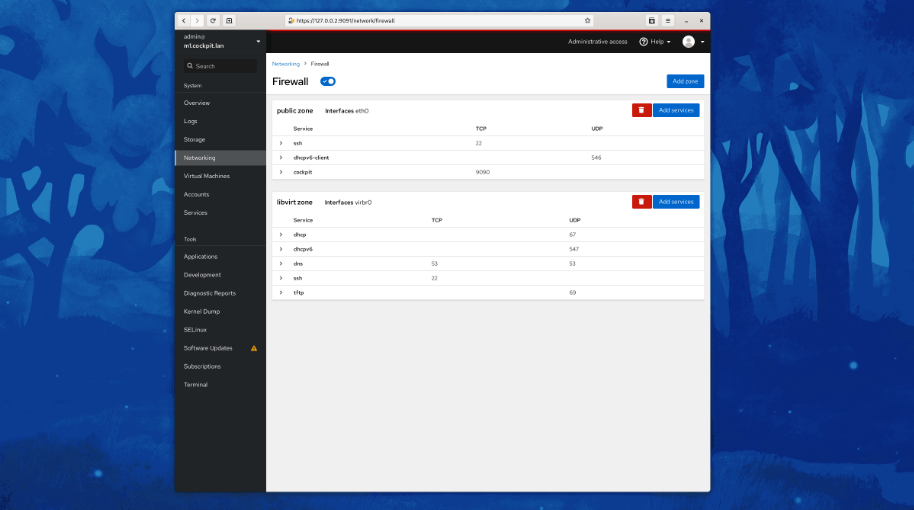
Cockpit serves as a user-friendly web-based graphical interface designed for server management, catering to everyone from beginners to seasoned Linux administrators. By leveraging system APIs and commands, Cockpit allows an entire team of administrators to manage systems in their preferred manner, whether that involves using the command line or various utilities alongside the Cockpit interface. With Cockpit, users can access their servers through a web browser and execute system tasks effortlessly using a mouse. It simplifies operations such as initiating containers, managing storage, configuring networks, and reviewing logs. Essentially, Cockpit acts like a graphical "desktop interface" tailored specifically for individual servers. If you have preferred applications or command-line tools for server management, you can continue utilizing those alongside Cockpit without any disruptions. Since Cockpit operates using the same system tools as the command line, you can seamlessly switch between Cockpit and your other preferred methods. This flexibility ensures that you can efficiently manage your servers while still maintaining your usual workflow.
API Access
Has API
No
API Access
Has API
No



Integrations
Ansible
No
CentOS
No
Debian
No
Fedora
No
Fedora CoreOS
No
Red Hat Enterprise Linux
No
Salesforce
Yes
Ubuntu
No
openSUSE Tumbleweed
No
Integrations
Ansible
Yes
CentOS
Yes
Debian
Yes
Fedora
Yes
Fedora CoreOS
Yes
Red Hat Enterprise Linux
Yes
Salesforce
No
Ubuntu
Yes
openSUSE Tumbleweed
Yes
Pricing Details
No price information available.
Free Trial
Yes
Free Version
No
Pricing Details
No price information available.
Free Trial
No
Free Version
Yes
Deployment
Web-Based
Yes
On-Premises
No
iPhone App
No
iPad App
No
Android App
No
Windows
No
Mac
No
Linux
No
Chromebook
No
Deployment
Web-Based
No
On-Premises
No
iPhone App
No
iPad App
No
Android App
Yes
Windows
Yes
Mac
Yes
Linux
Yes
Chromebook
No
Customer Support
Business Hours
No
Live Rep (24/7)
No
Online Support
Yes
Customer Support
Business Hours
No
Live Rep (24/7)
No
Online Support
Yes
Types of Training
Training Docs
No
Webinars
Yes
Live Training (Online)
No
In Person
No
Types of Training
Training Docs
Yes
Webinars
No
Live Training (Online)
No
In Person
No
Vendor Details
Company Name
RevCult
Founded
2011
Country
United States
Website
revcult.com/product/products-cloud-security-cockpit/
Vendor Details
Company Name
Cockpit
Website
cockpit-project.org
Product Features
Cloud Security
Antivirus
No
Application Security
No
Behavioral Analytics
No
Encryption
No
Endpoint Management
No
Incident Management
No
Intrusion Detection System
No
Threat Intelligence
No
Two-Factor Authentication
No
Vulnerability Management
No
Product Features
Server Management
CPU Monitoring
No
Credential Management
No
Database Servers
No
Email Monitoring
No
Event Logs
No
History Tracking
No
Patch Management
No
Scheduling
No
User Activity Monitoring
No
Virtual Machine Monitoring
No
