Average Ratings 0 Ratings
Average Ratings 0 Ratings
Similar Products
-
FilerevFilerev is a powerful tool that helps you easily find and manage hidden files, duplicate files, large files, and oversized folders, ensuring a streamlined and clutter-free digital workspace. Key features include advanced scanning technology that identifies the unorganized files taking up the most space and cluttering your Google Drive. Filerev enhances productivity by saving time and reducing the frustration of manual file organization. The custom filters and bulk delete tool give you complete control over finding and removing unwanted files in your account. The storage analyzer lets you browse your folders by size to see where the space is being used in your Google Drive. Whether you're an individual, a small business, or a large enterprise, Filerev offers robust solutions tailored to your needs. Visit filerev.com to discover how Filerev can transform your Google Drive experience and boost efficiency.
-
Secure EraserSecure Eraser: Secure Data Deletion, Shredders Your Files & Folders. Just because it has been removed from your hard drive doesn't mean that it is gone forever. Anyone can restore the information as long as it was not overwritten. It becomes more difficult if the computer has been resold, or given away. Secure Eraser employs the most well-known method of data disposal. It overwrites sensitive information so that it cannot be recovered even with specialized software. Our award-winning solutions for permanently destroying data eliminate cross-references that may leave traces of deleted files within the allocation table of your hard disk. This Windows software is easy to use and can overwrite sensitive data up to 35 times, regardless of whether they're files, folders or drives, recycle bins, or traces of surfing. You can also delete files that you have already deleted but not for good.
-
Proton DriveProton Drive is the secure workspace for storing sensitive data and collaborating with confidence across teams, clients, and external partners. With full end-to-end encryption, you can share files, contracts, and business documents securely — and stay in control at all times. Set passwords, expiration dates, or revoke access instantly. Files are encrypted on your device before upload, and only you and your collaborators can access them. Even Proton can’t see your data. Each user gets 1 TB of storage, and you can scale as your organization grows. Proton Drive is developed in Switzerland by the makers of Proton Mail. We’re independent, built on privacy-first principles, and free from Big Tech surveillance, lock-in, or monetization of user data. We offer more than secure storage: - Real-time collaboration with Proton Docs - Granular sharing controls for external and internal access - File recovery for peace of mind - Cross-device access, including Windows, macOS, iOS, and Android We also help you meet compliance requirements out of the box. Proton Drive supports: - GDPR, HIPAA, DORA, NIS2, and ISO 27001 - Independently audited SOC 2 Type II compliance - No complex setup or third-party integrations required. By choosing Proton Drive, you show your clients, partners, and regulators that privacy and security are built into your workflows — not an afterthought.
-
CapLinkedCapLinked is a web-based platform built for organizations that need a better way to manage, protect, and share sensitive business documents during high stakes work. Known as The Deal Room That Works, CapLinked gives teams, advisors, and lawyers a controlled workspace for due diligence, mergers and acquisitions, fundraising, audits, licensing, asset sales, and confidential projects where accuracy, speed, and oversight matter. Instead of relying on email attachments, consumer file sharing links, or scattered folders, teams can organize documents in structured workspaces with clear folder layouts, searchable files, user groups, and permissions. Administrators can decide who can view, upload, print, download, or share materials, while watermarking, passwords, expiration settings, tracking, and reporting help reduce risk when information is shared outside the organization. CapLinked makes complex document review more efficient for internal teams and external reviewers. Buyers, investors, attorneys, accountants, partners, and other stakeholders can access the materials they need in a professional environment, while project owners maintain visibility into engagement and adjust access as a review changes. This helps reduce version confusion and manual follow up when managing sensitive files across organizations. For boutique firms, Big 4 consultants, global enterprises, and teams in between, CapLinked supports secure collaboration without unnecessary complexity. Its data room and document tools help companies protect financial records, legal documents, intellectual property, contracts, operational files, and strategic materials while keeping reviews organized. Visit caplinked.com to see how CapLinked can help teams share documents, control access, and move work forward
-
SynchredibleSynchredible makes it easy to synchronize, copy, and back up individual folders or entire drives with just a single click. Its intuitive assistant guides you step by step in setting up tasks that can be scheduled, triggered by changes (real-time monitoring), or executed automatically when an external storage device is connected. Keep your data synchronized effortlessly and manage it seamlessly! With years of proven technology, Synchredible not only transfers data from A to B but also supports bidirectional synchronization. It automatically detects changes and reliably syncs the most recently edited files. Thanks to advanced duplicate detection, Synchredible saves valuable time by skipping unchanged files, enabling fast synchronization of large datasets in seconds! Synchredible is highly versatile, supporting local folder synchronization, network and USB device synchronization, as well as synchronization with cloud storage.
-
D&B ConnectYour first-party data can be used to unlock its full potential. D&B Connect is a self-service, customizable master data management solution that can scale. D&B Connect's family of products can help you eliminate data silos and bring all your data together. Our database contains hundreds of millions records that can be used to enrich, cleanse, and benchmark your data. This creates a single, interconnected source of truth that empowers teams to make better business decisions. With data you can trust, you can drive growth and lower risk. Your sales and marketing teams will be able to align territories with a complete view of account relationships if they have a solid data foundation. Reduce internal conflict and confusion caused by incomplete or poor data. Segmentation and targeting should be strengthened. Personalization and quality of marketing-sourced leads can be improved. Increase accuracy in reporting and ROI analysis.
-
Nalpeiron ZentitleThe pioneer in Enterprise-Class Cloud Based Software Licensing and Monetization since 2005, as used by the world's leading SaaS, Software and IoT Companies. 1000s of software companies have used Zentitle to launch new software products faster and control their entitlements easily, many going from startup to IPO on our cloud software license management solutions. Software Companies looking to monetize their products and manage their customers use the Zentitle platform. Save engineering time. Reduce infrastructure costs. Get your software to market quickly. If you create and sell software, it is time to adopt modern Licensing Models. Product Managers looking to drive revenue from their products do so much faster with Zentitle. New offerings, plans and tiers can be brought to market fast, with little to no engineering once Zentitle is in place. Allow your customers to buy in all the ways they want to.
-
DriveStrikeDriveStrike is simple to use, implement, and manage. DriveStrike allows you to perform remote wipe, remote lock, or remote locate commands on any platform. Mobile device management MDM for mobile platforms. Integrated drive encryption support. Our support team is available to answer any questions, help you install our services, or manage your account. It's never been easier to protect your data and devices. We are happy to answer any questions you may have or help you understand how to best protect your data. Protect your business with a device- and data protection platform that keeps all devices protected with a single solution. Your Workstations, iPads and iPads, Smartphones as well as Tablets, Tablets, Tablets, and Laptops will be protected, organized, secure, & protected.
-
gPanelAdministrators have visibility and control over all user data and settings through gPanel's central user management interface. It offers security features that provide peace of mind and security. gPanel's intuitive interface makes it easy to use. This means you can spend less time looking and more time doing. Our advanced administration makes it easy to add, delete, suspend, and de-provision users. Just a click away, you can easily control docs, groups and sites, as well as email settings. Google Workspace does not provide much administrative power for documents within Google Drive. However, gPanel gives admins full text searching and text rights over any document in Drive owned or created by users in their domain. It also allows them to transfer ownership of Google Docs. Administrators have the ability to manage their domain with confidence using gPanel. Admins can save time with gPanel by automating repetitive, monotonous processes.
-
SmartDrawSmartDraw makes professional drawings and diagrams accessible to everyone. Non-technical users can quickly create floor plans, while professionals get the precision and scale they require. With industry-leading floor planning tools and an intuitive interface for traditional diagramming like flowcharts and organizational charts, SmartDraw delivers enterprise-ready power without unnecessary complexity. Key features: - Large collection of symbols and templates - Ability to create custom shapes - Import PDFs, images, Google Maps, Visio files, Visio stencils - Draw to any scale - Enrich drawings with data - Generate manifest and bills of materials - Generate diagrams from data automatically like org charts, AWS, Azure, PI Boards, and more - Use natural language text prompts to generate diagrams with AI - Save files directly to OneDrive, SharePoint, or Google Drive, or other preferred provider - Integrations with the Microsoft and Google enterprise stack plus Confluence and Jira SmartDraw supports a wide range of industries and real-world use cases, helping teams plan, document, and communicate more effectively. Construction professionals use it to create scaled floor plans, site layouts, and electrical and plumbing drawings. Fire departments rely on it for fire pre-planning and incident documentation, while police departments use it for accident reconstruction and crime scene diagrams. IT teams build network diagrams and cloud architectures, HR leaders create organizational charts, and product managers map out processes and workflows. From physical layouts to business processes, SmartDraw provides a single platform that adapts to the needs of each role and industry.
Description
CleanMyDrive 2 is an effortlessly accessible tool that occupies minimal space and uses hardly any system resources. It operates continuously, ensuring you can easily reach all your connected drives. Are you experiencing slow write speeds on your camera's SD card? Or perhaps your USB stick is incompatible with certain devices? CleanMyDrive 2 is compatible with a wide range of storage options, including SSDs, external hard drives, SD cards, and USB flash drives. You can monitor the space used on each drive as well as the contents stored within them. The application provides a visual storage bar for all your external drives, similar to what macOS offers for internal drives, allowing you to see the types of files and their respective sizes. With CleanMyDrive 2, you won't need to search through Finder, as all your drives are conveniently located in the menu bar. You can simply drag and drop files into the app to transfer them to your desired drive with ease, streamlining your file management process even further. This makes CleanMyDrive 2 an essential tool for anyone who frequently manages multiple storage devices.
Description
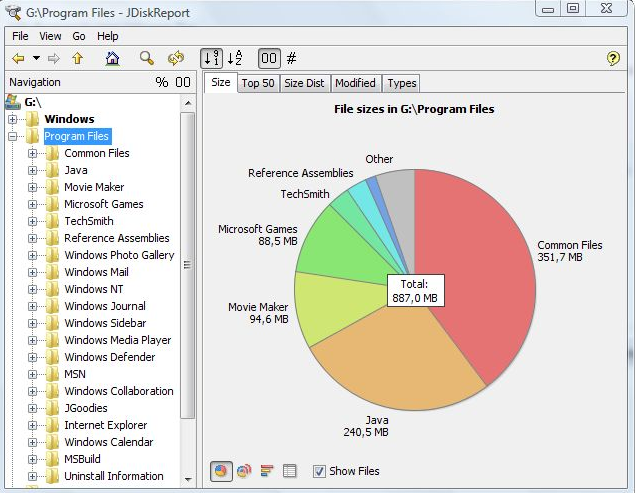
JDiskReport is a useful application that allows users to comprehend the amount of disk space consumed by files and directories while also aiding in the identification of outdated files and folders. The software analyzes your disk drives and compiles various statistics, which can be displayed as summary charts and detailed tables for easier interpretation. It is a completely free, ad-free program that does not have any limitations or expiration dates. This versatile tool is compatible with Windows, Mac, Linux, and other platforms, provided that Java is installed beforehand. Users should ensure that they have Java properly set up prior to installing JDiskReport. The application has been validated across Windows, Mac, and Linux systems, and it is also functional on Solaris and other operating systems that support Java. Additionally, an early version of JDiskReport 2 is currently accessible, which, while less polished than its predecessors from JGoodies, offers a different experience. Although this version is lacking certain features, such as the ability to click on the size pie chart, it can function as a cron job in the background, supplies more detailed information, and showcases a refreshed visual design. As a result, users looking for a robust analysis tool for their disk space management will find JDiskReport to be an invaluable asset.
API Access
Has API
No
API Access
Has API
No


Pricing Details
No price information available.
Free Trial
No
Free Version
No
Pricing Details
Free
Free Trial
No
Free Version
Yes
Deployment
Web-Based
No
On-Premises
No
iPhone App
No
iPad App
No
Android App
No
Windows
No
Mac
Yes
Linux
No
Chromebook
No
Deployment
Web-Based
No
On-Premises
No
iPhone App
No
iPad App
No
Android App
No
Windows
Yes
Mac
Yes
Linux
Yes
Chromebook
No
Customer Support
Business Hours
No
Live Rep (24/7)
No
Online Support
Yes
Customer Support
Business Hours
Yes
Live Rep (24/7)
No
Online Support
Yes
Types of Training
Training Docs
Yes
Webinars
No
Live Training (Online)
No
In Person
No
Types of Training
Training Docs
Yes
Webinars
No
Live Training (Online)
No
In Person
Yes
Vendor Details
Company Name
MacPaw
Founded
2009
Country
United States
Website
macpaw.com/cleanmydrive
Vendor Details
Company Name
JGoodies
Country
Germany
Website
www.jgoodies.com/freeware/jdiskreport/
