Average Ratings 0 Ratings
Average Ratings 0 Ratings
Similar Products
-
SmartDrawSmartDraw makes professional drawings and diagrams accessible to everyone. Non-technical users can quickly create floor plans, while professionals get the precision and scale they require. With industry-leading floor planning tools and an intuitive interface for traditional diagramming like flowcharts and organizational charts, SmartDraw delivers enterprise-ready power without unnecessary complexity. Key features: - Large collection of symbols and templates - Ability to create custom shapes - Import PDFs, images, Google Maps, Visio files, Visio stencils - Draw to any scale - Enrich drawings with data - Generate manifest and bills of materials - Generate diagrams from data automatically like org charts, AWS, Azure, PI Boards, and more - Use natural language text prompts to generate diagrams with AI - Save files directly to OneDrive, SharePoint, or Google Drive, or other preferred provider - Integrations with the Microsoft and Google enterprise stack plus Confluence and Jira SmartDraw supports a wide range of industries and real-world use cases, helping teams plan, document, and communicate more effectively. Construction professionals use it to create scaled floor plans, site layouts, and electrical and plumbing drawings. Fire departments rely on it for fire pre-planning and incident documentation, while police departments use it for accident reconstruction and crime scene diagrams. IT teams build network diagrams and cloud architectures, HR leaders create organizational charts, and product managers map out processes and workflows. From physical layouts to business processes, SmartDraw provides a single platform that adapts to the needs of each role and industry.
-
HighchartsHighcharts, a Javascript-based charting library, makes it easy to add interactive charts and graphs to web or mobile projects of any size. Highcharts is used by more than 80% of the 100 biggest companies in the world, as well as thousands of developers from a variety of industries, including finance, publishing, application development, and data science. Highcharts is in active development since 2009. It remains a favorite among developers due to its robust feature set and ease-of-use documentation, accessibility features and vibrant community.
-
DXchartsIn just a few days, you can integrate and customize a lightning-fast financial table with your product. You can make changes or create a completely new interface. You want more? We offer a full access alternative. Data feeds with futures and indices, equities, FX and cryptocurrencies by default. Sign up now to get your data feeds. DXcharts can be integrated with any market data source, as it is data feed-agnostic. Native libraries for all platforms. Native web, native mobile & desktop. Get a solution that is specifically tailored to your product. Analyzing statistics from trading activity can help you evaluate securities and predict their future movements. You can create custom studies with the intuitive dxScript. You can adjust the layout of charts however you like and sync them by instrument, chart type and timeframe, range, studies & appearance.
-
TradingView Stock WidgetsAs fast as it takes to make a cup of coffee, grab powerful charts and add real-time financial information to your website. Simply copy and paste our iFrame codes, and you're good to go. Our display ratings make it easy to see the technical analysis of a symbol. This widget is ideal for macro-level analysis of the markets. This widget is especially useful on homepages. The widget displays the top five most active stocks, as well as the losing and winning stocks. It updates based upon current market activity so you always see the most relevant stocks. Keep an eye out for announcements and important economic events. You can also set up filters in just a few clicks. Our scrolling ticker tape allows you to go vintage Wall Street. This stock exchange-style ticker can be embedded in just a few clicks. You don't need a power suit or expensive watch.
-
ONLYOFFICE DocsONLYOFFICE Docs is a secure online office suite for teams and businesses of all sizes. Create and edit docs, sheets, slides, fillable forms and PDFs. Collaborate with your teammates in real time using two co-editing modes, version history and other tools. Enable the AI assistant of your choice — ChatGPT, DeepSeek, Mistral, Groq AI, etc. Generate new content, summarize, translate and do more with your favourite AI tool while working on office files. Integrate ONLYOFFICE Docs into your business platform, whether it be Odoo, Alfresco, Confluence, Pipedrive, Nextcloud, Redmine, SuiteCRM, etc., via an integration app (40+ available integrations). Use Docs within ONLYOFFICE DocSpace, a room-based document collaboration platform equipped with the online office suite. Create dedicated spaces for different purposes, invite your teammates, assign access permissions and collaborate the way you like. With DocSpace, you can store, share and co-edit office files, and even interact with third parties.
-
PathSolutions TotalViewTotalView offers network monitoring as well as root-cause troubleshooting of problems in plain-English. The solution monitors every device as well as every interface on every device. In addition, TotalView goes deep, collecting 19 error counters, performance, configuration, and connectedness so nothing is outside of it’s view. A built-in heuristics engine analyzes this information to produce plain-English answers to problems. Complex problems can now be solved by junior level engineers leaving the senior level engineers to work on more strategic level projects. The core product includes everything needed to run a perfectly healthy network: Configuration management, server monitoring, cloud service monitoring, IPAM, NetFlow, path mapping, and diagramming. Get Total Network Visibility on your network and solve more problems faster.
-
GWIAnnually, we conduct surveys with over a million individuals worldwide, enabling businesses to swiftly grasp evolving consumer trends. Our user-friendly platform is tailored for busy teams, facilitating the extraction of essential information, customized analysis, and seamless sharing. Identify your ideal customer using more than 250,000 profiling metrics. Utilize question charts to gain insights into the thoughts, emotions, and actions of your audience. Aggregate data and visualizations to craft a compelling narrative for your team. Combine various data points for comprehensive analysis and deeper understanding. Access unparalleled insights into consumer behavior through survey results that capture the perspectives, interests, and actions of billions of individuals globally. We consistently pose the same survey questions across different regions, allowing for detailed insights into local markets while also providing a broader global perspective. Discover what consumers genuinely think about your brand and its competitors, gaining valuable insights into industry leaders and their market positions. This holistic approach ensures that businesses can navigate the complexities of consumer perception effectively.
-
HR PartnerHR Partner is an all-inclusive, simple HR system for companies with 20 to 500+ employees. With HR Partner, you can eliminate manual HR tasks. HR Partner allows employees to submit leave requests and they are automatically sent to their managers. HR Partner is smart and simple for both HR admins and employees to use. It gives you everything you need to manage your HR processes and reduce the time spent on HR administration tasks. HR Partner includes: - Employee Records One safe place to store contact data, files, reviews, assets, and more - Leave Requests, Approvals & Accruals An easy, transparent process for both employees and admin users - Onboarding Checklists Easily assign a checklist for new employees to check off, read, sign, upload or watch - Recruitment and Applicant Tracking Publish jobs and manage applicants with a Kanban tracking system - Employee Portal Empower employees by giving them the information and tools they need - Electronic Signatures Allow employees and job applicants to sign HR documents electronically - Plus a Lot More 100's more features, including; timesheets, company files, org chart, and more. Start a free trial or request a demo today!
-
DbVisualizerDbVisualizer is a universal database client for anyone who works with data, from indie developers and startups to professional teams managing complex database environments, including developers, DBAs, analysts, and data engineers working across relational and NoSQL databases. Key features: - SQL editor with intelligent autocomplete, visual query builders, variables, and execution tools - AI Assistant for answering questions, explaining errors, and analyzing code - Git integration for managing SQL scripts and team collaboration - Customizable layouts, key bindings, and UI themes - Favorites for frequently used scripts and database objects - Configurable security settings for organizational requirements Connects via JDBC to MySQL, PostgreSQL, SQL Server, Oracle, Snowflake, SQLite, Cassandra, BigQuery, and more. Runs on Windows, macOS, and Linux. Nearly 7 million downloads, with Pro users in 150 countries, scaling from solo projects to enterprise database management.
-
Zoho ProjectsProject management is as efficient as it gets. Zoho Projects, a cloud-based project management software, helps you plan and track your work efficiently. It also allows you to collaborate with your team from anywhere. To get things done on schedule, plan your project activities, assign work, manage your resources, and collaborate better with your team. Gantt charts can be used to create your project plan and track your tasks. Zoho Projects helps you keep track of your key tasks and their dependencies and shows you any deviations from your planned progress. Reduce time spent on repetitive tasks. Our project management software is easy to use, no matter how complex your process is. It has a drag-and drop interface that makes it easier to create and deploy new automations. The Projects timesheet module allows you to log both billable and unbilled hours. You can record every minute of your hardwork, manually or with timers. Our built-in integration with Zoho Invoice generates invoices.
Description
ChartAI stands out as the pioneering AI-powered diagramming tool designed to assist professionals in crafting diagrams and charts in just two seconds using artificial intelligence. By simply providing your diagram specifications, ChartAI takes over, delivering polished diagrams or charts in minutes that are ready for immediate use. This quick generation of visuals enables users to concentrate on analysis and presentation rather than the creation process itself. Its user-friendly interface caters to both beginners and seasoned professionals, ensuring accessibility for everyone. The application produces aesthetically pleasing diagrams that fit a variety of business applications. It accommodates multiple diagram styles, such as flowcharts, organizational charts, and data visualizations, making it versatile for different needs. Additionally, users have the capability to create synthetic datasets intended for testing and development, enhancing the application's utility. Furthermore, logging in with a Google account streamlines the process of accessing and managing your ChartAI account and its associated data, providing convenience and efficiency for all users.
Description
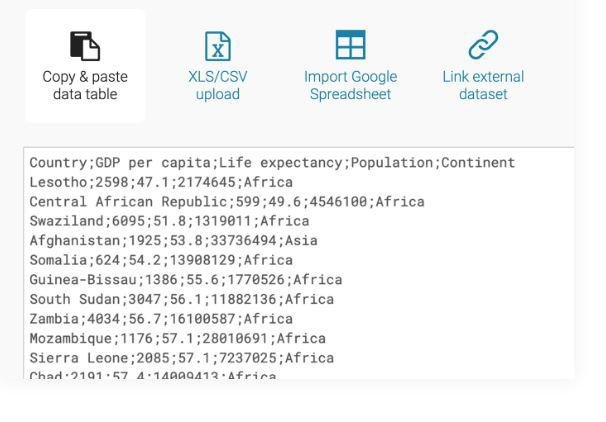
Enhance your narratives with a variety of charts, maps, and tables designed for optimal engagement. Our platform provides 19 interactive and responsive chart options, which range from straightforward bar and line visuals to more complex arrow, range, and scatter plots. Additionally, we feature three types of interactive and responsive maps, suitable for creating everything from basic locator maps to detailed thematic choropleth and symbol maps. Our newly designed responsive data tables offer extensive styling possibilities and support the inclusion of bar and line charts, images, as well as a search function and pagination for easy navigation. Datawrapper empowers some of the leading teams worldwide to effectively communicate their messages through the use of data. Our mission is to make it possible for everyone, including you, to craft stunning charts, maps, and tables effortlessly. You can easily transfer your data from online sources, Excel, or Google Sheets, and we also allow for CSV/XLS file uploads or linking to a URL or Google Sheet for real-time chart updates. With just a click, you can select from numerous chart and map types, after which you can personalize and annotate your visuals to enhance their impact and clarity. This user-friendly approach to data visualization ensures that everyone can tell compelling stories backed by accurate data.
API Access
Has API
No
API Access
Has API
Yes




Integrations
Google Sheets
No
Microsoft Excel
No
Nocode HQ
No
SPP.co
No
Integrations
Google Sheets
Yes
Microsoft Excel
Yes
Nocode HQ
Yes
SPP.co
Yes
Pricing Details
Free
Free Trial
No
Free Version
Yes
Pricing Details
€199 per month
Free Trial
No
Free Version
No
Deployment
Web-Based
Yes
On-Premises
No
iPhone App
No
iPad App
No
Android App
No
Windows
No
Mac
No
Linux
No
Chromebook
No
Deployment
Web-Based
Yes
On-Premises
No
iPhone App
No
iPad App
No
Android App
No
Windows
No
Mac
No
Linux
No
Chromebook
No
Customer Support
Business Hours
No
Live Rep (24/7)
No
Online Support
Yes
Customer Support
Business Hours
No
Live Rep (24/7)
No
Online Support
Yes
Types of Training
Training Docs
Yes
Webinars
No
Live Training (Online)
No
In Person
No
Types of Training
Training Docs
Yes
Webinars
No
Live Training (Online)
No
In Person
Yes
Vendor Details
Company Name
ChartAI
Website
chartai.io
Vendor Details
Company Name
Datawrapper
Founded
2012
Country
Germany
Website
www.datawrapper.de/
Product Features
Data Visualization
Analytics
No
Content Management
No
Dashboard Creation
No
Filtered Views
No
OLAP
No
Relational Display
No
Simulation Models
No
Visual Discovery
No
Product Features
Data Visualization
Analytics
Yes
Content Management
No
Dashboard Creation
No
Filtered Views
No
OLAP
No
Relational Display
No
Simulation Models
Yes
Visual Discovery
No
