Average Ratings 0 Ratings
Average Ratings 0 Ratings
Similar Products
-
GroupTogetherGroupTogether is a user-friendly online platform designed for creating group cards, collecting gifts, and sending eGift Cards quickly and effortlessly. It allows users to initiate a group card, decide whether to gather funds or select a gift, and then distribute a single link to friends, family, coworkers, or teammates. Participants have the option to add personalized messages, share photos, and include GIFs, while also contributing a specific amount, any amount they choose, or simply signing the card without making a financial contribution. With privacy assured, GroupTogether eliminates the discomfort of using personal banking details and ensures secure transactions, complete with verifiable records of contributions and expenditures. Organizers have the flexibility to use the collected funds for a variety of gifts, including eGift Cards, gift baskets, flowers, or the versatile GroupTogether AnyCard that allows recipients to choose from over 100 eGift Cards. The platform provides the option for digital delivery or downloadable PDFs for printing, making it a practical solution for various occasions such as remote team celebrations, workplace events, classroom activities, birthdays, farewells, and retirements. Moreover, this seamless process fosters a sense of community and connection, even in virtual settings.
-
Vibe RetailVibe Retail is a cloud-based point-of-sale (POS) and retail operations system designed exclusively for businesses that sell physical products through one or multiple locations. Unlike most POS platforms that attempt to serve restaurants, hospitality, or service-based businesses, Vibe Retail focuses only on retail, allowing the platform to be engineered around real retail workflows rather than generalized use cases. The system centralizes inventory, sales, employee, customer, and supplier data into a single, mobile-friendly interface. Retailers can track inventory across stores and warehouses in real time, manage product variations such as size, color, and material, and maintain serialized inventory for traceability. Additional capabilities include barcode generation and scanning, purchase order creation, supplier receiving, delivery reconciliation, and real-time stock transfers between locations. On the transaction side, Vibe Retail supports multiple retail payment types, including credit and debit cards, cash, checks, gift cards, and EBT. Retail-specific workflows such as layaway, delivery fulfillment, loyalty programs, and branded receipts are built into the system. Mobile receipt printing and role-based staff permissions allow retailers to operate efficiently both at fixed checkout counters and on the sales floor. Vibe Retail integrates with ecommerce platforms such as Shopify and WooCommerce, synchronizing inventory, orders, and customer data across online and physical channels. Built-in analytics provide more than 40 real-time reports covering sales performance, inventory movement, employee activity, and operational metrics, helping retailers maintain visibility and control as they scale.
-
Wash-Dry-Fold POSWash-Dry-Fold POS is a laundromat POS system engineered by laundromat operators, built by the team running Liberty Laundry in Tulsa, Oklahoma. One platform runs wash-dry-fold, pickup and delivery, commercial accounts, and retail — every feature included, no long-term contract. Purpose-built for laundry operations rather than adapted from generic retail software: • Wash-dry-fold — order intake, weigh-in, pricing, and live status tracking • Pickup and delivery — customer accounts, scheduling, and recurring orders • Order tracking — a Kanban pipeline from drop-off to ready-for-pickup • Commercial accounts — B2B invoicing for hotels, gyms, and salons • Hardware integrations — Speed Queen / Alliance, Laundroworks, ESD, FasCard, LaundryCard machine-start and card systems • Attendant controls — role-based logins and guided task workflows • Theft prevention — audit reporting on voids, discounts, and cash variance • Repair tracking and analytics — maintenance logs plus revenue, labor, and machine-start data
-
VoucherCartProfitable Gift cards, vouchers, and tickets are the most lucrative items you can sell for your business. They allow you to receive payment in full and in advance of products/services that you only deliver about 85% of the time. Flexible Your services and products can be sold as tickets, gift cards, or vouchers. You can sell what you want, at the terms and prices that you set, whenever and wherever you like, and at the profits you make. Powerful VoucherCart allows you to reach your customers in a way that is unmatched by other digital channels. Viral VoucherCart's embedded viral behaviors and loyalty means that we can attract new customers and retain them like no other eCommerce platform.
-
WallesterWallester is an Estonian-licensed financial institution and has been an official Visa partner since 2018, specialising in innovative digital financial solutions and card issuance. We empower companies across the European Economic Area (EEA) and the UK to streamline payments, launch branded cards, and scale efficiently. What we do: 1. White-Label Solution with Embedded Finance Our White-Label solution enables businesses to integrate financial services directly into their platforms - a concept known as embedded finance. This allows companies to launch branded payment cards tailored to their specific needs, enhancing customer experiences and opening new revenue streams. We ensure a swift time-to-market with simplified integration and dedicated support from our implementation team. 2. Wallester Business: Corporate Expense Management Wallester Business is designed to modernise corporate expense management. It provides companies with instant access to virtual and physical Visa cards, streamlining financial processes through a modern app and comprehensive portal. Features include expense tracking, budget analytics, and seamless integration with accounting systems to enhance financial oversight and efficiency. With a diverse team of over 190 professionals located in Estonia, Latvia, France and the United Kingdom, we are dedicated to developing high-quality, profitable products for our clients. Our passion for innovation drives us to improve and adapt to the evolving financial landscape continuously. We aim to elevate businesses by providing the most advanced financial technologies, enabling them to reach new heights in efficiency and growth. We are always open to collaboration and eager to assist companies in navigating the future of finance.
-
TremendousTremendous is the easiest way to distribute digital rewards and incentives globally. Tremendous allows you to instantly reward your recipients using gift cards, prepaid Visa®, cards, cash, or other digital rewards. Companies large and small can easily track, buy, and manage incentive programs at scale with us. Tremendous allows customers to send rewards individually or in bulk. Our API also allows customers to integrate with our API and automatically send rewards. We work with top brands around the world to support their specific use cases, such as market research, customer loyalty and health & wellbeing, employee rewards, referrals, etc. Tremendous is completely free to use. There are no platform fees Tremendous is currently the only platform that allows cash disbursements (Bank/ACH, PayPal). Tremendous has the best international coverage (230+ countries and regions). Tremendous has created the best API in the industry
-
Square PaymentsAccept all payments quickly, securely, and easily. Accept card payments quickly and easily, no matter where you are selling. You can streamline the process of creating, sending, and tracking your invoices. Customer not available in person? Remote credit card payments can be made over the phone or via your computer. Get paid quickly Square makes it easy to create and grow an online store and accept online payments seamlessly with Square. Accepting cards is as easy, painless, secure, and fast as possible with Square. We don't charge extra, have no long-term contracts and are not able to use tricks. You can rely on fast, secure payments.
-
EBizChargeEBizCharge is the leading embedded payments application for businesses to accept payments directly inside QuickBooks, Microsoft Dynamics, NetSuite, SAP, Acumatica, and 100+ other business systems. Trusted by 20,000 companies, EBizCharge combines modern billing tools with integrated payment processing to help B2B companies get invoices paid faster, eliminate manual work, and keep payment data automatically synced to their ERP. Companies use EBizCharge to: ◉ Accept credit card, debit card, and ACH payments natively inside ERP, CRM, or eCommerce platforms ◉ Speed up collections with easy billing tools: payment links, online customer portal, recurring billing, saved cards, and more ◉ Improve security and reduce risk with PCI-compliance, encryption, tokenization, fraud protection, and certified by the PCI-Security Council ⎯ HOW IT WORKS IN YOUR ERP, CRM, & E-COMMERCE PLATFORMS EBizCharge integrates natively with your ERP, CRM, or e-commerce platform through certified software connections, so payments work directly inside the system you already use. ⎯ FEATURES • Email payment links • Recurring billing • Secure online customer payment portal • Securely save cards • EMV terminals • Mobile payments • Ability to surcharge • Dedicated in-house support
-
FramnexFramnex is a financial infrastructure and client monetization platform for businesses that want to launch branded financial products around existing customer relationships. The platform helps partners offer accounts, payments, FX, cards, wallets, payouts, money transfers, mobile banking apps, and digital asset products without becoming a bank or assembling fragmented infrastructure vendors. Framnex is built for companies that already serve clients with financial needs, including FX brokers, company formation firms, banking consultants, payment providers, digital asset platforms, marketplaces, and fintech startups. Partners can start with one financial product and expand into a broader ecosystem as client demand grows. The platform includes core banking, ledger, cards, payments, wallets, compliance, connectors, and developer capabilities. Framnex connects with banking, payments, cards, compliance, and digital asset infrastructure providers to support real financial product launches. Its guided implementation model helps partners define the business opportunity, design the product scope, configure the solution, integrate systems, test workflows, and prepare for production. The platform emphasizes enterprise-grade compliance, KYC and AML controls, transaction monitoring, regulatory support, security, and partner-first delivery. By combining white-label financial products, embedded finance, banking infrastructure, compliance workflows, cards, wallets, payments, FX, and guided launch support, Framnex helps businesses create recurring financial revenue under their own brand.
-
AiraloStay connected effortlessly across more than 200 countries and regions with an eSIM that can be installed in just minutes. Experience seamless global connectivity without the burden of roaming charges — it’s straightforward and budget-friendly. This technology is integrated into your phone's hardware, functioning just like a traditional SIM card but operating entirely in a digital format. By opting for an eSIM, you can bypass the hassle of physical SIM cards and spotty Wi-Fi, allowing you to connect to a mobile network as soon as you reach your destination. Choose from a variety of prepaid local, regional, or global eSIM plans tailored to help you stay online wherever you go. Simply download the eSIM, install it on your device, and you’ll be ready to access mobile networks seamlessly upon arrival. With this modern solution, you can enjoy the freedom and flexibility of staying connected without any unexpected fees or complications.
Description
Utilize any Windows computer along with this software to craft and print the ideal business card tailored to your specifications. You can either personalize a pre-existing business card template or start from scratch, ensuring that your cards align perfectly with your preferences. Create business cards suitable for distribution anywhere across the globe, with options for both US (inch) and international (metric) dimensions. The software accommodates all styles of business cards, including wide, tall, double-sided, photo quality (full bleed), folded, and CD cards. You have the option to print your designs on US Letter or A4 paper stock from Avery® and other reputable manufacturers, or you can export your creations for professional printing services. For a cost lower than a single batch of traditional business cards, you can acquire our software and produce an unlimited number of cards whenever you need them. Design a custom business card in just minutes—begin with a template, input your details, and your card will be generated and ready for printing instantly. Once you create a unique design, save it as a template, allowing for immediate generation of business cards for numerous employees without hassle. This flexibility makes it easy to maintain a consistent and professional appearance across your entire team.
Description
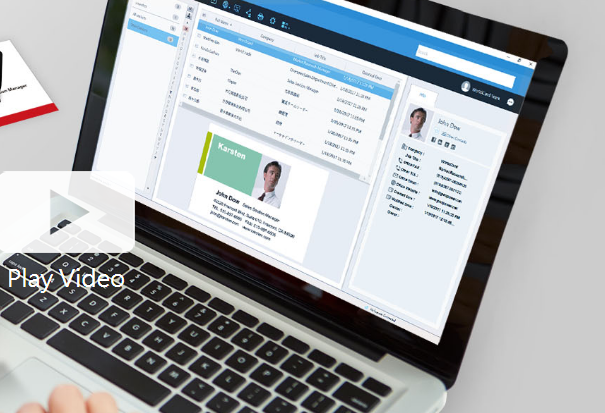
Business cards can be recognized and the associated data can be exported as a CSV file prior to the subscription's expiration. If you wish to retain the images of the business cards, it is advisable to reach out to PenPower's customer service for assistance. Please note that after the subscription expires, user data will be retained by the system for a period of 180 days; if renewal does not occur within this timeframe, all data will be permanently deleted. To optimize performance with WorldCard Team, it is recommended that the NAS edition should not exceed 20 users, while the Basic edition is best suited for fewer than 100 users. The maximum number of users allowed for the Windows Server edition will depend on the performance capabilities of your server. Additionally, you can transfer contact data to WorldCard Team from either WorldCard or WorldCard Mobile. When implementing the WorldCard Team system in your organization, we highly recommend migrating all contacts to WorldCard Team rather than continuing with WorldCard for improved efficiency and streamlined management of your business contacts. This approach not only enhances organization but also facilitates better collaboration among team members.
API Access
Has API
No
API Access
Has API
No



Integrations
Salesforce
No
Pricing Details
$29.95 one-time payment
Free Trial
Yes
Free Version
No
Pricing Details
Contact PenPower Technologies for pricing details.
Free Trial
Yes
Free Version
No
Deployment
Web-Based
No
On-Premises
No
iPhone App
No
iPad App
No
Android App
No
Windows
Yes
Mac
No
Linux
No
Chromebook
No
Deployment
Web-Based
Yes
On-Premises
No
iPhone App
Yes
iPad App
Yes
Android App
Yes
Windows
Yes
Mac
Yes
Linux
No
Chromebook
No
Customer Support
Business Hours
Yes
Live Rep (24/7)
No
Online Support
Yes
Customer Support
Business Hours
Yes
Live Rep (24/7)
No
Online Support
No
Types of Training
Training Docs
Yes
Webinars
No
Live Training (Online)
Yes
In Person
Yes
Types of Training
Training Docs
Yes
Webinars
No
Live Training (Online)
Yes
In Person
No
Vendor Details
Company Name
CAM Development
Country
United States
Website
www.camdevelopment.com/designer/business_card/
Vendor Details
Company Name
PenPower Technology
Founded
1991
Country
United States
Website
www.worldcardteam.com/EN/
Product Features
Business Card
Contact Management
No
Data Extraction
No
Design Templates
Yes
Image Editor
No
Print Management
Yes
Step-by-Step Wizard
Yes
Product Features
Business Card
Contact Management
Yes
Data Extraction
Yes
Design Templates
No
Image Editor
No
Print Management
No
Step-by-Step Wizard
No
Contact Management
Activity Management
No
Appointment Management
No
Contact Database
Yes
Contact History
No
Contact Import/Export
Yes
Customer Pipeline
No
Email Marketing
No
Group Management
No
Interaction Tracking
Yes
Lead Management
No
Prospecting Tools
No
Sales Pipeline Management
No
Search / Filter
No
Segmentation
Yes
Shared Contacts
Yes
Social Media Integration
No
CRM
Calendar/Reminder System
No
Call Logging
No
Document Storage
No
Email Marketing
Yes
Internal Chat Integration
No
Lead Scoring
No
Marketing Automation Integration
No
Mobile Access
Yes
Quotes / Proposals
No
Segmentation
No
Social Media Integration
Yes
Task Management
No
Territory Management
No
Customer Engagement
Analytics
No
Churn Management
No
Communication Management
Yes
Community Management
Yes
Content Syndication
Yes
Feedback Collection
Yes
Gamification
No
Live Chat
No
Video Content
No
