Average Ratings 1 Rating
Average Ratings 0 Ratings
Similar Products
-
Checksum.aiEngineering teams shipping with AI have a new bottleneck: validation. Code output has accelerated. Quality hasn't. Checksum closes the gap. Checksum is a continuous quality platform with a suite of AI agents that handle testing end-to-end, at every stage of the development lifecycle. Where most tools wait for a human to trigger them, Checksum runs autonomously in the background, generating tests, executing them, and repairing failures without manual intervention. Seventy percent of test failures are resolved automatically through real-time auto-recovery. The platform covers every layer: end-to-end UI flows via Playwright, API endpoint chains, and targeted CI tests scoped to exactly what changed in a PR. All tests land as real code in your repository and are delivered as standard Playwright, owned by your team. Checksum is fine-tuned on 1.5+ million test runs and integrates natively with Cursor, Claude Code, and 100+ AI coding agents. Type /checksum and your coding agent's output gets tested before it ever reaches review. Generation and healing happen on Checksum's cloud infrastructure which means no LLM tokens consumed, no local resources required. The result: test suites that stay green as the product evolves, fewer regressions reaching production, and release confidence that scales alongside AI output.
-
ParasoftParasoft's mission is to provide automated testing solutions and expertise that empower organizations to expedite delivery of safe and reliable software. A powerful unified C and C++ test automation solution for static analysis, unit testing and structural code coverage, Parasoft C/C++test helps satisfy compliance with industry functional safety and security requirements for embedded software systems.
-
Virtuoso QAVirtuoso QA is a secure, agentic test automation platform for any browser-based application. Touchstone, our agentic assurance layer, turns your business requirements into tests, then runs, fixes and maintains them as your application changes. More than thirty specialised agents author, generate, triage and self-heal your functional and end-to-end tests, while a deterministic engine executes every run and your team approves every decision that matters. Every release comes with evidence of what was tested, what changed and who approved it. Release Insights shows execution risk and requirement coverage across every journey, and teams can export an Evidence Report in minutes rather than assembling one over weeks. That makes the platform a natural fit for regulated industries like financial services, insurance, healthcare, the public sector and more. The mission is to set the standard of proof for software releases. AI generates software. Virtuoso QA generates the evidence to trust it.
-
QA WolfQA Wolf helps engineering teams achieve 80% automated test coverage end-to-end in just four months. Here's an overview of what you get in the box, whether it's 100 or 100,000 tests. • Automated end-to-end testing for 80% of the user flows in 4 months. The tests are written in Playwright, an open-source tool (no vendor lock-in; you own the code). • Test matrix and outline in the AAA framework. • Unlimited parallel testing on any environment of your choice. • We host and maintain 100% parallel-run infrastructure. • Maintenance of flaky and broken test for 24 hours. • Guaranteed 100% reliable results -- zero flakes. • Human-verified bugs sent via your messaging app as a bug report. • CI/CD Integration with your deployment pipelines and issue trackers. • Access to full-time QA Engineers at QA Wolf 24 hours a day.
-
MuukTestYou know that you could be testing more to catch bugs earlier, but QA testing can take a lot of time, effort and resources to do it right. MuukTest can get growing engineering teams up to 95% coverage of end-to-end tests in just 3 months. Our QA experts create, manage, maintain, and update E2E tests on the MuukTest Platform for your web, API, and mobile apps at record speed. We begin exploratory and negative tests after achieving 100% regression coverage within 8 weeks to uncover bugs and increase coverage. The time you spend on development is reduced by managing your testing frameworks, scripts, libraries and maintenance. We also proactively identify flaky tests and false test results to ensure the accuracy of your tests. Early and frequent testing allows you to detect errors in the early stages your development lifecycle. This reduces the burden of technical debt later on.
-
Astra PentestAstra's Pentest is a comprehensive solution for penetration testing. It includes an intelligent vulnerability scanner and in-depth manual pentesting. The automated scanner performs 10000+ security checks, including security checks for all CVEs listed in the OWASP top 10 and SANS 25. It also conducts all required tests to comply with ISO 27001 and HIPAA. Astra provides an interactive pentest dashboard which allows users to visualize vulnerability analysis, assign vulnerabilities to team members, collaborate with security experts, and to collaborate with security experts. The integrations with CI/CD platforms and Jira are also available if users don't wish to return to the dashboard each time they want to use it or assign a vulnerability for a team member.
-
GearsetGearset is a full‑featured Salesforce DevOps solution built for the enterprise, giving teams the tools to adopt best practices across every stage of the DevOps lifecycle. From metadata and CPQ deployments to CI/CD, testing, code analysis, sandbox seeding, backups, archiving, and observability, Gearset gives teams unmatched insight and control over their Salesforce workflows. Over 3,000 organizations — including names like McKesson and IBM — rely on Gearset to deliver with security and scale in mind. With advanced governance, detailed audit trails, SOX/ISO/HIPAA support, multi‑team pipelines, integrated security checks, and adherence to ISO 27001, SOC 2, GDPR, CCPA/CPRA, and HIPAA, Gearset combines enterprise‑ready compliance with rapid onboarding and an intuitive interface — all in one platform. Leading firms in finance, healthcare, and tech trust Gearset to power their DevOps initiatives without adding complexity.
-
InnoslateSPEC Innovations’ leading model-based systems engineering solution is designed to help your team minimize time-to-market, reduce costs, and mitigate risks, even with the most complex systems. Available as both a cloud-based and on-premise application, it offers an intuitive graphical user interface accessible through any modern web browser. Innoslate's comprehensive lifecycle capabilities include: • Requirements Management • Document Management • System Modeling • Discrete Event Simulation • Monte Carlo Simulation • DoDAF Models and Views • Database Management • Test Management with detailed reports, status updates, results, and more • Real-Time Collaboration And much more.
-
FlagsmithFlagsmith gives software engineering teams a self-hosted or fully managed feature flagging platform for controlling releases across web, mobile, and backend systems. Ship code behind a flag, then decide who sees it — by environment, user, or custom segment — without redeploying. Run Flagsmith however fits your infrastructure: our managed cloud, your own private cloud, or fully on-premise. What you get: Progressive rollouts with one-click rollback if something breaks Live config changes — flip features on or off instantly, no redeploy required Segment-based A/B and multivariate testing Project and role-based access control for multi-team organizations Native integrations with the tools already in your stack MCP support and a CLI so AI agents and scripts can manage flags directly Open source at its core, Flagsmith is built for teams that want control over where their configuration data lives.
-
Aikido SecurityAikido is the all-in-one security platform for development teams to secure their complete stack, from code to cloud. Aikido centralizes all code and cloud security scanners in one place. Aikido offers a range of powerful scanners including static code analysis (SAST), dynamic application security testing (DAST), container image scanning, and infrastructure-as-code (IaC) scanning. Aikido integrates AI-powered auto-fixing features, reducing manual work by automatically generating pull requests to resolve vulnerabilities and security issues. It also provides customizable alerts, real-time vulnerability monitoring, and runtime protection, enabling teams to secure their applications and infrastructure seamlessly.
Description
It works: Codeless testing
Give your entire team the ability to create and maintain automated tests. Not just developers.
Meet your testing demands fast. You can get full coverage of your tests in days and not months.
Our natural-language tests are very resistant to code changes. Our AI will quickly repair any test failures.
Continuous Testing is a key component of Agile/DevOps. Push features to production in the same day.
Boozang supports the following test approaches:
- Codeless Record/Replay interface
- BDD / Cucumber
- API testing
- Model-based testing
- HTML Canvas testing
The following features makes your testing a breeze
- In-browser console debugging
- Screenshots to show where test fails
- Integrate to any CI server
- Test with unlimited parallel workers to speed up tests
- Root-cause analysis reports
- Trend reports to track failures and performance over time
- Test management integration (Xray / Jira)
Description
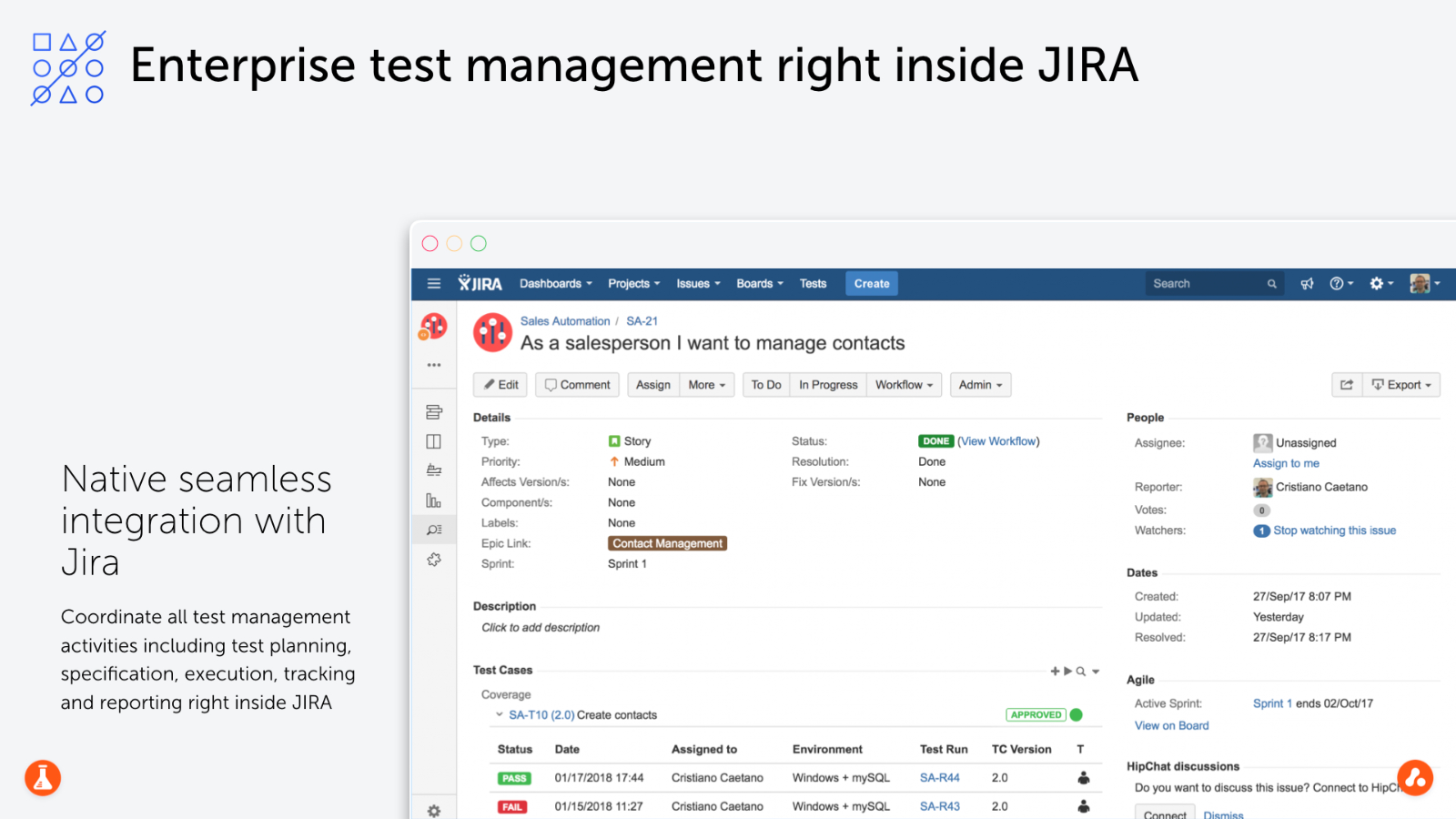
Test Management for Jira is an enterprise tool that allows you to plan, manage and measure your entire testing life cycle within Jira. It supports both agile and waterfall methodologies.
TM4J provides mission-critical projects with scalability and availability on any Jira deployment (Cloud Server, DataCenter, Server). TM4J will empower agile teams by enabling BDD at scale using Cucumber or any other compatible gherkin tool for collaboration between developers and testers.
You can use up to 70 built in reports to make informed decisions based upon real-time metrics throughout your software development lifecycle. Our powerful FREE REST API makes it easy to integrate CI servers, DevOps, and test automation tools and frameworks. This will help you save time and effort.
TM4J has been used by over 3.000 clients around the world and is the best QA and Testing app for Jira.
API Access
Has API
Yes
API Access
Has API
No




Integrations
Jira
Yes
Azure DevOps Server
Yes
Bitbucket
Yes
CircleCI
Yes
Cucumber
Yes
Docker
Yes
GitHub
Yes
GitLab
Yes
JFrog Xray
Yes
Jenkins
Yes
Integrations
Jira
Yes
Azure DevOps Server
No
Bitbucket
No
CircleCI
No
Cucumber
No
Docker
No
GitHub
No
GitLab
No
JFrog Xray
No
Jenkins
No
Pricing Details
$249 USD / month / user
Onboard the whole team from:
$799 USD / team / month
$799 USD / team / month
Free Trial
Yes
Free Version
Yes
Pricing Details
$10.00/month
Free Trial
Yes
Free Version
No
Deployment
Web-Based
Yes
On-Premises
Yes
iPhone App
No
iPad App
No
Android App
No
Windows
No
Mac
No
Linux
No
Chromebook
No
Deployment
Web-Based
Yes
On-Premises
No
iPhone App
No
iPad App
No
Android App
No
Windows
Yes
Mac
Yes
Linux
No
Chromebook
No
Customer Support
Business Hours
Yes
Live Rep (24/7)
Yes
Online Support
Yes
Customer Support
Business Hours
Yes
Live Rep (24/7)
No
Online Support
Yes
Types of Training
Training Docs
Yes
Webinars
Yes
Live Training (Online)
Yes
In Person
Yes
Types of Training
Training Docs
Yes
Webinars
No
Live Training (Online)
No
In Person
No
Vendor Details
Company Name
Boozang
Founded
2016
Country
Canada
Website
boozang.com
Vendor Details
Company Name
SmartBear
Founded
2009
Country
United States
Website
smartbear.com/product/tm4j/overview/
Product Features
API Testing
Functional Testing
Yes
Fuzz Testing
Yes
Load Testing
Yes
Penetration Testing
Yes
Runtime and Error Detection
Yes
Security Testing
Yes
UI Testing
Yes
Validation Testing
Yes
Automated Testing
Hierarchical View
Yes
Move & Copy
Yes
Parameterized Testing
Yes
Requirements-Based Testing
Yes
Security Testing
No
Supports Parallel Execution
Yes
Test Script Reviews
No
Unicode Compliance
No
Functional Testing
Automated Testing
Yes
Interface Testing
Yes
Regression Testing
Yes
Reporting / Analytics
Yes
Sanity Testing
Yes
Smoke Testing
Yes
System Testing
Yes
Unit Testing
Yes
Software Testing
Automated Testing
Yes
Black-Box Testing
Yes
Dynamic Testing
Yes
Issue Tracking
No
Manual Testing
Yes
Quality Assurance Planning
No
Reporting / Analytics
Yes
Static Testing
Yes
Test Case Management
Yes
Variable Testing Methods
Yes
White-Box Testing
No
Test Management
Automation Integration
No
Collaboration Tools
No
Pass/Fail Results Tabulation
No
Reporting / Analytics
No
Requirements Management
No
Test Scheduling
No
Test Tracking
No
Time/Budget Tracking
No
Product Features
Agile Project Management Tools
Backlog Management
No
Feedback Management
No
Gantt/Timeline View
No
Kanban Board
No
Prioritization
No
Request Management
No
Resource Management
No
Retrospectives Management
No
Status Tracking
Yes
Supports Scrum
No
Team Management
No
Template Management
No
Workflow Management
Yes
Automated Testing
Hierarchical View
Yes
Move & Copy
Yes
Parameterized Testing
Yes
Requirements-Based Testing
Yes
Security Testing
No
Supports Parallel Execution
No
Test Script Reviews
Yes
Unicode Compliance
No
Bug Tracking
Backlog Management
No
Filtering
Yes
Issue Tracking
Yes
Release Management
Yes
Task Management
No
Ticket Management
No
Workflow Management
Yes
Continuous Integration
Build Log
No
Change Management
No
Configuration Management
No
Continuous Delivery
Yes
Continuous Deployment
Yes
Debugging
No
Permission Management
No
Quality Assurance Management
No
Testing Management
Yes
DevOps
Approval Workflow
Yes
Dashboard
Yes
KPIs
No
Policy Management
No
Portfolio Management
No
Prioritization
No
Release Management
No
Timeline Management
No
Troubleshooting Reports
No
Issue Tracking
Assignment Management
Yes
Dashboard
Yes
Escalation Management
Yes
Issue Auditing
Yes
Issue Scheduling
Yes
Knowledge Base
No
Project Management
No
Recurring Issues
No
Scheduling
No
Task Management
No
Performance Testing
API Testing
No
Benchmarking
No
Cross Browser Testing
No
Debugging
No
Historical Reporting
No
Load Testing
No
Mobile Testing
No
Parallel Testing
No
Regression Testing
Yes
UI Testing
No
Web Testing
No
Quality Management
Audit Management
No
Complaint Management
No
Compliance Management
No
Corrective and Preventive Actions (CAPA)
No
Defect Tracking
Yes
Document Control
No
Equipment Management
No
ISO Standards Management
No
Maintenance Management
No
Risk Management
No
Supplier Quality Control
No
Training Management
No
