
Average Ratings 0 Ratings
Average Ratings 0 Ratings
Similar Products
-
SureSyncSureSync is a file replication and synchronization application that provides one-way and multi-way processing in both scheduled and real-time modes. Processing can be performed via UNC path, FTP, or with our Communications Agent. Features of the Agent include real-time monitors, delta copies, TCP transfers, compression, and encryption. The agent must be installed on a Windows machine. File Locking enables real-time collaboration and is available in SureSync Managed File Transfer (MFT). With file locking a file opened by a user in one office will be read-only for users in other offices until changes have been saved and synchronized. MFT also includes archiving to create versioned file backups, enhanced cloud support and more. SQL Protection simplifies backups of critical SQL databases.
-
TinyPNGTinyPNG (by Tinify) is a free image optimization service built for developers and designers. It utilizes smart lossy compression to reduce the file sizes of JPEG, PNG, WebP, and AVIF files by up to 80% with no visible quality loss. That means faster load times, better SEO, and lower bandwidth. You can compress, convert, and resize images via a clean web interface or integrate it into your workflow with the API. The platform also provides an image CDN for fast global delivery of optimized assets. SDKs are available for Python, Node.js, PHP, Java, Ruby, and .NET. WordPress plugin included, plus plenty of community-driven integrations. No tuning, no noise, Tinify just works. Whether you're optimizing a handful of images or processing millions, it scales effortlessly. All plans include a generous free tier, and support is quick when you need it. George the panda 🐼 approves.
-
CivicPlus Social Media ArchivingThe most reliable archiving software in the world for managing records compliance and risks for public entities. CivicPlus Social Media Archiving is a software that connects directly with your social networks in order to capture, preserve and archive all content posted and engaged in by your organization in context and near-real time. All of this information is stored in a secure, easy-to-use archive that allows you to manage your online communications, as well as help your organization comply with public records laws and regulations. Social media archiving ensures that your organization's communications will be saved, so you can easily respond and comply with public records laws. All content, including deleted or edited posts and comments, can be captured and preserved. Replay recordings in their original context, and ensure their authenticity using digital signatures.
-
LogicalDOCLogicalDOC empowers organizations all over the globe to take complete control of their document management. This premier document management system (DMS), which focuses on business process automation and quick content retrieval, allows teams to create, collaborate and manage large volumes of documents. It also stores valuable company data in one central repository. The system features include drag-and-drop document uploads, forms management, optical characters recognition (OCR), duplicate detection and barcode recognition, event logs, document archiving and integrated document workflow. Schedule a free, no obligation, one-on-one demo today.
-
GearsetGearset is a full‑featured Salesforce DevOps solution built for the enterprise, giving teams the tools to adopt best practices across every stage of the DevOps lifecycle. From metadata and CPQ deployments to CI/CD, testing, code analysis, sandbox seeding, backups, archiving, and observability, Gearset gives teams unmatched insight and control over their Salesforce workflows. Over 3,000 organizations — including names like McKesson and IBM — rely on Gearset to deliver with security and scale in mind. With advanced governance, detailed audit trails, SOX/ISO/HIPAA support, multi‑team pipelines, integrated security checks, and adherence to ISO 27001, SOC 2, GDPR, CCPA/CPRA, and HIPAA, Gearset combines enterprise‑ready compliance with rapid onboarding and an intuitive interface — all in one platform. Leading firms in finance, healthcare, and tech trust Gearset to power their DevOps initiatives without adding complexity.
-
ManageEngine EventLog AnalyzerEventLog Analyzer from Manage Engine is the industry's most affordable security information and event management software (SIEM). This cloud-based, secure solution provides all essential SIEM capabilities, including log analysis, log consolidation, user activity monitoring and file integrity monitoring. It also supports event correlation, log log forensics and log retention. Real-time alerting is possible with this powerful and secure solution. Manage Engine's EventLog Analyzer allows users to prevent data breaches, detect the root cause of security issues, and mitigate sophisticated cyber-attacks.
-
P3SourceP3Source is a cost-effective, and user-friendly print procurement and resale platform, meticulously designed for corporate, educational, and non-profit print buyers. P3Source also offers features for brokers, print management firms, inplants and print manufacturers to manage and resell work. Crafted by industry-savvy print enthusiasts, P3Source operates as an efficient print procurement management system, revitalizing the conventional 'Bid and Buy' RFQ process commonly used in the Printing and Marketing Services Industry. As a project management hub, P3Source capably handles dozens of simultaneous projects, bringing together all the details, files, approvals, notes, and historical data in one easy-to-search place. It archives completed projects for future access and detailed reporting. P3source's web portals tie together the supply chain. Customers can submit requests, approve projects and upload production files. Suppliers can effortlessly submit quotes, accept orders, post shipment data, and even present their invoices. This streamlined approach ensures quick, hassle-free transactions for all parties. Celebrate the future of print management with P3Source - easy, efficient, and made with you in mind.
-
MobiPDF (formerly PDF Extra)MobiPDF (formerly PDF Extra) is an intuitive reader and editor that allows you to read, edit, create, OCR, organize, annotate, fill and sign, convert, and share any PDF. This makes MobiPDF an excellent choice for users seeking a budget-friendly alternative to Adobe Acrobat Pro. HERE’S WHAT YOU GET WITH MOBIPDF: Multiple Page View Modes: Enjoy a distraction-free "Read Mode". Advanced Editing Tools: Experience a Word-like PDF editing environment. Two-Way Conversions: Convert PDFs to and from Word, Excel, PowerPoint, or image formats. OCR Support: Make scanned documents searchable. Markup Tools: Highlight, comment, strikethrough, stamp, and more to enhance your documents. Effortless PDF Organizer: Reorder, compress, split, and combine PDFs with ease. Sign & Secure: Add signatures, create and fill forms, and protect your PDFs with passwords, encryption, and digital certificates. Offline Mode: Work freely on your projects, even offline. Seamless translation: One-click translate any PDF into 50+ languages.
-
1Password1Password is a password manager that's secure, scalable, easy-to-use, and trusted by some of the most prestigious companies in the world. 1Password makes it easy to keep your employees safe online with its simple interface. Good security habits will become second nature once 1Password is a part of your employees' workflow. 1Password Advanced Protection now available with 1Password Business You can set Master Password policies, enforce two factor authentication across the entire team, limit access with firewall rules, review sign in attempts, and require that your team use the latest version 1Password. Our award-winning apps can be downloaded for Mac, iOS and Linux as well as Windows, Android, and Windows. 1Password syncs seamlessly between devices so that your employees have access to their passwords at all times. Your risk is reduced and your productivity increases when everyone uses 1Password.
-
Picsart EnterpriseAI-powered Image & video editing for seamless integration. Picsart Creative is a powerful suite of AI-driven tools that will enhance your visual content workflows. It's a great tool for entrepreneurs, product owners and developers. Integrate advanced image and video editing capabilities into your projects. What We Offer Programmable Image APIs - AI-powered background removal and enhancements. GenAI APIs - Text-to-Image Generation, Avatar Creation, Inpainting and Outpainting. AI-powered video editing, upscale and optimization with AI-programmable Video APIs Format Conversion: Convert images seamlessly for optimal performance. Specialized Tools: AI Effects, Pattern Generation, and Image Compression. Accessible to everyone: Integrate via automation platforms such as Make.com and Zapier. Use plugins to integrate Figma, Sketch GIMP and CLI tools. No coding is required. Why Picsart? Easy setup, extensive documentation and continuous feature updates.
Description
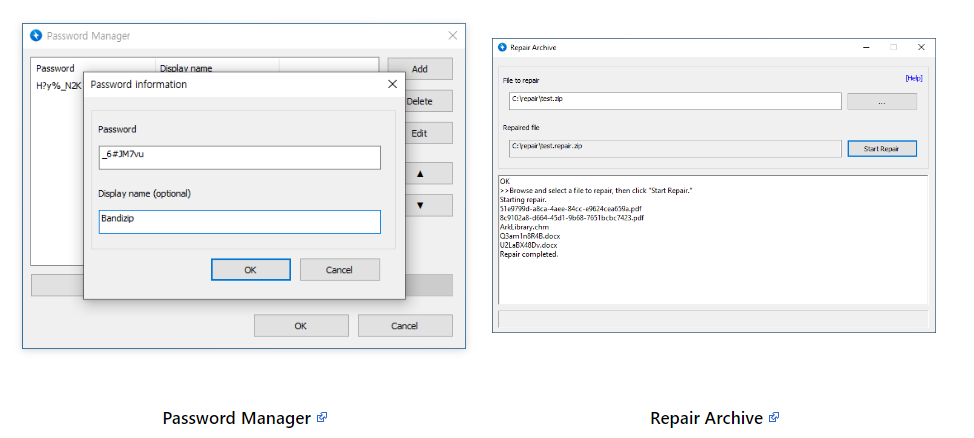
Bandizip is a robust archiving tool that boasts incredibly fast processing speeds along with a range of user-friendly features. It is available at no cost, while its premium versions offer an array of advanced options. Compatible with Windows operating systems including 7, 8, 8.1, 10, and 11 across 32-bit, 64-bit, and arm64 architectures, it serves as a comprehensive solution for compression, decompression, browsing, and editing. The software allows extraction from over 30 different formats, such as RAR, RAR5, 7Z, and ZIP. Users can create password-protected archives and split them into multiple volumes for convenience. Its multi-core support enhances compression speed significantly, making it up to six times faster. Bandizip also integrates seamlessly with the Windows 11 context menu for easy access. Additionally, it helps users manage frequently used passwords for archive handling and can analyze corrupted ZIP files to recover as much intact data as possible. The program features an optimized brute-force search for quickly recovering lost passwords, as well as the ability to view image thumbnails within an archive without the need for extraction. To ensure safety, it includes a reliable antimalware scan that detects potential threats within archives, further solidifying its utility as a comprehensive archiving solution. Overall, Bandizip stands out as a valuable tool for anyone needing efficient file management and archiving capabilities.
Description
RAR is a widely used file compression format, yet the default settings on Windows OS only accommodate the ZIP format, leaving RAR files inaccessible. To open these RAR files, you can utilize a convenient solution: RAR File Extractor, a user-friendly utility designed specifically for unzipping RAR archives. This software allows you to swiftly extract and decompress all content stored within a RAR file. Simply select the desired RAR file (*.rar) and designate an output folder; after that, just click the "extract" button to initiate the process. Additionally, you can choose options such as "overwrite" existing files and specify what happens once the extraction is finished. Notably, this program also supports multi-volume RAR archives, making it versatile for various compression needs. As a completely free tool, it is devoid of adware and available for both personal and commercial use. It’s worth noting that the initial version of RAR File Extractor may display slight interface variations with future software updates. Overall, this tool simplifies the task of managing RAR files effectively.
API Access
Has API
API Access
Has API


Integrations
Unzip One
Pricing Details
Free
Free Trial
Free Version
Pricing Details
Free
Free Trial
Free Version
Deployment
Web-Based
On-Premises
iPhone App
iPad App
Android App
Windows
Mac
Linux
Chromebook
Deployment
Web-Based
On-Premises
iPhone App
iPad App
Android App
Windows
Mac
Linux
Chromebook
Customer Support
Business Hours
Live Rep (24/7)
Online Support
Customer Support
Business Hours
Live Rep (24/7)
Online Support
Types of Training
Training Docs
Webinars
Live Training (Online)
In Person
Types of Training
Training Docs
Webinars
Live Training (Online)
In Person
Vendor Details
Company Name
Bandisoft
Website
en.bandisoft.com/bandizip/
Vendor Details
Company Name
RAR File Extractor
Website
rarfileextractor.com
