Average Ratings 0 Ratings
Average Ratings 0 Ratings
Similar Products
-
LALAL.AIAny audio or video can be extracted to extract vocal, accompaniment, and other instruments. High-quality stem cutting based on the #1 AI-powered technology in the world. Next-generation vocal remover and music source separator service for fast, simple, and precise stem removal. You can remove vocal, instrumental, drums and bass tracks, as well as acoustic guitar, electric guitar, and synthesizer tracks, without any quality loss. You can start the service free of charge. Upgrade to get more files processed and faster results. Only for personal use. Move to the next level. You can process thousands of minutes of audio and/or video. This software is suitable for both personal and business use. Each LALAL.AI package has a limit on the amount of audio/video that can be split. The package minute limit is deducted from each file that has been fully split. You can split as many files you like, provided their total length does not exceed the minute limit.
-
MuzaicMuzaic.ai is a browser-based tool that scores video automatically. You give it a cut (or a folder of cuts); it returns a finished audio mix — music, SFX, ambience and voiceover as separate layers — mastered to broadcast spec, in roughly 30 seconds per clip. What it actually does The pipeline runs in four stages. First it analyses the video: scenes, objects, pacing, colour and sentiment. From that it builds an audio plan and commits each concept to a clear direction (the site's example: a string quartet under a battle scene) rather than averaging toward something inoffensive. Then it composes every layer to fit the picture and the other layers — SFX land on the action, ambience ducks under speech, the voiceover is drafted from your brief rather than read out. Finally it mixes and masters the result. Existing audio in the source can be kept, replaced or mixed under. Output is three concepts per clip, exported as MP3 or WAV. Layer balance is adjusted inside Muzaic before export; the deliverable is the finished mix, not separate stems. The commercial angle Pricing is metered in minutes of finished audio, not per track or per download; downloads are unlimited. Personal is free for 10 minutes a month, non-commercial only. Creator ($45/month) covers your own brand and paid ads. Studio ($249/month) is for agencies: the licence travels to the client and the legal cover extends to them too. Enterprise adds TV, radio, cinema and OOH, plus a custom contract, DPA and SLA. What it is not It is not a music-generation toy. The free tier exists to test the workflow on your own footage; nothing from it may be published. The target user is a team producing hundreds of ad variants a month, where the audio step is the bottleneck.
-
4K Video DownloaderYou can watch videos from anywhere, anytime, even offline. It's easy to download: simply copy the link from your browser, and then click 'Paste Link" in the application. You can save full playlists and channels on YouTube in high-quality and other video or audio formats. Download your YouTube Mix, Watch Later and Liked videos as well as private YouTube playlists. Receive new videos from your favorite YouTube channels automatically. You can feel the action around you with virtual reality videos. To experience the amazing VR experience in 360deg, download 360deg videos. You can bypass any restrictions placed by your Internet service provider to bypass your school firewall or workplace firewall. To access YouTube and other sites, set up an in-app proxy connection.
-
LTXMost AI video tools hand you a black box: closed weights, a subscription, and no way to see what is happening under the hood. LTX takes the opposite approach. Built by Lightricks, LTX is an open foundation model that generates and simulates across video, audio, and the physical world, and it puts the weights, the code, and the control in your hands. At the center of the model is LTX-2.5, a 22B-parameter dual-stream diffusion transformer that produces native 4K video at up to 50 frames per second, with audio and video generated together in a single pass rather than stitched together afterward. Artificial Analysis, an independent benchmarking group, currently ranks LTX among the top three AI video models in the world. You choose how you want to use it. Download the open weights and run LTX-2.5 on your own hardware. License the model for on-premise deployment backed by enterprise support. Or build directly on LTX Studio, the production suite that turns the model into a full creative workflow. Companies like ElevenLabs, Asteria Film Co., Magnopus, and NVIDIA already rely on LTX for their own work. LTX is not built for one-off social clips. It is infrastructure for teams that generate motion, audio, and physical environments as part of their own products and pipelines.
-
DeskTimeDeskTime is a high-performance, 100% automated time tracking and productivity management solution designed for modern IT teams, software houses, and remote organizations. Unlike traditional trackers that rely on manual "Start/Stop" timers, DeskTime runs silently in the background, logging computer activity from the moment of boot-up to ensure zero data loss and absolute payroll accuracy. ⏱️ 🚀 Key Technical Features: ✅ Fully Automated Tracking: Eliminate manual timesheets. DeskTime captures arrival, departure, and total work hours automatically based on device activity. ⚡ ✅ Productivity Profiling: Categorize URLs, applications, and document titles as Productive, Unproductive, or Neutral. Calculate real-time efficiency scores for individuals and teams. 📈 ✅ Advanced Resource Management: Integrated Shift Scheduling and an Absence Calendar allow HR and team leads to manage leave, vacations, and staffing within a single interface. 📅 ✅ Project & Cost Analysis: Track billable hours at the project and task level. Monitor budget burn rates and export precise reports for client invoicing or CapEx/OpEx accounting. 💸 ✅ Offline Time Logging: Capture time spent in meetings or on-site visits via manual entries or the dedicated mobile app for Android and iOS. 📱 ✅ Enterprise-Grade Security: DeskTime is GDPR compliant and ISO 27001 certified. Features include two-factor authentication (2FA), data encryption at rest and in transit, and optional blurred screenshots to protect employee privacy. 🔒 🛠️ Built for Integration: Seamlessly sync your workflow with top-tier project management and communication tools, including: ⚙️Jira, GitLab, Trello, and Asana. ⚙️Google and Outlook Calendars. ⚙️Custom API for bespoke internal tool integration.
-
ISL Light Remote DesktopISL Light is a remote desktop software that is easy to use for security-conscious users. It offers great value-performance. ISL Light is a powerful tool for IT staff and support personnel to solve problems remotely via remote support, unattended access, or screen-sharing from mobile devices. It is cross-platform and provides 256-bit encrypted sessions, all the standard remote access features, as well as session recording, chat, videocall and multi-monitor support, file transfers, reporting, and many other important extras. Users can choose between cloud and on-premise services. ISL Online license doesn't limit the number or workstations of clients, users, and users you can support. It is a reliable, highly secure software that can be used in all industries, including banks, hospitals, government institutions, and insurances.
-
ScreencaptScreencapt allows you to record the entire screen or a selected area. You can also record a specific window. Screencapt is the ideal screen recorder because of its flexibility. Using the integrated audio recording you can also add your commentary or system sound directly into the screen recording. This is particularly useful when creating explanation videos or presentations. Screencapt's ability to record a webcam is a special feature. You can now add your comments and reactions to the video. This makes your screen recordings more personal and professional. Screencapt offers advanced options to record the cursor. You can choose to hide the cursor or add special effects to highlight specific actions. This is especially useful for software tutorials and demonstrations where a clear cursor view is required.
-
ConnecteamConnecteam is an all in one employee app that was specifically designed for non-desk employees. It provides all the necessary capabilities to manage and operate field employees, including communication features, workflows and scheduling, as well as time clock. Just a few clicks and you can bring together your deskless workforce. Your desktop Launchpad allows you to collaborate, manage operations, develop professional skills, and monitor employee engagement. In minutes, you can create a fully-branded mobile app for your company. You can add safety checklists, orientation courses, product catalogues, and shift management to your mobile app. Or, you can customize the features to suit your needs. You can also gain insight into how your team interacts with company assets and take steps to improve efficiency. Connecteam allows managers and employees to automate their processes and allow them to focus on growth. Integrations include Google Calendar, Gusto, QuickBooks Payroll, Xero and others.
-
ServoDeskEasy to use, award-winning Help Desk software for service teams that need to do more with less. Simplisys Service Desk provides flexible solutions for support teams of any size. - Manage multiple data channels with one interface Roles-based access to tickets - Email integration that creates and acknowledges tickets automatically. - Features rich reporting tool and dynamic dashboards. - Roles based Customer Portal - Simple to use business rules and workflows to drive automated processes. - API's for integration with third party software. We offer unparalleled support and market-leading service. Don't waste your time looking through thousands of documents online. Give us a call.
-
FreshserviceFreshservice is the right choice if you are looking for an IT service desk solution with simplicity. Freshservice is an easy-to-use ITIL service desk from Freshworks that helps businesses modernize IT and other business functions without the complexity and cost. Freshservice provides everything teams need to manage proactive IT services, including asset management, ticketing, configuration management, enhanced impact analysis, robust incident management functions, and more.
Description
AudioDesk offers an array of advanced features expected from a top-tier workstation application, such as 24-bit/192-kHz recording and real-time, 32-bit effects processing. This software encompasses multi-track audio editing, precise audio placement, and a fully equipped virtual mixing environment that supports up to 64 stereo busses, alongside automated mixing and graphic editing capabilities for both mix and effects automation. Users can engage in actions like scrubbing, trimming, spotting, and applying crossfades, while also benefiting from compatibility with third-party AU, VST2, and MAS effects plug-ins, in addition to unlimited digital track bouncing that includes effects and automation. Notably, AudioDesk imposes no arbitrary restrictions on the number of tracks you can handle, allowing for an unlimited number of audio tracks, which means it can accommodate as many as your computer's capacity permits. Furthermore, unlike many other audio sequencers, AudioDesk ensures that users have the freedom to utilize any number of tracks simultaneously without limitations.
Description
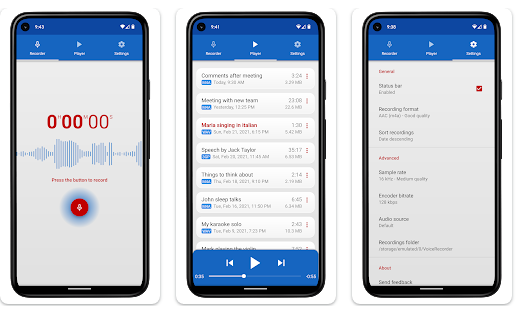
Splend Voice Recorder is a free audio recording application for Android that is aesthetically pleasing, fully equipped with features, and user-friendly. This sound recorder allows for high-quality audio captures without any time restrictions, as long as there is available memory. It can serve various purposes, such as taking voice notes, recording meetings, interviews, lectures, speeches, concerts, and even sleep talking. The app is compatible with both smartphones and tablets, functioning well regardless of the presence of external storage. Users can choose from four audio formats: MP3, high-quality PCM (wav), good quality AAC (m4a/mp4), and AMR (3gp), ensuring efficient use of storage space. The adjustable sample rate ranges from standard phone quality (8 kHz) to CD quality (44 kHz), and the bit rate can be modified from 32 to 320 kbps. It also features a live audio spectrum analyzer, enables background recording even when the device's screen is turned off, and allows users to customize their recording folders. Additionally, users can select their preferred audio source, whether from microphones or phone calls, and enjoy an integrated media player that functions similarly to a standard mp3 player, enhancing the overall experience. This versatility makes it an excellent tool for anyone needing to capture audio effectively.
API Access
Has API
No
API Access
Has API
No



Integrations
No details available.
Integrations
No details available.
Pricing Details
No price information available.
Free Trial
No
Free Version
No
Pricing Details
Free
Free Trial
No
Free Version
Yes
Deployment
Web-Based
No
On-Premises
No
iPhone App
No
iPad App
No
Android App
No
Windows
Yes
Mac
Yes
Linux
No
Chromebook
No
Deployment
Web-Based
No
On-Premises
No
iPhone App
No
iPad App
No
Android App
Yes
Windows
No
Mac
No
Linux
No
Chromebook
No
Customer Support
Business Hours
Yes
Live Rep (24/7)
No
Online Support
Yes
Customer Support
Business Hours
No
Live Rep (24/7)
No
Online Support
Yes
Types of Training
Training Docs
No
Webinars
Yes
Live Training (Online)
No
In Person
No
Types of Training
Training Docs
Yes
Webinars
No
Live Training (Online)
No
In Person
Yes
Vendor Details
Company Name
MOTU
Country
United States
Website
motu.com/products/software/audiodesk
Vendor Details
Company Name
Splend Apps
Country
Poland
Website
splendapps.com
Product Features
Audio Editing
Audio Effects
No
Batch Processing
No
Export Audio (Multiple File Types)
No
Record Live Audio
No
Record Multiple Simultaneous Tracks
No
Scrub, Search, Bookmark
No
Sound Editing Tools
No
Spectral Analysis / FFT
No
Speech Synthesis (TTS)
No
Swappable Patches
No
Virtual Instruments
No
Virtual Mixing
No
Voice Changer
No
