
Average Ratings 0 Ratings
Average Ratings 0 Ratings
Similar Products
-
IONOS Cloud Object StorageIONOS Cloud Object Storage is a flexible storage solution tailored for the management and retrieval of extensive volumes of unstructured data within cloud platforms. Fully compliant with the S3 API standard, it empowers developers and IT professionals to utilize existing S3 clients and tools for bucket and object management, seamlessly integrating into modern cloud-native applications and systems. This service allows businesses to store nearly limitless amounts of static or backup data without the complexities of traditional storage management. Engineered for both reliability and high availability, it ensures data remains accessible and secure through redundant storage mechanisms across multiple nodes, safeguarding against potential infrastructure failures. Ideal for a variety of use cases, it supports the storage of backups, archives, and disaster recovery snapshots, while also efficiently managing substantial datasets that are essential for analytics, machine learning, or digital content initiatives. Furthermore, its scalability makes it an excellent choice for organizations anticipating growth or needing to adapt quickly to changing data storage requirements.
-
Files.com6,000+ companies trust Files.com to automate and secure business critical transfers. We obsess about security, compliance, reliability, and performance so your critical business processes just work every time. Easily manage any transfer flow without writing scripts or code, and onboard workloads and partners effortlessly. We support standard file transfer protocols (FTP, SFTP, AS2) for working with external partners and also provide native apps for high performance internal transfers. As a fully Cloud-Native SaaS, there are no servers for you to buy or maintain, there is no installation required, and high availability and redundancy are built in and free. Our InfoSec Program is audited annually by Kirkpatrick Price, a leading information security CPA firm. Our audit covers the scope of the entire Files.com business (not just datacenter operations) and names Files.com specifically. Beware of smaller competitors who try to pass off someone else’s audit as their own. Technical capabilities include encryption at-rest and in-transit, four types of two-factor authentication, nine enterprise identity (SSO) integrations, configurable password and session policies, and a perfect “A+” score from Qualys SSL Labs.
-
QuantaStorQuantaStor, a unified Software Defined Storage platform, is designed to scale up and down to simplify storage management and reduce overall storage costs. QuantaStor storage grids can be configured to support complex workflows that span datacenters and sites. QuantaStor's storage technology includes a built-in Federated Management System that allows QuantaStor servers and clients to be combined to make management and automation easier via CLI and RESTAPIs. QuantaStor's layered architecture gives solution engineers unprecedented flexibility and allows them to design applications that maximize workload performance and fault tolerance for a wide variety of storage workloads. QuantaStor provides end-to-end security coverage that allows multi-layer data protection for cloud and enterprise storage deployments.
-
Google Cloud PlatformGoogle Cloud is an online service that lets you create everything from simple websites to complex apps for businesses of any size. Customers who are new to the system will receive $300 in credits for testing, deploying, and running workloads. Customers can use up to 25+ products free of charge. Use Google's core data analytics and machine learning. All enterprises can use it. It is secure and fully featured. Use big data to build better products and find answers faster. You can grow from prototypes to production and even to planet-scale without worrying about reliability, capacity or performance. Virtual machines with proven performance/price advantages, to a fully-managed app development platform. High performance, scalable, resilient object storage and databases. Google's private fibre network offers the latest software-defined networking solutions. Fully managed data warehousing and data exploration, Hadoop/Spark and messaging.
-
YodeckNext-generation technology for digital signage professionals Yodeck, a cloud-based digital signage platform, is unbeatable. It powers your screen with dynamic content that instantly engages your target audience. Yodeck makes it easy to create, schedule, and design content from the web. To get your message across to those who matter most to you, use attention-grabbing media such as videos, images and PDF files, Office documents, data dashboards, and social media. It provides enterprise-grade security and control. Yodeck's drag-and-drop editing feature allows users to be creative in organizing content into interesting layouts. Yodeck is proud to offer a unique digital signage solution for businesses of all sizes. This includes local diners as well as global leaders like Delta Airlines, Autodesk and Adobe.
-
ROLLERAt ROLLER, we help leisure and attractions businesses unlock their full potential and grow with confidence. Trusted by more than 3,000 venues across 30+ countries—including leading brands like Sky Zone, Altitude, American Dream, Uptown Jungle, Flip Out, Oxygen, Innoflate, and Jumpsquare—we bring deep expertise in the unique needs of the attractions industry. From family entertainment centers and trampoline parks to water parks, zoos, aquariums, and children’s museums, ROLLER supports a wide range of venue types. Our all-in-one, cloud-based platform is designed to simplify operations and maximize revenue. With integrated tools for ticketing, point of sale, memberships, payments, and digital waivers, ROLLER enables operators to streamline workflows, improve the guest experience, and make smarter business decisions—all from a single system.
-
FinOpslyMost enterprises can report what AI cost them. Far fewer can say which team owns it, whether it was approved, or what it returned. FinOpsly closes that gap. The platform governs AI spend on the same cost model that carries the cloud, data platform and SaaS an AI workload consumes, so a business unit sees the full cost of an AI initiative instead of four disconnected bills. Capabilities include: Cost estimation before deployment. Model an architecture and get a priced workload across model APIs, GPU capacity, warehouse consumption and storage, with the assumptions on screen. Weigh model choices against consumption you have actually measured. Attribution that holds up in a chargeback cycle. Spend resolves to owners, teams, applications, business units and customers through hierarchies nine or more levels deep. Tagging is standardized across providers, keys and resources are labeled in bulk from plain-language rules, and whatever remains unattributed is published as a number, not absorbed. Guardrails that act. Set budgets by project, team or API key. Catch anomalies with root cause and route them to whoever owns the resource. Surface waste that provider tooling misses, using FinOpsly's own detection models. Plan commitments across AWS, Azure and Google Cloud. Park idle compute on approved schedules, reversibly. Financial results you can defend. Automated chargeback in a single cycle. Savings measured as what reached run-rate against a no-action baseline. Unit economics down to cost per call, per active user and per customer served. For technology and finance leaders accountable for what AI spend returns.
-
DragonflyDragonfly serves as a seamless substitute for Redis, offering enhanced performance while reducing costs. It is specifically engineered to harness the capabilities of contemporary cloud infrastructure, catering to the data requirements of today’s applications, thereby liberating developers from the constraints posed by conventional in-memory data solutions. Legacy software cannot fully exploit the advantages of modern cloud technology. With its optimization for cloud environments, Dragonfly achieves an impressive 25 times more throughput and reduces snapshotting latency by 12 times compared to older in-memory data solutions like Redis, making it easier to provide the immediate responses that users demand. The traditional single-threaded architecture of Redis leads to high expenses when scaling workloads. In contrast, Dragonfly is significantly more efficient in both computation and memory usage, potentially reducing infrastructure expenses by up to 80%. Initially, Dragonfly scales vertically, only transitioning to clustering when absolutely necessary at a very high scale, which simplifies the operational framework and enhances system reliability. Consequently, developers can focus more on innovation rather than infrastructure management.
-
Comet BackupStart running backups and restores in less than 15 minutes! Comet is a fast, secure all-in-one backup platform for businesses and IT providers. You control your backup environment and storage destination (local, Wasabi, AWS, Google Cloud Storage, Azure, Backblaze, or other S3 storage providers). Our software supports businesses across 120 countries in 13 languages. Test drive Comet Backup with a 30-day FREE trial!
-
CloudflareCloudflare is the foundation of your infrastructure, applications, teams, and software. Cloudflare protects and ensures the reliability and security of your external-facing resources like websites, APIs, applications, and other web services. It protects your internal resources, such as behind-the firewall applications, teams, devices, and devices. It is also your platform to develop globally scalable applications. Your website, APIs, applications, and other channels are key to doing business with customers and suppliers. It is essential that these resources are reliable, secure, and performant as the world shifts online. Cloudflare for Infrastructure provides a complete solution that enables this for everything connected to the Internet. Your internal teams can rely on behind-the-firewall apps and devices to support their work. Remote work is increasing rapidly and is putting a strain on many organizations' VPNs and other hardware solutions.
Description
Amazon S3 Express One Zone is designed as a high-performance storage class that operates within a single Availability Zone, ensuring reliable access to frequently used data and meeting the demands of latency-sensitive applications with single-digit millisecond response times. It boasts data retrieval speeds that can be up to 10 times quicker, alongside request costs that can be reduced by as much as 50% compared to the S3 Standard class. Users have the flexibility to choose a particular AWS Availability Zone in an AWS Region for their data, which enables the co-location of storage and computing resources, ultimately enhancing performance and reducing compute expenses while expediting workloads. The data is managed within a specialized bucket type known as an S3 directory bucket, which can handle hundreds of thousands of requests every second efficiently. Furthermore, S3 Express One Zone can seamlessly integrate with services like Amazon SageMaker Model Training, Amazon Athena, Amazon EMR, and AWS Glue Data Catalog, thereby speeding up both machine learning and analytical tasks. This combination of features makes S3 Express One Zone an attractive option for businesses looking to optimize their data management and processing capabilities.
Description
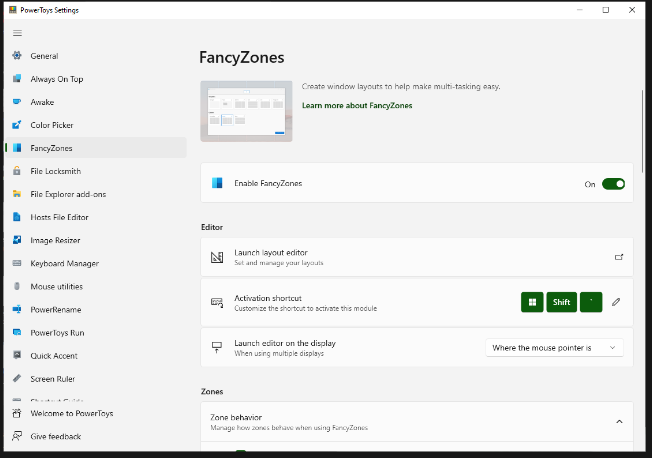
FancyZones serves as a window management tool designed to help users arrange and snap their application windows into optimized layouts, enhancing workflow efficiency and allowing for quick restoration of these layouts. This utility empowers you to specify a series of designated zones on your desktop where windows can be directed. By dragging a window into a predetermined zone or using a designated keyboard shortcut, the respective window automatically resizes and relocates to occupy that zone completely. Additionally, if you have the "Use non-primary mouse button to toggle zone activation" option activated, you can enter zone selection mode by simply clicking the secondary mouse button. When two zones are positioned next to each other, a window can be adjusted to span the combined area of both zones, effectively rounding up to the smallest rectangle that encompasses the two. As you maneuver the mouse cursor close to the shared boundary of two zones, both zones become active at the same time, giving you the flexibility to drop the window into either or both. Moreover, you can drag the window until it activates one zone and then, by pressing and holding the control key while continuing to drag, select multiple zones to expand your layout options. This feature significantly streamlines the process of organizing your desktop workspace efficiently.
API Access
Has API
Yes
API Access
Has API
No


Integrations
AWS Glue
Yes
Amazon Athena
Yes
Amazon EC2
Yes
Amazon EKS
Yes
Amazon EMR
Yes
Amazon S3
Yes
Amazon SageMaker
Yes
Amazon Web Services (AWS)
Yes
PyTorch
Yes
Integrations
AWS Glue
No
Amazon Athena
No
Amazon EC2
No
Amazon EKS
No
Amazon EMR
No
Amazon S3
No
Amazon SageMaker
No
Amazon Web Services (AWS)
No
PyTorch
No
Pricing Details
No price information available.
Free Trial
Yes
Free Version
No
Pricing Details
Free
Free Trial
No
Free Version
Yes
Deployment
Web-Based
Yes
On-Premises
No
iPhone App
No
iPad App
No
Android App
No
Windows
No
Mac
No
Linux
No
Chromebook
No
Deployment
Web-Based
No
On-Premises
No
iPhone App
No
iPad App
No
Android App
No
Windows
Yes
Mac
No
Linux
No
Chromebook
No
Customer Support
Business Hours
Yes
Live Rep (24/7)
Yes
Online Support
Yes
Customer Support
Business Hours
Yes
Live Rep (24/7)
No
Online Support
Yes
Types of Training
Training Docs
Yes
Webinars
Yes
Live Training (Online)
No
In Person
Yes
Types of Training
Training Docs
Yes
Webinars
Yes
Live Training (Online)
No
In Person
Yes
Vendor Details
Company Name
Amazon
Founded
1994
Country
United States
Website
aws.amazon.com/s3/storage-classes/express-one-zone/
Vendor Details
Company Name
Microsoft
Country
United States
Website
learn.microsoft.com/en-us/windows/powertoys/fancyzones


