Average Ratings 0 Ratings
Average Ratings 0 Ratings
Similar Products
-
KnakKnak is the enterprise-grade, no-code solution that transforms how marketing teams build emails and landing pages — without relying on developers or agencies. With a robust modular design system, real-time collaboration, and native integrations with platforms like Marketo, SFMC, and Eloqua, Knak eliminates production bottlenecks while preserving brand governance. Empower your team to deliver high-performance assets quickly, securely, and at scale — no code required. Trusted by global brands to streamline campaign execution and accelerate time-to-market.
-
ZaharaZahara's cloud-based platform automates budget management and suppliers. It also allows for multi-level purchase approvals, delivery approvals, and invoice reconciliation and approvals. Zahara integrates seamlessly with the most popular accounting software, such as QuickBooks Online or Xero, to provide expanding SME's with real-time visibility and central control over their purchasing. Zahara can be used for controlling spend within an organization. We can take the initial request to purchase something and automate the approval and sending the PO to the Vendor. Deliveries can be received, invoices from vendors matched and processed before being exported to finance. Zahara increases control and speeds up processing.
-
InboxAllyInboxAlly is email deliverability software that moves your messages out of spam and promotions and into the primary inbox. It builds and protects sender reputation, warms new domains and IPs automatically, verifies inbox placement across the major mailbox providers, and monitors blacklists in real time. It layers onto any ESP or SMTP setup without changing how you send. Every plan carries a REST API, a dedicated customer success manager and 24/7 live support. Used by marketers, agencies, cold outreach teams and deliverability consultants.
-
ROLLERAt ROLLER, we help leisure and attractions businesses unlock their full potential and grow with confidence. Trusted by more than 3,000 venues across 30+ countries—including leading brands like Sky Zone, Altitude, American Dream, Uptown Jungle, Flip Out, Oxygen, Innoflate, and Jumpsquare—we bring deep expertise in the unique needs of the attractions industry. From family entertainment centers and trampoline parks to water parks, zoos, aquariums, and children’s museums, ROLLER supports a wide range of venue types. Our all-in-one, cloud-based platform is designed to simplify operations and maximize revenue. With integrated tools for ticketing, point of sale, memberships, payments, and digital waivers, ROLLER enables operators to streamline workflows, improve the guest experience, and make smarter business decisions—all from a single system.
-
YodeckNext-generation technology for digital signage professionals Yodeck, a cloud-based digital signage platform, is unbeatable. It powers your screen with dynamic content that instantly engages your target audience. Yodeck makes it easy to create, schedule, and design content from the web. To get your message across to those who matter most to you, use attention-grabbing media such as videos, images and PDF files, Office documents, data dashboards, and social media. It provides enterprise-grade security and control. Yodeck's drag-and-drop editing feature allows users to be creative in organizing content into interesting layouts. Yodeck is proud to offer a unique digital signage solution for businesses of all sizes. This includes local diners as well as global leaders like Delta Airlines, Autodesk and Adobe.
-
Premier Construction SoftwarePremier Construction Software is an AI-powered cloud ERP built for growing general contractors who need tight control over job costs, WIP, and cash flow across multiple projects and entities. It unifies construction accounting, project management, and field operations so GCs can eliminate spreadsheets, speed up billing, and protect margins with real-time financial visibility. How we help GCs win more work and protect margin: • Construction cloud ERP built for general contractors, owners, and developers managing multi-project, multi-entity portfolios. • Advanced construction accounting with detailed job costing, real-time WIP reporting, and cash-flow forecasting to spot issues before they hit the P&L. • Integrated project and field management with RFIs, subcontracts, drawings, and change orders tied directly to the budget and schedule. • Automated billing, approvals, and payroll workflows (including subcontractor and pay app portals) to reduce manual entry and speed up collections. • Native AI and predictive intelligence that surface risks, recommend next actions, and provide executive-ready dashboards for owners and project leaders. • Unlimited entities, consolidated reporting, and role-based dashboards so finance and operations see the same numbers in real time. Trusted by GCs and Land Developers globally, Premier saves time, cuts risk, and helps you move forward with clarity. With Premier, you’re not just adopting software, you’re partnering with a trusted leader committed to your success.
-
LIVE ConnectBanyan Technology is a leading provider of over-the-road (OTR) shipping solutions, delivering advanced freight management through its LIVE Connect® platform. Designed for Shippers, 3PLs and supply chain partners, LIVE Connect simplifies Truckload (TL), Less-Than-Truckload (LTL), Final Mile and Parcel shipping with real-time rating, execution and visibility. The platform eliminates manual inefficiencies with AI-powered predictive pricing, automated freight auditing and real-time business intelligence dashboards. Seamless TMS and API integrations provide instant carrier connectivity, optimizing cost savings and improving operational efficiency. With 3x more carrier connections than any other provider, businesses gain unmatched flexibility and control over their shipping operations. Since 2001, Banyan Technology has been committed to client-driven innovation, continuously enhancing LIVE Connect to meet evolving industry demands. Headquartered in Cleveland, Ohio, Banyan delivers exceptional service and ongoing support, ensuring businesses ship smarter and more efficiently.
-
DetrackStreamline everything from proof of delivery and real-time driver tracking, through to route optimisation and customer updates. Save time, reduce operating costs, and boost productivity with Detrack. Integrations Integrate with the best accounting and SMS platforms. From order creation through to proof of delivery, everything works together seamlessly - orders sync automatically, customers get notified instantly and drivers receive jobs in real-time. Test drive all features for free It only takes a few minutes to add your drivers, upload or create jobs and start branding your customer comms. Our free trial gives you access to all features for 14 days. We know that there aren’t enough hours in the day and our experts are available 24/5 to help you get set up to achieve your goals faster. You can chat live or book a call back for practical, hands-on support.
-
BidJSBidlogix provides auction software for auction houses all over the world. We offer webcast auction software and timed auction software. Our software is embedded on your website with fully customizable styling. Bidlogix, a UK-based company, began providing auction software in 2013. Our software is constantly being improved by our 2 in-house development teams. We have over 10 auctions running per day using our software. Our software can handle the largest auctions in real-time, and can be translated into multiple languages.
-
OnetraceBuilt specifically for subcontractors, Onetrace is construction management software that connects job planning, on-site evidence capture, and compliance sign-off in a single workflow. Rather than juggling spreadsheets and paper records, teams get one system covering everything from the first site visit to final handover, with audit-ready documentation ready for clients, main contractors, and regulators whenever it's needed. The platform supports a wide range of trades, including passive fire protection, drylining, roofing, and M&E. For fire protection specialists in particular, Onetrace works as dedicated fire protection software — linking photographs, sign-off forms, and approvals to the exact job and location they cover, so compliant installations are easy to evidence. Teams also get live visibility of projects, timesheets, signed documentation, and site progress as it happens. Key functionality: customisable forms, drag-and-drop scheduling, GPS-verified time-tracking, scope variation tracking, cost calculation, and mobile drawing markups with photo capture.
Description
Algoma is an online platform designed for assessing land development feasibility specifically tailored for real estate professionals analyzing locations across the United States. Users have the ability to search for sites by entering an address or specifying parcel characteristics, allowing them to access detailed parcel information, applicable zoning regulations with referenced code sections, and various GIS overlays that include wetlands, flood zones, and utility layouts, in addition to scenarios for buildable areas or unit yields. This platform consolidates rental, sales, and builder comparables alongside tools for assessing site capacity for both single-family and multifamily developments. Furthermore, teams can manage site information and deal-related activities, create AI-enhanced renderings, generate zoning reports, and conveniently export studies in PDF or CAD formats. Additionally, Algoma facilitates research on property owners, the creation of letters of intent, and the tracking of due diligence processes. It is specifically crafted for homebuilders, multifamily developers, industrial developers, brokers, and land acquisition teams, ensuring they have the necessary resources to streamline their decision-making processes effectively. The platform's user-friendly design enhances collaboration and efficiency among real estate teams.
Description
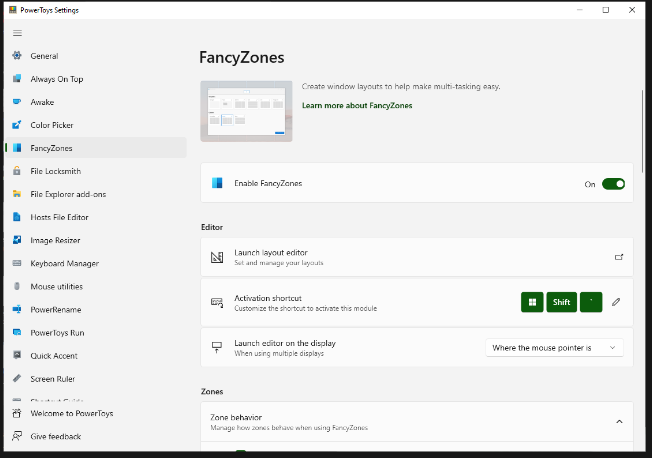
FancyZones serves as a window management tool designed to help users arrange and snap their application windows into optimized layouts, enhancing workflow efficiency and allowing for quick restoration of these layouts. This utility empowers you to specify a series of designated zones on your desktop where windows can be directed. By dragging a window into a predetermined zone or using a designated keyboard shortcut, the respective window automatically resizes and relocates to occupy that zone completely. Additionally, if you have the "Use non-primary mouse button to toggle zone activation" option activated, you can enter zone selection mode by simply clicking the secondary mouse button. When two zones are positioned next to each other, a window can be adjusted to span the combined area of both zones, effectively rounding up to the smallest rectangle that encompasses the two. As you maneuver the mouse cursor close to the shared boundary of two zones, both zones become active at the same time, giving you the flexibility to drop the window into either or both. Moreover, you can drag the window until it activates one zone and then, by pressing and holding the control key while continuing to drag, select multiple zones to expand your layout options. This feature significantly streamlines the process of organizing your desktop workspace efficiently.
API Access
Has API
No
API Access
Has API
No


Integrations
No details available.
Integrations
No details available.
Pricing Details
$99/seat/month
Standard is $99 per seat per month, billed annually at $1,188 per seat per year. Pro is $199 per seat per month, billed annually at $2,388 per seat per year. A free Basic plan and a free trial with no credit card are available. Enterprise starts at 3 seats with custom pricing. Construction-cost add-on is quoted separately.
Free Trial
Yes
Free Version
Yes
Pricing Details
Free
Free Trial
No
Free Version
Yes
Deployment
Web-Based
Yes
On-Premises
No
iPhone App
No
iPad App
No
Android App
No
Windows
No
Mac
No
Linux
No
Chromebook
No
Deployment
Web-Based
No
On-Premises
No
iPhone App
No
iPad App
No
Android App
No
Windows
Yes
Mac
No
Linux
No
Chromebook
No
Customer Support
Business Hours
No
Live Rep (24/7)
No
Online Support
Yes
Customer Support
Business Hours
Yes
Live Rep (24/7)
No
Online Support
Yes
Types of Training
Training Docs
No
Webinars
No
Live Training (Online)
Yes
In Person
No
Types of Training
Training Docs
Yes
Webinars
Yes
Live Training (Online)
No
In Person
Yes
Vendor Details
Company Name
Algoma
Founded
2023
Country
United States
Website
www.algoma.co
Vendor Details
Company Name
Microsoft
Country
United States
Website
learn.microsoft.com/en-us/windows/powertoys/fancyzones