Average Ratings 0 Ratings
Average Ratings 0 Ratings
Similar Products
-
Secure EraserSecure Eraser: Secure Data Deletion, Shredders Your Files & Folders. Just because it has been removed from your hard drive doesn't mean that it is gone forever. Anyone can restore the information as long as it was not overwritten. It becomes more difficult if the computer has been resold, or given away. Secure Eraser employs the most well-known method of data disposal. It overwrites sensitive information so that it cannot be recovered even with specialized software. Our award-winning solutions for permanently destroying data eliminate cross-references that may leave traces of deleted files within the allocation table of your hard disk. This Windows software is easy to use and can overwrite sensitive data up to 35 times, regardless of whether they're files, folders or drives, recycle bins, or traces of surfing. You can also delete files that you have already deleted but not for good.
-
FilerevFilerev is a powerful tool that helps you easily find and manage hidden files, duplicate files, large files, and oversized folders, ensuring a streamlined and clutter-free digital workspace. Key features include advanced scanning technology that identifies the unorganized files taking up the most space and cluttering your Google Drive. Filerev enhances productivity by saving time and reducing the frustration of manual file organization. The custom filters and bulk delete tool give you complete control over finding and removing unwanted files in your account. The storage analyzer lets you browse your folders by size to see where the space is being used in your Google Drive. Whether you're an individual, a small business, or a large enterprise, Filerev offers robust solutions tailored to your needs. Visit filerev.com to discover how Filerev can transform your Google Drive experience and boost efficiency.
-
AdmiralAdmiral is the top adblock recovery platform for publishers, helping recover millions of dollars in advertising revenue lost to adblockers, privacy tools, DNS filtering, VPNs, network-level blocking, and other forms of monetization disruption. Trusted by thousands of publishers and backed by more than a decade of expertise, Admiral pioneered Full Spectrum Adblock Recovery—combining multiple recovery approaches to maximize total adblock revenue. As the creator of Visitor Relationship Management (VRM), Admiral extends beyond ad recovery to help publishers recover and grow revenue through subscriptions, registrations, consent management, first-party data, email acquisition, social audience growth, donations, and other visitor monetization strategies. By combining recovery and revenue-growth approaches in one platform, Admiral helps publishers reduce revenue leakage, increase visitor lifetime value, and maximize monetization across the audience lifecycle. Admiral VRM delivers: * Industry-leading Full Spectrum Adblock Recovery * Paid subscriptions, paywalls, and donation campaigns * Visitor Copilot conversational AI for engagement and revenue growth * Registration walls, user accounts, and first-party data * Email, social audience, and app growth * GDPR and CCPA consent management Admiral also provides analytics, journey shaping, visitor segmentation, targeting, testing, and optimization. Publishers can add Admiral's free tag in minutes for immediate visibility into adblock rates and revenue recovery potential.
-
DeskTimeDeskTime is a high-performance, 100% automated time tracking and productivity management solution designed for modern IT teams, software houses, and remote organizations. Unlike traditional trackers that rely on manual "Start/Stop" timers, DeskTime runs silently in the background, logging computer activity from the moment of boot-up to ensure zero data loss and absolute payroll accuracy. ⏱️ 🚀 Key Technical Features: ✅ Fully Automated Tracking: Eliminate manual timesheets. DeskTime captures arrival, departure, and total work hours automatically based on device activity. ⚡ ✅ Productivity Profiling: Categorize URLs, applications, and document titles as Productive, Unproductive, or Neutral. Calculate real-time efficiency scores for individuals and teams. 📈 ✅ Advanced Resource Management: Integrated Shift Scheduling and an Absence Calendar allow HR and team leads to manage leave, vacations, and staffing within a single interface. 📅 ✅ Project & Cost Analysis: Track billable hours at the project and task level. Monitor budget burn rates and export precise reports for client invoicing or CapEx/OpEx accounting. 💸 ✅ Offline Time Logging: Capture time spent in meetings or on-site visits via manual entries or the dedicated mobile app for Android and iOS. 📱 ✅ Enterprise-Grade Security: DeskTime is GDPR compliant and ISO 27001 certified. Features include two-factor authentication (2FA), data encryption at rest and in transit, and optional blurred screenshots to protect employee privacy. 🔒 🛠️ Built for Integration: Seamlessly sync your workflow with top-tier project management and communication tools, including: ⚙️Jira, GitLab, Trello, and Asana. ⚙️Google and Outlook Calendars. ⚙️Custom API for bespoke internal tool integration.
-
ESET PROTECT AdvancedESET Protect Advanced offers a comprehensive cybersecurity solution for businesses of any size. It offers advanced endpoint security against ransomware and zero-day threats. It also includes full disk encryption to ensure legal compliance and data security. The solution uses adaptive scanning, cloud sandboxing and behavioral analysis for proactive cloud-based threats defense. Mobile threat protection secures Android and iOS with anti-malware and anti-theft. It also offers cloud app security, mail server protection, vulnerability and patch management, and cloud app protection. Multi-factor authentication and extended detection and reaction (XDR) improve threat detection and response. The solution provides a single pane of glass remote management to provide visibility into threats and users. It also offers advanced reporting and customized notifications.
-
ManageEngine ADAudit PlusADAudit Plus enhances the security and compliance of your Windows Server environment by delivering comprehensive insights into all operational activities. It offers a detailed overview of modifications made to Active Directory (AD) resources, encompassing AD objects and their respective attributes, group policies, and more. By conducting thorough AD audits, organizations can identify and mitigate insider threats, misuse of privileges, and other signs of potential security breaches, thereby bolstering their overall security framework. The tool enables users to monitor intricate details within AD, including entities such as users, computers, groups, organizational units (OUs), group policy objects (GPOs), schemas, and sites, along with their associated attributes. Furthermore, it tracks user management activities like the creation, deletion, password resets, and alterations in permissions, providing insights into the actions taken, the responsible individuals, the timing, and the originating locations. Additionally, it allows organizations to monitor the addition or removal of users from security and distribution groups, ensuring that access privileges are kept to the necessary minimum, which is critical for maintaining a secure environment. This level of oversight is vital for proactive security management and compliance adherence.
-
MobiOfficeMobiOffice (formerly OfficeSuite) is an easy-to-use office suite alternative, used by over 250 million users across 195 countries. Available on Windows, Android, iOS, and macOS, MobiOffice includes MobiDocs, MobiSheets, and MobiSlides. MobiOffice helps you manage text documents, spreadsheets, and presentations with ease. It's compatible with all major file formats including Microsoft Office (DOCX, ODT, PPTX), Google (Docs, Sheets, Slides), Apple iWork, and more. Explore each component: MobiDocs: Create and modify documents with comprehensive formatting options. MobiSheets: Simplify data management and analysis to visualize insights and generate reports effortlessly. MobiSlides: Craft impressive presentations with customizable templates and multimedia capabilities. MobiOffice integrates with MobiDrive, MobiSystems’ cloud storage solution for easy document saving and synchronization. Try it free for 7 days to see how this office suite meets your needs. Optimized for all major platforms, MobiOffice’s components - MobiDocs, MobiSheets, and MobiSlides - are available as a complete suite or as standalone apps on Windows, delivering tailored and affordable solutions that suit individual needs.
-
CapLinkedCapLinked is a web-based platform built for organizations that need a better way to manage, protect, and share sensitive business documents during high stakes work. Known as The Deal Room That Works, CapLinked gives teams, advisors, and lawyers a controlled workspace for due diligence, mergers and acquisitions, fundraising, audits, licensing, asset sales, and confidential projects where accuracy, speed, and oversight matter. Instead of relying on email attachments, consumer file sharing links, or scattered folders, teams can organize documents in structured workspaces with clear folder layouts, searchable files, user groups, and permissions. Administrators can decide who can view, upload, print, download, or share materials, while watermarking, passwords, expiration settings, tracking, and reporting help reduce risk when information is shared outside the organization. CapLinked makes complex document review more efficient for internal teams and external reviewers. Buyers, investors, attorneys, accountants, partners, and other stakeholders can access the materials they need in a professional environment, while project owners maintain visibility into engagement and adjust access as a review changes. This helps reduce version confusion and manual follow up when managing sensitive files across organizations. For boutique firms, Big 4 consultants, global enterprises, and teams in between, CapLinked supports secure collaboration without unnecessary complexity. Its data room and document tools help companies protect financial records, legal documents, intellectual property, contracts, operational files, and strategic materials while keeping reviews organized. Visit caplinked.com to see how CapLinked can help teams share documents, control access, and move work forward
-
PBRS Power BI Reports DistributionPBRS brings automated report production and distribution to organizations using Microsoft Power BI and SSRS. Developed by ChristianSteven Software, it runs in your Windows environment and coordinates reporting tasks that would otherwise involve manual exports or multiple automation flows. Build workflows for Power BI Service, Power BI Report Server, Power BI Paginated Reports and Microsoft SSRS. Launch them at regular intervals, on custom calendars, after a dataset refresh completes, or in response to supported database, file, email and system events. For personalized (Dynamic) reporting, PBRS reads SQL or JSON instructions to apply each recipient's filters, parameters, output format and delivery details. Report bursting allows a shared report to become separate outputs for customers, branches, departments or individual users. Produce PDF documents, Excel workbooks and CSV files where supported. Use Excel templates and formatting, merge suitable exports into workbook tabs, or collect several reports into a single email, ZIP archive or bookmarked PDF. Passwords and encryption help protect PDF documents. Route finished files to email addresses, Teams, SharePoint, OneDrive, Google Drive, Dropbox, FTP or SFTP servers, network folders, Slack and printers. Deliver exported documents to external audiences without requiring them to access Power BI. Execution records, notifications, retry settings and blank-report handling support unattended operation. A REST API lets developers connect supported scheduling and execution functions to their own applications. PBRS suits reporting operations that need consistent output, recipient-specific content and coordinated delivery across multiple reporting sources.
-
AnsaradaAnsarada brings order to organizational chaos to increase business value. Ansarada is a total deal lifecycle management platform that provides world-leading AI-powered Virtual Data Rooms and dealmaking tools. These tools include advanced AI insights and automation, next level Q&A and collaboration, plus purpose-built, digitized and customizable workflows and checklists for M&A, capital raising, business audits, tenders and other high stakes outcomes. Unlike some competitor Virtual Data Rooms, Ansarada offers free trials, 24/7 localized expert support, integrated Q&A via email, AI-assisted deal prediction, plus easy drag and drop upload and superior document security controls. Manage and maximize your Deals with Ansarada Always & Secure File Share. Ansarada is designed to drive stronger business outcomes based on best practices from over 35,000 transactions.
Description
Active@ Partition Manager is a sophisticated utility designed for the creation, formatting, and management of disk partitions. This tool enables users to control their storage devices and the logical drives or partitions they house effectively. You can effortlessly create, delete, format, and assign names to partitions without the need to power down your computer, with most changes being applied instantly. It is compatible with a variety of widely-used file systems, including FAT, NTFS, exFAT, ReFS, HFS+, Ext2/Ext3/Ext4, BtrFS, UFS, XFS, and JFS. Additionally, Active@ Partition Manager functions as a distinct, lightweight component of the Active@ UNDELETE suite, which is known for its advanced data recovery capabilities. It also offers the unique feature of enabling users to start a non-bootable PC, granting them exclusive access to local disks and the system. The tool can be run from a CD, DVD, or USB flash drive, provided the appropriate BIOS configurations are in place. After successfully booting the system, the boot disk media can be safely removed. Moreover, the recovery utilities included in the software are capable of restoring deleted files or retrieving data from erased or damaged partitions, making it a comprehensive solution for partition management and data recovery.
Description
Your computer desktop is cluttered and confusing. The files and applications you need are not always in reach.
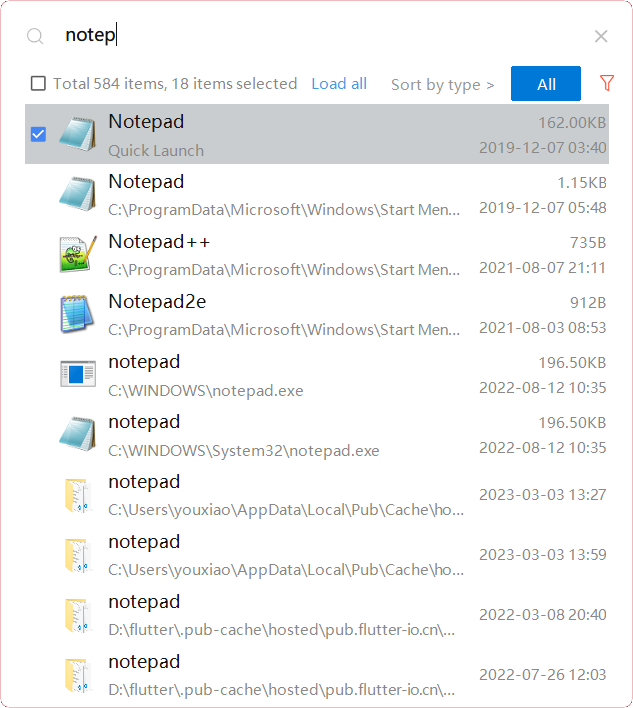
YXFile allows you to tagging file and search file as well as launch apps.
Tag Any File:
YXFile can tag every file type on any file system. The tagging is stored in a data base. YXFile will not alter your file names or create hidden files on your hard disk. You can move or rename files under the same partition. The tags won't be lost
Search for everything:
Search files and folders using their names. as well as file tags, launch items, and file tags.
Launch Apps
Launch App is a favorite feature of YXFile users. You can either type the name of the application or program you wish to open or use a shortcode. Click return and YXFile will open the program.
API Access
Has API
No
API Access
Has API
No



Integrations
Windows 10
No
Windows 11
No
Pricing Details
No price information available.
Free Trial
No
Free Version
No
Pricing Details
$39/user
One-time payment for lifetime access to Yfile
Free Trial
Yes
Free Version
No
Deployment
Web-Based
No
On-Premises
No
iPhone App
No
iPad App
No
Android App
No
Windows
Yes
Mac
No
Linux
No
Chromebook
No
Deployment
Web-Based
No
On-Premises
No
iPhone App
No
iPad App
No
Android App
No
Windows
Yes
Mac
No
Linux
No
Chromebook
No
Customer Support
Business Hours
Yes
Live Rep (24/7)
No
Online Support
Yes
Customer Support
Business Hours
Yes
Live Rep (24/7)
No
Online Support
No
Types of Training
Training Docs
Yes
Webinars
No
Live Training (Online)
No
In Person
Yes
Types of Training
Training Docs
Yes
Webinars
No
Live Training (Online)
No
In Person
No
Vendor Details
Company Name
LSoft Technologies Inc
Founded
1999
Country
United States
Website
www.pcdisk.com/index.html
Vendor Details
Company Name
ousaa
Founded
2016
Country
China
Website
yxfile.cc/
