Average Ratings 0 Ratings
Average Ratings 0 Ratings
Similar Products
-
GearsetGearset is a full‑featured Salesforce DevOps solution built for the enterprise, giving teams the tools to adopt best practices across every stage of the DevOps lifecycle. From metadata and CPQ deployments to CI/CD, testing, code analysis, sandbox seeding, backups, archiving, and observability, Gearset gives teams unmatched insight and control over their Salesforce workflows. Over 3,000 organizations — including names like McKesson and IBM — rely on Gearset to deliver with security and scale in mind. With advanced governance, detailed audit trails, SOX/ISO/HIPAA support, multi‑team pipelines, integrated security checks, and adherence to ISO 27001, SOC 2, GDPR, CCPA/CPRA, and HIPAA, Gearset combines enterprise‑ready compliance with rapid onboarding and an intuitive interface — all in one platform. Leading firms in finance, healthcare, and tech trust Gearset to power their DevOps initiatives without adding complexity.
-
Kasm WorkspacesKasm Workspaces streams your workplace environment directly to your web browser…on any device and from any location. Kasm is revolutionizing the way businesses deliver digital workspaces. We use our open-source web native container streaming technology to create a modern devops delivery of Desktop as a Service, application streaming, and browser isolation. Kasm is more than a service. It is a platform that is highly configurable and has a robust API that can be customized to your needs at any scale. Workspaces can be deployed wherever the work is. It can be deployed on-premise (including Air-Gapped Networks), in the cloud (Public and Private), or in a hybrid.
-
FlagsmithFlagsmith gives software engineering teams a self-hosted or fully managed feature flagging platform for controlling releases across web, mobile, and backend systems. Ship code behind a flag, then decide who sees it — by environment, user, or custom segment — without redeploying. Run Flagsmith however fits your infrastructure: our managed cloud, your own private cloud, or fully on-premise. What you get: Progressive rollouts with one-click rollback if something breaks Live config changes — flip features on or off instantly, no redeploy required Segment-based A/B and multivariate testing Project and role-based access control for multi-team organizations Native integrations with the tools already in your stack MCP support and a CLI so AI agents and scripts can manage flags directly Open source at its core, Flagsmith is built for teams that want control over where their configuration data lives.
-
ParasoftParasoft's mission is to provide automated testing solutions and expertise that empower organizations to expedite delivery of safe and reliable software. A powerful unified C and C++ test automation solution for static analysis, unit testing and structural code coverage, Parasoft C/C++test helps satisfy compliance with industry functional safety and security requirements for embedded software systems.
-
CodemagicCodemagic’s macOS build environments facilitate the smooth creation of hybrid applications, bolstered by an extensive array of preinstalled software. You can efficiently configure your Cordova Android and iOS application builds and workflows through a single codemagic.yaml file. To maintain the performance of your Android and iOS applications, Codemagic provides automated testing on simulators, emulators, and actual devices, ensuring you receive prompt feedback on your build outcomes. Integration with the Apple Developer Portal streamlines iOS code signing, enabling seamless deployment to App Store Connect and Google Play. Similarly, you can also set up your React Native app builds and workflows in one straightforward codemagic.yaml file. With multiple versions of Xcode, Android SDK, and npm preinstalled, Codemagic’s macOS build machines are designed for effortless Android and iOS builds. Moreover, Codemagic simplifies the automation of testing for your React Native applications across a variety of testing platforms. This comprehensive approach not only boosts productivity but also enhances the overall development experience.
-
Virtuoso QAVirtuoso QA is a secure, agentic test automation platform for any browser-based application. Touchstone, our agentic assurance layer, turns your business requirements into tests, then runs, fixes and maintains them as your application changes. More than thirty specialised agents author, generate, triage and self-heal your functional and end-to-end tests, while a deterministic engine executes every run and your team approves every decision that matters. Every release comes with evidence of what was tested, what changed and who approved it. Release Insights shows execution risk and requirement coverage across every journey, and teams can export an Evidence Report in minutes rather than assembling one over weeks. That makes the platform a natural fit for regulated industries like financial services, insurance, healthcare, the public sector and more. The mission is to set the standard of proof for software releases. AI generates software. Virtuoso QA generates the evidence to trust it.
-
JS7 JobSchedulerJS7 JobScheduler, an Open Source Workload Automation System, is designed for performance and resilience. JS7 implements state-of-the-art security standards. It offers unlimited performance for parallel executions of jobs and workflows. JS7 provides cross-platform job execution and managed file transfer. It supports complex dependencies without the need for coding. The JS7 REST-API allows automation of inventory management and job control. JS7 can operate thousands of Agents across any platform in parallel. Platforms - Cloud scheduling for Docker®, OpenShift®, Kubernetes® etc. - True multi-platform scheduling on premises, for Windows®, Linux®, AIX®, Solaris®, macOS® etc. - Hybrid cloud and on-premises use User Interface - Modern GUI with no-code approach for inventory management, monitoring, and control using web browsers - Near-real-time information provides immediate visibility to status changes, log outputs of jobs and workflows. - Multi-client functionality, role-based access management - OIDC authentication and LDAP integration High Availability - Redundancy & Resilience based on asynchronous design and autonomous Agents - Clustering of all JS7 Products, automatic fail-over and manual switch-over
-
StonebranchStonebranch’s Universal Automation Center (UAC) is a Hybrid IT automation platform, offering real-time management of tasks and processes within hybrid IT settings, encompassing both on-premises and cloud environments. As a versatile software platform, UAC streamlines and coordinates your IT and business operations, while ensuring the secure administration of file transfers and centralizing IT job scheduling and automation solutions. Powered by event-driven automation technology, UAC empowers you to achieve instantaneous automation throughout your entire hybrid IT landscape. Enjoy real-time hybrid IT automation for diverse environments, including cloud, mainframe, distributed, and hybrid setups. Experience the convenience of Managed File Transfers (MFT) automation, effortlessly managing and orchestrating file transfers between mainframes and systems, seamlessly connecting with AWS or Azure cloud services.
-
New RelicAround 25 million engineers work across dozens of distinct functions. Engineers are using New Relic as every company is becoming a software company to gather real-time insight and trending data on the performance of their software. This allows them to be more resilient and provide exceptional customer experiences. New Relic is the only platform that offers an all-in one solution. New Relic offers customers a secure cloud for all metrics and events, powerful full-stack analytics tools, and simple, transparent pricing based on usage. New Relic also has curated the largest open source ecosystem in the industry, making it simple for engineers to get started using observability.
-
Gemini Enterprise Agent PlatformGemini Enterprise Agent Platform is Google Cloud’s next-generation system for designing and managing advanced AI agents across the enterprise. Built as the successor to Vertex AI, it unifies model selection, development, and deployment into a single scalable environment. The platform supports a vast ecosystem of over 200 AI models, including Google’s latest Gemini innovations and popular third-party models. It offers flexible development tools like Agent Studio for visual workflows and the Agent Development Kit for deeper customization. Businesses can deploy agents that operate continuously, maintain long-term memory, and handle multi-step processes with high efficiency. Security and governance are central, with features such as agent identity verification, centralized registries, and controlled access through gateways. The platform also enables seamless integration with enterprise systems, allowing agents to interact with data, applications, and workflows securely. Advanced monitoring tools provide real-time insights into agent behavior and performance. Optimization features help refine agent logic and improve accuracy over time. By combining automation, intelligence, and governance, the platform helps organizations transition to autonomous, AI-driven operations. It ultimately supports faster innovation while maintaining enterprise-grade reliability and control.
Description
AWS Developer Tools are tailored for developers and IT operations experts engaged in DevOps, enabling them to deliver software swiftly and securely. These tools provide a means to store and version control your application's source code safely while also facilitating the automatic building, testing, and deployment of your application to either AWS or a local environment. With AWS CodePipeline, you can create a comprehensive software release workflow that incorporates these services alongside third-party tools, or you can choose to integrate each service individually with your current tools. By utilizing AWS developer tools to implement Continuous Integration and Continuous Deployment (CI/CD), you can significantly enhance your software development and release processes. These tools are specifically designed to work seamlessly with AWS, simplifying the setup process for your team and boosting overall productivity. Additionally, you can define your application infrastructure using familiar and user-friendly programming languages, which further streamlines the development process. Moreover, leveraging machine learning and big data can help pinpoint issues and provide recommendations based on Amazon's proven best practices, fostering a more efficient development environment.
Description
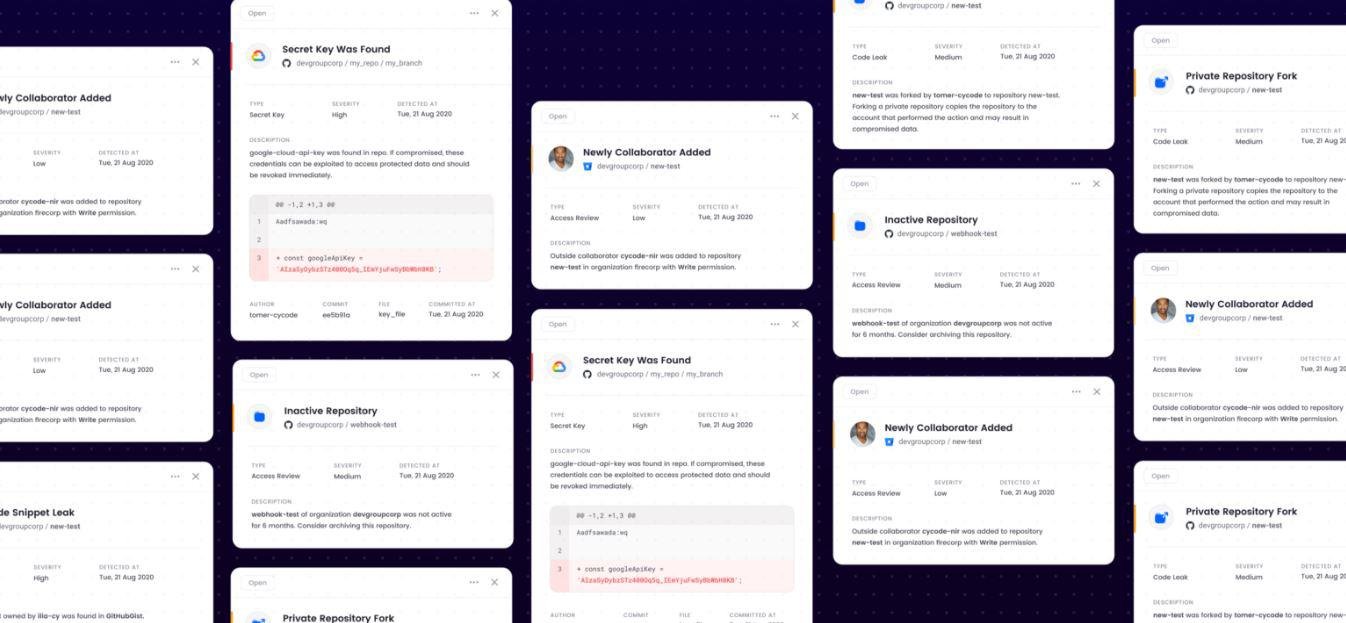
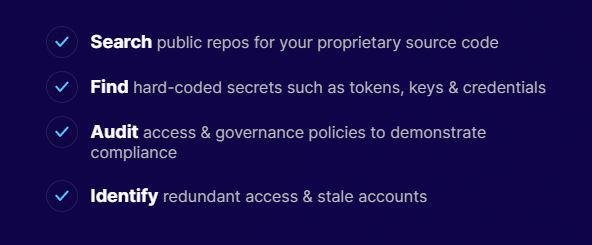
A comprehensive solution for ensuring security, governance, and pipeline integrity across all development tools and infrastructure is essential. Strengthen your source control management systems (SCM) by detecting secrets and leaks, while also safeguarding against code tampering. Examine your CI/CD configurations and Infrastructure-as-Code (IaC) for any security vulnerabilities or misconfigurations. Track any discrepancies between production systems’ IaC setups to thwart unauthorized code alterations. It's crucial to prevent developers from accidently making proprietary code public in repositories; this includes fingerprinting code assets and proactively identifying potential exposure on external sites. Maintain an inventory of assets, enforce stringent security policies, and easily showcase compliance throughout your DevOps ecosystem, whether it operates in the cloud or on-premises. Regularly scan IaC files for security flaws, ensuring alignment between specified IaC configurations and the actual infrastructure in use. Each commit or pull/merge request should be scrutinized for hard-coded secrets to prevent them from being merged into the master branch across all SCM platforms and various programming languages, thereby enhancing overall security measures. Implementing these strategies will create a robust security framework that supports both development agility and compliance.
API Access
Has API
No
API Access
Has API
No



Integrations
Amazon Web Services (AWS)
Yes
AWS CodePipeline
Yes
Axonius
No
CircleCI
No
Cobalt
No
Databricks
No
Flexport
No
GitHub
No
GitLab
No
Google Cloud Platform
No
Integrations
Amazon Web Services (AWS)
Yes
AWS CodePipeline
No
Axonius
Yes
CircleCI
Yes
Cobalt
Yes
Databricks
Yes
Flexport
Yes
GitHub
Yes
GitLab
Yes
Google Cloud Platform
Yes
Pricing Details
No price information available.
Free Trial
No
Free Version
No
Pricing Details
No price information available.
Free Trial
Yes
Free Version
No
Deployment
Web-Based
Yes
On-Premises
Yes
iPhone App
No
iPad App
No
Android App
No
Windows
No
Mac
No
Linux
No
Chromebook
No
Deployment
Web-Based
Yes
On-Premises
Yes
iPhone App
No
iPad App
No
Android App
No
Windows
No
Mac
No
Linux
No
Chromebook
No
Customer Support
Business Hours
Yes
Live Rep (24/7)
Yes
Online Support
Yes
Customer Support
Business Hours
No
Live Rep (24/7)
No
Online Support
Yes
Types of Training
Training Docs
Yes
Webinars
Yes
Live Training (Online)
No
In Person
Yes
Types of Training
Training Docs
Yes
Webinars
Yes
Live Training (Online)
Yes
In Person
No
Vendor Details
Company Name
Amazon
Founded
1994
Country
United States
Website
aws.amazon.com/es/products/developer-tools/
Vendor Details
Company Name
Cycode
Founded
2019
Country
Israel
Website
cycode.com
Product Features
Application Development
Access Controls/Permissions
No
Code Assistance
No
Code Refactoring
No
Collaboration Tools
No
Compatibility Testing
No
Data Modeling
No
Debugging
No
Deployment Management
No
Graphical User Interface
No
Mobile Development
No
No-Code
No
Reporting/Analytics
No
Software Development
No
Source Control
No
Testing Management
No
Version Control
No
Web App Development
No
DevOps
Approval Workflow
No
Dashboard
No
KPIs
No
Policy Management
No
Portfolio Management
No
Prioritization
No
Release Management
No
Timeline Management
No
Troubleshooting Reports
No
Product Features
Application Security
Analytics / Reporting
No
Open Source Component Monitoring
No
Source Code Analysis
No
Third-Party Tools Integration
No
Training Resources
No
Vulnerability Detection
No
Vulnerability Remediation
No
Cybersecurity
AI / Machine Learning
No
Behavioral Analytics
No
Endpoint Management
No
IOC Verification
No
Incident Management
No
Tokenization
No
Vulnerability Scanning
No
Whitelisting / Blacklisting
No
DevOps
Approval Workflow
No
Dashboard
No
KPIs
No
Policy Management
No
Portfolio Management
No
Prioritization
No
Release Management
No
Timeline Management
No
Troubleshooting Reports
No

