Average Ratings 8 Ratings
Average Ratings 0 Ratings
Similar Products
-
Process StreetProcess Street is the Compliance Operations Platform built for teams that need to move fast without breaking standards. It combines document control, workflow automation, and AI-powered oversight in a single system so every policy is followed, every step is tracked, and every audit is effortless. Unlike legacy GRC tools or static SOP docs, Process Street turns compliance into a living system. Policies are documented in governed, version-controlled Pages. Those policies are executed through dynamic workflows with built-in task assignment, approvals, and forms. Every action is logged, monitored, and optimized in real time by Cora, our AI compliance agent. Used across industries like financial services, real estate, healthcare, and manufacturing, Process Street helps teams automate employee onboarding, streamline audits, manage policy updates, enforce vendor reviews, and run critical processes at scale. No code required. No micromanagement. Just proof that work gets done right, every time. Companies like Salesforce, Colliers, Drift, and Hartford Healthcare trust Process Street to eliminate busywork, improve operational visibility, and reduce compliance risk across the business. With native integrations, role-based access, audit trails, and ISO-aligned workflows, it is the platform that makes compliance a competitive advantage. From onboarding to audits, Process Street is how high-stakes teams enforce standards, automate execution, and prove compliance by default.
-
Foxit Document Workflow APIsFoxit delivers a robust set of cloud-native APIs that enable organizations to automate and modernize document-driven workflows at scale. Built on flexible REST architecture, these APIs allow developers to seamlessly create, convert, extract, sign, and display documents within their own applications—improving efficiency while reducing manual processes. The Foxit PDF Services API handles large-scale PDF processing, including conversion, extraction, optimization, and redaction. The Document Generation API streamlines the production of personalized PDFs and DOCX files using dynamic templates and live business data. The Foxit eSign API integrates secure, legally binding eSignature workflows with audit tracking and compliance capabilities. The PDF Embed API provides customizable in-app document viewing with support for annotations, forms, and secure user access. Combined, Foxit APIs give enterprises a secure and scalable platform for digital document automation and workflow transformation.
-
LALAL.AIAny audio or video can be extracted to extract vocal, accompaniment, and other instruments. High-quality stem cutting based on the #1 AI-powered technology in the world. Next-generation vocal remover and music source separator service for fast, simple, and precise stem removal. You can remove vocal, instrumental, drums and bass tracks, as well as acoustic guitar, electric guitar, and synthesizer tracks, without any quality loss. You can start the service free of charge. Upgrade to get more files processed and faster results. Only for personal use. Move to the next level. You can process thousands of minutes of audio and/or video. This software is suitable for both personal and business use. Each LALAL.AI package has a limit on the amount of audio/video that can be split. The package minute limit is deducted from each file that has been fully split. You can split as many files you like, provided their total length does not exceed the minute limit.
-
MobiPDF (formerly PDF Extra)MobiPDF (formerly PDF Extra) is an intuitive reader and editor that allows you to read, edit, create, OCR, organize, annotate, fill and sign, convert, and share any PDF. This makes MobiPDF an excellent choice for users seeking a budget-friendly alternative to Adobe Acrobat Pro. HERE’S WHAT YOU GET WITH MOBIPDF: Multiple Page View Modes: Enjoy a distraction-free "Read Mode". Advanced Editing Tools: Experience a Word-like PDF editing environment. Two-Way Conversions: Convert PDFs to and from Word, Excel, PowerPoint, or image formats. OCR Support: Make scanned documents searchable. Markup Tools: Highlight, comment, strikethrough, stamp, and more to enhance your documents. Effortless PDF Organizer: Reorder, compress, split, and combine PDFs with ease. Sign & Secure: Add signatures, create and fill forms, and protect your PDFs with passwords, encryption, and digital certificates. Offline Mode: Work freely on your projects, even offline. Seamless translation: One-click translate any PDF into 50+ languages.
-
WrikeWrike is a powerful work management platform that gives cross-functional teams full visibility into complex projects. Our cloud-based collaboration software software is trusted by 20,000+ leading companies around the world, including tech giants such as Fitbit and Siemens. Wrike boasts a wide range of award-winning features, including dynamic request forms, automated workflows, cross-tagging, custom item types, and 400+ app integrations. Work smarter with Work Intelligence™: our advanced communication software that offers voice commands, smart replies, and document processing. We also offer tailor-made templates to help teams kick-start Agile projects and tick every box for compliance. As well as 99.9% uptime, our enterprise-grade security offers single sign-on, role-based access control, and continuous data backup. For extra peace of mind, you can use the Wrike Lock add-on and gain full ownership of your master encryption key. Wrike has been proven to make organizational processes 40% more efficient, eliminating time-consuming admin work and reducing costs across the board. Discover how it can benefit your team — start your free two-week trial today.
-
optivalue.aiThe sovereign AI that turns every answer into lasting expertise. Cut response times by up to 90%. Optivalue.ai automates information discovery and drafting, freeing experts for the high-impact personalization that wins bids. It acts as an expert librarian for your knowledge base: submit a questionnaire — RFP, audit, security or compliance — and get a complete, source-verified draft in minutes. Every answer is built on 89 Domain-Specific Language Models specialized by function and industry, not a generic LLM. Each answer carries a 0-100 confidence score and precise source citations (document, page, timestamp) for full traceability. When no source supports an answer, Optivalue.ai says "I don't know" rather than hallucinate. You don't just answer correctly — you prove it. It's an engine of progress for your organization. Optivalue.ai runs a gap analysis to identify weaknesses in your documentation. Following the recommendations strengthens your internal documents and builds lasting expertise across the organization. Your data stays yours: a private AI per client, never shared, deployed on-premise or in a sovereign cloud. Enterprise-grade security, compliant with GDPR, ISO 27001, HIPAA, SOC 2 and FedRAMP. All plans include unlimited users and unlimited projects. Start your 14-day free trial — no credit card, no commitment. Trusted by L'Oréal, Stellantis, Thales Alenia Space, Exaion (EDF Group), Equans and Mango. Winner of the European Sovereignty Prize 2026 (AI category).
-
PropelPropel is a modern, AI-powered cloud platform built for how manufacturers work today. It unifies Product Lifecycle Management (PLM), Quality Management System (QMS), and Product Information Management (PIM) into one intelligent system, giving teams a connected, always-accurate view of their products. With AI embedded across the platform through Propel One, manufacturers can automate routine work, surface insights faster, and make better decisions with confidence. AI continuously learns from product data to proactively flag risks, highlight trends, and guide next best actions across teams. Instead of relying on spreadsheets, siloed tools, and manual handoffs, teams manage product data, changes, and quality processes in a single governed environment with full traceability. Propel creates a true digital product record that spans design, development, manufacturing, commercialization, and continuous improvement. Built-in workflows standardize change management, streamline quality events, and support compliance without slowing teams down. Trusted by medical device, high tech, and industrial manufacturers, Propel helps organizations reduce errors, shorten cycle times, and improve collaboration across engineering, quality, operations, supply chain, and product teams. The result is faster launches, higher product quality, and a more resilient foundation for growth as products and processes become more complex. Propel has been recognized by Deloitte as a fast-growing technology company and named to the Inc. 5000 list of fastest-growing private companies, reflecting strong customer adoption and momentum helping manufacturers modernize how they build, manage, and deliver products. Designed to scale with growing products, teams, and regulatory demands.
-
MOVEitProgress MOVEit software is a Managed File Transfer (MFT) solution designed to help organizations securely control, monitor and govern the movement of sensitive and mission critical data. As file transfer volumes grow and regulatory requirements become more demanding, many organizations face operational risk from fragmented tools, limited visibility and manual processes. MOVEit software addresses these challenges by centralizing file transfer activity into a single, controlled environment that improves oversight, strengthens security and promotes operational consistency. Progress MOVEit Transfer consolidates internal file transfers, external data exchanges and ad-hoc sharing into one managed system, reducing complexity while improving control over business critical data movement. The platform is well suited for organizations that handle sensitive data and operate in regulated environments, supporting requirements such as PCI DSS, HIPAA and GDPR. Progress MOVEit Cloud extends these capabilities through a fully managed, auditor certified SaaS deployment that delivers the same security, control and governance standards as on premises deployments, without the overhead of maintaining infrastructure. The cloud service provides documented controls, strong encryption, detailed audit logging, role based access enforcement, built in resiliency and continuous monitoring. Progress MOVEit Automation provides no code file transfer automation, simplifying complex, multi step file transfer processes that would otherwise rely on custom scripts. By reducing manual effort and standardizing file movement, MOVEit Automation helps minimize errors, accelerate partner onboarding and improve operational efficiency while maintaining strong security and compliance controls.
-
Files.com6,000+ companies trust Files.com to automate and secure business critical transfers. We obsess about security, compliance, reliability, and performance so your critical business processes just work every time. Easily manage any transfer flow without writing scripts or code, and onboard workloads and partners effortlessly. We support standard file transfer protocols (FTP, SFTP, AS2) for working with external partners and also provide native apps for high performance internal transfers. As a fully Cloud-Native SaaS, there are no servers for you to buy or maintain, there is no installation required, and high availability and redundancy are built in and free. Our InfoSec Program is audited annually by Kirkpatrick Price, a leading information security CPA firm. Our audit covers the scope of the entire Files.com business (not just datacenter operations) and names Files.com specifically. Beware of smaller competitors who try to pass off someone else’s audit as their own. Technical capabilities include encryption at-rest and in-transit, four types of two-factor authentication, nine enterprise identity (SSO) integrations, configurable password and session policies, and a perfect “A+” score from Qualys SSL Labs.
-
FilerevFilerev is a powerful tool that helps you easily find and manage hidden files, duplicate files, large files, and oversized folders, ensuring a streamlined and clutter-free digital workspace. Key features include advanced scanning technology that identifies the unorganized files taking up the most space and cluttering your Google Drive. Filerev enhances productivity by saving time and reducing the frustration of manual file organization. The custom filters and bulk delete tool give you complete control over finding and removing unwanted files in your account. The storage analyzer lets you browse your folders by size to see where the space is being used in your Google Drive. Whether you're an individual, a small business, or a large enterprise, Filerev offers robust solutions tailored to your needs. Visit filerev.com to discover how Filerev can transform your Google Drive experience and boost efficiency.
Description
AI File Pro revolutionizes the way we manage documents by converting disorganized files into an intelligent database that is easily searchable through advanced AI technology. Users can effortlessly upload documents from various sources, enabling the software to automatically perform text extraction using OCR, analyze the material, and categorize the files accordingly. A standout feature of this platform is its conversational search capability; for instance, by asking "Which contracts expire in Q1?", users receive direct answers with highlighted references rather than generic file lists. The AI exhibits a strong understanding of context, timeframes, and legal terminology, achieving over 95% accuracy in its interpretations. Additionally, it offers recommendations for logical folder organization based on the content analyzed and allows previews of proposed changes prior to implementation. To ensure enterprise-level security, the software includes role-based access controls, comprehensive audit trails, and compliance with SOC 2 and GDPR standards. Consequently, users can locate information up to 15 times faster, and the pricing model is flexible, starting at $15 for 1GB, making it accessible for various organizational needs. This innovative approach not only enhances productivity but also empowers teams to manage their information more effectively.
Description
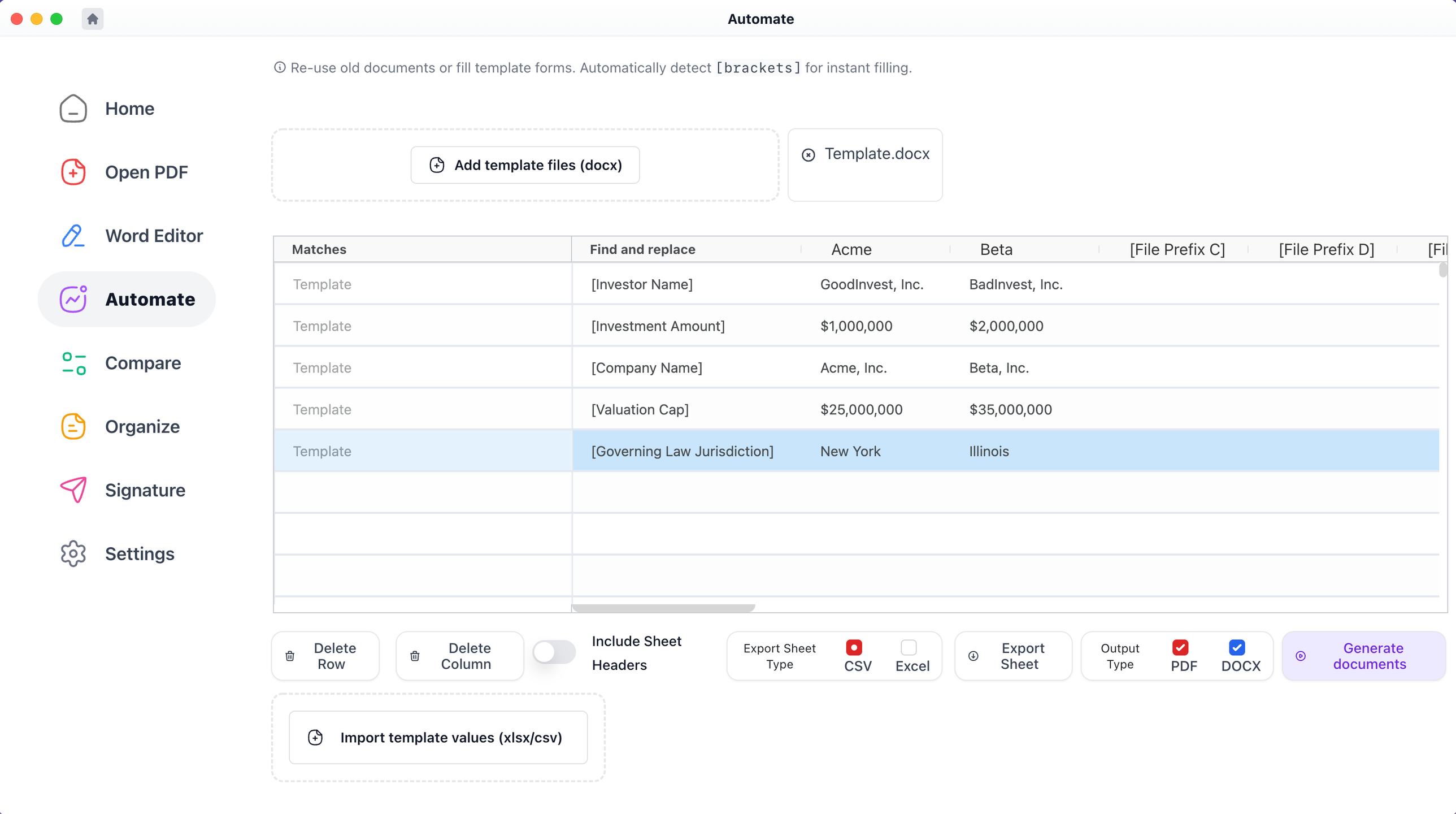
With Macro, users can effortlessly click on any defined term, section, chapter, or clause to access immediate context. You can also compare various files, merge edits from multiple Word and PDF documents into a single version, produce bulk blacklines, and make comparisons with templates. It allows for the generation of files from templates, creating one or several documents simultaneously from a spreadsheet, and enables the combination of PDF and Word files. This service is available for free on both Windows and Mac platforms. From an IT and support standpoint, Macro closely resembles the desktop versions of Adobe Acrobat and Microsoft Word, but it includes extra features tailored for financial and legal processes. This IT documentation unfolds in a chronological order. Additionally, when you click on any defined term highlighted in blue, a popup appears displaying the definition as outlined within the document, and you can access nested popups that facilitate an in-depth understanding of your document without limitation. This functionality significantly enhances user experience, making document navigation more intuitive and efficient.
API Access
Has API
API Access
Has API
Screenshots View All
No images available

Integrations
Microsoft Word
Pricing Details
$15/GB used
Free Trial
Free Version
Pricing Details
$49 per user per month
Free Trial
Free Version
Deployment
Web-Based
On-Premises
iPhone App
iPad App
Android App
Windows
Mac
Linux
Chromebook
Deployment
Web-Based
On-Premises
iPhone App
iPad App
Android App
Windows
Mac
Linux
Chromebook
Customer Support
Business Hours
Live Rep (24/7)
Online Support
Customer Support
Business Hours
Live Rep (24/7)
Online Support
Types of Training
Training Docs
Webinars
Live Training (Online)
In Person
Types of Training
Training Docs
Webinars
Live Training (Online)
In Person
Vendor Details
Company Name
FabSoft
Founded
1991
Country
United States
Website
FabSoft.com
Vendor Details
Company Name
Macro
Founded
2020
Country
United States
Website
www.macro.com
Product Features
Product Features
Document Generation
Batch Processing
Collaboration
Digital Signature
Interaction Tracking
Multiple Output Formats
Templates
PDF Editors
Access Controls / Permissions
Annotations
Commenting / Notes
Compare Side-by-Side
Customizable Branding
Delete Pages
Electronic Signature
Forms Management
Full Text Search
Merge / Append
Offline Access
Optical Character Recognition (OCR)
Rearrange Pages
Rotate Pages
Watermarking
