
The IT burden nobody planned for
Email signatures were never supposed to become a complex infrastructure topic.
For years, they were treated as a minor configuration task: add a logo, insert a disclaimer, standardize contact information, and move on.
But modern Microsoft 365 environments changed the equation.
Distributed workforces, hybrid infrastructures, multiple devices, Outlook rendering inconsistencies, compliance requirements, and growing brand expectations have turned email signatures into a surprisingly difficult operational challenge for IT teams… sigh.
And in most organizations, the problem keeps resurfacing.
Users manually edit signatures. Legal disclaimers become outdated. Logos break between Outlook desktop and mobile. Marketing requests banner updates. IT receives tickets for issues that should not require manual intervention in the first place.
What used to be a formatting detail has quietly become a governance issue, not just for marketing, also for IT.
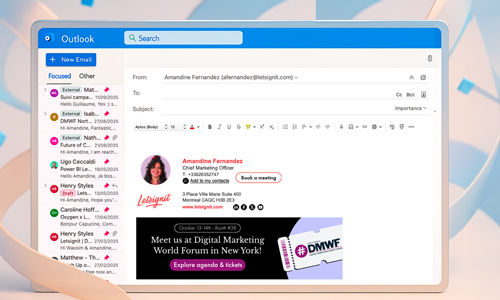
Why Microsoft 365 native tools break at scale
Microsoft 365 provides basic mechanisms for managing disclaimers and signatures, namely through Exchange Online mail flow rules. For smaller environments, this may be enough.
At enterprise scale, however, limitations appear quickly.
Exchange transport rules were designed for compliance and mail processing; not for dynamic signature management across thousands of users and devices.
The issues are well known to administrators:
- Inconsistent rendering between Outlook desktop, Outlook Web App, and mobile clients
- No true user-level signature experience
- Limited personalization capabilities
- Complex formatting behavior in replies and forwards
- Difficulties managing multi-brand or multi-entity environments
- Limited segmentation and targeting logic
- Difficulty to manage and deploy the right template at scale
Organizations often try to compensate through a mix of local Outlook signatures, transport rules, PowerShell scripts, and manual governance processes.
The result is usually fragmentation.
And fragmentation becomes expensive very quickly—not only operationally, but also from a governance and identity perspective.
Microsoft itself acknowledges many of these limitations in its native disclaimer approach for Exchange Online.
This is precisely where platforms like Letsignit come in: not to replace Microsoft 365, but to extend its governance capabilities with centralized management, native Outlook integration, and real-time deployment across users and devices.
Outlook signatures are no longer just formatting
In enterprise environments, email signatures increasingly sit at the intersection of identity, compliance, and communication governance.
Every outgoing email carries organizational identity:
- employee names and titles
- phone numbers
- legal disclaimers
- certifications
- company branding
- external links
When this information becomes inconsistent, organizations lose control over a highly visible communication layer.
For regulated industries, this creates additional challenges. Financial services, healthcare, legal firms, and multinational organizations often require strict control over disclaimers and identity presentation across all outbound communication.
At the same time, organizations face growing exposure to phishing and business email compromise (BEC) attacks. While signatures themselves are not a security control, inconsistent identity formatting can weaken trust signals across external communications.
What looks like a small operational issue can quickly become a broader governance problem.
This is why many organizations are moving toward centralized email signature governance platforms like Letsignit, capable of synchronizing user data directly from Microsoft Entra ID while enforcing standardized signatures across Outlook environments.
What IT teams actually need in 2026
The expectations around email signature management have evolved significantly.
Organizations no longer need static signatures deployed once and forgotten. They need centralized governance capable of operating across complex cloud environments. Just like Letsignit offers.
In practice, this means:
- centralized template management
- Microsoft Entra ID synchronization
- cross-device consistency
- role-based signature assignment
- support for hybrid Microsoft 365 environments
- standardized legal disclaimer enforcement
- auditability and administrative control
- minimal dependency on local user configuration
This is not only a theoretical governance issue. For companies operating at scale, the value is also very practical: users should not have to manage signatures themselves, and IT should not have to intervene every time something changes.
As Alexandre Desgranges, Technical Director at BDO France, explains in a Letsignit customer story, “users don’t have to think about their email signature. The signature and banner are added automatically.” For an organization with more than 2,000 employees, that level of automation is what turns signature management from a recurring admin burden into a governed process.
Where business value starts to appear
Once governance and deployment are centralized, additional use cases naturally emerge.
Marketing teams can activate banners for webinars, product launches, recruitment campaigns, or events directly within employee signatures. Internal communications teams can distribute messages organization-wide without additional tooling.
Because the infrastructure layer is already standardized, activation becomes operationally simple.
More advanced platforms also introduce analytics capabilities, allowing organizations to measure clicks and engagement generated through signature banners.
In many environments, campaigns embedded in signatures generate click-through rates between 2% and 8% without requiring dedicated email sends.
The business value is real—but it only becomes possible once the technical foundations are solved first.
From signature management to governed communication
For IT teams, the challenge is no longer simply to create a consistent email signature.
It is to manage a communication layer that touches every employee, every device, and every external interaction — without adding complexity to the Microsoft 365 environment.
This is where Letsignit brings a different approach.
Letsignit centralizes email signature management while keeping IT in control of governance, deployment, and security. Signatures can be synchronized with Microsoft Entra ID, assigned by role, department, entity, or location, and updated across users without relying on manual configuration or local edits.
For IT teams, this means fewer tickets, fewer inconsistencies, and a cleaner governance model.
For business teams, it means email signatures can finally become usable: not as static footers, but as managed communication spaces for campaigns, legal messages, internal announcements, security reminders, or event promotion.
The value of Letsignit is not only that it standardizes signatures.
It turns a historically unmanaged layer into a controlled, scalable, and measurable communication channel.
The technology itself is simple to understand.
The impact comes from bringing governance, consistency, and activation into the same platform.
For a more technical customer perspective, this Vinci Energies customer video is worth watching. Paul Martory, Microsoft Office 365 system administrator at Vinci Energies, shares how Letsignit fits into a large Microsoft environment from an IT point of view. It is a useful complement to the article because it shows the same issue in practice: email signature management is not only about design or marketing activation, but also about deployment, administration, and long-term governance at scale.
Related Categories