Microsoft

Bing Users Claim a ChatGPT-assisted Bing Temporarily Appeared Friday (theverge.com) 31

Several Bing users say a ChatGPT-assisted version of Bing "mysteriously appeared (and disappeared) earlier today," the Verge reported Friday: Student and designer Owen Yin reported seeing the "new Bing" on Twitter this morning. He told The Verge via Twitter DM that he has Bing set as his homepage on Microsoft's Edge browser and the new UI just loaded up. "Didn't do anything to find it," said Yin. "After a couple of minutes it stopped working ... Jaw dropped when I realized what I was looking at...!" Yin was able to briefly test the system and shared further details about the integration in a blog post on Medium. He noted that the chatbot could not only answer questions but ask them in a conversational manner.

The new Bing can also apparently cite its sources. This is an important feature, as the inability of language models like ChatGPT to describe where their information is sourced from makes them less reliable.

Yin isn't the only one who says they encountered a new Bing today either. At least two others reported receiving access to the updated search engine on Twitter before it disappeared.

Screenshots of the AI-augmented Bing show a new "chat" option appearing in the menu bar next to "search." Select it and you're taken to a chat interface that says, "Welcome to the new Bing: Your AI-powered answer engine."

The Verge adds that they were "unable to verify the authenticity of these screenshots and Microsoft declined to comment on the validity of these apparent leaks."
Chrome

Google Is Working On Blink-Based iOS Browser, Contrary To Apple's WebKit Rule (theregister.com) 73

Longtime Slashdot reader Dotnaught writes: "Google's Chromium developers have begun work on an experimental web browser for Apple's iOS using the search giant's Blink engine," reports The Register. "That's unexpected because the current version of Chrome for iOS uses Apple's WebKit rendering engine under the hood. Apple requires every iOS browser to use WebKit and its iOS App Store Review Guidelines state, 'Apps that browse the web must use the appropriate WebKit framework and WebKit Javascript.'"

Google insists this is an experiment and isn't intended for release. But the stripped-down, Blink-based browser could be preparation for European competition rules that look like they will require Apple to stop requiring that other browser makers use its WebKit engine.
"This is an experimental prototype that we are developing as part of an open source project with the goal to understand certain aspects of performance on iOS," said a Google spokesperson. "It will not be available to users and we'll continue to abide by Apple's policies."
Google

ChromeOS and Microsoft 365 Will Start Playing Nicer With Each Other This Year (arstechnica.com) 13

An anonymous reader shares a report: Google and Microsoft don't always take pains to make sure their products work great together -- Google originally declared Microsoft's Chromium-based Edge browser "not supported" by the Google Drive web apps; Microsoft is always trying to make you use Bing -- but it looks like Google's ChromeOS will start working a bit better with the Microsoft 365 service later this year. Google says ChromeOS will add a "new integration" for Microsoft 365, making it easier to install the app and adding built-in support for OneDrive in ChromeOS' native Files app.

This should allow users to search for and access OneDrive files the same way they get to local files, or files stored in their Google Drive account. The integration will be added in "the coming months," and users in ChromeOS' dev and beta channels will be able to access it before it rolls out to all ChromeOS users later this year. ChromeOS users can currently access OneDrive and other Microsoft 365 services through their web interfaces or Android apps installed via the Google Play Store, but they don't integrate with the built-in ChromeOS Files app the way that Google Drive does. This integration will help close that gap for people who, for example, use Google products at home but Microsoft products at work or vice versa.

Technology

Apple Brings Mainland Chinese Web Censorship To Hong Kong (theintercept.com) 35

An anonymous reader shares a report: When Safari users in Hong Kong recently tried to load the popular code-sharing website GitLab, they received a strange warning instead: Apple's browser was blocking the site for their own safety. The access was temporarily cut off thanks to Apple's use of a Chinese corporate website blacklist, which resulted in the innocuous site being flagged as a purveyor of misinformation. Neither Tencent, the massive Chinese firm behind the web filter, nor Apple will say how or why the site was censored. The outage was publicized just ahead of the new year. On December 30, 2022, Hong Kong-based software engineer and former Apple employee Chu Ka-cheong tweeted that his web browser had blocked access to GitLab, a popular repository for open-source code. Safari's "safe browsing" feature greeted him with a full-page "deceptive website warning," advising that because GitLab contained dangerous "unverified information," it was inaccessible. Access to GitLab was restored several days later, after the situation was brought to the company's attention.

The warning screen itself came courtesy of Tencent, the mammoth Chinese internet conglomerate behind WeChat and League of Legends. The company operates the safe browsing filter for Safari users in China on Apple's behalf -- and now, as the Chinese government increasingly asserts control of the territory, in Hong Kong as well. Apple spokesperson Nadine Haija would not answer questions about the GitLab incident, suggesting they be directed at Tencent, which also declined to offer responses. The episode raises thorny questions about privatized censorship done in the name of "safety" -- questions that neither company seems interested in answering: How does Tencent decide what's blocked? Does Apple have any role? Does Apple condone Tencent's blacklist practices?

GNOME

83% of GNOME Users Installed Extensions, Survey Shows (omglinux.com) 86

Last summer GNOME invited people to voluntarily run the tool gnome-info-collect on their systems to send back (non-sensitive/non-identifiable) data about their system configurations. 2,560 people ran the tool, and they're now releasing the data.

Here's the distribution of distros for all 2,560 respondents:

Fedora: 1,376 (54.69%)
Arch: 469 (18.64%)
Ubuntu: 267 (10.61%)
Manjaro: 140 (5.56%)
EndeavourOS: 66 (2.62%)
Debian: 44 (1.75%)
openSUSE: 38 (1.51%)
Pop! 38 (1.51%)
Other: 78 (3.10%)


And the breakdown of hardware manufacturers (top four):

Lenovo: 516 (23.54%)
Dell: 329 (15.01%)
ASUS: 261 (11.91%)
HP: 223 (10.17%)


The site OMG! Linux pointed out that 90% of systems had Flatpak installed — (though it's enabled by default on Fedora, which was 54.69% of all the respondents). Some other interesting stats they noticed: - Most common default browser: Firefox (73.14%), Chrome (11.64%), Brave (4.76%). [Microsoft Edge was the default browser on 37 systems (1.51%) ]

- 83% of users have at least one (non-default) GNOME extension installed
- 'App Indicator' is the most popular extension (by 43% of those using extensions)

- GSConnect, User Themes, and Dash to Panel/Dock also widely used

- Most popular desktop apps: GIMP (58.48%), VLC (53.71%), Steam (53.40%)


[...] The popularity of GNOME extensions will surprise no-one. It is a solid indicator that the existing GNOME extension system is good at doing what it's there to: let users augment and extend their system in the ways they want.

GNOME's report adds that "it's exciting to see the popularity of new GNOME apps like Flatseal, To Do, Bottles, and Fragments."

One other interesting stat from their report: 55% of the participants were using Online Accounts, with Google the most common one added, followed by Nextcloud and Microsoft. But "Some of the account types had very little usage at all, with Foursquare, Facebook, Media Server, Flickr and Last.fm all being active on less than 1% of systems."
Apple

Apple TV Requires You To Have an iPhone To Accept New iCloud Terms and Conditions (9to5mac.com) 99

An anonymous reader shares a report: A viral tweet today highlights a somewhat frustrating limitation with the Apple TV software. As of a recent software update, tvOS expects users have access to an iPhone or iPad in order to do things like accept new iCloud terms and conditions, or update their Apple ID settings. Although most people who use the Apple TV 4K box are deeply ensconced in the Apple ecosystem, this doesn't apply to everyone. Up until recently, the Apple TV could be used essentially independently. It was assumed to be a standalone device, not an accessory. Not so much, anymore. Moreover, these changes mean Apple TV users who have Macs -- but no personal iOS devices -- are also left in the lurch.

Most of the Apple TV can be used without needing access to other Apple hardware. You can set up the Apple TV from scratch completely independently, install apps, and make purchases. Typical Apple ID management duties can be performed from a web browser on a PC, if occasionally necessary. However, there are some tasks -- seemingly more prevalent than ever as of tvOS 16 -- that the Apple TV expects you to do on an iOS device signed in with the same account. This viral tweet from @hugelgupf showcases perhaps the most egregious example: accepting new iCloud terms and conditions requires an iOS device.

Piracy

Major Private Torrent Sites Have a Security Disaster to Fix Right Now 30

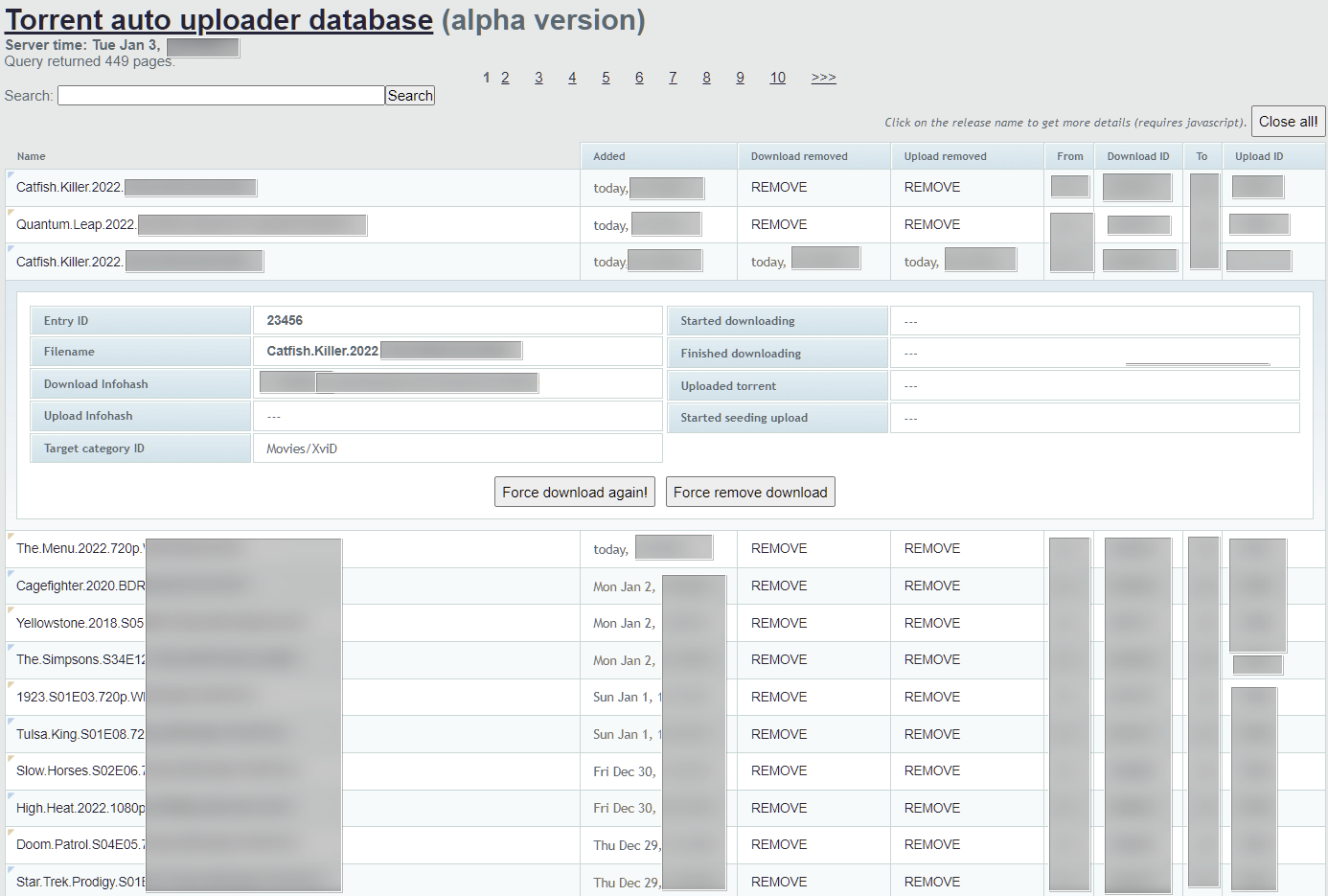
At least three major torrent sites are currently exposing intimate details of their operations to anyone with a web browser. TorrentFreak understands that the sites use a piece of software that grabs brand-new content from other sites before automatically uploading it to their own. A security researcher tried to raise the alarm but nobody will listen. From the report: To get their hands on the latest releases as quickly as possible, [private torrent sites, or private trackers as they're commonly known] often rely on outside sources that have access to so-called 0-Day content, i.e, content released today. The three affected sites seem to have little difficulty obtaining some of their content within minutes. At least in part, that's achieved via automation. When outside suppliers of content are other torrent sites, a piece of software called Torrent Auto Uploader steps in. It can automatically download torrents, descriptions, and associated NFO files from one site and upload them to another, complete with a new .torrent file containing the tracker's announce URL. The management page [here] has been heavily redacted because the content has the potential to identify at least one of the sites. It's a web interface, one that has no password protection and is readily accessible by anyone with a web browser. The same problem affects at least three different servers operated by the three sites in question.

Torrent Auto Uploader relies on torrent clients to transfer content. The three sites in question all use rTorrent clients with a ruTorrent Web UI. We know this because the researcher sent over a whole bunch of screenshots and supporting information which confirms access to the torrent clients as well as the Torrent Auto Uploader software. The image [here] shows redactions on the tracker tab for good reason. In a regular setup, torrent users can see the names of the trackers coordinating their downloads. This setup is no different except that these URLs reference three different trackers supplying the content to one of the three compromised sites.

Rather than publish a sequence of completely redacted screenshots, we'll try to explain what they contain. One begins with a GET request to another tracker, which responds with a torrent file. It's then uploaded to the requesting site which updates its SQL database accordingly. From there the script starts checking for any new entries on a specific RSS feed which is hidden away on another site that has nothing to do with torrents. The feed is protected with a passkey but that's only useful when nobody knows what it is. The same security hole also grants direct access to one of the sites tracker 'bots' through the panel that controls it. Then there's access to 'Staff Tools' on the same page which connect to other pages allowing username changes, uploader application reviews, and a list of misbehaving users that need to be monitored. That's on top of user profiles, the number of torrents they have active, and everything else one could imagine. Another screenshot featuring a torrent related to a 2022 movie reveals the URL of yet another third-party supplier tracker. Some basic queries on that URL lead to even more torrent sites. And from there, more, and more, and more -- revealing torrent passkeys for every single one on the way.
Firefox

You Can Hook Your MIDI Keyboard Up To a Website With Firefox 108 (theregister.com) 79

A new feature in Firefox version 108 that may please musicians is the improved support for the Web MIDI API. "The MIDI standard is very close to a remarkable 40 years old, and Web MIDI does just what the name implies: it allows web apps to send and receive MIDI signals to and from musical instruments," reports The Register. "In principle this will allow sequencer apps to be implemented in Javascript." From the report: Amusingly, the last time The Reg mentioned Web MIDI, it was because Apple was taking it off Safari users, allegedly because of security concerns. Firefox 108 addresses that with a new security mechanism for preventing, and optionally permitting, apps inside browser tabs to access hardware resources -- in this instance, your MIDI ports. No, this does not mean that you can listen to CANYON.MID directly within Firefox. .MID files are not the same as General MIDI. But if you are nostalgic for that for some reason, help is at hand. A full list of features and changes can be found here.
Iphone

Apple Fixes 'Actively Exploited' Zero-Day Affecting Most iPhones (techcrunch.com) 38

An anonymous reader quotes a report from TechCrunch: Apple has confirmed that an iPhone software update it released two weeks ago fixed a zero-day security vulnerability that it now says was actively exploited. The update, iOS 16.1.2, landed on November 30 and rolled out to all supported iPhones -- including iPhone 8 and later -- with unspecified "important security updates."

In a disclosure to its security updates page on Tuesday, Apple said the update fixed a flaw in WebKit, the browser engine that powers Safari and other apps, which if exploited could allow malicious code to run on the person's device. The bug is called a zero-day because the vendor is given zero days notice to fix the vulnerability. Apple said security researchers at Google's Threat Analysis Group, which investigates nation state-backed spyware, hacking and cyberattacks, discovered and reported the WebKit bug.

Apple said in its Tuesday disclosure that it is aware that the vulnerability was exploited "against versions of iOS released before iOS 15.1," which was released in October 2021. As such, and for those who have not yet updated to iOS 16, Apple also released iOS and iPadOS 15.7.2 to fix the WebKit vulnerability for users running iPhones 6s and later and some iPad models. The bug is tracked as CVE-2022-42856, or WebKit 247562. It's not clear for what reason Apple withheld details of the bug for two weeks.

The Internet

Web Browsers Drop Mysterious Company With Ties To US Military Contractor (washingtonpost.com) 57

An anonymous reader quotes a report from the Washington Post: Major web browsers moved Wednesday to stop using a mysterious software company that certified websites were secure, three weeks after The Washington Post reported its connections to a U.S. military contractor. Mozilla's Firefox and Microsoft's Edge said they would stop trusting new certificates from TrustCor Systems that vouched for the legitimacy of sites reached by their users, capping weeks of online arguments among their technology experts, outside researchers and TrustCor, which said it had no ongoing ties of concern. Other tech companies are expected to follow suit.

The Post reported on Nov. 8 that TrustCor's Panamanian registration records showed the same slate of officers, agents and partners as a spyware-maker identified this year as an affiliate of Arizona-based Packet Forensics, which has sold communication interception services to U.S. government agencies for more than a decade. One of those contracts listed the "place of performance" as Fort Meade, Md., the home of the National Security Agency and the Pentagon's Cyber Command. The case has put a new spotlight on the obscure systems of trust and checks that allow people to rely on the internet for most purposes. Browsers typically have more than a hundred authorities approved by default, including government-owned ones and small companies, to seamlessly attest that secure websites are what they purport to be.
"Certificate Authorities have highly trusted roles in the internet ecosystem and it is unacceptable for a CA to be closely tied, through ownership and operation, to a company engaged in the distribution of malware," Mozilla's Kathleen Wilson wrote to a mailing list for browser security experts. "Trustcor's responses via their Vice President of CA operations further substantiates the factual basis for Mozilla's concerns."
Chromium

'The Arc Browser is the Chrome Replacement I've Been Waiting For' (theverge.com) 98

The Browser Company's Chromium-based Arc browser "isn't perfect, and it takes some getting used to," writes the Verge. "But it's full of big new ideas about how we should interact with the web — and it's right about most of them." Arc wants to be the web's operating system. So it built a bunch of tools that make it easier to control apps and content, turned tabs and bookmarks into something more like an app launcher, and built a few platform-wide apps of its own. The app is much more opinionated and much more complicated than your average browser with its row of same-y tabs at the top of the screen. Another way to think about it is that Arc treats the web the way TikTok treats video: not as a fixed thing for you to consume but as a set of endlessly remixable components for you to pull apart, play with, and use to create something of your own. Want something to look better or have an idea for what to do with it? Go for it.

This is a fun moment in the web browser industry. After more than a decade of total Chrome dominance, users are looking elsewhere for more features, more privacy, and better UI. Vivaldi has some really clever features; SigmaOS is also betting on browsers as operating systems; Brave has smart ideas about privacy; even Edge and Firefox are getting better fast. But Arc is the biggest swing of them all: an attempt to not just improve the browser but reinvent it entirely....

Right now, Arc is only available for the Mac, but the company has said it's also working on Windows and mobile versions, both due next year. It's still in a waitlisted beta and is still very much a beta app, with some basic features missing, other features still in flux, and a few deeply annoying bugs. But Arc's big ideas are the right ones. I don't know if The Browser Company is poised to take on giants and win the next generation of the browser wars, but I'd bet that the future of browsers looks a lot like Arc....

In a way, Arc is more like ChromeOS than Chrome. It tries to expand the browser to become the only app you need because, in a world where all your apps are web apps and all your files are URLs, who really needs more than a browser?

The article describes Arc as a power user tool with vertical sidebar combining bookmarks, tabs, and apps. (And sets of these can apparently be combined into different "spaces".) These are enhanced with a hefty set of keyboard shortcuts (including tab searching), along with built-in media controls for Twitch/Spotify/Google Meet (as well as a picture-in-picture mode).
BR. Arc even has a shareable, collaborative whiteboard app "Easel". And it also offers powerful features like the ability to rewrite how your browser displays any site's CSS. ("I have one that removes the Trending sidebar from Twitter and another that cleans up my Gmail page.")
Privacy

1Password Embraces a Passwordless Future (theverge.com) 40

1Password has announced that passkey support will be available to its customers in "early 2023," allowing users to securely log in to apps and websites without a password. The Verge reports: Passkeys are a passwordless login technology developed by the FIDO Alliance, whose members include most of the Big Tech companies. The tech allows users to replace traditional passwords with their device's own authentication -- such as an iPhone with Face ID -- offering greater security and protection since there's no password to steal or accidentally hand over via a phishing attack.

1Password claims its own variation, called Universal Sign On, will be superior to others by supporting multiple platforms and cross-platform syncing when it launches next year. By contrast, passkey support through companies like Apple is only built to seamlessly synchronize access on devices within the same ecosystem. A live demonstration of how passkeys will work is available for 1Password users using the latest version of its Chrome browser extension, alongside a video demo for those not using the service and a directory listing which websites, apps, and services are using passkeys for authentication. 1Password will bring full support for passkeys to its browser extension and desktop apps in early 2023, with mobile support to follow.

Software

Zoom Is Adding Email and Calendar Features (engadget.com) 16

At its Zoomtopia conference, the company announced a bunch of features that are coming to its platform, including two key ones for productivity: email and calendars. Engadget reports: You can connect third-party email and calendar services to Zoom and access them through the desktop app. The company says that can help save you time instead of having to switch between apps and perhaps needing to hunt for the right tab in your browser. Those on the Zoom One Pro or Zoom Standard Pro plans will be able to set up email accounts through the platform, and folks with certain plans have the option to use custom domains. You'll get up to 100GB of storage included. The key selling point is that messages sent directly between Zoom Mail Service users (i.e. those who use Zoom's email hosting services) will have end-to-end encryption. You'll also be able to send external emails that can expire and contain access-restricted links.

As for Zoom Calendar, there will be options to see which of your contacts has joined a meeting, and you can schedule Zoom voice and video calls in the app. Zoom's own calendar service will include the ability to book appointments. On the way in 2023 is a feature called Zoom Spots. The company describes this as a virtual coworking space where colleagues can stay more connected during the workday via video-first conversations. While the company didn't reveal too much detail about Zoom Spots in its blog post, there may be a downside as the feature could enable bosses to keep a closer eye on what their employees are doing.

Businesses will soon be able to employ Zoom Virtual Agent, a conversational AI and chatbot designed to help customers resolve issues. That tool will be available in early 2023. Other things in the pipeline include a way for developers to make money from the Zoom Apps Marketplace and a virtual coach to help sellers perfect their pitches. As for the core functions people know Zoom for, there's a feature on the way that connects team chats with in-meeting chats. You'll be able to carry the conversation from one to the other and back again to keep things flowing. The company is also looking to roll out translation options for team chats in 2023. In the near future, you'll be able to schedule a chat message to send at a later time.

Zoom Phone is coming to the web, which should be handy for many folks. A progressive web app will be available for ChromeOS too. Meanwhile, users will be able to use a one-click chat message as a response when they can't answer a call. As for Zoom Rooms, there will be a way for folks in one of those to join a Google Meet room and vice versa. Last, but by no means least, Zoom revealed a string of updates for meetings. The Smart Recordings feature uses AI to generate summaries, next steps and chapters to make archived meetings more digestible and help you get to the part you're looking for. There will be meeting templates that can automatically configure the right settings and a way to record videos with narration and screensharing that you can send to colleagues. On top of that, you'll have more avatar options, including the ability to use a Meta avatar.

Apple

Spotify Pulls Audiobook Purchases From iOS App After Apple Blocks Updates (theverge.com) 33

An update for Spotify's iOS app released Thursday had a big change for its audiobooks vertical -- and not for the better. The app no longer indicates how you can buy any of the audiobooks in its store, posing a major roadblock for its new business. Now when you go to make a purchase, the app displays a mostly empty screen saying, "Want to listen? You can't buy audiobooks in the app. We know, it's not ideal." There's no indication of where you might be able to buy the book. From a report: The update follows a statement from Spotify on Tuesday in which the audio streamer accused Apple of "choking competition" with its app rules for audiobook purchasing. It is worth noting that Apple also sells individual audiobooks through its Books app, which can be purchased in-app. When Spotify's audiobooks feature launched a month ago, users could not buy titles directly in the app, but they could tap a button that would email them a link to purchase the book on the web. Once the purchase was made, the title would become available for listening in the app. Now, users have to go to Spotify's audiobooks hub in a web browser or through the desktop app in order to make a purchase.
IT

DuckDuckGo's Privacy-Focused Mac Browser is Now Available for Public Beta Testing (theverge.com) 13

DuckDuckGo is rolling out its web browsing app for Mac users as an open beta test. Designed for privacy, the app was announced back in April as a closed beta, but is now available for all Mac users to try before its official public launch. From a report: The desktop browser includes the same built-in protections we've seen already featured in DuckDuckGo's mobile apps, combining DuckDuckGo's search engine, defenses against third-party tracking, cookie pop-up protection, and its popular one-click data clearing 'Fire Button.' Some additional features have been added to the browser (version 0.30) since its original announcement.

Now users can try Duck Player, a feature that protects users from targeted ads and cookies while watching YouTube content. Ads viewed within the Duck Player will not be personalized, which DuckDuckGo claims actually removed most YouTube ads as a result during testing. YouTube will still register your views, but content watched through Duck Player won't contribute to your YouTube advertising profile. Pinned tabs and a new bookmarks bar have been included to address feedback from early beta testing, as well as a way to view your locally stored browsing history. DuckDuckGo's Cookie Consent Pop-Up Manager is also available which works on about 50 percent of sites (with more to come) to automatically choose the most private option and spare users from the annoying pop-up messages. The app also lets you activate DuckDuckGo Email Protection on the desktop to better protect your inbox with email tracker blocking.

Windows

New Apple Services and Apps Are Rolling Out On Windows 11 and Xbox (arstechnica.com) 15

Today, Microsoft and Apple announced a number of deeper integrations of Apple services on both Windows PCs and Xbox game consoles, including Music and TV apps for both platforms and the ability to browse your iCloud Photo Library within the Windows 11 Photos app. Ars Technica reports: The Apple Music app for Xbox is already available. Existing users can download the app and start listening to their playlists and stations, while new users can sign up for a one-month trial. The user interface for Apple Music on the Xbox is almost exactly the same as the one we've used before on Apple TV hardware. It doesn't add any new features we haven't seen before, but it's nice to see parity between the platforms. The Music and TV apps for Windows aren't available yet, but the companies say they'll both be available next year.

The Windows iTunes app lets users listen to songs and watch TV and movies purchased through Apple's online store. Even though Apple Music will arrive on Windows, iTunes will continue to be available, and users will still be able to access Podcasts and Books there. While you'll have to wait until next year to download the Music and TV apps in Windows, the iCloud Photo Library integration is available right now. You'll have to download the iCloud Windows app (which is already used to sync a variety of things, like browser bookmarks) and opt into syncing your iCloud Photo Library. After that, both videos and photos should be available within the Windows 11 Photos app.

IT

Microsoft's Edge Browser Gets Shared Workspaces, New Security Features (techcrunch.com) 14

Microsoft today announced a few user-facing updates to its Edge browser. The most important of these is likely Edge Workspaces, a new feature (currently in preview) that will allow teams to share browser tabs. From a report: Microsoft argues that this feature can be useful when bringing on new team members to an existing project. Instead of sharing lots of links and files, the team can simply share a single like to an Edge Workspace (which will then likely consist of lots of links and files, but hey, at least it's just one link to share). As the project evolves, the tabs are updated in real time. I guess that's a use case. We've seen our share of extensions that do similar things, none of which ever get very popular. Meanwhile, teams share these links and files in other ways (think Confluent, etc.). On the security front, Microsoft is bringing typo protection for website URLs to the browser, promising to protect "users from accidentally navigating to online fraud sites after misspelling the website address by suggesting the website that the user intended." Nothing too complicated here, and a useful feature for sure.
Google

Google is Bringing Passkey Support To Android and Chrome (googleblog.com) 63

Android Developers Blog: Passkeys are a significantly safer replacement for passwords and other phishable authentication factors. They cannot be reused, don't leak in server breaches, and protect users from phishing attacks. Passkeys are built on industry standards and work across different operating systems and browser ecosystems, and can be used for both websites and apps. Passkeys follow already familiar UX patterns, and build on the existing experience of password autofill. For end-users, using one is similar to using a saved password today, where they simply confirm with their existing device screen lock such as their fingerprint. Passkeys on users' phones and computers are backed up and synced through the cloud to prevent lockouts in the case of device loss. Additionally, users can use passkeys stored on their phone to sign in to apps and websites on other nearby devices.

Today's announcement is a major milestone in our work with passkeys, and enables two key capabilities: Users can create and use passkeys on Android devices, which are securely synced through the Google Password Manager. Developers can build passkey support on their sites for end-users using Chrome via the WebAuthn API, on Android and other supported platforms. To try this today, developers can enroll in the Google Play Services beta and use Chrome Canary. Both features will be generally available on stable channels later this year. Our next milestone in 2022 will be an API for native Android apps. Passkeys created through the web API will work seamlessly with apps affiliated with the same domain, and vice versa. The native API will give apps a unified way to let the user pick either a passkey or a saved password. Seamless, familiar UX for both passwords and passkeys helps users and developers gradually transition to passkeys.

For the end-user, creating a passkey requires just two steps: (1) confirm the passkey account information, and (2) present their fingerprint, face, or screen lock when prompted. Signing in is just as simple: (1) The user selects the account they want to sign in to, and (2) presents their fingerprint, face, or screen lock when prompted. A passkey on a phone can also be used to sign in on a nearby device. For example, an Android user can now sign in to a passkey-enabled website using Safari on a Mac. Similarly, passkey support in Chrome means that a Chrome user, for example on Windows, can do the same using a passkey stored on their iOS device. Since passkeys are built on industry standards, this works across different platforms and browsers - including Windows, macOS and iOS, and ChromeOS, with a uniform user experience.

Google

Google's 'Incognito' Mode Inspires Staff Jokes - and a Big Lawsuit (bloomberg.com) 60

An email mocking Chrome browsing mode's faux privacy has surfaced in the courtroom. From a report: On International Data Privacy Day last year, an email popped into Alphabet Chief Executive Sundar Pichai's inbox from Google's marketing chief Lorraine Twohill full of ideas on gaining user trust. "Make Incognito Mode truly private," she wrote in a bullet point. "We are limited in how strongly we can market Incognito because it's not truly private, thus requiring really fuzzy, hedging language that is almost more damaging." Now, billions of dollars in damages could be at stake in a consumer lawsuit targeting the private-browsing feature if a judge agrees Tuesday to let the case proceed as a class action on behalf of millions of users.

Twohill's assessment of Incognito's shortcomings was remarkably candid considering Google had already been sued at the time she messaged her boss, who himself had shepherded the feature through development back when the company launched its Chrome browser in 2008. Google denies wrongdoing. "Privacy controls have long been built into our services and we encourage our teams to constantly discuss or consider ideas to improve them," spokesman Jose Castaneda said in an email. Court filings show that well before the search engine giant was taken to court, rank and file Googlers frankly voiced their own frustrations that Incognito didn't live up to its name.

Twitter

Twitter Knows You Took a Screenshot, Asks You To Share Instead (arstechnica.com) 54

An anonymous reader quotes a report from Ars Technica: Twitter is seemingly working to remind people that interesting tweets are something you should click, load, and view while logged into the company's ad-funded service, not merely see in a screenshot. That's why some users are seeing a "Share Tweet?" pop-up whenever the Twitter app notices them taking a screenshot. Social media analyst Matt Navarra noted the two kinds of nudge prompts in a tweet: "Copy link" and "Share Tweet." TechCrunch noted that some of its staff members were receiving the prompt and pointed to another tweet in which Twitter provided both "Copy link" and "Share Tweet" buttons.

Twitter makes money when people visit the site in a browser or load it in Twitter's official apps, then see sponsored tweets or pre-roll advertisements on native videos (users can also sign up for a Twitter Blue subscription). Screenshots, whether shared directly or on competing social platforms, don't create revenue. Engaging with Twitter itself could encourage people to sign up and do more of that. Twitter reported 237.8 million "average monetizable daily active usage" in Q2 2022, up 16.6 percent compared to the same quarter in 2021. The company claims this increase was driven by "ongoing product improvements" and "global conversation around current events." It makes sense why Twitter, the corporate entity, prefers tweet links to screenshots, enough so to A/B/C test a prompt that can make users feel like the Twitter app is both closely watching and scolding them. But for Twitter, the cultural entity, screenshots are enormously valuable, likely more so than links alone. If you've been engaging in Internet culture for years, you've seen why.

Slashdot Top Deals