BeeCut Description
BeeCut Video Editor seeks to offer users an easy and approachable way to explore video editing. Users can perform a variety of tasks including trimming, cutting, and rearranging videos, as well as creating picture-in-picture effects, removing portions of video, and converting speech to text, among other features. Its user-friendly design sets it apart from rivals, making it particularly suitable for those new to video editing. Furthermore, the intuitive interface allows beginners to quickly become proficient in editing without feeling overwhelmed by complex tools.
BeeCut Alternatives
AI Video Cut is a complimentary tool designed to convert long videos into dynamic short clips that are perfect for platforms such as YouTube Shorts, TikTok, and social media advertisements. By utilizing AI-enhanced prompts, it provides a range of ready-made templates alongside customizable features, enabling users to craft enticing trailers, product showcases, and educational content. The tool boasts advanced smart cropping technology that recognizes faces, a variety of caption styles, and multilingual support, ensuring that the content resonates with a wide array of audiences. Additionally, users have the flexibility to export their videos in different lengths and aspect ratios tailored to various platforms and viewer preferences. Ideal for content creators, digital marketers, social media strategists, e-commerce entrepreneurs, event coordinators, and podcasters, AI Video Cut streamlines the process of enhancing video content, making it accessible and efficient for anyone looking to elevate their visual storytelling. With its user-friendly interface and innovative features, AI Video Cut empowers individuals and businesses alike to make a lasting impact through their video content.
Learn more
Switcher Studio allows you to capture video from multiple angles and edit it in real-time. This will allow you to connect with your community in a more engaging way. You can stream it live or save it for later. Your audience will be attracted to you with relevant content. Make it look great. There's no need to purchase, lug or learn largeequipment. Switcher is compatible with iPads and iPhones. Switcher is so intuitive that anyone can create amazing video with it. You don't need to hire outside videographers or producers. It takes an hour to edit every minute of edited video. Every minute of live-editing takes, well, one second. You can share every moment, live or recorded, external or internal, with video -- no matter what it holds.
Learn more
iMovie
iMovie for both iOS and macOS allows you to experience your videos in an entirely new way. It provides a user-friendly interface for browsing clips and crafting impressive Hollywood-style trailers as well as breathtaking 4K films. You can start your editing journey on your iPhone or iPad and seamlessly transition to your Mac to complete your project. Whether on a Mac or an iOS device, creating cinematic masterpieces has never been simpler. Just pick your favorite clips and enhance them with titles, music, and various effects. With support for 4K video, iMovie helps you produce films that boast exceptional quality. You can select from a variety of styles to incorporate beautifully animated titles and credits into your projects. On a Mac, the customization options for text—such as font, size, formatting, and color—are straightforward and flexible. Elevate the excitement of action scenes by using slow-motion effects or amp up the pace with speed adjustments. Additionally, you can give your school projects a professional touch by utilizing picture-in-picture and split-screen effects, ensuring that your storytelling is both engaging and visually appealing.
Learn more
Camtasia
Camtasia is a powerful yet easy-to-use video editor and screen recorder.
Camtasia offers a range of plans designed to meet your video creation needs, making it easy to produce professional-looking videos quickly—even if you’ve never made a video before.
Our AI-powered features, including Camtasia Rev, script generation, text-to-speech, translations, and avatar videos, streamline the video creation process. Whether you choose our Free, Essentials, Create, or Pro plan, Camtasia provides the tools and features you need to tell your story.
Learn more
Pricing
Pricing Starts At:
$0.00
Pricing Information:
Monthly Plan: $29.95/month
Yearly Plan: $39.95/year
Lifetime Plan: $59.95
Family Lifetime: $209.9/5 users
Yearly Plan: $39.95/year
Lifetime Plan: $59.95
Family Lifetime: $209.9/5 users
Free Version:
Yes
Integrations
No Integrations at this time
Company Details
Company:
BeeCut
Year Founded:
2010
Headquarters:
China
Website:
beecut.com
Media
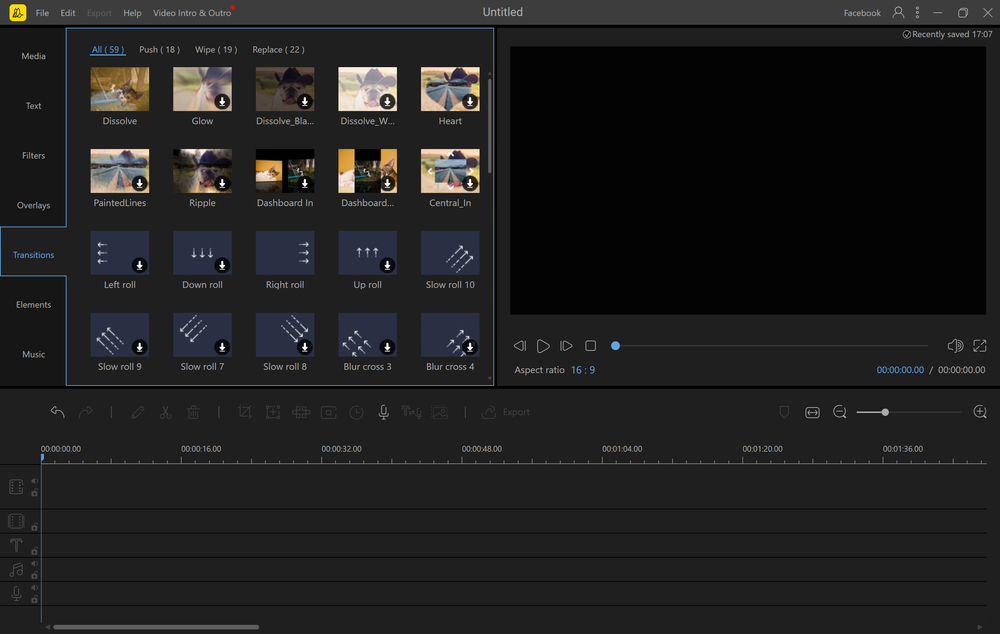
Transition Library


Recommended Products
Build Data Resilience - Take the Assessment Today
Is your recovery strategy as strong as you think? Take this quick self-assessment to check your recovery readiness and gain tailored insights. In only 2 minutes, you'll learn where you fall on the recovery readiness scale.
Product Details
Platforms
Web-Based
Windows
Mac
iPhone App
iPad App
Android App
Types of Training
Training Docs
Customer Support
Business Hours
Live Rep (24/7)
Online Support
BeeCut Features and Options
Video Editing Software
Audio Tools
Brand Overlay
Media Library
Speed Adjustment
Split / Merge
Supports HD Resolution
Text Overlay
Video Capture
BeeCut User Reviews
Write a Review- Previous
- Next
