Average Ratings 0 Ratings
Average Ratings 0 Ratings
Similar Products
-
TIMiHigh-Performance Data Engineering. Total Sovereignty. TIMi delivers the power of a complete cloud data stack—on-premises, fully sovereign, and ridiculously fast. We reject artificial vendor lock-in and hidden costs. Instead, we offer absolute peace of mind through engineering excellence, giving your team the freedom to experiment, innovate, and solve complex AI, analytics, and automation challenges in record time. Why Top Enterprises Choose TIMi? Enterprise Integration & *No-Code* ETL/Data preparation: Automate complex workflows and seamlessly link your entire stack: SAP, Salesforce, SharePoint, S3, Azure Storage, PowerBI, Tableau, etc. Unmatched Infrastructure Efficiency: Our competitors such as Databricks, Dataiku, and MS Fabric all rely on Spark—and that makes them inherently inefficient since a single €2k TIMi server outperforms a 267-node Spark cluster. TIMi process billions of rows in seconds and manage petabyte-scale data lakes at a fraction of the cost. Proven AI Leadership: Harness pioneering machine learning from the creators of the first Auto-ML engine (est. 2007). Whether deployed on-premises or via our EU-Hosted Sovereign Cloud, TIMi empowers leaders in Banking, Telecoms, Manufacturing, Retail, Defense and Government.
-
DbVisualizerDbVisualizer is a universal database client for anyone who works with data, from indie developers and startups to professional teams managing complex database environments, including developers, DBAs, analysts, and data engineers working across relational and NoSQL databases. Key features: - SQL editor with intelligent autocomplete, visual query builders, variables, and execution tools - AI Assistant for answering questions, explaining errors, and analyzing code - Git integration for managing SQL scripts and team collaboration - Customizable layouts, key bindings, and UI themes - Favorites for frequently used scripts and database objects - Configurable security settings for organizational requirements Connects via JDBC to MySQL, PostgreSQL, SQL Server, Oracle, Snowflake, SQLite, Cassandra, BigQuery, and more. Runs on Windows, macOS, and Linux. Nearly 7 million downloads, with Pro users in 150 countries, scaling from solo projects to enterprise database management.
-
Comet BackupStart running backups and restores in less than 15 minutes! Comet is a fast, secure all-in-one backup platform for businesses and IT providers. You control your backup environment and storage destination (local, Wasabi, AWS, Google Cloud Storage, Azure, Backblaze, or other S3 storage providers). Our software supports businesses across 120 countries in 13 languages. Test drive Comet Backup with a 30-day FREE trial!
-
Google Cloud SQLCloud SQL is a fully managed relational database service that supports MySQL, PostgreSQL, and SQL Server. It includes rich extensions, configuration flags, and developer ecosystems. Cloud SQL offers $300 in credits for new customers. You won't pay until you upgrade. Reduce maintenance costs by using fully managed MySQL, PostgreSQL, and SQL Server databases. The SRE team provides 24/7 support for reliable and secure services. Data encryption in transit and at rest ensures the highest level of security. Private connectivity with Virtual Private Cloud, user-controlled network access, and firewall protection add an additional layer of safety. Compliant with SSAE 16, ISO 27001, PCI DSS, and HIPAA, you can trust your data to be protected. Scale your database instances with a single API request, whether you are just testing or need a highly available database in production. Standard connection drivers and integrated migration tools let you create and connect to a database in a matter of minutes. Transform your database management with AI-driven support in Gemini, currently available in preview on Cloud SQL. It enhances development, optimizes performance, and simplifies fleet management, governance, and migration.
-
RaimaDBRaimaDB, an embedded time series database that can be used for Edge and IoT devices, can run in-memory. It is a lightweight, secure, and extremely powerful RDBMS. It has been field tested by more than 20 000 developers around the world and has been deployed in excess of 25 000 000 times. RaimaDB is a high-performance, cross-platform embedded database optimized for mission-critical applications in industries such as IoT and edge computing. Its lightweight design makes it ideal for resource-constrained environments, supporting both in-memory and persistent storage options. RaimaDB offers flexible data modeling, including traditional relational models and direct relationships through network model sets. With ACID-compliant transactions and advanced indexing methods like B+Tree, Hash Table, R-Tree, and AVL-Tree, it ensures data reliability and efficiency. Built for real-time processing, it incorporates multi-version concurrency control (MVCC) and snapshot isolation, making it a robust solution for applications demanding speed and reliability.
-
AnalyticsCreatorAnalyticsCreator is a metadata-driven design application for data warehouse automation and data product engineering across the Microsoft data stack. Its Governed Control Model connects business meaning, data structures, transformation rules, dependencies, lineage and technical implementation in one controlled project model. Data teams design the required architecture in AnalyticsCreator, then generate native Microsoft assets from that design. Generated outputs can include SQL Server objects, SSIS packages, Azure Data Factory pipelines, supported Microsoft Fabric components, deployment artefacts and Power BI semantic models. AnalyticsCreator supports dimensional, 3NF and hybrid modelling approaches together with ingestion, transformations, delta loading, historisation, Slowly Changing Dimensions, snapshots and repeatable data-processing patterns. Because generated outputs are native Microsoft technology, no AnalyticsCreator runtime is required in production. Organisations retain ownership of the resulting implementation and can integrate generated assets into Git, Azure DevOps and CI/CD workflows. Lineage, documentation and dependency information remain connected to the design, helping teams understand change impact before regenerating affected assets. Design Intelligence extends this governed project context into AI-assisted data engineering by providing authorised AI tools and agents with structured access to metadata, lineage, dependencies and design rules. Typical use cases include enterprise data warehouse development, Microsoft Fabric adoption, SQL Server and SSIS modernisation, governed Power BI delivery and repeatable data product engineering.
-
PassworkPasswork is a corporate password manager built for organizations that take security seriously, available as a self-hosted platform or a secure cloud service. Designed and headquartered in Barcelona, Spain, Passwork meets GDPR, NIS2, ENS, and other European regulatory standards by default. The self-hosted version keeps all credentials on your own server under the full control of your system administrators. The cloud option is hosted in secure German data centers. Both deployment models rely on client-side AES-256 encryption and zero-knowledge architecture, ensuring your data is never accessible to third parties. Passwork holds ISO/IEC 27001 certification. Enterprises rely on it for secure password sharing, privileged access management, and centralized credential governance.
-
SynchredibleSynchredible makes it easy to synchronize, copy, and back up individual folders or entire drives with just a single click. Its intuitive assistant guides you step by step in setting up tasks that can be scheduled, triggered by changes (real-time monitoring), or executed automatically when an external storage device is connected. Keep your data synchronized effortlessly and manage it seamlessly! With years of proven technology, Synchredible not only transfers data from A to B but also supports bidirectional synchronization. It automatically detects changes and reliably syncs the most recently edited files. Thanks to advanced duplicate detection, Synchredible saves valuable time by skipping unchanged files, enabling fast synchronization of large datasets in seconds! Synchredible is highly versatile, supporting local folder synchronization, network and USB device synchronization, as well as synchronization with cloud storage.
-
Servers.com by NexcessServers.com by Nexcess delivers hybrid bare metal cloud hosting solutions that give businesses greater control over their infrastructure while maintaining the flexibility needed to grow. Its portfolio includes Scalable Bare Metal for on-demand capacity, Enterprise Bare Metal for customized deployments, AI Compute for GPU-powered workloads, and Managed Kubernetes for containerized applications. The platform is built to accommodate organizations that require reliable performance, security, and predictable infrastructure management. Through a network of data centers across multiple continents, customers can deploy services closer to their users and minimize latency. Businesses in industries such as gaming, financial services, advertising technology, streaming, SaaS, and Web3 rely on the platform to support high-demand operations. The infrastructure is designed to handle traffic spikes, intensive computing requirements, and geographically distributed workloads. Advanced networking capabilities and direct connectivity options help optimize application responsiveness and uptime. Organizations can combine different infrastructure offerings to create environments that align with their operational and budget requirements. By providing scalable and customizable bare metal solutions, Servers.com helps businesses maintain performance while adapting to changing market demands.
-
BackUp MakerMalware, accidental deletion, and hardware defects can put valuable files at risk. BackUp Maker helps you create dependable backups with minimal effort, giving you a reliable copy of your data whenever you need it. Select the files, folders, or drives you want to protect, define a schedule or trigger-based backup, and choose a suitable destination. BackUp Maker stores your data efficiently in ZIP archives on local and external drives, network locations, USB media, web servers, or in the cloud. Protect confidential content with powerful AES encryption of up to 256 bits. Encrypted backup archives can also be transferred securely to web servers using SFTP or FTP/FTPS. BackUp Maker supports a flexible backup strategy tailored to your needs. Back up only new and modified files, maintain several backup generations, distribute copies across different storage locations, and run custom actions before or after each backup. This makes it easy to automate comprehensive, space-saving, and secure data protection.
Description
dbForge Data Compare for SQL Server is a specialized tool for comparing table data in SQL Server databases. Its user-friendly graphical interface allows users to quickly master its functions and perform tasks without writing code.
Key Features:
- Supports SQL Server tables, views, data in backups, data in script folders, SQL Azure Cloud, and custom queries.
- Detects changes effectively and exports results as CSV, HTML, and Excel files.
- Offers full-text data search, easy navigation, sorting, and filtering for viewing results.
- Restores missing or damaged data down to a single row from native backups.
- Synchronizes data through wizards, allowing for deployment of selected or all changes.
- Generates data deployment scripts that can be executed directly or saved for recurring use.
- Deploys to SQL Server databases, SQL Azure cloud databases, and SQL Server on Amazon RDS.
- Automates routine data comparison and synchronization tasks via a command-line interface.
dbForge Data Compare integrates seamlessly with SQL Server Management Studio, enhancing its default functionality within a familiar interface.
Description
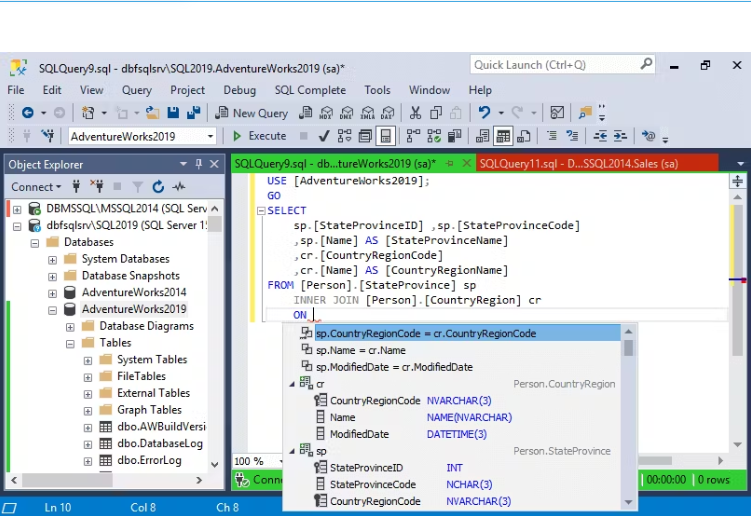
dbForge SQL Complete is a robust coding assistance tool designed as an add-in for SQL Server Management Studio (SSMS) and Visual Studio (VS). It provides numerous features to improve code quality and speed up code creation within the SSMS interface, helping to organize coding efforts and boost overall productivity.
Key Features:
- Context-aware suggestions for keywords and objects
- Flexible SQL formatting with various customization options
- Professional, safe, and fast code refactoring
- Quick access to database object descriptions
- T-SQL debugger for improving code quality
- Customizable code snippets with the ability to create user-defined snippets
- Execute statements against the target database directly from the SQL - -
- Complete window
- Various data visualization options
- Customizable execution warnings and notifications
- Query history with the ability to restore lost or closed documents or tabs
- A comprehensive set of tools for data manipulation
dbForge SQL Complete significantly reduces human typing errors. Its integration with SSMS enhances coding capabilities, providing users with a powerful toolset. A free edition of the solution is also available.
API Access
Has API
No
API Access
Has API
No




Integrations
SQL
Yes
SQL Server
Yes
SQL Server Management Studio (SSMS)
Yes
Visual Studio
No
Integrations
SQL
Yes
SQL Server
Yes
SQL Server Management Studio (SSMS)
Yes
Visual Studio
Yes
Pricing Details
$239.95
Free Trial
Yes
Free Version
No
Pricing Details
$129.95
Free Trial
Yes
Free Version
Yes
Deployment
Web-Based
No
On-Premises
No
iPhone App
No
iPad App
No
Android App
No
Windows
Yes
Mac
Yes
Linux
Yes
Chromebook
No
Deployment
Web-Based
No
On-Premises
No
iPhone App
No
iPad App
No
Android App
No
Windows
Yes
Mac
No
Linux
No
Chromebook
No
Customer Support
Business Hours
Yes
Live Rep (24/7)
No
Online Support
Yes
Customer Support
Business Hours
Yes
Live Rep (24/7)
No
Online Support
Yes
Types of Training
Training Docs
Yes
Webinars
No
Live Training (Online)
Yes
In Person
No
Types of Training
Training Docs
Yes
Webinars
No
Live Training (Online)
Yes
In Person
No
Vendor Details
Company Name
Devart
Founded
1997
Country
United States of America
Website
www.devart.com
Vendor Details
Company Name
Devart
Founded
1997
Country
United States of America
Website
www.devart.com
Product Features
Database
Backup and Recovery
No
Creation / Development
No
Data Migration
No
Data Replication
No
Data Search
No
Data Security
No
Database Conversion
No
Mobile Access
No
Monitoring
No
NOSQL
No
Performance Analysis
No
Queries
Yes
Relational Interface
No
Virtualization
No
Product Features
Database
Backup and Recovery
No
Creation / Development
No
Data Migration
No
Data Replication
No
Data Search
No
Data Security
No
Database Conversion
No
Mobile Access
No
Monitoring
No
NOSQL
No
Performance Analysis
No
Queries
No
Relational Interface
No
Virtualization
No
