Average Ratings 0 Ratings
Average Ratings 0 Ratings
Similar Products
-
RaimaDBRaimaDB, an embedded time series database that can be used for Edge and IoT devices, can run in-memory. It is a lightweight, secure, and extremely powerful RDBMS. It has been field tested by more than 20 000 developers around the world and has been deployed in excess of 25 000 000 times. RaimaDB is a high-performance, cross-platform embedded database optimized for mission-critical applications in industries such as IoT and edge computing. Its lightweight design makes it ideal for resource-constrained environments, supporting both in-memory and persistent storage options. RaimaDB offers flexible data modeling, including traditional relational models and direct relationships through network model sets. With ACID-compliant transactions and advanced indexing methods like B+Tree, Hash Table, R-Tree, and AVL-Tree, it ensures data reliability and efficiency. Built for real-time processing, it incorporates multi-version concurrency control (MVCC) and snapshot isolation, making it a robust solution for applications demanding speed and reliability.
-
ArboStarARBOSTAR stands at the forefront of business management solutions for the tree care and landscaping industry, offering a revolutionary, all-in-one platform. This cloud-based system is designed for businesses of any size, integrating essential tools to streamline operations. From Client Relationship Management (CRM) and Field & Equipment Management to Business Analytics, Accounting, Finance, Payment Processing, IP Telephony & SMS, Human Capital Management, and Quality Assurance with an ERP system, ARBOSTAR brings every necessary module under one roof for efficient and effective management. The interactive Map View feature further simplifies scheduling and marketing by showing real-time locations of leads, crews, and equipment, optimizing your business operations with ease.
-
JSCAPE MFT ServerJSCAPE by Redwood is a secure managed file transfer (MFT) software that automates complex file workflows, consolidating manual processes, custom scripts and siloed tools into a single, reliable platform. Low-code automation triggers enable IT teams to orchestrate file transfers across Windows, Linux, macOS, Solaris and any other platform, with unlimited users, trading partners and concurrent connections included and no additional middleware required. JSCAPE delivers enterprise-grade security, backed by an unblemished track record since 1999 and active third-party certifications that most MFT providers don't hold: SOC 2 Type 1 and Type 2, ISO 27001, Drummond Certified™, and FIPS 140-2 and 140-3 validated encryption. Quarterly penetration testing and annual third-party audits keep your environment audit-ready year-round. The solution handles any file size and any protocol — SFTP, FTP/S, HTTP/S, AS2, OFTP2, WebDAV, and more — while meeting compliance requirements for HIPAA, PCI DSS, SOX, GDPR and GLBA. It also fits cleanly into any environment (on-premises, cloud, hybrid, containerized or SaaS), with native integrations for Microsoft Azure, AWS, IBM Cloud, CyberArk, Box, Dropbox and leading workload automation solutions like RunMyJobs. Trusted by 1,000+ organizations in 57+ countries, JSCAPE includes 24/7/365 expert technical support with an 8-minute median response time and online training at no extra cost in every plan. Request a personalized demo today.
-
Globalscape Enhanced File Transfer (EFT)Globalscape's Enhanced File Transfer platform (EFT) is a user-friendly managed file transfer software (MFT). Globalscape EFT is trusted by thousands of Windows-Centric Organizations for mission-critical file transfers. EFT offers security and compliance, as well as powerful tools for collaboration, automation, and analysis. It is available in cloud/SaaS EFT Arcus and on-premises EFT deployments. EFT, unlike traditional file transfer software, provides enterprise-level data security and data transfer automation through integration to back-end systems. EFT administration is simple, yet provides complete control over your file transfer system. EFT replaces insecure legacy systems and expensive leased lines with a high-performing, scalable alternative.
-
MobiPDFMobiPDF (formerly PDF Extra) is an intuitive reader and editor that allows you to read, edit, create, OCR, organize, annotate, fill and sign, convert, and share any PDF. This makes MobiPDF an excellent choice for users seeking a budget-friendly alternative to Adobe Acrobat Pro. HERE’S WHAT YOU GET WITH MOBIPDF: Multiple Page View Modes: Enjoy a distraction-free "Read Mode". Advanced Editing Tools: Experience a Word-like PDF editing environment. Two-Way Conversions: Convert PDFs to and from Word, Excel, PowerPoint, or image formats. OCR Support: Make scanned documents searchable. Markup Tools: Highlight, comment, strikethrough, stamp, and more to enhance your documents. Effortless PDF Organizer: Reorder, compress, split, and combine PDFs with ease. Sign & Secure: Add signatures, create and fill forms, and protect your PDFs with passwords, encryption, and digital certificates. Offline Mode: Work freely on your projects, even offline. Seamless translation: One-click translate any PDF into 50+ languages.
-
ActCAD SoftwareACTCAD is suitable for professional drawings creation for Architects, Structural Engineers, Civil Engineres, Mechanical Drawings, Electrical drawings, interior design, tool design, machine designs etc.ActCAD is professional grade 2D Drafting and 3D Modeling CAD software which works in dwg and dxf file formats. Most affordable cad software.ActCAD is a native dwg/dxf cad software suitable for professional 2D drafting and 3D modeling projects. ActCAD is trusted by over 30000 users in over 103 countries for more than 10 years. The interface, commands, icons, dialogs, shortcuts etc. are very much similar to other popular cad software tools available in market. Flexible license types available even for single license. There is no learning for existing cad users while saving 80% of the costs.ActCAD offers free email technical support without any limitations. ActCAD can be fully customized and programs can be developed using our free API toolkit. It supports popular programming languages like , lisp dcl, .net, C++ etc. Apart from all regular commands, ActCAD offers many productive tools like pdf to cad converter, Block libraries, Image to Cad converter, handling point sets between Cad and Excel and many more.
-
JS7 JobSchedulerJS7 JobScheduler, an Open Source Workload Automation System, is designed for performance and resilience. JS7 implements state-of-the-art security standards. It offers unlimited performance for parallel executions of jobs and workflows. JS7 provides cross-platform job execution and managed file transfer. It supports complex dependencies without the need for coding. The JS7 REST-API allows automation of inventory management and job control. JS7 can operate thousands of Agents across any platform in parallel. Platforms - Cloud scheduling for Docker®, OpenShift®, Kubernetes® etc. - True multi-platform scheduling on premises, for Windows®, Linux®, AIX®, Solaris®, macOS® etc. - Hybrid cloud and on-premises use User Interface - Modern GUI with no-code approach for inventory management, monitoring, and control using web browsers - Near-real-time information provides immediate visibility to status changes, log outputs of jobs and workflows. - Multi-client functionality, role-based access management - OIDC authentication and LDAP integration High Availability - Redundancy & Resilience based on asynchronous design and autonomous Agents - Clustering of all JS7 Products, automatic fail-over and manual switch-over
-
CirrusPrintCirrusPrint helps you manage and streamline your printing and document delivery across multiple networks. It solves cloud migration issues related to printing and provides the fastest and most direct way to deliver documents to users. With CirrusPrint, traditional network printing is still possible without any changes to operations. You can also print to your users, email your printers, and send a file from your smartphone to a printer anywhere in the country. CirrusPrint can be used on Windows or Linux, either in the cloud or at your own data center. It can accept print jobs and other documents, compress them, and deliver them to remote printers and users. It is easy to integrate with applications. You can print to it as any network printer, email files, drop files into the device, or use REST API. CirrusPrint jobs are sent quickly and securely to remote printers as exact duplicates of the original job.
-
CloudFilerCloudFiler provides filing and searching in both New and Classic Outlook on all phones & tablets, all popular browsers, Macs and ARM based devices. Created Microsoft's new web Add-in technology by the architect of the Oasys email management system previously owned by Arup Group Ltd and the Excitech Mail system owned by Symetri and latterly Pentagon. File to: the cloud, Windows folders, SharePoint, OneDrive, Egnyte, Autodesk Forma, Bentley ProjectWise, etc. Favoured by the biggest businesses globally.
-
SmartDrawSmartDraw makes professional drawings and diagrams accessible to everyone. Non-technical users can quickly create floor plans, while professionals get the precision and scale they require. With industry-leading floor planning tools and an intuitive interface for traditional diagramming like flowcharts and organizational charts, SmartDraw delivers enterprise-ready power without unnecessary complexity. Key features: - Large collection of symbols and templates - Ability to create custom shapes - Import PDFs, images, Google Maps, Visio files, Visio stencils - Draw to any scale - Enrich drawings with data - Generate manifest and bills of materials - Generate diagrams from data automatically like org charts, AWS, Azure, PI Boards, and more - Use natural language text prompts to generate diagrams with AI - Save files directly to OneDrive, SharePoint, or Google Drive, or other preferred provider - Integrations with the Microsoft and Google enterprise stack plus Confluence and Jira SmartDraw supports a wide range of industries and real-world use cases, helping teams plan, document, and communicate more effectively. Construction professionals use it to create scaled floor plans, site layouts, and electrical and plumbing drawings. Fire departments rely on it for fire pre-planning and incident documentation, while police departments use it for accident reconstruction and crime scene diagrams. IT teams build network diagrams and cloud architectures, HR leaders create organizational charts, and product managers map out processes and workflows. From physical layouts to business processes, SmartDraw provides a single platform that adapts to the needs of each role and industry.
Description
Vifm is a file manager that features a curses interface, creating a Vim-inspired atmosphere for handling files within various file systems, while incorporating several innovative elements from mutt. For users familiar with vi, Vifm allows for comprehensive keyboard navigation of files, eliminating the need to learn new commands. It offers Vim-like user mappings, command-line functionalities with ranges and abbreviations, as well as marks and registers that resemble those in Vim. The tool also includes directory tree comparison, along with the ability to undo, redo, and run operations in the background. It supports FUSE file systems and permits the application of color schemes to particular sub-trees, while also allowing file decorations to be tailored based on their type or name. Users can create named bookmarks (tags) and utilize a Less-like preview mode with customizable viewers, enhancing the overall experience. Advanced features such as file filtering and renaming, along with flexible viewing options like one or two-pane setups within tabs, are also available. Additionally, it supports shell-like command-line editing and provides various views including table, grid, tree, and miller layouts for files. Vifm is designed with built-in compatibility for GNU Screen and tmux, supports multi-block selection, and is cross-platform, operating seamlessly on GNU/Linux, BSD, Solaris, Windows, and Mac OS, making it a versatile choice for file management across different systems. This combination of functionalities makes Vifm a powerful tool for those who appreciate a keyboard-centric approach to file management.
Description
Your computer desktop is cluttered and confusing. The files and applications you need are not always in reach.
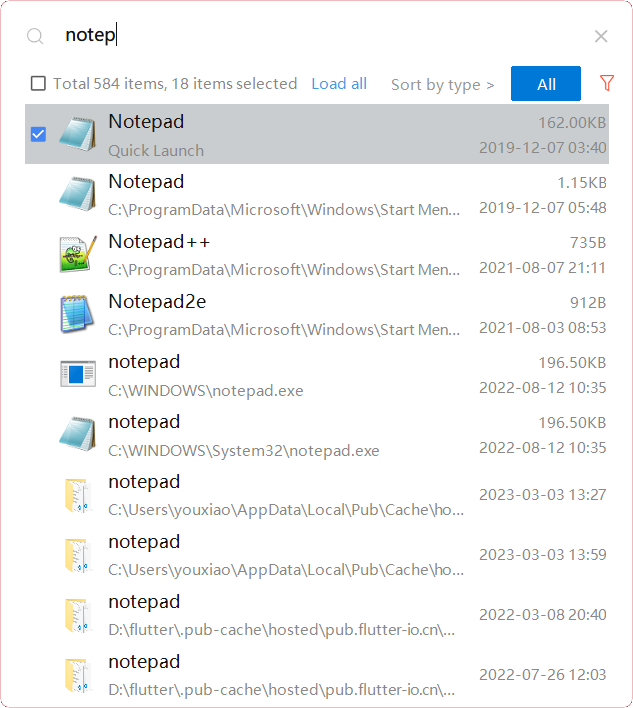
YXFile allows you to tagging file and search file as well as launch apps.
Tag Any File:
YXFile can tag every file type on any file system. The tagging is stored in a data base. YXFile will not alter your file names or create hidden files on your hard disk. You can move or rename files under the same partition. The tags won't be lost
Search for everything:
Search files and folders using their names. as well as file tags, launch items, and file tags.
Launch Apps
Launch App is a favorite feature of YXFile users. You can either type the name of the application or program you wish to open or use a shortcode. Click return and YXFile will open the program.
API Access
Has API
Yes
API Access
Has API
No



Integrations
No details available.
Integrations
No details available.
Pricing Details
Free
Free Trial
No
Free Version
Yes
Pricing Details
$39/user
One-time payment for lifetime access to Yfile
Free Trial
Yes
Free Version
No
Deployment
Web-Based
No
On-Premises
No
iPhone App
No
iPad App
No
Android App
No
Windows
Yes
Mac
Yes
Linux
Yes
Chromebook
No
Deployment
Web-Based
No
On-Premises
No
iPhone App
No
iPad App
No
Android App
No
Windows
Yes
Mac
No
Linux
No
Chromebook
No
Customer Support
Business Hours
No
Live Rep (24/7)
No
Online Support
Yes
Customer Support
Business Hours
Yes
Live Rep (24/7)
No
Online Support
No
Types of Training
Training Docs
Yes
Webinars
No
Live Training (Online)
No
In Person
No
Types of Training
Training Docs
Yes
Webinars
No
Live Training (Online)
No
In Person
No
Vendor Details
Company Name
Vifm
Country
United States
Website
vifm.info/
Vendor Details
Company Name
ousaa
Founded
2016
Country
China
Website
yxfile.cc/
