Average Ratings 0 Ratings
Average Ratings 0 Ratings
Similar Products
-
AdmiralAdmiral is the top adblock recovery platform for publishers, helping recover millions of dollars in advertising revenue lost to adblockers, privacy tools, DNS filtering, VPNs, network-level blocking, and other forms of monetization disruption. Trusted by thousands of publishers and backed by more than a decade of expertise, Admiral pioneered Full Spectrum Adblock Recovery—combining multiple recovery approaches to maximize total adblock revenue. As the creator of Visitor Relationship Management (VRM), Admiral extends beyond ad recovery to help publishers recover and grow revenue through subscriptions, registrations, consent management, first-party data, email acquisition, social audience growth, donations, and other visitor monetization strategies. By combining recovery and revenue-growth approaches in one platform, Admiral helps publishers reduce revenue leakage, increase visitor lifetime value, and maximize monetization across the audience lifecycle. Admiral VRM delivers: * Industry-leading Full Spectrum Adblock Recovery * Paid subscriptions, paywalls, and donation campaigns * Visitor Copilot conversational AI for engagement and revenue growth * Registration walls, user accounts, and first-party data * Email, social audience, and app growth * GDPR and CCPA consent management Admiral also provides analytics, journey shaping, visitor segmentation, targeting, testing, and optimization. Publishers can add Admiral's free tag in minutes for immediate visibility into adblock rates and revenue recovery potential.
-
DeskTimeDeskTime is a high-performance, 100% automated time tracking and productivity management solution designed for modern IT teams, software houses, and remote organizations. Unlike traditional trackers that rely on manual "Start/Stop" timers, DeskTime runs silently in the background, logging computer activity from the moment of boot-up to ensure zero data loss and absolute payroll accuracy. ⏱️ 🚀 Key Technical Features: ✅ Fully Automated Tracking: Eliminate manual timesheets. DeskTime captures arrival, departure, and total work hours automatically based on device activity. ⚡ ✅ Productivity Profiling: Categorize URLs, applications, and document titles as Productive, Unproductive, or Neutral. Calculate real-time efficiency scores for individuals and teams. 📈 ✅ Advanced Resource Management: Integrated Shift Scheduling and an Absence Calendar allow HR and team leads to manage leave, vacations, and staffing within a single interface. 📅 ✅ Project & Cost Analysis: Track billable hours at the project and task level. Monitor budget burn rates and export precise reports for client invoicing or CapEx/OpEx accounting. 💸 ✅ Offline Time Logging: Capture time spent in meetings or on-site visits via manual entries or the dedicated mobile app for Android and iOS. 📱 ✅ Enterprise-Grade Security: DeskTime is GDPR compliant and ISO 27001 certified. Features include two-factor authentication (2FA), data encryption at rest and in transit, and optional blurred screenshots to protect employee privacy. 🔒 🛠️ Built for Integration: Seamlessly sync your workflow with top-tier project management and communication tools, including: ⚙️Jira, GitLab, Trello, and Asana. ⚙️Google and Outlook Calendars. ⚙️Custom API for bespoke internal tool integration.
-
Secure EraserSecure Eraser: Secure Data Deletion, Shredders Your Files & Folders. Just because it has been removed from your hard drive doesn't mean that it is gone forever. Anyone can restore the information as long as it was not overwritten. It becomes more difficult if the computer has been resold, or given away. Secure Eraser employs the most well-known method of data disposal. It overwrites sensitive information so that it cannot be recovered even with specialized software. Our award-winning solutions for permanently destroying data eliminate cross-references that may leave traces of deleted files within the allocation table of your hard disk. This Windows software is easy to use and can overwrite sensitive data up to 35 times, regardless of whether they're files, folders or drives, recycle bins, or traces of surfing. You can also delete files that you have already deleted but not for good.
-
Comet BackupStart running backups and restores in less than 15 minutes! Comet is a fast, secure all-in-one backup platform for businesses and IT providers. You control your backup environment and storage destination (local, Wasabi, AWS, Google Cloud Storage, Azure, Backblaze, or other S3 storage providers). Our software supports businesses across 120 countries in 13 languages. Test drive Comet Backup with a 30-day FREE trial!
-
Veeam Data PlatformVeeam Data Platform is a unified data resilience solution that helps organizations recover from cyberattacks and outages, and protect workloads across hybrid and multicloud environments – all without vendor lock-in. The platform includes built-in security capabilities designed to mitigate ransomware and other data-loss threats, including AI-backed threat detection across a broad range of workload types. This is intended to help teams identify and respond to threats before they disrupt operations. Veeam Data Platform supports workload portability across hypervisors, cloud providers, and on-premises environments, allowing organizations to move or recover data across infrastructure without being tied to a specific vendor or platform. For organizations looking to simplify deployment, Veeam Software Appliance provides a pre-built, hardened, and highly available option, reducing the manual setup and maintenance work required from IT teams.
-
IONOS Cloud Object StorageIONOS Cloud Object Storage is a flexible storage solution tailored for the management and retrieval of extensive volumes of unstructured data within cloud platforms. Fully compliant with the S3 API standard, it empowers developers and IT professionals to utilize existing S3 clients and tools for bucket and object management, seamlessly integrating into modern cloud-native applications and systems. This service allows businesses to store nearly limitless amounts of static or backup data without the complexities of traditional storage management. Engineered for both reliability and high availability, it ensures data remains accessible and secure through redundant storage mechanisms across multiple nodes, safeguarding against potential infrastructure failures. Ideal for a variety of use cases, it supports the storage of backups, archives, and disaster recovery snapshots, while also efficiently managing substantial datasets that are essential for analytics, machine learning, or digital content initiatives. Furthermore, its scalability makes it an excellent choice for organizations anticipating growth or needing to adapt quickly to changing data storage requirements.
-
Virtuoso QAVirtuoso QA is a secure, agentic test automation platform for any browser-based application. Touchstone, our agentic assurance layer, turns your business requirements into tests, then runs, fixes and maintains them as your application changes. More than thirty specialised agents author, generate, triage and self-heal your functional and end-to-end tests, while a deterministic engine executes every run and your team approves every decision that matters. Every release comes with evidence of what was tested, what changed and who approved it. Release Insights shows execution risk and requirement coverage across every journey, and teams can export an Evidence Report in minutes rather than assembling one over weeks. That makes the platform a natural fit for regulated industries like financial services, insurance, healthcare, the public sector and more. The mission is to set the standard of proof for software releases. AI generates software. Virtuoso QA generates the evidence to trust it.
-
ESET PROTECT AdvancedESET Protect Advanced offers a comprehensive cybersecurity solution for businesses of any size. It offers advanced endpoint security against ransomware and zero-day threats. It also includes full disk encryption to ensure legal compliance and data security. The solution uses adaptive scanning, cloud sandboxing and behavioral analysis for proactive cloud-based threats defense. Mobile threat protection secures Android and iOS with anti-malware and anti-theft. It also offers cloud app security, mail server protection, vulnerability and patch management, and cloud app protection. Multi-factor authentication and extended detection and reaction (XDR) improve threat detection and response. The solution provides a single pane of glass remote management to provide visibility into threats and users. It also offers advanced reporting and customized notifications.
-
UnimusUnimus is a powerful network automation, configuration backup, and change management solution designed to simplify network operations for businesses of all sizes. Supporting 450+ device types across 160+ vendors, Unimus is a network-agnostic platform that eliminates manual network tasks while enhancing security and reliability. With automated configuration backups, Unimus ensures seamless disaster recovery, giving IT teams quick access to historical versions and real-time change tracking. Its network auditing features provide instant visibility into configuration consistency, compliance, and security risks. Change management is simplified with automatic change detection, detailed version history, and customizable notifications. Unimus' intuitive web-based interface makes it easy to manage networks without requiring deep technical expertise, while its integrated CLI access allows for real-time troubleshooting and command execution. Whether you're looking to automate bulk configuration changes, perform firmware upgrades, or improve network visibility, Unimus provides a scalable, cost-effective solution for modern network infrastructures.
-
OvermonitorOvermonitor is cloud-based infrastructure, website, and endpoint monitoring built for teams that want fast setup, clear alerts, and practical visibility without the complexity or cost of enterprise monitoring suites. Monitor websites, servers, endpoints, processes, Windows services, event logs, uptime, response time, SSL certificates, and internal network health from one easy dashboard. At the core of Overmonitor is a small, lightweight server agent that installs quickly, pairs with your account, and reports a heartbeat every minute from inside your network. This gives you visibility beyond public uptime checks, helping detect server outages, stalled services, failing processes, internal connectivity problems, and endpoint health issues before they become customer-facing downtime. Overmonitor supports city-level geotargeted monitoring, practical maintenance windows that reduce alert noise, push notifications for alerts, audible dashboard alerts for operations screens, process monitor rollups, embeddable performance graphs, and flexible à la carte pricing so you only pay for the monitoring you need. Designed for SaaS operators, IT teams, MSPs, developers, and small businesses, Overmonitor helps you track availability, analyze website performance, monitor infrastructure health, and improve end-user experience without being locked into a bloated monitoring platform.
Description
TestDisk is a robust and complimentary software for data recovery! Its primary function is to assist in retrieving lost partitions and restoring the bootability of non-operational disks, especially when these issues arise due to software malfunctions, specific virus types, or user mistakes, like mistakenly deleting a Partition Table. Using TestDisk for partition table recovery is straightforward, allowing users to fix partition tables, retrieve deleted partitions, and recover the FAT32 boot sector from a backup. It can also rebuild the boot sectors for FAT12, FAT16, and FAT32, repair FAT tables, and restore the NTFS boot sector from its backup. Additionally, it can rectify the Master File Table (MFT) with the help of its mirror and find backup SuperBlocks for ext2, ext3, and ext4 file systems. Users can undelete files from FAT, exFAT, NTFS, and ext2 file systems, as well as copy files from deleted partitions across these formats. TestDisk caters to both beginners and experienced users alike, making it accessible for those unfamiliar with data recovery processes by providing detailed information about a non-booting drive. Furthermore, its intuitive interface and comprehensive functionality make it a valuable tool for anyone facing data recovery challenges.
Description
Your computer desktop is cluttered and confusing. The files and applications you need are not always in reach.
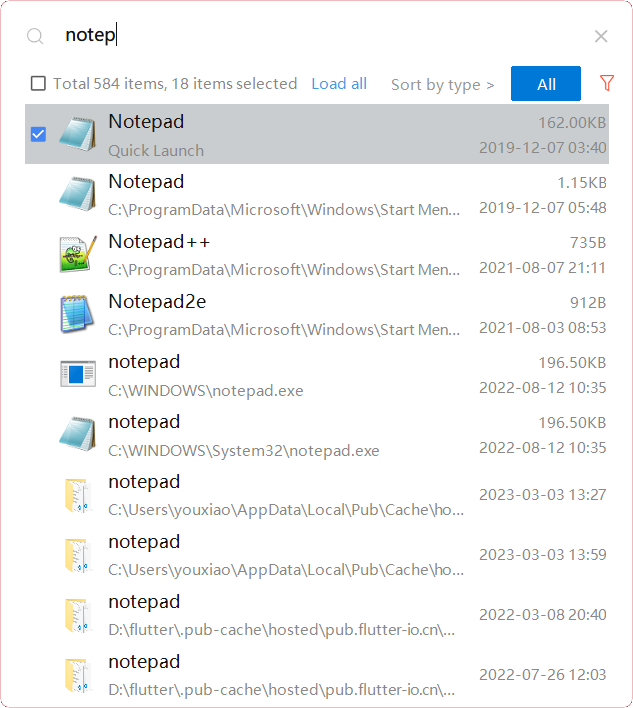
YXFile allows you to tagging file and search file as well as launch apps.
Tag Any File:
YXFile can tag every file type on any file system. The tagging is stored in a data base. YXFile will not alter your file names or create hidden files on your hard disk. You can move or rename files under the same partition. The tags won't be lost
Search for everything:
Search files and folders using their names. as well as file tags, launch items, and file tags.
Launch Apps
Launch App is a favorite feature of YXFile users. You can either type the name of the application or program you wish to open or use a shortcode. Click return and YXFile will open the program.
API Access
Has API
No
API Access
Has API
No



Integrations
No details available.
Integrations
No details available.
Pricing Details
Free
Free Trial
No
Free Version
Yes
Pricing Details
$39/user
One-time payment for lifetime access to Yfile
Free Trial
Yes
Free Version
No
Deployment
Web-Based
No
On-Premises
No
iPhone App
No
iPad App
No
Android App
No
Windows
Yes
Mac
Yes
Linux
Yes
Chromebook
No
Deployment
Web-Based
No
On-Premises
No
iPhone App
No
iPad App
No
Android App
No
Windows
Yes
Mac
No
Linux
No
Chromebook
No
Customer Support
Business Hours
No
Live Rep (24/7)
No
Online Support
Yes
Customer Support
Business Hours
Yes
Live Rep (24/7)
No
Online Support
No
Types of Training
Training Docs
Yes
Webinars
No
Live Training (Online)
No
In Person
No
Types of Training
Training Docs
Yes
Webinars
No
Live Training (Online)
No
In Person
No
Vendor Details
Company Name
TestDisk
Website
www.cgsecurity.org/wiki/TestDisk
Vendor Details
Company Name
ousaa
Founded
2016
Country
China
Website
yxfile.cc/
Product Features
Data Recovery
Web Access / Restoration
No
Backup Log
No
Backup Scheduling
No
Compression
No
Continuous Backup
No
Encryption
No
Incremental Backup
No
Local Server Options
No
Multiple System Support
No
Remote Server Options
No
Secure Data Storage
No
