Average Ratings 0 Ratings
Average Ratings 0 Ratings
Similar Products
-
PeerGFSA Comprehensive Solution for Streamlined File Orchestration and Management across Edge, Data Center, and Cloud Storage PeerGFS presents an exclusively software-based solution designed to address file management and replication challenges within multi-site and hybrid multi-cloud environments. With our extensive expertise spanning over 25 years, we specialize in file replication for geographically dispersed organizations. Here's how PeerGFS can benefit your operations: Enhanced Availability: Achieve high availability through Active-Active data centers, whether located on-premises or in the cloud. Edge Data Protection: Safeguard your valuable data at the Edge with continuous protection to the central Data Center. Improved Productivity: Empower distributed project teams by providing swift, local access to critical file information. In today's world, having a real-time data infrastructure is paramount. PeerGFS seamlessly integrates with your existing storage systems, supporting: High-volume data replication between interconnected data centers. Wide area networks characterized by lower bandwidth and higher latency. Rest assured, PeerGFS is designed to be user-friendly, making installation and management a breeze.
-
OptiSignsOptiSigns, your friendly digital signage software! Designed with simplicity and ease in mind, it's the perfect harmony of affordable software and usage with any hardware in the market. Pick from 140+ Apps, Thousands of Templates, and formats like images & videos, playlists, Google Slides, Weather, Instagram, Twitter, YouTube – you name it! Level up your business and start engaging your audience. For just $10/month per screen, use any display to capture your audiences attention! Remotely manage it all from one central portal. Indulge in features, images, videos, playlists, and schedules. Jazz it up with apps like Google Slides, Weather, Instagram, Facebook, Twitter, and more. Oh, and did we mention? We play nice with the most hardware and operating systems in the market like Fire TV Stick, Android, Chrome, Raspberry Pi, Roku, Windows, Linux, and MacOS. Time to unleash your business potential!
-
JDisc DiscoveryJDisc Discovery is a powerful IT asset management and network discovery tool, designed to provide organizations with clear, real-time insights into their entire IT environment. By automatically scanning the network, it identifies and catalogs devices, from physical servers and workstations to virtual machines and network appliances, giving users a detailed inventory of their assets. The tool captures essential data such as hardware specifications, installed software, system configurations, and interdependencies among devices. A key advantage of JDisc Discovery is its agentless architecture. Rather than requiring installation on each device, it uses multiple protocols (like SNMP, SSH, WMI) to gather information, ensuring quick deployment and compatibility across various operating systems, including Windows, Linux, and Unix. This makes it ideal for diverse and dynamic IT ecosystems, enabling efficient and non-intrusive data collection.
-
NinjaOneNinjaOne automates the hardest parts of IT, empowering more than 20,000 IT teams. By providing deep insights into endpoints, robust security measures, and centralized control, NinjaOne boosts efficiency while safeguarding sensitive data and cutting IT expenses. This comprehensive platform offers a versatile toolkit for managing and securing endpoints, including patch management, mobile device oversight, software distribution, remote support, backup solutions, and more, thanks to its extensive IT and security integrations.
-
Comet BackupStart running backups and restores in less than 15 minutes! Comet is a fast, secure all-in-one backup platform for businesses and IT providers. You control your backup environment and storage destination (local, Wasabi, AWS, Google Cloud Storage, Azure, Backblaze, or other S3 storage providers). Our software supports businesses across 120 countries in 13 languages. Test drive Comet Backup with a 30-day FREE trial!
-
Veeam Data PlatformVeeam Data Platform is a unified data resilience solution that helps organizations recover from cyberattacks and outages, and protect workloads across hybrid and multicloud environments – all without vendor lock-in. The platform includes built-in security capabilities designed to mitigate ransomware and other data-loss threats, including AI-backed threat detection across a broad range of workload types. This is intended to help teams identify and respond to threats before they disrupt operations. Veeam Data Platform supports workload portability across hypervisors, cloud providers, and on-premises environments, allowing organizations to move or recover data across infrastructure without being tied to a specific vendor or platform. For organizations looking to simplify deployment, Veeam Software Appliance provides a pre-built, hardened, and highly available option, reducing the manual setup and maintenance work required from IT teams.
-
Thinfinity WorkspaceThinfinity Workspace 7.0's Technical Highlights: - Progressive Web App (PWA) technology for a seamless user experience - Integrated Thinfinity VNC, VirtualUI, and z/Scope for maximum versatility - HTML5 terminal emulation supporting DEC terminals, TN 5220, and TN 3270 protocols - Robust enterprise-grade audit logs for security and compliance management - Proprietary VNC protocol for real-time monitoring and troubleshooting IMPROVE USER EXPERIENCE - Deliver business-critical apps, desktops and files from a single web portal. - Provide simplified remote browser access for your users, while confining them to only the resources that they need. SIMPLIFY IT AND AVOID VPNs - Forget traditional VPN deployments and complexities. - Enable access from Chromebooks, mobile devices or any computer with a Web Browser. Zero setup. KEEP YOUR BUSINESS SECURE - Use enterprise-grade encrypted connections. - Integrate with your existing and external identity platforms. - Apply 2FA or MFA policies with all identity providers.
-
pCloud BusinesspCloud Business is a cloud storage and file synchronization platform designed for teams that need controlled access, cross-platform compatibility, and predictable storage allocation. It provides centralized file management with granular permissions and optional client-side encryption. Founded in 2013 in Switzerland, pCloud operates under EU-aligned privacy standards and offers data residency in Luxembourg (EU) and Dallas, Texas (US). The platform supports over 23 million users globally. Core Functionality : - Per-User Storage Allocation : 1 TB or 2 TB per user, suitable for small to mid-sized teams and distributed environments. - Virtual File System (pCloud Drive) : Mounts as a local drive on Windows, macOS, and Linux. Files are streamed on demand, reducing local disk usage. - File Sync & Sharing : Folder-level sync, link-based sharing, and permission control (view/edit/manage). Supports password-protected and time-limited links. - Admin & Access Control : Centralized user management, role assignment, and storage distribution via admin console. - Versioning & File History : File versioning with up to 180 days retention, enabling rollback and recovery. - Cross-Platform Support : Native clients for Windows, macOS, Linux, iOS, Android, plus web interface. - Client-Side Encryption (Optional) : Zero-knowledge encryption via pCloud Encryption for sensitive data; encryption keys are not stored server-side. Technical Positioning: - Swiss jurisdiction; GDPR-aligned processing - No file size limits - Works without mandatory ecosystem lock-in (no bundled office suite required) - Compatible with heterogeneous environments (Linux included) Trial : 30-day free trial available for up to 10 users.
-
3CX3CX is an open-standards, software-based IP PBX that provides complete Unified Communications right out of the box. 3CX is suitable for all industries and sizes. It can provide everything you need, from mobility and status to advanced call center features and more, at a fraction the cost. 3CX is ideal for remote companies and includes mobile apps, video conference, and website live chat. The installation, management, and maintenance of the PBX are so simple that you can easily manage it yourself, on your own appliance, server, or on a cloud-based platform. You can also choose to have it hosted on 3CX for an easy solution.
-
Airlock DigitalAirlock Digital delivers an easy-to-manage and scalable application control solution to protect endpoints with confidence. Built by cybersecurity professionals and trusted by organizations worldwide, Airlock Digital enforces a Deny by Default security posture to block all untrusted code, including unknown applications, unwanted scripts, malware, and ransomware.
Description
SystemRescue is a Linux-based toolkit designed for system recovery, available as a bootable medium for managing or fixing your system and data following a crash. Its primary goal is to simplify administrative tasks on your machine, including the creation and modification of hard disk partitions. The toolkit includes a variety of Linux system utilities, such as GParted, fsarchiver, and essential tools for filesystem management, along with basic programs like editors, midnight commander, and network utilities. It is compatible with both Linux and Windows operating systems, making it suitable for use on desktop computers and servers alike. This rescue environment does not require installation, as it can be directly booted from a CD/DVD or USB flash drive, though installation on a hard drive is also an option if desired. Additionally, the kernel is compatible with all major file systems, including ext4, xfs, btrfs, vfat, and ntfs, along with support for network file systems such as Samba and NFS, ensuring a comprehensive recovery solution. The versatility and ease of use of SystemRescue make it an invaluable tool for anyone needing to manage or recover their systems effectively.
Description
Your computer desktop is cluttered and confusing. The files and applications you need are not always in reach.
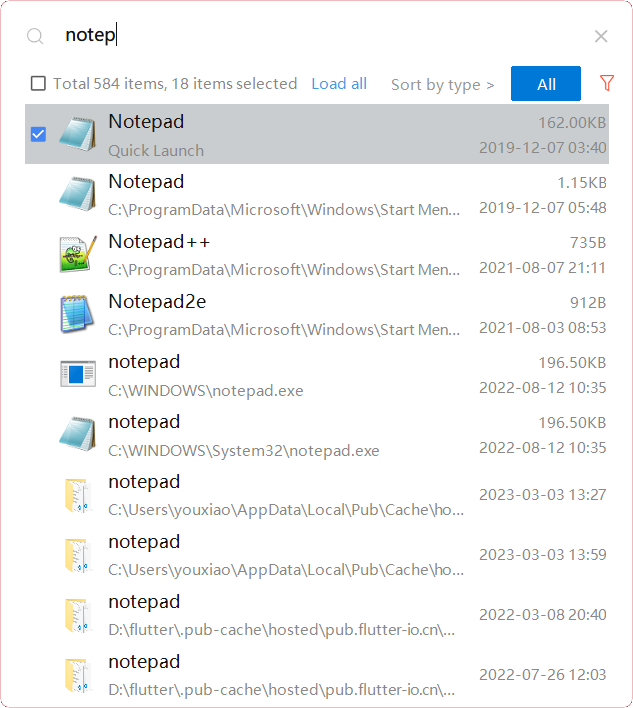
YXFile allows you to tagging file and search file as well as launch apps.
Tag Any File:
YXFile can tag every file type on any file system. The tagging is stored in a data base. YXFile will not alter your file names or create hidden files on your hard disk. You can move or rename files under the same partition. The tags won't be lost
Search for everything:
Search files and folders using their names. as well as file tags, launch items, and file tags.
Launch Apps
Launch App is a favorite feature of YXFile users. You can either type the name of the application or program you wish to open or use a shortcode. Click return and YXFile will open the program.
API Access
Has API
No
API Access
Has API
No



Integrations
No details available.
Integrations
No details available.
Pricing Details
No price information available.
Free Trial
No
Free Version
No
Pricing Details
$39/user
One-time payment for lifetime access to Yfile
Free Trial
Yes
Free Version
No
Deployment
Web-Based
No
On-Premises
No
iPhone App
No
iPad App
No
Android App
No
Windows
No
Mac
No
Linux
Yes
Chromebook
No
Deployment
Web-Based
No
On-Premises
No
iPhone App
No
iPad App
No
Android App
No
Windows
Yes
Mac
No
Linux
No
Chromebook
No
Customer Support
Business Hours
No
Live Rep (24/7)
No
Online Support
No
Customer Support
Business Hours
Yes
Live Rep (24/7)
No
Online Support
No
Types of Training
Training Docs
Yes
Webinars
No
Live Training (Online)
No
In Person
No
Types of Training
Training Docs
Yes
Webinars
No
Live Training (Online)
No
In Person
No
Vendor Details
Company Name
SystemRescue
Website
www.system-rescue.org
Vendor Details
Company Name
ousaa
Founded
2016
Country
China
Website
yxfile.cc/
Product Features
Data Recovery
Web Access / Restoration
No
Backup Log
No
Backup Scheduling
No
Compression
No
Continuous Backup
No
Encryption
No
Incremental Backup
No
Local Server Options
No
Multiple System Support
No
Remote Server Options
No
Secure Data Storage
No
