Average Ratings 0 Ratings
Average Ratings 0 Ratings
Similar Products
-
AI Video CutAI Video Cut is a complimentary tool designed to convert long videos into dynamic short clips that are perfect for platforms such as YouTube Shorts, TikTok, and social media advertisements. By utilizing AI-enhanced prompts, it provides a range of ready-made templates alongside customizable features, enabling users to craft enticing trailers, product showcases, and educational content. The tool boasts advanced smart cropping technology that recognizes faces, a variety of caption styles, and multilingual support, ensuring that the content resonates with a wide array of audiences. Additionally, users have the flexibility to export their videos in different lengths and aspect ratios tailored to various platforms and viewer preferences. Ideal for content creators, digital marketers, social media strategists, e-commerce entrepreneurs, event coordinators, and podcasters, AI Video Cut streamlines the process of enhancing video content, making it accessible and efficient for anyone looking to elevate their visual storytelling. With its user-friendly interface and innovative features, AI Video Cut empowers individuals and businesses alike to make a lasting impact through their video content.
-
GroupTogetherGroupTogether is a user-friendly online platform designed for creating group cards, collecting gifts, and sending eGift Cards quickly and effortlessly. It allows users to initiate a group card, decide whether to gather funds or select a gift, and then distribute a single link to friends, family, coworkers, or teammates. Participants have the option to add personalized messages, share photos, and include GIFs, while also contributing a specific amount, any amount they choose, or simply signing the card without making a financial contribution. With privacy assured, GroupTogether eliminates the discomfort of using personal banking details and ensures secure transactions, complete with verifiable records of contributions and expenditures. Organizers have the flexibility to use the collected funds for a variety of gifts, including eGift Cards, gift baskets, flowers, or the versatile GroupTogether AnyCard that allows recipients to choose from over 100 eGift Cards. The platform provides the option for digital delivery or downloadable PDFs for printing, making it a practical solution for various occasions such as remote team celebrations, workplace events, classroom activities, birthdays, farewells, and retirements. Moreover, this seamless process fosters a sense of community and connection, even in virtual settings.
-
Dialpad SupportCustomer experience shouldn't run on disconnected tools and static scripts. Dialpad Contact Center brings voice, digital channels, and human agents together in a single AI-native platform, built to act — not just record — on every customer interaction. This is Agentic AI in practice: agents that reason through a problem, take the next step, and drive it to resolution without waiting on a human to intervene. Where legacy systems leave data trapped in silos, Dialpad Contact Center closes that gap, linking voice and data so context travels with the customer instead of getting lost between systems. The payoff compounds. Dialpad has already generated over 775 million AI recaps, and each new interaction adds to a growing base of operational intelligence — sharper resolution paths, more productive agents, better outcomes quarter over quarter. None of it runs unchecked: Dialpad's Guardian layer keeps AI operations secure and governed, so intelligence scales without sacrificing oversight. In practice, that means up to 80% of issues get resolved autonomously, freeing your team to focus on the conversations that genuinely need a human. Intelligence works at the edge; people stay at the center of the experience. And you don't have to take the ROI on faith. Through Dialpad's Proving Ground, enterprises can validate performance and cost savings before rolling out at scale — a far more reliable path than betting on a brittle, rules-based bot.
-
YodeckNext-generation technology for digital signage professionals Yodeck, a cloud-based digital signage platform, is unbeatable. It powers your screen with dynamic content that instantly engages your target audience. Yodeck makes it easy to create, schedule, and design content from the web. To get your message across to those who matter most to you, use attention-grabbing media such as videos, images and PDF files, Office documents, data dashboards, and social media. It provides enterprise-grade security and control. Yodeck's drag-and-drop editing feature allows users to be creative in organizing content into interesting layouts. Yodeck is proud to offer a unique digital signage solution for businesses of all sizes. This includes local diners as well as global leaders like Delta Airlines, Autodesk and Adobe.
-
Yeastar P-Series PBX SystemFocusing on delivering "Easy-first Unified Communications", Yeastar P-Series Phone System offers companies of all sizes with a complete package for calls, video, messaging, and integrations, out of the box. Available in the Appliance, Software, and Cloud Editions, P-Series provides flexible deployment options, allowing you to have it sited on-premises or in the cloud. Balancing costs and future growth, it requires a lower total cost of ownership, less training, and fewer management efforts. The ease of use and future-proof adaptability are paramount.
-
Switcher StudioSwitcher Studio allows you to capture video from multiple angles and edit it in real-time. This will allow you to connect with your community in a more engaging way. You can stream it live or save it for later. Your audience will be attracted to you with relevant content. Make it look great. There's no need to purchase, lug or learn largeequipment. Switcher is compatible with iPads and iPhones. Switcher is so intuitive that anyone can create amazing video with it. You don't need to hire outside videographers or producers. It takes an hour to edit every minute of edited video. Every minute of live-editing takes, well, one second. You can share every moment, live or recorded, external or internal, with video -- no matter what it holds.
-
VoucherCartProfitable Gift cards, vouchers, and tickets are the most lucrative items you can sell for your business. They allow you to receive payment in full and in advance of products/services that you only deliver about 85% of the time. Flexible Your services and products can be sold as tickets, gift cards, or vouchers. You can sell what you want, at the terms and prices that you set, whenever and wherever you like, and at the profits you make. Powerful VoucherCart allows you to reach your customers in a way that is unmatched by other digital channels. Viral VoucherCart's embedded viral behaviors and loyalty means that we can attract new customers and retain them like no other eCommerce platform.
-
CoachIQCoachIQ offers sports coaches a comprehensive platform to manage scheduling, payments, client communication, and session tracking with ease. Beyond these core features, it provides video analysis and media sharing capabilities that let coaches upload athlete clips, add notes or voiceover feedback, and share libraries of drills or game footage for athlete learning. With tools to enhance both in-person and virtual coaching, CoachIQ helps coaches grow their business and deepen engagement. Trusted by top coaches, it simplifies daily operations and supports scaling with professional features.
-
net2phonenet2phone is an AI-powered business communication platform for companies serious about customer experience. Trusted by 500,000+ users and backed by 30+ years of experience, net2phone eliminates the friction of scattered channels and disconnected tools, so every conversation drives retention and growth. Communication breaks down when channels are scattered and tools do not talk to each other. net2phone solves this with a connected business VoIP and unified communications platform built for teams that cannot afford dropped context or slow resolutions. Unite, net2phone's unified communications solution, brings voice, messaging, video, and chat into a single place, with call and video recording, transcription, sentiment analysis on voice calls, automated action item tracking, and AI-generated follow-up emails. AI Agent handles inquiries and completes workflows on its own, answering questions, resolving support cases, scheduling, and managing returns across phone and chat, in 30+ languages, with seamless handoff to human agents when needed. Coach AI analyzes 100% of voice, video, and text interactions, giving managers full visibility into team performance with sentiment analysis, call summaries, and coaching recommendations by user or department. uContact, net2phone's omnichannel contact center, gives high-volume sales and support teams the automation, AI-driven routing, and real-time dashboards they need to deliver consistent customer experiences at scale. Every net2phone solution connects to the tools businesses already use, with a drag-and-drop workflow builder for automating processes without writing code, backed by enterprise-grade security and expert guidance at every step, from setup to integration to ongoing optimization.
-
WallesterWallester is an Estonian-licensed financial institution and has been an official Visa partner since 2018, specialising in innovative digital financial solutions and card issuance. We empower companies across the European Economic Area (EEA) and the UK to streamline payments, launch branded cards, and scale efficiently. What we do: 1. White-Label Solution with Embedded Finance Our White-Label solution enables businesses to integrate financial services directly into their platforms - a concept known as embedded finance. This allows companies to launch branded payment cards tailored to their specific needs, enhancing customer experiences and opening new revenue streams. We ensure a swift time-to-market with simplified integration and dedicated support from our implementation team. 2. Wallester Business: Corporate Expense Management Wallester Business is designed to modernise corporate expense management. It provides companies with instant access to virtual and physical Visa cards, streamlining financial processes through a modern app and comprehensive portal. Features include expense tracking, budget analytics, and seamless integration with accounting systems to enhance financial oversight and efficiency. With a diverse team of over 190 professionals located in Estonia, Latvia, France and the United Kingdom, we are dedicated to developing high-quality, profitable products for our clients. Our passion for innovation drives us to improve and adapt to the evolving financial landscape continuously. We aim to elevate businesses by providing the most advanced financial technologies, enabling them to reach new heights in efficiency and growth. We are always open to collaboration and eager to assist companies in navigating the future of finance.
Description
Introducing a digital business card platform that seamlessly combines robust functionality with user-friendly design. Users can upload or record captivating video material, including demo clips, explainer videos, real estate showcases, or promotional content to grab attention effectively. Sharing your digital business card is a breeze; you can send it via the online portal, text, email, social media channels, QR code, or through a POS system. To ensure you never miss a follow-up meeting, you can set reminders and alerts based on specific dates and times. The app also allows you to conveniently call or text your contacts, add new ones, modify existing entries, export contacts to your phone, or jot down personalized notes. It's perfect for sharing your information at conferences, networking functions, social gatherings, or during prospecting efforts. Additionally, you can attach documents such as eBooks, whitepapers, flyers, or fillable forms to your digital card. Furthermore, the platform supports international messaging, allowing you to connect with individuals across the globe effortlessly. This versatility makes it an invaluable tool for anyone looking to enhance their networking experience.
Description
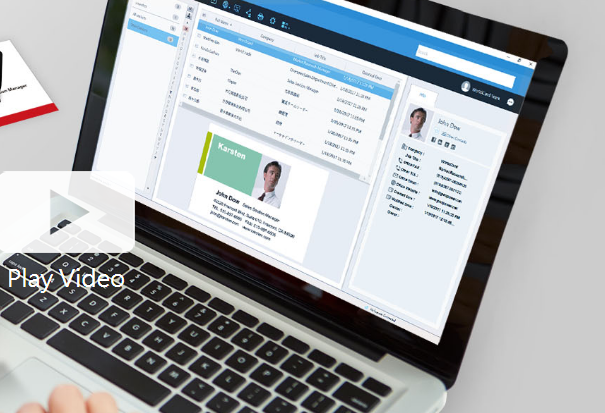
Business cards can be recognized and the associated data can be exported as a CSV file prior to the subscription's expiration. If you wish to retain the images of the business cards, it is advisable to reach out to PenPower's customer service for assistance. Please note that after the subscription expires, user data will be retained by the system for a period of 180 days; if renewal does not occur within this timeframe, all data will be permanently deleted. To optimize performance with WorldCard Team, it is recommended that the NAS edition should not exceed 20 users, while the Basic edition is best suited for fewer than 100 users. The maximum number of users allowed for the Windows Server edition will depend on the performance capabilities of your server. Additionally, you can transfer contact data to WorldCard Team from either WorldCard or WorldCard Mobile. When implementing the WorldCard Team system in your organization, we highly recommend migrating all contacts to WorldCard Team rather than continuing with WorldCard for improved efficiency and streamlined management of your business contacts. This approach not only enhances organization but also facilitates better collaboration among team members.
API Access
Has API
No
API Access
Has API
No



Integrations
Salesforce
Yes
Google Calendar
Yes
HubSpot CRM
Yes
HubSpot Customer Platform
Yes
Microsoft Outlook
Yes
iCloud
Yes
Integrations
Salesforce
Yes
Google Calendar
No
HubSpot CRM
No
HubSpot Customer Platform
No
Microsoft Outlook
No
iCloud
No
Pricing Details
$6.99 per month
Free Trial
No
Free Version
Yes
Pricing Details
Contact PenPower Technologies for pricing details.
Free Trial
Yes
Free Version
No
Deployment
Web-Based
Yes
On-Premises
No
iPhone App
Yes
iPad App
Yes
Android App
Yes
Windows
No
Mac
No
Linux
No
Chromebook
No
Deployment
Web-Based
Yes
On-Premises
No
iPhone App
Yes
iPad App
Yes
Android App
Yes
Windows
Yes
Mac
Yes
Linux
No
Chromebook
No
Customer Support
Business Hours
No
Live Rep (24/7)
No
Online Support
Yes
Customer Support
Business Hours
Yes
Live Rep (24/7)
No
Online Support
No
Types of Training
Training Docs
Yes
Webinars
No
Live Training (Online)
No
In Person
No
Types of Training
Training Docs
Yes
Webinars
No
Live Training (Online)
Yes
In Person
No
Vendor Details
Company Name
Switchit
Founded
2014
Country
United States
Website
switchitapp.com
Vendor Details
Company Name
PenPower Technology
Founded
1991
Country
United States
Website
www.worldcardteam.com/EN/
Product Features
Product Features
Business Card
Contact Management
Yes
Data Extraction
Yes
Design Templates
No
Image Editor
No
Print Management
No
Step-by-Step Wizard
No
Contact Management
Activity Management
No
Appointment Management
No
Contact Database
Yes
Contact History
No
Contact Import/Export
Yes
Customer Pipeline
No
Email Marketing
No
Group Management
No
Interaction Tracking
Yes
Lead Management
No
Prospecting Tools
No
Sales Pipeline Management
No
Search / Filter
No
Segmentation
Yes
Shared Contacts
Yes
Social Media Integration
No
CRM
Calendar/Reminder System
No
Call Logging
No
Document Storage
No
Email Marketing
Yes
Internal Chat Integration
No
Lead Scoring
No
Marketing Automation Integration
No
Mobile Access
Yes
Quotes / Proposals
No
Segmentation
No
Social Media Integration
Yes
Task Management
No
Territory Management
No
Customer Engagement
Analytics
No
Churn Management
No
Communication Management
Yes
Community Management
Yes
Content Syndication
Yes
Feedback Collection
Yes
Gamification
No
Live Chat
No
Video Content
No
