Average Ratings 0 Ratings
Average Ratings 0 Ratings
Similar Products
-
HarmoniA powerful data analysis and visualization platform specifically designed for market research data. Harmoni can do it all, from data processing to analysis, reporting and visualization, as well as distribution, alerts and distribution. Spend less time processing data and more time analysing it. Harmoni automates your job. Harmoni makes it easy to share valuable and actionable insights with stakeholders. Although market research budgets are shrinking in number, expectations are increasing. Harmoni allows you to slice and dice data as the questions are asked. Harmoni allows you to combine multiple data sources into one usable set. Harmoni supports many data sources including IBM SPSS®, SQL and Microsoft Excel, CSV, tab delimited files, Dimensions and more. Harmoni is integrated with popular market research platforms such as Voxco and FocusVision Decipher.
-
TIMiHigh-Performance Data Engineering. Total Sovereignty. TIMi delivers the power of a complete cloud data stack—on-premises, fully sovereign, and ridiculously fast. We reject artificial vendor lock-in and hidden costs. Instead, we offer absolute peace of mind through engineering excellence, giving your team the freedom to experiment, innovate, and solve complex AI, analytics, and automation challenges in record time. Why Top Enterprises Choose TIMi? Enterprise Integration & *No-Code* ETL/Data preparation: Automate complex workflows and seamlessly link your entire stack: SAP, Salesforce, SharePoint, S3, Azure Storage, PowerBI, Tableau, etc. Unmatched Infrastructure Efficiency: Our competitors such as Databricks, Dataiku, and MS Fabric all rely on Spark—and that makes them inherently inefficient since a single €2k TIMi server outperforms a 267-node Spark cluster. TIMi process billions of rows in seconds and manage petabyte-scale data lakes at a fraction of the cost. Proven AI Leadership: Harness pioneering machine learning from the creators of the first Auto-ML engine (est. 2007). Whether deployed on-premises or via our EU-Hosted Sovereign Cloud, TIMi empowers leaders in Banking, Telecoms, Manufacturing, Retail, Defense and Government.
-
ParasoftParasoft's mission is to provide automated testing solutions and expertise that empower organizations to expedite delivery of safe and reliable software. A powerful unified C and C++ test automation solution for static analysis, unit testing and structural code coverage, Parasoft C/C++test helps satisfy compliance with industry functional safety and security requirements for embedded software systems.
-
BudgytYou know the pain. 8,000+ formulas in your Excel budget, any one of which could break. Department heads emailing versions back and forth. Mystery errors appearing right before board meetings. Weekends lost hunting for that one number that doesn't add up. We built Budgyt because we lived that nightmare as CFOs ourselves. It's a true database that works like Excel, so your team doesn't need training. But formulas never break. Every number traces back to source with one click. Import your chart of accounts and actuals directly from your accounting system. Click any variance to drill down to vendor-level detail instantly. Run rolling reforecasts every month without rebuilding everything from scratch. We connected it via API so you're up and running in hours, not spending months on implementation consulting. Built for multi-department organizations where budgeting needs to be collaborative, but the finance team needs to stay in control. No more emailing spreadsheets around. No more "did I break something?" panic. Just budgeting that actually works.
-
SynapSynap is an intelligent online exam platform for secure, question-based learning, trusted by organisations worldwide. Designed to help businesses, training providers, and educational institutions create, deliver, and manage both practice and high-stakes exams with ease. Synap offers a fully customisable, brandable portal, allowing companies to maintain their identity while providing seamless exam experiences. Our platform supports diverse question types including images, MCQs, and EMQs, which can be created directly or imported in bulk via CSV to streamline large-scale assessment needs. Integrated proctoring ensures exam integrity by monitoring candidates during live exams, preventing cheating and fraud. Synap delivers robust analytics and reporting tools, giving organisations detailed insights into learner performance, progress, and question effectiveness. This data empowers businesses to make informed decisions, improve training outcomes, and identify skill gaps quickly. With flexible exam timers, question randomisation, and secure environments, Synap scales effortlessly from small teams to enterprise-level clients. Plus, easy LMS integrations and API support enable smooth workflow automation. Synap’s intuitive interface requires minimal training, enabling organisations to deploy exams quickly and efficiently. Our dedicated customer success team provides ongoing support to ensure smooth implementation and continuous optimisation. Synap also supports compliance with data protection regulations, giving organisations peace of mind when handling sensitive learner data.
-
MuukTestYou know that you could be testing more to catch bugs earlier, but QA testing can take a lot of time, effort and resources to do it right. MuukTest can get growing engineering teams up to 95% coverage of end-to-end tests in just 3 months. Our QA experts create, manage, maintain, and update E2E tests on the MuukTest Platform for your web, API, and mobile apps at record speed. We begin exploratory and negative tests after achieving 100% regression coverage within 8 weeks to uncover bugs and increase coverage. The time you spend on development is reduced by managing your testing frameworks, scripts, libraries and maintenance. We also proactively identify flaky tests and false test results to ensure the accuracy of your tests. Early and frequent testing allows you to detect errors in the early stages your development lifecycle. This reduces the burden of technical debt later on.
-
Label LIVELabel LIVE is the easiest to use label printer app for designing and printing labels. You can print barcodes and address labels, shelf tags, inventory labels, and many other jobs using Label LIVE. Use your Mac or Windows 10 desktop computer to work with thermal label printers from mydpi, Brother, DYMO and Zebra. Label LIVE generates PDFs that can be sent to any printer that is installed using a driver. This means you can send complex print jobs to inkjet and laser printers, too. Need to import spreadsheet data? Label LIVE can import Excel, Numbers or CSV files with a few clicks.
-
Astra PentestAstra's Pentest is a comprehensive solution for penetration testing. It includes an intelligent vulnerability scanner and in-depth manual pentesting. The automated scanner performs 10000+ security checks, including security checks for all CVEs listed in the OWASP top 10 and SANS 25. It also conducts all required tests to comply with ISO 27001 and HIPAA. Astra provides an interactive pentest dashboard which allows users to visualize vulnerability analysis, assign vulnerabilities to team members, collaborate with security experts, and to collaborate with security experts. The integrations with CI/CD platforms and Jira are also available if users don't wish to return to the dashboard each time they want to use it or assign a vulnerability for a team member.
-
Expedience SoftwareEXPEDIENCE AUTOMATES MICROSOFT WORD PROPOSALS Use Microsoft Word to craft business proposals, RFP responses, or Statements of Work (SOWs)? Expedience delivers unmatched efficiency, flawless branding consistency, and 100% document accuracy – without ever leaving Microsoft Word! THE MICROSOFT ADVANTAGE Native to Microsoft Word, Expedience leverages the best of Microsoft 365: • Use Rich Content (tables, charts, videos, PowerPoint slides, etc) • Consistent Corporate Branding • Copilot Generative AI • Excel Data Integration • Realtime Collaboration AUTOMATED SALES PROPOSALS & SOWs Create complete Microsoft Word document proposals, sales documents, and SOWs in just a few clicks - even from Excel spreadsheets! Consistent, accurate, and perfectly formatted every time. TRUSTED CONTENT Expedience stores your curated, branded, approved content in a library for quick reuse. This means that your team will have trusted content at their fingertips directly within Microsoft Word.
-
TrustInSoft AnalyzerTrustInSoft commercializes a source code analyzer called TrustInSoft Analyzer, which analyzes C and C++ code and mathematically guarantees the absence of defects, immunity of software components to the most common security flaws, and compliance with a specification. The technology is recognized by U.S. federal agency the National Institute of Standards and Technology (NIST), and was the first in the world to meet NIST’s SATE V Ockham Criteria for high quality software. The key differentiator for TrustInSoft Analyzer is its use of mathematical approaches called formal methods, which allow for an exhaustive analysis to find all the vulnerabilities or runtime errors and only raises true alarms. Companies who use TrustInSoft Analyzer reduce their verification costs by 4, efforts in bug detection by 40, and obtain an irrefutable proof that their software is safe and secure. The experts at TrustInSoft can also assist clients in training, support and additional services.
Description
SmartstatXL: Comprehensive Statistical Analysis Within Excel.
Harness the complete capacity of your data using SmartstatXL, an Excel add-in that effortlessly incorporates advanced statistical analysis into your well-known spreadsheet platform. This innovative tool aims to streamline your data evaluation workflow by merging the powerful features of statistical software with the user-friendly nature of Excel.
Noteworthy Characteristics of SmartstatXL:
• Seamless Excel Integration: Conduct intricate data evaluations right inside Excel. SmartstatXL’s seamless integration enables you to utilize Excel’s capabilities while accessing sophisticated statistical tools, eliminating the hassle of toggling between different software.
• Broad Range of Analytical Tools: SmartstatXL is packed with an extensive selection of features that cater to various analytical needs, including Descriptive Statistics, Normality Tests, Hypothesis Tests (like t-Tests and z-Tests), and advanced techniques such as Correlation, Regression, ANOVA, Time Series Analysis, Reliability Assessments, Factor Analysis, PCA, and Discriminant Analysis, ensuring all your statistical needs are met efficiently.
With SmartstatXL, you can elevate your data analysis to new heights without sacrificing the comfort of your existing tools.
Description
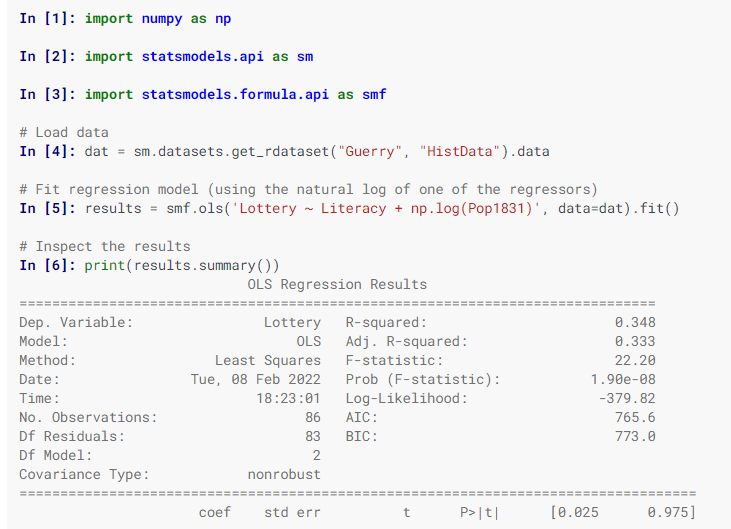
Statsmodels is a Python library designed for the estimation of various statistical models, enabling users to perform statistical tests and explore data effectively. Each estimator comes with a comprehensive array of result statistics, which are validated against established statistical software to ensure accuracy. This package is distributed under the open-source Modified BSD (3-clause) license, promoting free use and modification. Users can specify models using R-style formulas or utilize pandas DataFrames for convenience. To discover available results, you can check dir(results), and you will find that attributes are detailed in results.__doc__, while methods include their own docstrings for further guidance. Additionally, numpy arrays can be employed as an alternative to formulas. For most users, the simplest way to install statsmodels is through the Anaconda distribution, which caters to data analysis and scientific computing across various platforms. Overall, statsmodels serves as a powerful tool for statisticians and data analysts alike.
API Access
Has API
API Access
Has API
Screenshots View All
No images available

Pricing Details
$5
Free Trial
Free Version
Pricing Details
Free
Free Trial
Free Version
Deployment
Web-Based
On-Premises
iPhone App
iPad App
Android App
Windows
Mac
Linux
Chromebook
Deployment
Web-Based
On-Premises
iPhone App
iPad App
Android App
Windows
Mac
Linux
Chromebook
Customer Support
Business Hours
Live Rep (24/7)
Online Support
Customer Support
Business Hours
Live Rep (24/7)
Online Support
Types of Training
Training Docs
Webinars
Live Training (Online)
In Person
Types of Training
Training Docs
Webinars
Live Training (Online)
In Person
Vendor Details
Company Name
Smartstat
Founded
2021
Country
Indonesia
Website
www.smartstat.info
Vendor Details
Company Name
statsmodels
Website
www.statsmodels.org/stable/index.html
Product Features
Statistical Analysis
Analytics
Association Discovery
Compliance Tracking
File Management
File Storage
Forecasting
Multivariate Analysis
Regression Analysis
Statistical Process Control
Statistical Simulation
Survival Analysis
Time Series
Visualization

