Average Ratings 0 Ratings
Average Ratings 1 Rating
Similar Products
-
LALAL.AIAny audio or video can be extracted to extract vocal, accompaniment, and other instruments. High-quality stem cutting based on the #1 AI-powered technology in the world. Next-generation vocal remover and music source separator service for fast, simple, and precise stem removal. You can remove vocal, instrumental, drums and bass tracks, as well as acoustic guitar, electric guitar, and synthesizer tracks, without any quality loss. You can start the service free of charge. Upgrade to get more files processed and faster results. Only for personal use. Move to the next level. You can process thousands of minutes of audio and/or video. This software is suitable for both personal and business use. Each LALAL.AI package has a limit on the amount of audio/video that can be split. The package minute limit is deducted from each file that has been fully split. You can split as many files you like, provided their total length does not exceed the minute limit.
-
ChainstackChainstack's APIs and software are used by thousands of businesses, large and small, to build, scale, and maintain blockchain applications. To ensure your security and control, Chainstack's APIs offer secure node connections and key security best practices. Invite other members to join your network and deploy their infrastructure using simple network management tools. You can build and deploy the blockchain protocol that suits your needs. The protocol will never be updated or modified again. Chainstack's managed services for blockchain make it easy to launch, join, and scale decentralized networks. You can now safely experiment with enterprise-grade tools and services and then run production. Continuously monitor and provision your resources.
-
ConvesioConvesio gives commerce businesses the edge they need to grow faster — combining ultra-reliable WordPress hosting with seamless, built-in payment processing. At the heart of it all is ConvesioPay, a powerful payments platform that integrates directly with your hosting stack. No clunky plugins. No middlemen. Just faster, more secure transactions that help you convert and scale without friction. With auto-scaling containers, PCI-compliant infrastructure, and real-time revenue insights, Convesio removes the bottlenecks that slow down online stores. It’s performance, payments, and peace of mind — all in one place. Highlights: Integrated payments through ConvesioPay Built for WooCommerce and high-traffic stores Enterprise-grade uptime and scalability Security-first, PCI-compliant environment Real-time performance and revenue visibility
-
LTXMost AI video tools hand you a black box: closed weights, a subscription, and no way to see what is happening under the hood. LTX takes the opposite approach. Built by Lightricks, LTX is an open foundation model that generates and simulates across video, audio, and the physical world, and it puts the weights, the code, and the control in your hands. At the center of the model is LTX-2.5, a 22B-parameter dual-stream diffusion transformer that produces native 4K video at up to 50 frames per second, with audio and video generated together in a single pass rather than stitched together afterward. Artificial Analysis, an independent benchmarking group, currently ranks LTX among the top three AI video models in the world. You choose how you want to use it. Download the open weights and run LTX-2.5 on your own hardware. License the model for on-premise deployment backed by enterprise support. Or build directly on LTX Studio, the production suite that turns the model into a full creative workflow. Companies like ElevenLabs, Asteria Film Co., Magnopus, and NVIDIA already rely on LTX for their own work. LTX is not built for one-off social clips. It is infrastructure for teams that generate motion, audio, and physical environments as part of their own products and pipelines.
-
TinyPNGTinyPNG (by Tinify) is a free image optimization service built for developers and designers. It utilizes smart lossy compression to reduce the file sizes of JPEG, PNG, WebP, and AVIF files by up to 80% with no visible quality loss. That means faster load times, better SEO, and lower bandwidth. You can compress, convert, and resize images via a clean web interface or integrate it into your workflow with the API. The platform also provides an image CDN for fast global delivery of optimized assets. SDKs are available for Python, Node.js, PHP, Java, Ruby, and .NET. WordPress plugin included, plus plenty of community-driven integrations. No tuning, no noise, Tinify just works. Whether you're optimizing a handful of images or processing millions, it scales effortlessly. All plans include a generous free tier, and support is quick when you need it. George the panda 🐼 approves.
-
4K Video DownloaderYou can watch videos from anywhere, anytime, even offline. It's easy to download: simply copy the link from your browser, and then click 'Paste Link" in the application. You can save full playlists and channels on YouTube in high-quality and other video or audio formats. Download your YouTube Mix, Watch Later and Liked videos as well as private YouTube playlists. Receive new videos from your favorite YouTube channels automatically. You can feel the action around you with virtual reality videos. To experience the amazing VR experience in 360deg, download 360deg videos. You can bypass any restrictions placed by your Internet service provider to bypass your school firewall or workplace firewall. To access YouTube and other sites, set up an in-app proxy connection.
-
MLM SoftMLM Soft Cloud Platform (MLM Soft Cloud) is a high performance ERP class software designed for MLM and Direct Selling companies. We know how important it is to get your product or opportunity to market as quickly as possible. We can drastically reduce the time required to achieve this. Our cloud-based platform can deliver MLM software in just one week. The platform is fully customizable, from the design to the content, including languages, currencies, wallets, roles of access, messages, and reporting. Our compensation plan engine is configurable to any algorithm. MLM Soft is designed to be the core of your MLM IT landscape. It can be integrated into any 3rd-party software, including ecommerce, CRM, payment, marketing and more, thanks to its full rest API.
-
RAD PDFInstall-free PDF editing, form filling, redaction, signing, viewing, and more on your website with RAD PDF! Packaged as an easy to use library / WebControl (compatible with .NET 3.5+, .NET Core, and .NET 5+), RAD PDF can be used with just about any flavor of ASP.NET including MVC, Razor, Blazor, WebForms, and more. RAD PDF is compatible with 99% of internet browsers, including those on Linux, Mac OS X, Microsoft Windows, and mobile. No plugins. No Adobe Reader. RAD PDF is more than a PDF to HTML converter. It natively supports all the most common PDF features including annotations, bookmarks, form fields, page labels, and more. With advanced PDF options, RAD PDF allows you to selectively enable and disable features not available with Adobe Acrobat Reader, like protecting a PDF from being downloaded while still viewable online. RAD PDF users can use PDF form fields directly from the web browser by enabling PDF form filling and PDF form saving without having to install any software. Integrating directly with ASP.NET, RAD PDF allows your web application to capture input data, build custom workflows, and provide an intuitive graphical user interface (GUI) for just about any online PDF interaction imaginable!
-
BudgytYou know the pain. 8,000+ formulas in your Excel budget, any one of which could break. Department heads emailing versions back and forth. Mystery errors appearing right before board meetings. Weekends lost hunting for that one number that doesn't add up. We built Budgyt because we lived that nightmare as CFOs ourselves. It's a true database that works like Excel, so your team doesn't need training. But formulas never break. Every number traces back to source with one click. Import your chart of accounts and actuals directly from your accounting system. Click any variance to drill down to vendor-level detail instantly. Run rolling reforecasts every month without rebuilding everything from scratch. We connected it via API so you're up and running in hours, not spending months on implementation consulting. Built for multi-department organizations where budgeting needs to be collaborative, but the finance team needs to stay in control. No more emailing spreadsheets around. No more "did I break something?" panic. Just budgeting that actually works.
-
GaffaGaffa is a REST API built for web scraping and browser automation, allowing developers to run real, full browsers at scale with a single API call. It removes the difficulty of managing headless browser frameworks, rotating proxies, CAPTCHA solving, and scaling infrastructure, all of which are handled automatically. JavaScript-heavy and dynamic websites render exactly as they would for a human visitor by default. Beyond standard scraping, Gaffa supports AI-driven structured data extraction (extract data into a defined schema without writing CSS selectors), screenshot and PDF capture, infinite-scroll and form-filling automation, and clean Markdown conversion for feeding webpages directly into LLM and RAG pipelines. A rotating residential proxy network keeps access reliable across regions, and a credit-based pricing model means teams pay only for the browser time and bandwidth they actually use. Gaffa is designed for AI engineers, data teams, and developers who want production-grade web data extraction without having to build and maintain their own infrastructure.
Description
Podium is a contemporary digital audio workstation (DAW) designed for Windows users. It provides functionalities for recording and editing both audio and MIDI, as well as the capability to host VST instrument and effect plugins. To utilize Podium effectively, you must set up the audio and MIDI interfaces you intend to work with. On the MIDI interface settings page, simply check the boxes for all the interfaces you wish to incorporate. For optimal low-latency performance, it is strongly advised to choose an ASIO audio driver on the audio configuration page. Upon your initial launch of Podium, the default setting will be to build and load the plugin database. When you initiate a new project, Podium will scan and compile a list of all detected plugins. In subsequent projects, the default will change to loading the existing plugin database, streamlining the process and eliminating the need for repetitive scanning. Should you have added new plugins since the last database build, you can opt to either rebuild or update the database to ensure all your plugins are recognized. This flexibility makes Podium a user-friendly choice for audio production.
Description
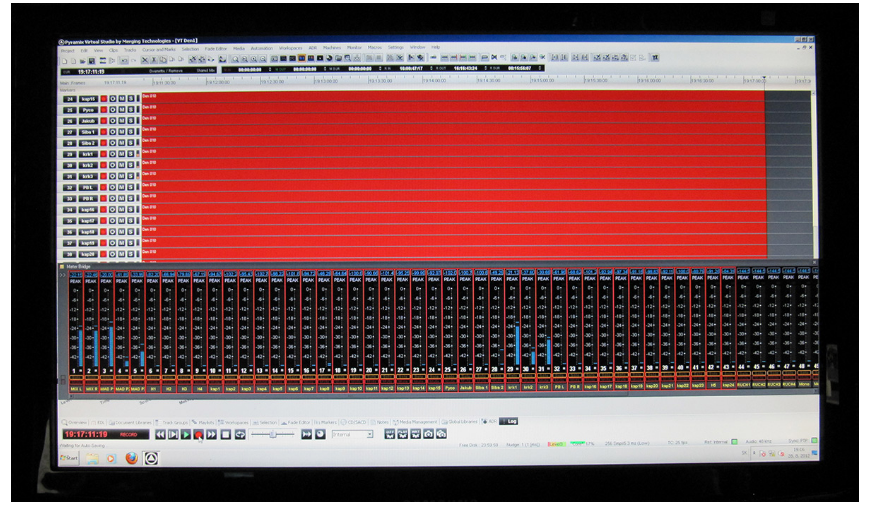
Pyramix is a digital audio workstation that is widely utilized by professional studios and engineers globally for tasks related to music production, mastering, and post-production in television and film. Combined with its networked audio interfaces, Pyramix delivers a comprehensive solution that enables the digital creation of music with an audio quality that mimics the warmth of analog sound. It empowers music producers to maintain the highest standards throughout the entire production process, equipping them with essential tools for extensive distribution, including the latest streaming formats like Dolby Atmos®. Collaborating with companies such as Flux Audio, Merging Technologies has integrated remarkable plugins into Pyramix, offering them in any resolution with almost negligible latency. Beyond being the most transparent, analog-sounding digital audio workstation, Pyramix also features innovative editing capabilities, including the distinctive source/destination mode that allows for effortlessly editing vast multitrack recordings at exceptional speed. This combination of features ensures that Pyramix stands out as an essential tool for audio professionals who value both quality and efficiency.
API Access
Has API
No
API Access
Has API
No



Integrations
Stackreaction
No
Trakwell.ai
No
Pricing Details
$35 per year
Free Trial
No
Free Version
No
Pricing Details
No price information available.
Free Trial
Yes
Free Version
No
Deployment
Web-Based
No
On-Premises
No
iPhone App
No
iPad App
No
Android App
No
Windows
Yes
Mac
No
Linux
No
Chromebook
No
Deployment
Web-Based
Yes
On-Premises
No
iPhone App
No
iPad App
No
Android App
No
Windows
Yes
Mac
Yes
Linux
Yes
Chromebook
No
Customer Support
Business Hours
No
Live Rep (24/7)
No
Online Support
Yes
Customer Support
Business Hours
Yes
Live Rep (24/7)
No
Online Support
Yes
Types of Training
Training Docs
Yes
Webinars
No
Live Training (Online)
No
In Person
No
Types of Training
Training Docs
Yes
Webinars
Yes
Live Training (Online)
No
In Person
Yes
Vendor Details
Company Name
Zynewave
Country
Denmark
Website
zynewave.com/podium/
Vendor Details
Company Name
Merging
Country
Switzerland
Website
www.merging.com/products/pyramix
Product Features
Audio Editing
Audio Effects
No
Batch Processing
No
Export Audio (Multiple File Types)
No
Record Live Audio
No
Record Multiple Simultaneous Tracks
No
Scrub, Search, Bookmark
No
Sound Editing Tools
No
Spectral Analysis / FFT
No
Speech Synthesis (TTS)
No
Swappable Patches
No
Virtual Instruments
No
Virtual Mixing
No
Voice Changer
No
Product Features
Audio Editing
Audio Effects
No
Batch Processing
No
Export Audio (Multiple File Types)
No
Record Live Audio
No
Record Multiple Simultaneous Tracks
No
Scrub, Search, Bookmark
No
Sound Editing Tools
No
Spectral Analysis / FFT
No
Speech Synthesis (TTS)
No
Swappable Patches
No
Virtual Instruments
No
Virtual Mixing
No
Voice Changer
No
