Average Ratings 0 Ratings
Average Ratings 0 Ratings
Similar Products
-
ClickLearnClickLearn simplifies complex business processes using popular software. You can create multi-format learning materials in any language and publish them to a 24/7 learning portal with just one click. A video walkthrough of the process, with narration in your preferred language. Put your learning to the test. This interactive simulation of your workplace allows you to test your knowledge without any hints. Interactive simulation of your workplace environment that guides you through the process. This guide is step-by-step. ClickLearn wrote this guide with perfectly cropped screenshots. ClickLearn Assist can be your go-to helper when you are stuck, need process help, or want to try a new process in the live system. You don't have to worry about making another mistake. All your learning materials can be auto-translated with a click of a button
-
DropTrackDropTrack is a music promotion and release management platform for independent artists, labels, managers, DJs, playlist curators, bloggers, radio contacts, and industry influencers. The platform helps users prepare tracks for promotion, pitch the right contacts, and measure how people respond to each release. DropTrack’s Music Analyzer gives artists a readiness score, mood, genre, similar artist references, and practical next steps before they spend money on promotion. Users can also generate release assets such as album art, press releases, artist bios, track versions, and professional campaign materials. The platform supports targeted submissions to labels, DJs, playlist curators, blogs, radio stations, and other contacts that fit a song’s genre and audience. Email campaign tools let users send music to their own lists or use DropTrack’s genre-based contact lists, then track opens, plays, downloads, comments, and follow-up signals. Spotify playlist placement options help artists pursue real playlist exposure while avoiding fake or bot-driven lists. DropTrack also connects with AI assistants such as Claude, ChatGPT, Cursor, and Copilot so users can create weekly label briefs, campaign drafts, contact ideas, and release checklists from account data. By combining track analysis, release preparation, contact lists, submissions, playlist placement, email campaigns, and analytics, DropTrack helps music teams promote smarter and build stronger fan and industry relationships.
-
NumaNuma is the AI Customer Operations System built for dealerships that are tired of losing revenue and customers to broken processes. Every day, service calls go unanswered, advisors spend their time fielding "where's my car?" instead of selling work, and managers only find out about unhappy customers after the bad review is already posted. Numa fixes this at the infrastructure level that can follow-up with your customers automatically and give visibility into customer satisfaction to your advisors, reps, and managers. Operator answers and routes every inbound call so nothing goes dark. Status Updates proactively reaches out to customers so advisors stop drowning in callbacks. Voice AI books appointments automatically so customers never wait. LiveCSI flags heat cases in real time so managers can intervene before a CSI score takes the hit. Opportunities can proactively reach out on declined services, open recalls, and equity moments. And it all runs through one unified system: one inbox, one shared context. The result: recovered revenue, freed-up advisors, and a customer experience that increases CSI and builds loyalty.
-
CompanyCamCompanyCam is a photo-based solution created specifically for contractors. Users can take unlimited photos—which are location and time stamped, sent to the cloud, and stored securely. Every photo is organized by project and instantly available to your team, allowing you to see what’s going on anytime, anywhere.
-
RAD PDFInstall-free PDF editing, form filling, redaction, signing, viewing, and more on your website with RAD PDF! Packaged as an easy to use library / WebControl (compatible with .NET 3.5+, .NET Core, and .NET 5+), RAD PDF can be used with just about any flavor of ASP.NET including MVC, Razor, Blazor, WebForms, and more. RAD PDF is compatible with 99% of internet browsers, including those on Linux, Mac OS X, Microsoft Windows, and mobile. No plugins. No Adobe Reader. RAD PDF is more than a PDF to HTML converter. It natively supports all the most common PDF features including annotations, bookmarks, form fields, page labels, and more. With advanced PDF options, RAD PDF allows you to selectively enable and disable features not available with Adobe Acrobat Reader, like protecting a PDF from being downloaded while still viewable online. RAD PDF users can use PDF form fields directly from the web browser by enabling PDF form filling and PDF form saving without having to install any software. Integrating directly with ASP.NET, RAD PDF allows your web application to capture input data, build custom workflows, and provide an intuitive graphical user interface (GUI) for just about any online PDF interaction imaginable!
-
HaystackHaystack connects every employee of your organization with the people, resources, and information they need to thrive and succeed. Haystack provides employees with a fun, intuitive and informative way to start the day. Custom branding with no-code and a modular layout make it easy to highlight key resources, organizational culture, and knowledge. Haystack's automated multi-channel delivery, combined with actionable analytics, makes it easy for you to reach your employees at the right time and place. Spend less time looking for information and more on achieving your goals. Haystack’s knowledge-sharing features make it easy for employees to get the materials they need, no matter where in the world they are. It can be difficult to stay connected with everyone as teams grow and change. Haystack’s rich employee profiles and company directory make colleagues around the world feel as if they are right across the room.
-
ZenTreasuryMost finance teams run two systems: one for lease accounting, one for treasury, reconciled by hand. ZenTreasury runs both as one governed subledger, because the ERP that posts the journal entry does not know the contract behind it. ZenTreasury does. Add a lease and the platform generates the full schedule automatically: right of use asset, lease liability, depreciation, interest, and balance carry forward, all following the standard from the moment the lease is saved. Index-linked remeasurement is handled automatically, with index rates, base values, and next indexation dates tracked per contract. Every later change, such as a scope change, term extension, rate revision, or partial termination, recalculates the schedule and logs it with a timestamp and user, so auditors get the before and after picture without asking. On the treasury side: centralised FX position management across forwards, swaps, and cross currency instruments with mark-to-market valuations; internal and external loan tracking with valuation against yield curves and automated interest accrual; trade finance and guarantee monitoring with fee and exposure tracking; and group wide cash flow forecasting with scenario modelling, all multi entity and multi currency. Direct bank connectivity included. One platform, accounting included, priced to the scope you run. Every customer gets a dedicated, isolated database. Lease calculations are independently reviewed by an international audit firm. Connect Claude, ChatGPT, or any MCP client directly to your contract data.
-
Virtuoso QAVirtuoso QA is an AI-native test automation solution built to streamline and scale enterprise quality assurance processes. It allows users to author tests in natural language, making it accessible for both technical and non-technical team members. The platform leverages self-healing AI to automatically adapt to changes in applications, reducing test flakiness and maintenance overhead. With features like live authoring, real-time execution, and automated diagnostics, teams can quickly identify and resolve issues. Virtuoso QA supports continuous testing across multiple browsers, devices, and environments, ensuring comprehensive test coverage. It integrates seamlessly with popular tools such as Jira, Jenkins, Azure DevOps, and BrowserStack, enabling smooth CI/CD workflows. The platform also provides detailed analytics and dashboards to track performance and optimize testing strategies. By automating test generation and execution, it significantly reduces manual effort and accelerates release cycles. Virtuoso QA empowers organizations to deliver high-quality software faster and more reliably.
-
QA WolfQA Wolf helps engineering teams achieve 80% automated test coverage end-to-end in just four months. Here's an overview of what you get in the box, whether it's 100 or 100,000 tests. • Automated end-to-end testing for 80% of the user flows in 4 months. The tests are written in Playwright, an open-source tool (no vendor lock-in; you own the code). • Test matrix and outline in the AAA framework. • Unlimited parallel testing on any environment of your choice. • We host and maintain 100% parallel-run infrastructure. • Maintenance of flaky and broken test for 24 hours. • Guaranteed 100% reliable results -- zero flakes. • Human-verified bugs sent via your messaging app as a bug report. • CI/CD Integration with your deployment pipelines and issue trackers. • Access to full-time QA Engineers at QA Wolf 24 hours a day.
-
DetrackStreamline everything from proof of delivery and real-time driver tracking, through to route optimisation and customer updates. Save time, reduce operating costs, and boost productivity with Detrack. Integrations Integrate with the best accounting and SMS platforms. From order creation through to proof of delivery, everything works together seamlessly - orders sync automatically, customers get notified instantly and drivers receive jobs in real-time. Test drive all features for free It only takes a few minutes to add your drivers, upload or create jobs and start branding your customer comms. Our free trial gives you access to all features for 14 days. We know that there aren’t enough hours in the day and our experts are available 24/5 to help you get set up to achieve your goals faster. You can chat live or book a call back for practical, hands-on support.
Description
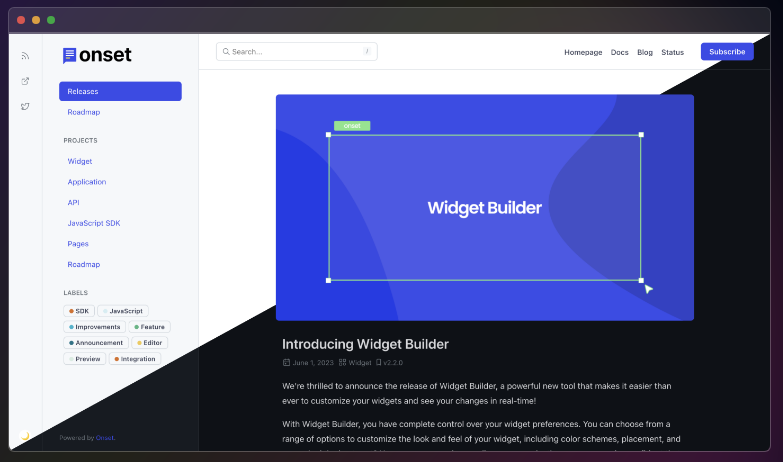
Streamline your product communication using Onset to ensure your users remain informed and engaged in a centralized manner. Keep them updated on matters that truly matter with timely notifications tailored to their needs. You can schedule release notes to be published automatically at your desired future date, allowing for seamless communication. Utilize tagging for your releases with SemVer, CalVer, or a custom versioning system of your choice. Monitor customer reactions to any changes or updates you implement in your product closely. Create content in Markdown or simply paste it, and it will be transformed into rich text effortlessly. Share your releases externally via a secure private link, enhancing visibility beyond your organization. With an AI-driven writing assistant, you can enhance the quality of your release notes significantly. Ensure that everyone is informed about the features you’re developing, their progress, and future plans. Additionally, gather valuable customer feedback on your roadmap features to identify which ones are most appealing and impactful. This comprehensive approach not only keeps your users in the loop but also fosters a collaborative environment for product development.
Description
Your notes remain synchronized across all devices seamlessly and in real-time, eliminating the need for a sync button as it operates effortlessly. You can easily add tags to your notes for quick retrieval through instant search functionality. Whether you want to share a to-do list, distribute instructions, or make your notes publicly accessible, the options are at your fingertips. Every alteration is automatically backed up, allowing you to revisit what you recorded last week or even last month. You can write, preview, and publish your notes using markdown format for an enhanced experience. All features, including apps, backups, syncing, and sharing, are offered entirely free of charge. Additionally, you have the option to browse notes for import or simply drag and drop files into the designated import window, with the app handling everything else for you. If you wish to maintain the markdown formatting of imported notes, you can select the "enable markdown on all notes" option, ensuring they are automatically set up as markdown notes within the simplenote application. This streamlined process makes it incredibly convenient for users to manage their notes efficiently.
API Access
Has API
API Access
Has API


Integrations
Bitbucket
Fixkey
GitHub
GitLab
Google Analytics
JavaScript
Mailchimp
Markdown
Sentry
Slack
Integrations
Bitbucket
Fixkey
GitHub
GitLab
Google Analytics
JavaScript
Mailchimp
Markdown
Sentry
Slack
Pricing Details
$30 per month
Free Trial
Free Version
Pricing Details
No price information available.
Free Trial
Free Version
Deployment
Web-Based
On-Premises
iPhone App
iPad App
Android App
Windows
Mac
Linux
Chromebook
Deployment
Web-Based
On-Premises
iPhone App
iPad App
Android App
Windows
Mac
Linux
Chromebook
Customer Support
Business Hours
Live Rep (24/7)
Online Support
Customer Support
Business Hours
Live Rep (24/7)
Online Support
Types of Training
Training Docs
Webinars
Live Training (Online)
In Person
Types of Training
Training Docs
Webinars
Live Training (Online)
In Person
Vendor Details
Company Name
Onset
Country
United States
Website
www.onset.io
Vendor Details
Company Name
Simplenote
Website
simplenote.com
Product Features
Product Features
Note-Taking
Categories / Organization
Clip From Web
Document Scanning
Formatting / Markdown
Handwriting
Hyperlinking
Image Insertion
List/Checklist Creation
Printing
Search
Sharing / Collaboration
Syncing
Templates
Voice Notes