Average Ratings 8 Ratings
Average Ratings 1 Rating
Similar Products
-
Switcher StudioSwitcher Studio allows you to capture video from multiple angles and edit it in real-time. This will allow you to connect with your community in a more engaging way. You can stream it live or save it for later. Your audience will be attracted to you with relevant content. Make it look great. There's no need to purchase, lug or learn largeequipment. Switcher is compatible with iPads and iPhones. Switcher is so intuitive that anyone can create amazing video with it. You don't need to hire outside videographers or producers. It takes an hour to edit every minute of edited video. Every minute of live-editing takes, well, one second. You can share every moment, live or recorded, external or internal, with video -- no matter what it holds.
-
ScreencaptScreencapt allows you to record the entire screen or a selected area. You can also record a specific window. Screencapt is the ideal screen recorder because of its flexibility. Using the integrated audio recording you can also add your commentary or system sound directly into the screen recording. This is particularly useful when creating explanation videos or presentations. Screencapt's ability to record a webcam is a special feature. You can now add your comments and reactions to the video. This makes your screen recordings more personal and professional. Screencapt offers advanced options to record the cursor. You can choose to hide the cursor or add special effects to highlight specific actions. This is especially useful for software tutorials and demonstrations where a clear cursor view is required.
-
3Q3Q is an API-first video infrastructure for developers and engineering teams who want direct control over their media backend. A REST video API and native player SDKs give you programmatic access to hosting, ingestion, encoding, live streaming, video-on-demand, and delivery, so you can build video portals, streaming apps, or OTT backends on a single European platform. The stack is transparent by design. 3Q supports adaptive bitrate streaming over HLS and DASH with mixed HEVC and AVC codecs and automatic Live-to-VoD. Delivery runs over a proprietary global CDN, encryption, and HTTP/2 over TLS 1.3. The Cookie- and Consent-free HTML5 Video Player is barrier-free in accordance with WCAG 2.1/BITV 2.0 and needs no consent layer. Video AI exposes speech-to-text transcription, automatic subtitles, translation, and chapter markers through the same API, and integration fits your existing pipeline and video workflows. What sets 3Q apart is ownership. 3Q runs on its own independent European video infrastructure, so your data stays in the EU and under German jurisdiction. 3Q is GDPR-compliant and all processes are ISO/IEC 27001 certified, with modular pay-as-you-go pricing and 24/7 support from real video experts.
-
SetplexSeplex is an OTT solutions provider, serving global operators with simple, powerful and scalable OTT solutions—from content preparation, management and monetization to video delivery, multi-screen apps and real-time analytics. We offer a unified OTT platform that includes middleware, transcoders, CDNs, DRM, multi-screen apps, STBs, and analytics—all designed to support operators globally.
-
OvermonitorOvermonitor is cloud-based infrastructure, website, and endpoint monitoring built for teams that want fast setup, clear alerts, and practical visibility without the complexity or cost of enterprise monitoring suites. Monitor websites, servers, endpoints, processes, Windows services, event logs, uptime, response time, SSL certificates, and internal network health from one easy dashboard. At the core of Overmonitor is a small, lightweight server agent that installs quickly, pairs with your account, and reports a heartbeat every minute from inside your network. This gives you visibility beyond public uptime checks, helping detect server outages, stalled services, failing processes, internal connectivity problems, and endpoint health issues before they become customer-facing downtime. Overmonitor supports city-level geotargeted monitoring, practical maintenance windows that reduce alert noise, push notifications for alerts, audible dashboard alerts for operations screens, process monitor rollups, embeddable performance graphs, and flexible à la carte pricing so you only pay for the monitoring you need. Designed for SaaS operators, IT teams, MSPs, developers, and small businesses, Overmonitor helps you track availability, analyze website performance, monitor infrastructure health, and improve end-user experience without being locked into a bloated monitoring platform.
-
Elecard BoroElecard Boro is a professional software solution designed to monitor video stream health and track QoS/QoE parameters across distributed networks. By providing centralized access to statistics and automated reporting, Boro enables telecom professioals to build a powerful monitoring ecosystem from scratch or easily scale existing infrastructure to ensure flawless broadcast quality. How it works: Boro utilizes distributed software probes to monitor UDP, RTP, HTTP, HLS, DASH, SRT, and RTMP streams. By aggregating multi-point measurements on a centralized server, operators can instantly isolate quality degradation across the entire delivery chain. The platform provides network-wide visibility and real-time alerts for ETSI TR 101 290 errors via Email, SNMP, Webhook, PagerDuty, and Telegram. Key Features: • Rapid Deployment & Scalability: Launch a monitoring probe in just 30 minutes. Easily scale your infrastructure by adding new probes to the unified Boro ecosystem on any hardware. • Proactive Issue Resolution: Monitor over 50 QoS and QoE parameters (including full ETSI TR 101 290 compliance) and use triggers to localize network anomalies before they impact viewers. • Advanced Diagnostics: Use comprehensive analysis of SCTE-35 ad-insertion cues and PCAP stream recording for in-depth delivery troubleshooting. • Effortless Integration & Access: Access monitoring data from any device via an intuitive web interface. Seamlessly integrate Boro into your existing workflow using WebHook, SNMP, and ControlAPI. • Operational Efficiency: Reduce the workload on QA and network engineers through automated regular reporting, advanced visualization dashboards, and smart threshold tuning that eliminates false alarms.
-
MuzaicMuzaic.ai is a browser-based tool that scores video automatically. You give it a cut (or a folder of cuts); it returns a finished audio mix — music, SFX, ambience and voiceover as separate layers — mastered to broadcast spec, in roughly 30 seconds per clip. What it actually does The pipeline runs in four stages. First it analyses the video: scenes, objects, pacing, colour and sentiment. From that it builds an audio plan and commits each concept to a clear direction (the site's example: a string quartet under a battle scene) rather than averaging toward something inoffensive. Then it composes every layer to fit the picture and the other layers — SFX land on the action, ambience ducks under speech, the voiceover is drafted from your brief rather than read out. Finally it mixes and masters the result. Existing audio in the source can be kept, replaced or mixed under. Output is three concepts per clip, exported as MP3 or WAV. Layer balance is adjusted inside Muzaic before export; the deliverable is the finished mix, not separate stems. The commercial angle Pricing is metered in minutes of finished audio, not per track or per download; downloads are unlimited. Personal is free for 10 minutes a month, non-commercial only. Creator ($45/month) covers your own brand and paid ads. Studio ($249/month) is for agencies: the licence travels to the client and the legal cover extends to them too. Enterprise adds TV, radio, cinema and OOH, plus a custom contract, DPA and SLA. What it is not It is not a music-generation toy. The free tier exists to test the workflow on your own footage; nothing from it may be published. The target user is a team producing hundreds of ad variants a month, where the audio step is the bottleneck.
-
pCloud BusinesspCloud Business is a cloud storage and file synchronization platform designed for teams that need controlled access, cross-platform compatibility, and predictable storage allocation. It provides centralized file management with granular permissions and optional client-side encryption. Founded in 2013 in Switzerland, pCloud operates under EU-aligned privacy standards and offers data residency in Luxembourg (EU) and Dallas, Texas (US). The platform supports over 23 million users globally. Core Functionality : - Per-User Storage Allocation : 1 TB or 2 TB per user, suitable for small to mid-sized teams and distributed environments. - Virtual File System (pCloud Drive) : Mounts as a local drive on Windows, macOS, and Linux. Files are streamed on demand, reducing local disk usage. - File Sync & Sharing : Folder-level sync, link-based sharing, and permission control (view/edit/manage). Supports password-protected and time-limited links. - Admin & Access Control : Centralized user management, role assignment, and storage distribution via admin console. - Versioning & File History : File versioning with up to 180 days retention, enabling rollback and recovery. - Cross-Platform Support : Native clients for Windows, macOS, Linux, iOS, Android, plus web interface. - Client-Side Encryption (Optional) : Zero-knowledge encryption via pCloud Encryption for sensitive data; encryption keys are not stored server-side. Technical Positioning: - Swiss jurisdiction; GDPR-aligned processing - No file size limits - Works without mandatory ecosystem lock-in (no bundled office suite required) - Compatible with heterogeneous environments (Linux included) Trial : 30-day free trial available for up to 10 users.
-
LTXMost AI video tools hand you a black box: closed weights, a subscription, and no way to see what is happening under the hood. LTX takes the opposite approach. Built by Lightricks, LTX is an open foundation model that generates and simulates across video, audio, and the physical world, and it puts the weights, the code, and the control in your hands. At the center of the model is LTX-2.5, a 22B-parameter dual-stream diffusion transformer that produces native 4K video at up to 50 frames per second, with audio and video generated together in a single pass rather than stitched together afterward. Artificial Analysis, an independent benchmarking group, currently ranks LTX among the top three AI video models in the world. You choose how you want to use it. Download the open weights and run LTX-2.5 on your own hardware. License the model for on-premise deployment backed by enterprise support. Or build directly on LTX Studio, the production suite that turns the model into a full creative workflow. Companies like ElevenLabs, Asteria Film Co., Magnopus, and NVIDIA already rely on LTX for their own work. LTX is not built for one-off social clips. It is infrastructure for teams that generate motion, audio, and physical environments as part of their own products and pipelines.
-
OptiSignsOptiSigns, your friendly digital signage software! Designed with simplicity and ease in mind, it's the perfect harmony of affordable software and usage with any hardware in the market. Pick from 140+ Apps, Thousands of Templates, and formats like images & videos, playlists, Google Slides, Weather, Instagram, Twitter, YouTube – you name it! Level up your business and start engaging your audience. For just $10/month per screen, use any display to capture your audiences attention! Remotely manage it all from one central portal. Indulge in features, images, videos, playlists, and schedules. Jazz it up with apps like Google Slides, Weather, Instagram, Facebook, Twitter, and more. Oh, and did we mention? We play nice with the most hardware and operating systems in the market like Fire TV Stick, Android, Chrome, Raspberry Pi, Roku, Windows, Linux, and MacOS. Time to unleash your business potential!
Description
Experience the power of free and open-source software designed for video recording and live streaming across Windows, Mac, or Linux platforms. Begin your streaming journey quickly and effortlessly while enjoying high-performance capabilities for real-time video and audio capture and mixing. Create diverse scenes that incorporate various sources, including window captures, images, text, browser windows, webcams, and capture cards. You can establish an unlimited number of scenes that allow for seamless transitions between them. The user-friendly audio mixer features unique per-source filters like noise gate, noise suppression, and gain adjustments, along with VST plugin support for comprehensive control. Enjoy a robust set of configuration options that make it easy to add new sources, duplicate existing ones, and modify their properties with minimal effort. The streamlined settings panel provides access to a multitude of options, enabling you to customize every facet of your broadcast or recording. The adaptable 'Dock' UI allows for personalized arrangement of the interface, and you can even separate individual docks into their own windows for enhanced convenience. With such flexibility and functionality, this software becomes an essential tool for content creators looking to elevate their streams.
Description
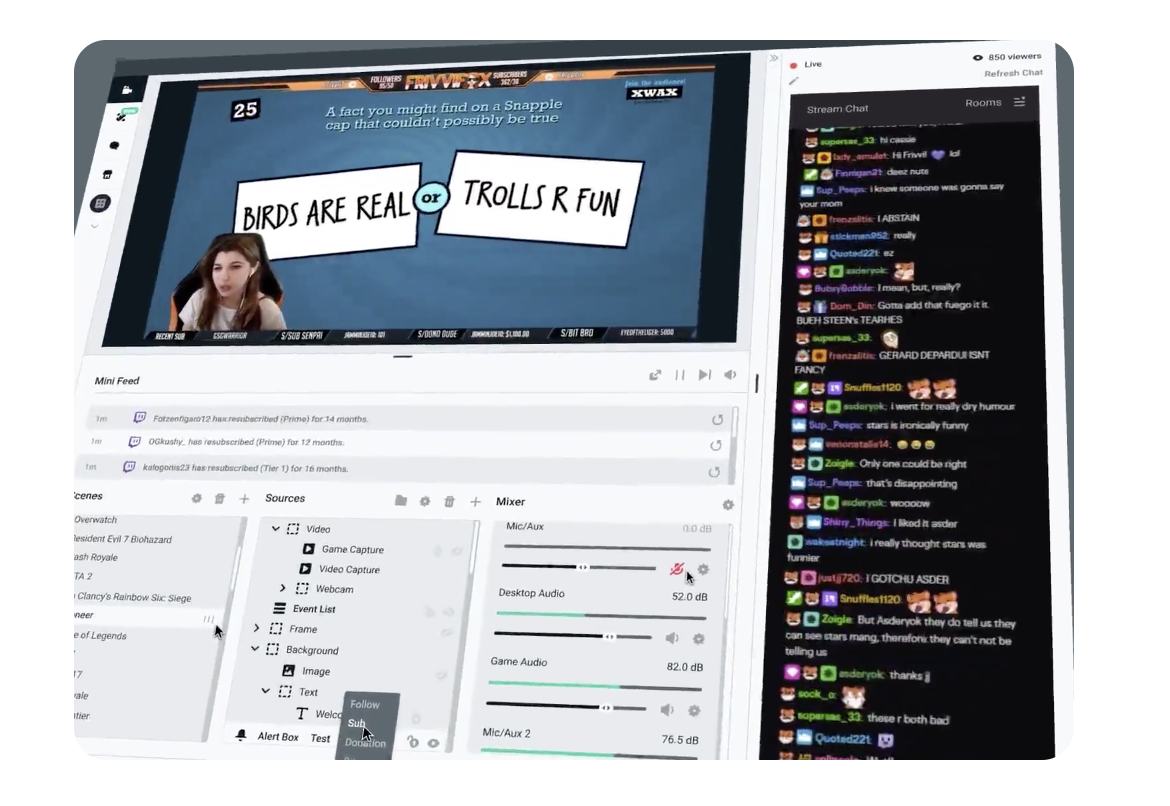
All-in-one streaming software. Live stream and grow your audience. One simple streaming software that is feature-packed and easy to use. Stream to Twitch, YouTube, Facebook in just seconds. Prime includes hundreds of stream overlays, plus many more. Stream on Twitch, YouTube and Facebook professionally. You can easily recognize your viewers live on stream using fully customizable alerts. Apps that give you more control, automation and better analytics. They also allow you to interact with viewers in new ways. All-in-one streaming software.
API Access
Has API
No
API Access
Has API
No


Integrations
Basket Score
Yes
DLive
Yes
Facebook
Yes
Facebook Live
Yes
Mix It Up
Yes
Streamer.bot
Yes
Vimeo
Yes
Vimeo Livestream
Yes
YouTube
Yes
AnyMiro
Yes
Integrations
Basket Score
Yes
DLive
Yes
Facebook
Yes
Facebook Live
Yes
Mix It Up
Yes
Streamer.bot
Yes
Vimeo
Yes
Vimeo Livestream
Yes
YouTube
Yes
AnyMiro
No
Pricing Details
No price information available.
Free Trial
No
Free Version
Yes
Pricing Details
$0
Free Trial
No
Free Version
Yes
Deployment
Web-Based
No
On-Premises
No
iPhone App
No
iPad App
No
Android App
No
Windows
Yes
Mac
Yes
Linux
Yes
Chromebook
No
Deployment
Web-Based
No
On-Premises
No
iPhone App
No
iPad App
No
Android App
No
Windows
Yes
Mac
Yes
Linux
No
Chromebook
No
Customer Support
Business Hours
No
Live Rep (24/7)
No
Online Support
No
Customer Support
Business Hours
Yes
Live Rep (24/7)
Yes
Online Support
Yes
Types of Training
Training Docs
Yes
Webinars
No
Live Training (Online)
No
In Person
No
Types of Training
Training Docs
Yes
Webinars
No
Live Training (Online)
No
In Person
No
Vendor Details
Company Name
Open Broadcaster Software
Country
United States
Website
obsproject.com
Vendor Details
Company Name
Streamlabs
Founded
2014
Country
United States
Website
streamlabs.com
Product Features
Live Streaming
Access Control
No
Audience Analytics
No
Audience Engagement
No
Browser-based
No
Customizable Branding
No
Encoding
No
Event Scheduling
No
Live Streaming Production
No
Moderation
No
Monetization Tools
No
Multi-Screen / Split-Screen
No
Multiple Camera Feeds
No
Multistreaming
No
Session Recording
No
Social Media Integration
No
Streaming Platform Integration
Yes
Screen Recording
Annotations / Drawing
No
Audio Capture
Yes
Backup
No
Collaboration Tools
No
File Sharing
No
Multi-Screen Recording
Yes
Screen Capture
Yes
Speech-to-Text
No
Video Editing
No
YouTube Uploading
No
Product Features
Live Streaming
Access Control
No
Audience Analytics
No
Audience Engagement
No
Browser-based
No
Customizable Branding
No
Encoding
No
Event Scheduling
No
Live Streaming Production
No
Moderation
No
Monetization Tools
No
Multi-Screen / Split-Screen
No
Multiple Camera Feeds
No
Multistreaming
No
Session Recording
No
Social Media Integration
No
Streaming Platform Integration
No
Screen Recording
Annotations / Drawing
No
Audio Capture
No
Backup
No
Collaboration Tools
No
File Sharing
No
Multi-Screen Recording
No
Screen Capture
No
Speech-to-Text
No
Video Editing
No
YouTube Uploading
No
