Average Ratings 0 Ratings
Average Ratings 0 Ratings
Similar Products
-
Adobe FireflyAdobe Firefly is a versatile AI-powered creative platform designed to help users generate and edit multimedia content with ease. It allows users to create images, videos, and audio using simple text prompts within an interactive and flexible workspace. The platform features tools like generative fill, image editing, and video editing, enabling users to refine and enhance their creations. Firefly also includes quick actions such as background removal, cropping, resizing, and format conversion to streamline workflows. Users can explore an infinite canvas for creative production and experiment with various styles and outputs. The platform encourages creativity by allowing users to remix content from a shared community gallery. With its intuitive design, it reduces the need for advanced technical skills. Firefly integrates AI capabilities to speed up content creation and editing processes. It supports both beginners and professionals in producing high-quality results. Overall, Adobe Firefly provides a powerful and accessible environment for modern digital creativity.
-
DropTrackDropTrack is a music promotion and release management platform for independent artists, labels, managers, DJs, playlist curators, bloggers, radio contacts, and industry influencers. The platform helps users prepare tracks for promotion, pitch the right contacts, and measure how people respond to each release. DropTrack’s Music Analyzer gives artists a readiness score, mood, genre, similar artist references, and practical next steps before they spend money on promotion. Users can also generate release assets such as album art, press releases, artist bios, track versions, and professional campaign materials. The platform supports targeted submissions to labels, DJs, playlist curators, blogs, radio stations, and other contacts that fit a song’s genre and audience. Email campaign tools let users send music to their own lists or use DropTrack’s genre-based contact lists, then track opens, plays, downloads, comments, and follow-up signals. Spotify playlist placement options help artists pursue real playlist exposure while avoiding fake or bot-driven lists. DropTrack also connects with AI assistants such as Claude, ChatGPT, Cursor, and Copilot so users can create weekly label briefs, campaign drafts, contact ideas, and release checklists from account data. By combining track analysis, release preparation, contact lists, submissions, playlist placement, email campaigns, and analytics, DropTrack helps music teams promote smarter and build stronger fan and industry relationships.
-
Private Internet Access (PIA)Browse without revealing your identity by using a private IP address and activating robust encryption to safeguard your online activities from your internet service provider and unsecured public Wi-Fi connections. Experience limitless connectivity with our anonymous VPN service, allowing you to bypass geographical restrictions and protocol limitations effortlessly. Whether you're focused on browsing or streaming content, Private Internet Access guarantees reliable performance. With the most extensive network capacity globally, Private Internet Access ensures top-notch speeds and superior encryption levels. Notably, it is the only VPN service worldwide that has consistently maintained a no-logs policy, providing peace of mind for its users. Take control of your online privacy and enjoy a seamless internet experience.
-
pCloud BusinesspCloud Business is a cloud storage and file synchronization platform designed for teams that need controlled access, cross-platform compatibility, and predictable storage allocation. It provides centralized file management with granular permissions and optional client-side encryption. Founded in 2013 in Switzerland, pCloud operates under EU-aligned privacy standards and offers data residency in Luxembourg (EU) and Dallas, Texas (US). The platform supports over 23 million users globally. Core Functionality : - Per-User Storage Allocation : 1 TB or 2 TB per user, suitable for small to mid-sized teams and distributed environments. - Virtual File System (pCloud Drive) : Mounts as a local drive on Windows, macOS, and Linux. Files are streamed on demand, reducing local disk usage. - File Sync & Sharing : Folder-level sync, link-based sharing, and permission control (view/edit/manage). Supports password-protected and time-limited links. - Admin & Access Control : Centralized user management, role assignment, and storage distribution via admin console. - Versioning & File History : File versioning with up to 180 days retention, enabling rollback and recovery. - Cross-Platform Support : Native clients for Windows, macOS, Linux, iOS, Android, plus web interface. - Client-Side Encryption (Optional) : Zero-knowledge encryption via pCloud Encryption for sensitive data; encryption keys are not stored server-side. Technical Positioning: - Swiss jurisdiction; GDPR-aligned processing - No file size limits - Works without mandatory ecosystem lock-in (no bundled office suite required) - Compatible with heterogeneous environments (Linux included) Trial : 30-day free trial available for up to 10 users.
-
MyQAt MyQ, the core belief is that print solutions should be automated, personalized, and easy to use, allowing people to focus on what matters most in their daily work. This principle is reflected in MyQ’s approach to our product design, combining intuitive user experiences with strong data security and efficient document workflows. MyQ’s print management solutions strengthen document security while helping organizations reduce costs, save time, and lower their environmental impact.
-
TeleRayTeleRay is an industry-first telehealth and image management platform. TeleRay cloud-based medical image management platform allows users to securely share images with professionals (specialists, referring, clinicians) and patients. The platform has many features, including the ability to import or convert DICOM or non DICOM images, query and HL7 connectivity. Integrate with any EMR, view images on an FDA approved viewer anywhere on any device. Complete DICOM image migration is available- set up, training, and implementation is included. Live streaming and remote control of modalities are options and great for many use cases to place professionals virtually in a room any where. TeleRay is the most secure platform with peer 2 peer health and data communication. You can use the app to access workflow tools like waiting rooms, multi-calls, call transfer and sharing of images. It's simple and affordable. More than 3000 locations use our service, including 38 of the top medical centers in more than 20 nations. Get started today for free.
-
FilerevFilerev is a powerful tool that helps you easily find and manage hidden files, duplicate files, large files, and oversized folders, ensuring a streamlined and clutter-free digital workspace. Key features include advanced scanning technology that identifies the unorganized files taking up the most space and cluttering your Google Drive. Filerev enhances productivity by saving time and reducing the frustration of manual file organization. The custom filters and bulk delete tool give you complete control over finding and removing unwanted files in your account. The storage analyzer lets you browse your folders by size to see where the space is being used in your Google Drive. Whether you're an individual, a small business, or a large enterprise, Filerev offers robust solutions tailored to your needs. Visit filerev.com to discover how Filerev can transform your Google Drive experience and boost efficiency.
-
Adaptive SecurityAdaptive Security is OpenAI’s investment for AI cyber threats. The company was founded in 2024 by serial entrepreneurs Brian Long and Andrew Jones. Adaptive has raised $50M+ from investors like OpenAI, a16z and executives at Google Cloud, Fidelity, Plaid, Shopify, and other leading companies. Adaptive protects customers from AI-powered cyber threats like deepfakes, vishing, smishing, and email spear phishing with its next-generation security awareness training and AI phishing simulation platform. With Adaptive, security teams can prepare employees for advanced threats with incredible, highly customized training content that is personalized for employee role and access levels, features open-source intelligence about their company, and includes amazing deepfakes of their own executives. Customers can measure the success of their training program over time with AI-powered phishing simulations. Hyper-realistic deepfake, voice, SMS, and email phishing tests assess risk levels across all threat vectors. Adaptive simulations are powered by an AI open-source intelligence engine that gives clients visibility into how their company's digital footprint can be leveraged by cybercriminals. Today, Adaptive’s customers include leading global organizations like Figma, The Dallas Mavericks, BMC Software, and Stone Point Capital. The company has a world class NPS score of 94, among the highest in cybersecurity.
-
HighchartsHighcharts, a Javascript-based charting library, makes it easy to add interactive charts and graphs to web or mobile projects of any size. Highcharts is used by more than 80% of the 100 biggest companies in the world, as well as thousands of developers from a variety of industries, including finance, publishing, application development, and data science. Highcharts is in active development since 2009. It remains a favorite among developers due to its robust feature set and ease-of-use documentation, accessibility features and vibrant community.
-
FuelCloudFuelCloud is a fuel technology company building the future of Fuel Management Systems for monitoring and managing bulk fuel supplies. By combining four generations of fuel industry knowledge with the latest innovations in cloud computing and mobile technology, FuelCloud's Fuel Management Systems deliver cardlock-level control at backyard prices. The result is a powerful yet affordable Fuel Management System that protects fuel from loss and theft, streamlines reporting and management, and puts you in control of your fuel. The heart of FuelCloud's system is the cloud-based web portal. From the web portal, managers can track transactions and tank volumes, control who can access fuel (and how much they can have), and automate creating and delivering reports The web portal also integrates your bulk fuel data with your other fleet and business management software, helping to create a complete data picture of your fleet operations from tank to tailpipe.
Description
What capabilities does Imagelys Picture Lab offer?
The Imagelys Filter Library within Imagelys Picture Lab boasts a range of artistic effects and textures that users can easily explore and apply to their photographs. With thousands of advanced artistic effects available, you have a wealth of options to enhance your images. Each effect can be customized and fine-tuned to suit your specific requirements, allowing for a tailored editing experience. To facilitate a smoother workflow, effects are categorized by styles, making it easier to find what you need. Additionally, users can utilize the search feature in the Toolpalette to quickly locate desired effects. The library continues to expand, adding new artistic effects and textures regularly.
The artistic effects and textures found in the Imagelys Filter Library provide a convenient way to elevate the aesthetic appeal and impact of your photos. These user-friendly controls are designed with the needs of professional photographers in mind, enabling subtle enhancements or the rapid application of artistic effects to bring your creative vision to fruition, all achieved with simple slider adjustments. With intuitive photo tuning controls and a diverse array of options to enhance every aspect of your images, Imagelys Picture Lab stands out as a powerful tool for photographers seeking to refine their work.
Description
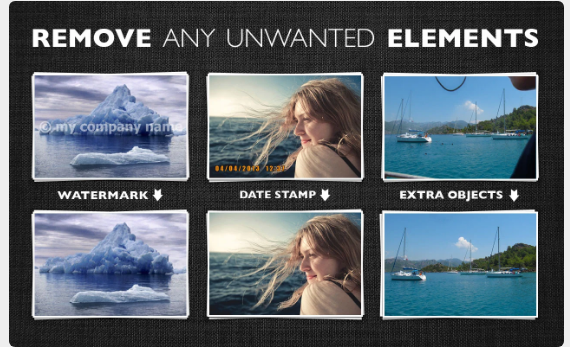
Inpaint effortlessly fills in selected areas with expertly generated textures derived from the surrounding image data. Visit our Tutorials page to discover how straightforward it is for anyone to achieve impressive results in just a few easy steps. You can either drag and drop a file here or click to upload an image, ensuring the format is JPG, PNG, or WebP, with a maximum file size of 10Mb and a resolution limit of 4.2 megapixels. Are pesky tourists constantly interrupting your perfect shots? Eliminate them from your photos using Inpaint! With a few simple actions, you can create stunning images that capture your original vision. Inpaint quickly allows you to highlight unwanted objects or people in your photo, and then you simply let Inpaint take care of the rest. Beyond the desired elements we want to feature in our pictures, there are often many distractions that detract from the overall composition. So, why not clear those away with Inpaint for a cleaner, more focused image? This tool is designed to enhance your photography experience, making it more enjoyable and efficient.
API Access
Has API
No
API Access
Has API
No
Screenshots View All
No images available

Integrations
No details available.
Integrations
No details available.
Pricing Details
$9
Free Trial
No
Free Version
No
Pricing Details
$19.99 one-time payment
Free Trial
No
Free Version
No
Deployment
Web-Based
No
On-Premises
No
iPhone App
No
iPad App
No
Android App
No
Windows
Yes
Mac
Yes
Linux
No
Chromebook
No
Deployment
Web-Based
Yes
On-Premises
No
iPhone App
No
iPad App
No
Android App
No
Windows
Yes
Mac
Yes
Linux
No
Chromebook
No
Customer Support
Business Hours
No
Live Rep (24/7)
No
Online Support
Yes
Customer Support
Business Hours
No
Live Rep (24/7)
No
Online Support
Yes
Types of Training
Training Docs
Yes
Webinars
No
Live Training (Online)
No
In Person
No
Types of Training
Training Docs
Yes
Webinars
No
Live Training (Online)
No
In Person
No
Vendor Details
Company Name
Jean Bernard Roussilhe
Founded
2002
Country
France
Website
www.imagelys.com
Vendor Details
Company Name
Inpaint
Country
United States
Website
theinpaint.com
