IBM Aspera
4.0 out of 5 starsAverage Ratings 1 Rating
Average Ratings 0 Ratings
Similar Products
-
Diplomat MFT by Coviant SoftwareDiplomat MFT from Coviant Software is a secure and scalable managed file transfer platform that replaces manual scripts and outdated FTP with reliable, automated file delivery. It supports secure protocols like SFTP, FTPS, HTTPS, and AS2, and integrates easily with cloud services including AWS S3, Azure Blob Storage, Google Cloud, Oracle Cloud, SharePoint, Dropbox, and more. Trusted for over 20 years without a single breach, Diplomat MFT helps organizations meet compliance standards like HIPAA, HITECH, GLBA, PCI/DSS, GDPR, and DORA. Advanced security features include automated PGP encryption, MFA, IP whitelisting, and threat intelligence scanning. Still using insecure or outdated tools for critical file transfers? Diplomat MFT is the smarter alternative. Built to simplify operations, close compliance gaps, and protect your most sensitive data. Start your free trial today.
-
Files.com6,000+ companies trust Files.com to automate and secure business critical transfers. We obsess about security, compliance, reliability, and performance so your critical business processes just work every time. Easily manage any transfer flow without writing scripts or code, and onboard workloads and partners effortlessly. We support standard file transfer protocols (FTP, SFTP, AS2) for working with external partners and also provide native apps for high performance internal transfers. As a fully Cloud-Native SaaS, there are no servers for you to buy or maintain, there is no installation required, and high availability and redundancy are built in and free. Our InfoSec Program is audited annually by Kirkpatrick Price, a leading information security CPA firm. Our audit covers the scope of the entire Files.com business (not just datacenter operations) and names Files.com specifically. Beware of smaller competitors who try to pass off someone else’s audit as their own. Technical capabilities include encryption at-rest and in-transit, four types of two-factor authentication, nine enterprise identity (SSO) integrations, configurable password and session policies, and a perfect “A+” score from Qualys SSL Labs.
-
MOVEitProgress MOVEit software is a Managed File Transfer (MFT) solution designed to help organizations securely control, monitor and govern the movement of sensitive and mission critical data. As file transfer volumes grow and regulatory requirements become more demanding, many organizations face operational risk from fragmented tools, limited visibility and manual processes. MOVEit software addresses these challenges by centralizing file transfer activity into a single, controlled environment that improves oversight, strengthens security and promotes operational consistency. Progress MOVEit Transfer consolidates internal file transfers, external data exchanges and ad-hoc sharing into one managed system, reducing complexity while improving control over business critical data movement. The platform is well suited for organizations that handle sensitive data and operate in regulated environments, supporting requirements such as PCI DSS, HIPAA and GDPR. Progress MOVEit Cloud extends these capabilities through a fully managed, auditor certified SaaS deployment that delivers the same security, control and governance standards as on premises deployments, without the overhead of maintaining infrastructure. The cloud service provides documented controls, strong encryption, detailed audit logging, role based access enforcement, built in resiliency and continuous monitoring. Progress MOVEit Automation provides no code file transfer automation, simplifying complex, multi step file transfer processes that would otherwise rely on custom scripts. By reducing manual effort and standardizing file movement, MOVEit Automation helps minimize errors, accelerate partner onboarding and improve operational efficiency while maintaining strong security and compliance controls.
-
GoAnywhere MFTGoAnywhere MFT offers secure file transfer for businesses. GoAnywhere MFT software can be deployed on-premise, in cloud or hybrid environments. It allows organizations to securely exchange data between employees, customers, trading partners, and systems. GoAnywhere MFT won the Cybersecurity Excellence Award in Secure File Transfer.
-
StonebranchStonebranch’s Universal Automation Center (UAC) is a Hybrid IT automation platform, offering real-time management of tasks and processes within hybrid IT settings, encompassing both on-premises and cloud environments. As a versatile software platform, UAC streamlines and coordinates your IT and business operations, while ensuring the secure administration of file transfers and centralizing IT job scheduling and automation solutions. Powered by event-driven automation technology, UAC empowers you to achieve instantaneous automation throughout your entire hybrid IT landscape. Enjoy real-time hybrid IT automation for diverse environments, including cloud, mainframe, distributed, and hybrid setups. Experience the convenience of Managed File Transfers (MFT) automation, effortlessly managing and orchestrating file transfers between mainframes and systems, seamlessly connecting with AWS or Azure cloud services.
-
Globalscape Enhanced File Transfer (EFT)Globalscape's Enhanced File Transfer platform (EFT) is a user-friendly managed file transfer software (MFT). Globalscape EFT is trusted by thousands of Windows-Centric Organizations for mission-critical file transfers. EFT offers security and compliance, as well as powerful tools for collaboration, automation, and analysis. It is available in cloud/SaaS EFT Arcus and on-premises EFT deployments. EFT, unlike traditional file transfer software, provides enterprise-level data security and data transfer automation through integration to back-end systems. EFT administration is simple, yet provides complete control over your file transfer system. EFT replaces insecure legacy systems and expensive leased lines with a high-performing, scalable alternative.
-
PeerGFSA Comprehensive Solution for Streamlined File Orchestration and Management across Edge, Data Center, and Cloud Storage PeerGFS presents an exclusively software-based solution designed to address file management and replication challenges within multi-site and hybrid multi-cloud environments. With our extensive expertise spanning over 25 years, we specialize in file replication for geographically dispersed organizations. Here's how PeerGFS can benefit your operations: Enhanced Availability: Achieve high availability through Active-Active data centers, whether located on-premises or in the cloud. Edge Data Protection: Safeguard your valuable data at the Edge with continuous protection to the central Data Center. Improved Productivity: Empower distributed project teams by providing swift, local access to critical file information. In today's world, having a real-time data infrastructure is paramount. PeerGFS seamlessly integrates with your existing storage systems, supporting: High-volume data replication between interconnected data centers. Wide area networks characterized by lower bandwidth and higher latency. Rest assured, PeerGFS is designed to be user-friendly, making installation and management a breeze.
-
PhotonFilePhotonFile serves as a file transfer and private cloud storage solution tailored for individuals and teams managing large files and continuous client or project workflows. It features Photon Transfer, which facilitates live relay between the sender and the recipient while they are connected, in addition to offering a temporary cloud-based delivery option that allows recipients to retrieve files after the upload has finished. Users can access files through a browser link without the need to create an account. Photon Vault ensures that files are stored within distinct client-side encrypted Vaults, allowing for secure ongoing access and sharing. The Vault Intake feature provides upload-only links that enable file collection without revealing the contents of existing Vaults, whereas Vault Sync synchronizes selected desktop folders with their respective Vaults. PhotonFile Desktop is compatible with Windows, macOS, and Linux operating systems. The platform also includes team workspaces that incorporate role-based collaboration features and Vault access controls. Free accounts come with limitations on transfer and Vault usage, while paid subscriptions and one-time File Passes unlock additional features and greater usage capacity. Additionally, the service is designed to accommodate a variety of workflows, making it a versatile tool for both personal and professional use.
-
Cerberus FTP ServerCerberus FTP Server provides a secure and reliable file transfer solution for the demanding IT professional. Supporting SFTP and SCP, FTP/S, and HTTP/S, Cerberus is able to authenticate against Active Directory and LDAP, run as a Windows service, has native x64 support, includes a robust set of integrity and security features and offers an easy-to-use manager for controlling user access to files and file operations.
-
JSCAPE MFT ServerJSCAPE by Redwood is a secure managed file transfer (MFT) software that automates complex file workflows, consolidating manual processes, custom scripts and siloed tools into a single, reliable platform. Low-code automation triggers enable IT teams to orchestrate file transfers across Windows, Linux, macOS, Solaris and any other platform, with unlimited users, trading partners and concurrent connections included and no additional middleware required. JSCAPE delivers enterprise-grade security, backed by an unblemished track record since 1999 and active third-party certifications that most MFT providers don't hold: SOC 2 Type 1 and Type 2, ISO 27001, Drummond Certified™, and FIPS 140-2 and 140-3 validated encryption. Quarterly penetration testing and annual third-party audits keep your environment audit-ready year-round. The solution handles any file size and any protocol — SFTP, FTP/S, HTTP/S, AS2, OFTP2, WebDAV, and more — while meeting compliance requirements for HIPAA, PCI DSS, SOX, GDPR and GLBA. It also fits cleanly into any environment (on-premises, cloud, hybrid, containerized or SaaS), with native integrations for Microsoft Azure, AWS, IBM Cloud, CyberArk, Box, Dropbox and leading workload automation solutions like RunMyJobs. Trusted by 1,000+ organizations in 57+ countries, JSCAPE includes 24/7/365 expert technical support with an 8-minute median response time and online training at no extra cost in every plan. Request a personalized demo today.
Description
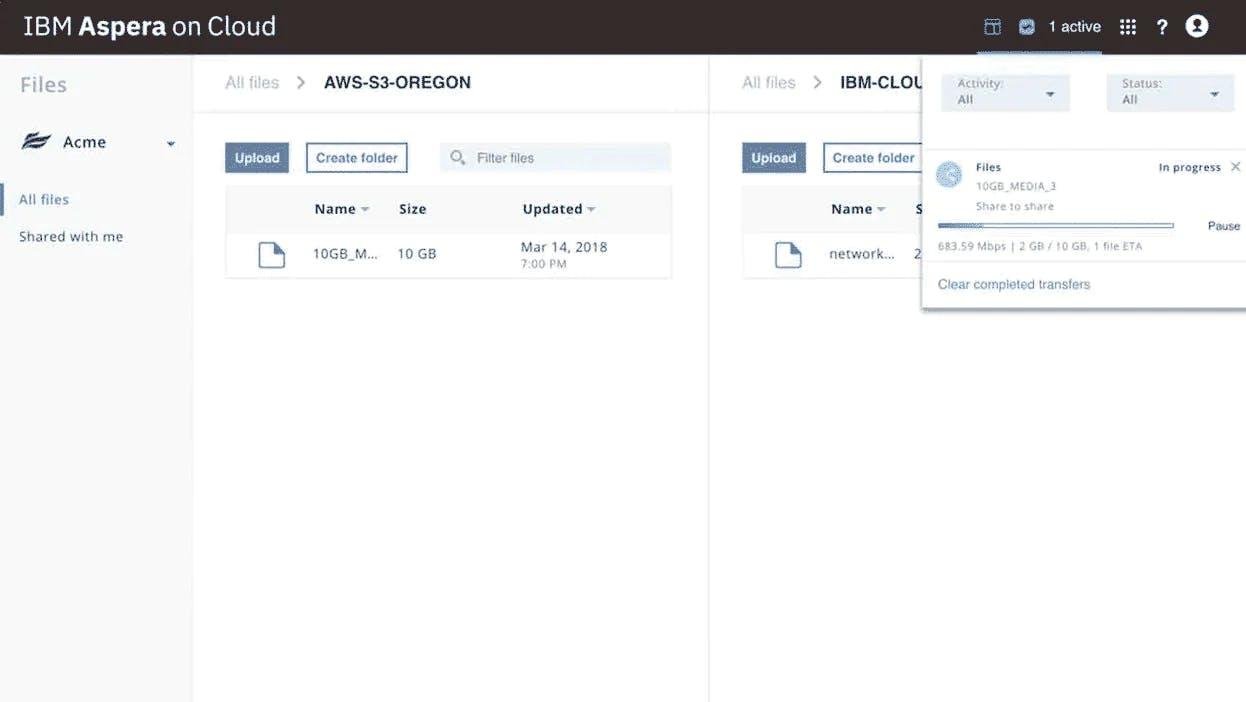
IBM Aspera® provides high-speed data transfer solution that moves large datasets quickly and securely, regardless of network conditions. It maximizes transfer speeds (up to 100x faster) using proprietary FASP® technology and scales effortlessly with no limits on data size or volume.
IBM Aspera offers flexible deployment options, including self-managed software, SaaS, or hybrid models, to support modern infrastructure needs. It enables global transfer, distribution, and synchronization of massive files and datasets, accelerating collaboration for teams working with big data and large files. With automation, monitoring, and control features, it streamlines data transfers and workflows while building highly scalable solutions that can run on-premises, in the cloud, or both. Additionally, IBM Aspera enhances digital asset security by integrating blockchain technology.
Description
Progress Automate MFT is a cloud-native managed file transfer platform designed to help businesses automate secure data exchanges between internal systems, cloud applications, and external partners. The software combines centralized workflow orchestration, distributed execution agents, and enterprise security controls in a browser-based management environment. Its no-code automation builder allows users to create scheduled and on-demand workflows involving multiple file sources, destinations, and processing steps. Organizations can configure conditional file routing, automated notifications, reusable workflow components, and custom scripts for more complex requirements. Progress Automate MFT supports secure transfer protocols including SFTP and FTPS, along with file processing operations such as compression, decompression, PGP encryption, and decryption. Its coordinator-agent architecture allows transfers to execute through Progress-hosted agents or self-hosted agents deployed on Windows and Linux servers behind corporate firewalls. The platform connects with AWS S3, Azure Data Lake Storage, Azure Blob Storage, Google Cloud Storage, SharePoint, OneDrive, network shares, and supported email systems. Centralized reporting, detailed audit logs, role-based permissions, multifactor authentication, and single sign-on help organizations monitor file activities and maintain security governance. Progress Automate MFT supports financial services, healthcare, manufacturing, insurance, and other industries that require reliable, auditable, and automated file exchanges across distributed environments.
API Access
Has API
No
API Access
Has API
No


Integrations
AWS Elemental
Yes
Aprimo
Yes
Azure Blob Storage
No
Azure Data Lake
No
Delinea Cloud Access Controller
Yes
EditShare
Yes
EoleCC
Yes
HostAccess
Yes
Hyland IDP
Yes
IBM Watson IoT Platform
Yes
Integrations
AWS Elemental
No
Aprimo
No
Azure Blob Storage
Yes
Azure Data Lake
Yes
Delinea Cloud Access Controller
No
EditShare
No
EoleCC
No
HostAccess
No
Hyland IDP
No
IBM Watson IoT Platform
No
Pricing Details
$250.20/year
Essentials - Annual plans start at 1 TB transfer volume per year. Discounts apply when committing to higher transfer volumes. Starting at USD 250.20*/ year
Advanced - Annual plans start at 6 TB transfer volume per year. Discounts apply when committing to higher transfer volumes. Starting at USD 11,088*/ year
Enterprise - Annual plans start at 60 TB transfer volume per year. Discounts apply when committing to higher transfer volumes.
Free Trial
Yes
Free Version
No
Pricing Details
$125 / month
Unlimited users
SFTP + 3 standard endpoints
Self-hosted agent file transfers
Extended support
Free Trial
Yes
Free Version
No
Deployment
Web-Based
Yes
On-Premises
No
iPhone App
No
iPad App
No
Android App
No
Windows
No
Mac
No
Linux
No
Chromebook
No
Deployment
Web-Based
Yes
On-Premises
No
iPhone App
No
iPad App
No
Android App
No
Windows
No
Mac
No
Linux
No
Chromebook
No
Customer Support
Business Hours
No
Live Rep (24/7)
No
Online Support
Yes
Customer Support
Business Hours
No
Live Rep (24/7)
No
Online Support
No
Types of Training
Training Docs
Yes
Webinars
No
Live Training (Online)
No
In Person
No
Types of Training
Training Docs
No
Webinars
No
Live Training (Online)
No
In Person
No
Vendor Details
Company Name
IBM
Founded
1911
Country
United States
Website
www.ibm.com/products/aspera
Vendor Details
Company Name
Progress Software
Founded
1981
Country
United States
Website
www.progress.com/automate-mft
Product Features
Content Collaboration
Client Portal
No
Cloud Storage
Yes
Digital Asset Management
No
Document Creation / Editing
No
Document Management
Yes
Electronic Signature
No
Feedback Management
No
File Sharing
Yes
Messaging / Discussion
No
Real-Time / Interactive Editing
No
Roles / Permissions
No
Search
Yes
Version Control
No
Video / Image Editing
No
Workflow / Approval Process
No
File Sharing
Audit Trail
Yes
Chat / Messaging
No
Collaboration
Yes
Document Management
Yes
Drag & Drop
Yes
Electronic Signature
No
Encryption
Yes
File Synchronization
Yes
Search
Yes
User Management
Yes
Version Control
No
Workflow Management
Yes
File Sync
Audit Trail
Yes
Backup and Recovery
Yes
Conflict Detection
No
Real Time Synchronization
Yes
Remote Synchronization
Yes
Synchronization Scheduling
Yes
Two-Way Synchronization
Yes
Managed File Transfer (MFT)
API Integration
Yes
Authentication / Auditing
Yes
Compression
No
Data Sharing
Yes
Data Transmission Protocol Integration
No
Database Management
No
Encryption Support
Yes
Fail-Over / Load Balancing
No
Product Features
Managed File Transfer (MFT)
API Integration
Yes
Authentication / Auditing
Yes
Compression
Yes
Data Sharing
Yes
Data Transmission Protocol Integration
Yes
Database Management
No
Encryption Support
Yes
Fail-Over / Load Balancing
Yes
Workload Automation
Alerts / Notifications
No
Audit Trails
No
Business Process Management
No
Cross-Platform Scheduling
No
Dashboard
No
Data Analysis / Visualization
No
Event-Triggers
No
Load Balancing
No
Resource-Based Scheduling
No
Robotic Process Automation (RPA)
No
Workflow Foundation Support
No