Average Ratings 0 Ratings
Average Ratings 0 Ratings
Similar Products
-
PeerGFSA Comprehensive Solution for Streamlined File Orchestration and Management across Edge, Data Center, and Cloud Storage PeerGFS presents an exclusively software-based solution designed to address file management and replication challenges within multi-site and hybrid multi-cloud environments. With our extensive expertise spanning over 25 years, we specialize in file replication for geographically dispersed organizations. Here's how PeerGFS can benefit your operations: Enhanced Availability: Achieve high availability through Active-Active data centers, whether located on-premises or in the cloud. Edge Data Protection: Safeguard your valuable data at the Edge with continuous protection to the central Data Center. Improved Productivity: Empower distributed project teams by providing swift, local access to critical file information. In today's world, having a real-time data infrastructure is paramount. PeerGFS seamlessly integrates with your existing storage systems, supporting: High-volume data replication between interconnected data centers. Wide area networks characterized by lower bandwidth and higher latency. Rest assured, PeerGFS is designed to be user-friendly, making installation and management a breeze.
-
Bacula EnterpriseBacula Enterprise provides backup and recovery for enterprise, HPC, defense, government and research environments. Developed by Switzerland-based Bacula Systems, it protects physical, virtual, container, database, SaaS and cloud workloads from one platform. Support data sovereignty with on-premises deployment without mandatory cloud control planes, call-home licensing or continuous internet access. Retain control over backup location, infrastructure, encryption keys and recovery procedures. Strengthen ransomware resilience with physically air-gapped tape, offline copies, immutable storage options, encryption, MFA, access controls and file integrity verification. For petabyte-scale HPC datasets, HPC Accelerator, parallel processing and Lustre, GPFS and ZFS integrations help protect large file populations. Use disk, tape, object storage and cloud targets, with no licensing charges based on protected data volume. VM coverage includes VMware vSphere/ESXi, Hyper-V, Proxmox, Nutanix AHV, XenServer, XCP-ng, KVM, QEMU, Libvirt, Red Hat Virtualization, OpenStack, Amazon EC2 and Azure VMs. Protect Kubernetes, OpenShift and Docker containers. Database coverage includes Oracle, SQL Server, PostgreSQL, MySQL, Percona for MySQL, MariaDB, SAP HANA, Sybase ASE, IBM Db2, MongoDB and InterSystems IRIS, plus Amazon RDS integration. Other workloads include Hadoop HDFS, Microsoft 365 and Google Workspace. BWeb administration, scheduling, monitoring, reporting, deduplication and compression simplify operations. Restore files, application data, VMs and supported bare-metal systems. Its open-core architecture combines Bacula's open-source foundation with enterprise-only plugins, security features, management tools and commercial support.
-
Veeam Data PlatformVeeam Data Platform is a unified data resilience solution that helps organizations recover from cyberattacks and outages, and protect workloads across hybrid and multicloud environments – all without vendor lock-in. The platform includes built-in security capabilities designed to mitigate ransomware and other data-loss threats, including AI-backed threat detection across a broad range of workload types. This is intended to help teams identify and respond to threats before they disrupt operations. Veeam Data Platform supports workload portability across hypervisors, cloud providers, and on-premises environments, allowing organizations to move or recover data across infrastructure without being tied to a specific vendor or platform. For organizations looking to simplify deployment, Veeam Software Appliance provides a pre-built, hardened, and highly available option, reducing the manual setup and maintenance work required from IT teams.
-
Secure EraserSecure Eraser: Secure Data Deletion, Shredders Your Files & Folders. Just because it has been removed from your hard drive doesn't mean that it is gone forever. Anyone can restore the information as long as it was not overwritten. It becomes more difficult if the computer has been resold, or given away. Secure Eraser employs the most well-known method of data disposal. It overwrites sensitive information so that it cannot be recovered even with specialized software. Our award-winning solutions for permanently destroying data eliminate cross-references that may leave traces of deleted files within the allocation table of your hard disk. This Windows software is easy to use and can overwrite sensitive data up to 35 times, regardless of whether they're files, folders or drives, recycle bins, or traces of surfing. You can also delete files that you have already deleted but not for good.
-
Comet BackupStart running backups and restores in less than 15 minutes! Comet is a fast, secure all-in-one backup platform for businesses and IT providers. You control your backup environment and storage destination (local, Wasabi, AWS, Google Cloud Storage, Azure, Backblaze, or other S3 storage providers). Our software supports businesses across 120 countries in 13 languages. Test drive Comet Backup with a 30-day FREE trial!
-
FilerevFilerev is a powerful tool that helps you easily find and manage hidden files, duplicate files, large files, and oversized folders, ensuring a streamlined and clutter-free digital workspace. Key features include advanced scanning technology that identifies the unorganized files taking up the most space and cluttering your Google Drive. Filerev enhances productivity by saving time and reducing the frustration of manual file organization. The custom filters and bulk delete tool give you complete control over finding and removing unwanted files in your account. The storage analyzer lets you browse your folders by size to see where the space is being used in your Google Drive. Whether you're an individual, a small business, or a large enterprise, Filerev offers robust solutions tailored to your needs. Visit filerev.com to discover how Filerev can transform your Google Drive experience and boost efficiency.
-
AdmiralAdmiral is the top adblock recovery platform for publishers, helping recover millions of dollars in advertising revenue lost to adblockers, privacy tools, DNS filtering, VPNs, network-level blocking, and other forms of monetization disruption. Trusted by thousands of publishers and backed by more than a decade of expertise, Admiral pioneered Full Spectrum Adblock Recovery—combining multiple recovery approaches to maximize total adblock revenue. As the creator of Visitor Relationship Management (VRM), Admiral extends beyond ad recovery to help publishers recover and grow revenue through subscriptions, registrations, consent management, first-party data, email acquisition, social audience growth, donations, and other visitor monetization strategies. By combining recovery and revenue-growth approaches in one platform, Admiral helps publishers reduce revenue leakage, increase visitor lifetime value, and maximize monetization across the audience lifecycle. Admiral VRM delivers: * Industry-leading Full Spectrum Adblock Recovery * Paid subscriptions, paywalls, and donation campaigns * Visitor Copilot conversational AI for engagement and revenue growth * Registration walls, user accounts, and first-party data * Email, social audience, and app growth * GDPR and CCPA consent management Admiral also provides analytics, journey shaping, visitor segmentation, targeting, testing, and optimization. Publishers can add Admiral's free tag in minutes for immediate visibility into adblock rates and revenue recovery potential.
-
NinjaOneNinjaOne automates the hardest parts of IT, empowering more than 20,000 IT teams. By providing deep insights into endpoints, robust security measures, and centralized control, NinjaOne boosts efficiency while safeguarding sensitive data and cutting IT expenses. This comprehensive platform offers a versatile toolkit for managing and securing endpoints, including patch management, mobile device oversight, software distribution, remote support, backup solutions, and more, thanks to its extensive IT and security integrations.
-
Files.com6,000+ companies trust Files.com to automate and secure business critical transfers. We obsess about security, compliance, reliability, and performance so your critical business processes just work every time. Easily manage any transfer flow without writing scripts or code, and onboard workloads and partners effortlessly. We support standard file transfer protocols (FTP, SFTP, AS2) for working with external partners and also provide native apps for high performance internal transfers. As a fully Cloud-Native SaaS, there are no servers for you to buy or maintain, there is no installation required, and high availability and redundancy are built in and free. Our InfoSec Program is audited annually by Kirkpatrick Price, a leading information security CPA firm. Our audit covers the scope of the entire Files.com business (not just datacenter operations) and names Files.com specifically. Beware of smaller competitors who try to pass off someone else’s audit as their own. Technical capabilities include encryption at-rest and in-transit, four types of two-factor authentication, nine enterprise identity (SSO) integrations, configurable password and session policies, and a perfect “A+” score from Qualys SSL Labs.
-
CapLinkedCapLinked is a web-based platform built for organizations that need a better way to manage, protect, and share sensitive business documents during high stakes work. Known as The Deal Room That Works, CapLinked gives teams, advisors, and lawyers a controlled workspace for due diligence, mergers and acquisitions, fundraising, audits, licensing, asset sales, and confidential projects where accuracy, speed, and oversight matter. Instead of relying on email attachments, consumer file sharing links, or scattered folders, teams can organize documents in structured workspaces with clear folder layouts, searchable files, user groups, and permissions. Administrators can decide who can view, upload, print, download, or share materials, while watermarking, passwords, expiration settings, tracking, and reporting help reduce risk when information is shared outside the organization. CapLinked makes complex document review more efficient for internal teams and external reviewers. Buyers, investors, attorneys, accountants, partners, and other stakeholders can access the materials they need in a professional environment, while project owners maintain visibility into engagement and adjust access as a review changes. This helps reduce version confusion and manual follow up when managing sensitive files across organizations. For boutique firms, Big 4 consultants, global enterprises, and teams in between, CapLinked supports secure collaboration without unnecessary complexity. Its data room and document tools help companies protect financial records, legal documents, intellectual property, contracts, operational files, and strategic materials while keeping reviews organized. Visit caplinked.com to see how CapLinked can help teams share documents, control access, and move work forward
Description
Hetman Partition Recovery is an advanced data recovery solution designed to recover lost, deleted, and inaccessible files from various storage devices. It helps restore data from formatted partitions, corrupted file systems, RAW drives, and accidentally deleted volumes.
The software supports HDDs, SSDs, USB flash drives, memory cards, and external disks. It works with a wide range of file systems, including NTFS, ReFS, FAT, exFAT, Ext2/3/4, APFS, HFS+, XFS, Btrfs, and ZFS.
Automatic disk analysis detects available and previously deleted partitions. Quick Scan provides fast recovery of recently deleted files, while Full Analysis performs an in-depth search for lost data and reconstructs damaged file system structures.
Users can preview recoverable documents, photos, videos, and other files before recovery. A built-in disk imaging feature enables safer analysis of unstable storage devices without repeatedly accessing the original disk.
Description
Your computer desktop is cluttered and confusing. The files and applications you need are not always in reach.
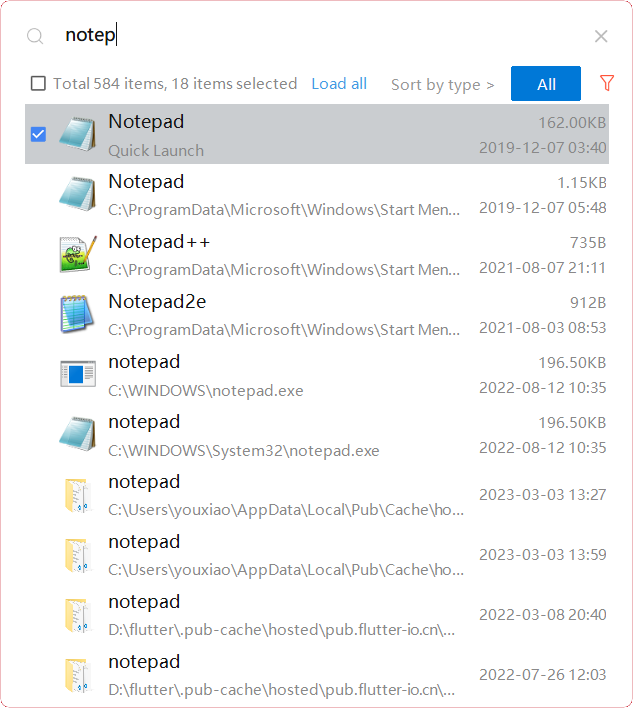
YXFile allows you to tagging file and search file as well as launch apps.
Tag Any File:
YXFile can tag every file type on any file system. The tagging is stored in a data base. YXFile will not alter your file names or create hidden files on your hard disk. You can move or rename files under the same partition. The tags won't be lost
Search for everything:
Search files and folders using their names. as well as file tags, launch items, and file tags.
Launch Apps
Launch App is a favorite feature of YXFile users. You can either type the name of the application or program you wish to open or use a shortcode. Click return and YXFile will open the program.
API Access
Has API
No
API Access
Has API
No



Integrations
No details available.
Integrations
No details available.
Pricing Details
$67.95 one-time payment
Free Trial – Scan disks and preview recoverable files. Saving recovered files requires a license.
Home – For personal, non-commercial data recovery.
Office – For business and internal company use, including encrypted volumes and virtual disks.
Business – For professional data recovery services and commercial use.
Unlimited – All Hetman Software products for unlimited computers within one company.
All paid licenses are perpetual.
Home – For personal, non-commercial data recovery.
Office – For business and internal company use, including encrypted volumes and virtual disks.
Business – For professional data recovery services and commercial use.
Unlimited – All Hetman Software products for unlimited computers within one company.
All paid licenses are perpetual.
Free Trial
Yes
Free Version
Yes
Pricing Details
$39/user
One-time payment for lifetime access to Yfile
Free Trial
Yes
Free Version
No
Deployment
Web-Based
No
On-Premises
No
iPhone App
No
iPad App
No
Android App
No
Windows
Yes
Mac
Yes
Linux
Yes
Chromebook
No
Deployment
Web-Based
No
On-Premises
No
iPhone App
No
iPad App
No
Android App
No
Windows
Yes
Mac
No
Linux
No
Chromebook
No
Customer Support
Business Hours
Yes
Live Rep (24/7)
No
Online Support
Yes
Customer Support
Business Hours
Yes
Live Rep (24/7)
No
Online Support
No
Types of Training
Training Docs
Yes
Webinars
No
Live Training (Online)
No
In Person
No
Types of Training
Training Docs
Yes
Webinars
No
Live Training (Online)
No
In Person
No
Vendor Details
Company Name
Hetman Software
Founded
2006
Country
Ukraine
Website
hetmanrecovery.com/hard-drive-data-recovery-software
Vendor Details
Company Name
ousaa
Founded
2016
Country
China
Website
yxfile.cc/
Product Features
Business Continuity
Backup Log
No
Backup Scheduling
No
Compression
No
Continuous Backup
No
Encryption
Yes
Incremental Backup
No
Local Server Options
No
Multiple System Support
No
Remote Server Options
Yes
Secure Data Storage
Yes
Web Access / Restoration
Yes
Data Recovery
Web Access / Restoration
No
Backup Log
No
Backup Scheduling
No
Compression
No
Continuous Backup
No
Encryption
Yes
Incremental Backup
No
Local Server Options
Yes
Multiple System Support
Yes
Remote Server Options
Yes
Secure Data Storage
Yes