Average Ratings 0 Ratings
Average Ratings 0 Ratings
Similar Products
-
Google Cloud RunFully managed compute platform to deploy and scale containerized applications securely and quickly. You can write code in your favorite languages, including Go, Python, Java Ruby, Node.js and other languages. For a simple developer experience, we abstract away all infrastructure management. It is built upon the open standard Knative which allows for portability of your applications. You can write code the way you want by deploying any container that listens to events or requests. You can create applications in your preferred language with your favorite dependencies, tools, and deploy them within seconds. Cloud Run abstracts away all infrastructure management by automatically scaling up and down from zero almost instantaneously--depending on traffic. Cloud Run only charges for the resources you use. Cloud Run makes app development and deployment easier and more efficient. Cloud Run is fully integrated with Cloud Code and Cloud Build, Cloud Monitoring and Cloud Logging to provide a better developer experience.
-
SuperfiliateThe brands seeing the strongest results from creator marketing aren't simply increasing campaign volume—they're building an engine for sustainable creator-led growth. Superfiliate brings every creator initiative into a single platform, replacing disconnected tools with one centralized system. From affiliates and ambassadors to influencers and paid creators, brands can recruit, manage, and grow every partnership through unified profiles, automated workflows, creator discovery, and performance tracking. Leading ecommerce brands including Graza, Cymbiotika, Omnilux, and MUD\WTR rely on Superfiliate to scale creator programs that consistently generate high-performing content, strengthen paid media, and tie every partnership back to measurable revenue. Native integrations with Meta, TikTok Shop, and YouTube connect creator performance across channels, giving brands a complete view of which creators, campaigns, and content are driving results. The outcome is a creator program that's no longer managed as a collection of campaigns, but as a scalable acquisition channel that becomes more valuable over time.
-
BANDBAND creates robust interaction frameworks designed for enterprise-level applications of distributed AI agents. The platform facilitates immediate, collaborative interactions among both agents and humans, incorporating a runtime control plane that upholds policies, defines authority limits, and ensures transparency across diverse systems. Additionally, BAND empowers developers, engineering teams, and leaders of enterprise platforms who are managing multi-agent ecosystems spanning internal infrastructures, SaaS solutions, and environments shared with partners. This support enhances operational efficiency and fosters innovation within complex organizational structures.
-
HaystackHaystack connects every employee of your organization with the people, resources, and information they need to thrive and succeed. Haystack provides employees with a fun, intuitive and informative way to start the day. Custom branding with no-code and a modular layout make it easy to highlight key resources, organizational culture, and knowledge. Haystack's automated multi-channel delivery, combined with actionable analytics, makes it easy for you to reach your employees at the right time and place. Spend less time looking for information and more on achieving your goals. Haystack’s knowledge-sharing features make it easy for employees to get the materials they need, no matter where in the world they are. It can be difficult to stay connected with everyone as teams grow and change. Haystack’s rich employee profiles and company directory make colleagues around the world feel as if they are right across the room.
-
NMI PaymentsNMI Payments gives developers, SaaS builders, ISVs and ISOs a simple path to embedded payments. As a full-stack processor, acquirer, and technology partner, NMI enables you to integrate, brand, and manage payment acceptance within your platform—without becoming a PayFac or building complex infrastructure. The platform combines flexibility, scalability, and speed, offering white-labeled payments infrastructure that keeps your brand front and center. With omnichannel support for in-store, online, in-app, and unattended payments, you can deliver a consistent merchant experience across every touchpoint. NMI also manages onboarding, compliance, and risk, freeing your team to focus on innovation and customer growth. Developer-First Experience NMI’s developer-first environment puts full control in your hands. Build, test, and launch payments in a modern sandbox with clear documentation and ready-to-use code snippets. Guided onboarding flows and API recipes simplify integration, while low-code and no-code tools accelerate deployment. Business users can evaluate monetization options with instant revenue calculators and self-service sign-up. Whether you’re embedding payments for the first time or scaling across channels, NMI helps you go live faster, stay compliant, and grow with confidence
-
CareermindsCareerminds helps organizations support their people at every stage of the talent lifecycle through outplacement services, career transition, talent solutions, and job architecture. We partner with HR and business leaders to navigate workforce change, enable growth, and build resilient, future-ready organizations. Founded in 2008, Careerminds operates across 80 languages and 100+ countries, combining global scale with a personalized, high-touch experience. Our unique delivery methodology blends advanced technology, workforce intelligence, and one-to-one coaching to deliver scalable, measurable results. Career transition Outplacement & Executive Outplacement Services: Data-driven outplacement services that help employees transition faster while supporting employers with measurable outcomes, cost efficiency, and brand protection. Workforce Redeployment: Redeployment services that enable internal mobility by aligning skills to business needs, reducing attrition and supporting agility. Job architecture: Career Frameworks: A solution that creates role clarity, defines skill expectations, and supports internal mobility and long-term workforce planning. Workforce Intelligence: A data-driven platform offering insight into skills, roles, and talent trends to support workforce planning and decision-making. Career Enablement: A modern career enablement tool that gives employees visibility into career paths and ownership of their development. Talent solutions: Career Development: A career development program that help employees build skills, grow in their roles, and prepare for future opportunities. Executive & Leadership Coaching: Executive and leadership coaching services that empower leaders to navigate change, strengthen performance, and drive sustainable growth.
-
Aikido SecurityAikido is the all-in-one security platform for development teams to secure their complete stack, from code to cloud. Aikido centralizes all code and cloud security scanners in one place. Aikido offers a range of powerful scanners including static code analysis (SAST), dynamic application security testing (DAST), container image scanning, and infrastructure-as-code (IaC) scanning. Aikido integrates AI-powered auto-fixing features, reducing manual work by automatically generating pull requests to resolve vulnerabilities and security issues. It also provides customizable alerts, real-time vulnerability monitoring, and runtime protection, enabling teams to secure their applications and infrastructure seamlessly.
-
Rocket z/Assure VAPYour mission-critical systems carry the weight of your entire organization. Protecting them shouldn't leave you guessing about hidden vulnerabilities or compliance risks. Rocket® z/Assure™ Vulnerability Analysis Program (VAP) is a specialized mainframe security solution built to proactively scan and safeguard your most valuable environments. By identifying system-level risks before they become active threats, we partner with you to ensure your infrastructure remains locked down, resilient, and fully compliant. We understand the responsibility of managing enterprise security, and our tool gives you the exact insights you need to confidently eliminate weak points. Key benefits for your security team: - Identify and resolve hidden vulnerabilities with deep, automated scanning. - Protect your mission-critical data from evolving external and internal threats. - Streamline compliance reporting with clear, actionable security insights. Take control of your mainframe security. Partner with Rocket Software to protect your digital foundation today.
-
UnimusUnimus is a powerful network automation, configuration backup, and change management solution designed to simplify network operations for businesses of all sizes. Supporting 450+ device types across 160+ vendors, Unimus is a network-agnostic platform that eliminates manual network tasks while enhancing security and reliability. With automated configuration backups, Unimus ensures seamless disaster recovery, giving IT teams quick access to historical versions and real-time change tracking. Its network auditing features provide instant visibility into configuration consistency, compliance, and security risks. Change management is simplified with automatic change detection, detailed version history, and customizable notifications. Unimus' intuitive web-based interface makes it easy to manage networks without requiring deep technical expertise, while its integrated CLI access allows for real-time troubleshooting and command execution. Whether you're looking to automate bulk configuration changes, perform firmware upgrades, or improve network visibility, Unimus provides a scalable, cost-effective solution for modern network infrastructures.
-
Planview ProjectAdvantagePlanview ProjectAdvantage brings clarity, control, and scalability to enterprise project management by unifying project data, resources, and performance insights in one platform. Built for growing PMOs and complex organizations, it eliminates silos and inefficiencies by connecting teams through a single source of truth. Users can monitor resource allocation, track workloads, and forecast capacity with precision using dynamic dashboards. ProjectAdvantage’s portfolio scoring tools and sandbox environments make it easy to prioritize initiatives and align them with company strategy. Its flexibility supports any methodology—Agile, hybrid, or Waterfall—making it ideal for diverse industries and workflows. Seamless integrations with leading enterprise systems like Jira, ServiceNow, and Microsoft Teams enable cross-functional collaboration and real-time visibility. Backed by AI-driven analytics, Planview Projectadvantage helps accelerate project delivery, improve performance tracking, and ensure continuous strategic alignment. Designed for agility, it’s a transformative solution that turns project chaos into structured, measurable success.
Description
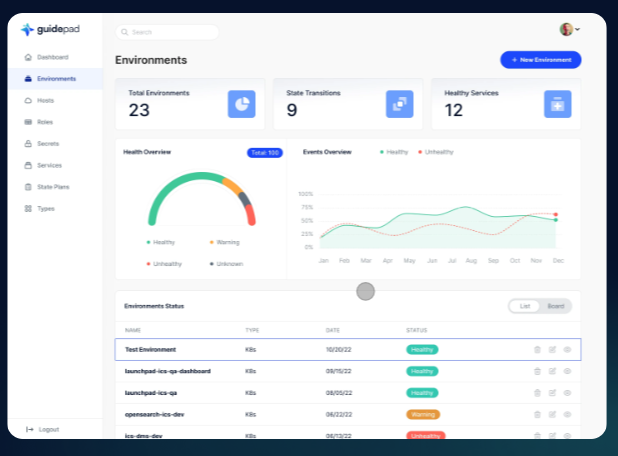
Guidepad is a comprehensive platform designed to simplify the intricacies of contemporary software development by equipping teams with shared, reusable tools alongside a robust automation framework. By modernizing enterprise software development, we strike a balance between abstraction and customizable functionality, thus offering a unified solution for all stakeholders involved in software engineering, spanning data engineering and workflow automation. The platform includes a variety of essential toolsets and modular abstractions that allow users to define entity schemas, infrastructure, services, permission boundaries, and application programming interface operations as data, which facilitates a range of low-code/no-code interfaces. This innovative approach minimizes the need for engineers to construct individual system components, allowing them to engage in meta-level programming to design the entire system. Users can effortlessly create configurations using low-code/no-code methods, and the platform seamlessly translates these configurations into functioning software at runtime. Overall, Guidepad empowers development teams to focus on higher-level design rather than getting bogged down in the minutiae of coding, ultimately streamlining the entire software development process.
Description
Enhancing the management of OSS repositories can be achieved through the utilization of multiple monorepo configurations. To facilitate better onboarding, comprehensive tutorials for all variants should be accessible directly from the homepage. Additionally, improving dialog handling can be accomplished using abstract APIs provided by the core framework. The core architecture should also be refined by separating out high-level packages designed for advanced use cases and scalability. This guide will provide a step-by-step approach to installing everything necessary to create your first NativeScript application. While setting up the Android development environment may seem intimidating for newcomers, closely following the outlined steps will ensure a smooth setup process, allowing you to dive into development with confidence. With clear instructions and resources readily available, new developers will find themselves equipped to tackle Android development challenges effectively.
API Access
Has API
Yes
API Access
Has API
Yes





Integrations
Ably
No
Carrot Seed
No
Muscula
No
RxDB
No
TypeORM
No
barKoder Barcode Scanner SDK
No
Integrations
Ably
Yes
Carrot Seed
Yes
Muscula
Yes
RxDB
Yes
TypeORM
Yes
barKoder Barcode Scanner SDK
Yes
Pricing Details
$1,000 per month
Free Trial
No
Free Version
No
Pricing Details
Free
Free Trial
No
Free Version
Yes
Deployment
Web-Based
Yes
On-Premises
No
iPhone App
No
iPad App
No
Android App
No
Windows
No
Mac
No
Linux
No
Chromebook
No
Deployment
Web-Based
Yes
On-Premises
No
iPhone App
Yes
iPad App
Yes
Android App
Yes
Windows
Yes
Mac
Yes
Linux
Yes
Chromebook
Yes
Customer Support
Business Hours
No
Live Rep (24/7)
No
Online Support
Yes
Customer Support
Business Hours
No
Live Rep (24/7)
No
Online Support
Yes
Types of Training
Training Docs
Yes
Webinars
No
Live Training (Online)
No
In Person
No
Types of Training
Training Docs
Yes
Webinars
No
Live Training (Online)
No
In Person
No
Vendor Details
Company Name
Guidepad
Founded
2022
Country
United States
Website
www.guidepad.io
Vendor Details
Company Name
NativeScript
Website
nativescript.org
Product Features
Application Development
Access Controls/Permissions
No
Code Assistance
No
Code Refactoring
No
Collaboration Tools
No
Compatibility Testing
No
Data Modeling
No
Debugging
No
Deployment Management
No
Graphical User Interface
No
Mobile Development
No
No-Code
No
Reporting/Analytics
No
Software Development
No
Source Control
No
Testing Management
No
Version Control
No
Web App Development
No
Product Features
UX
Animation
No
For Mobile
No
For Websites
No
Heatmaps
No
Prototyping
No
Screen Activity Recording
No
Unmoderated Testing
No
Usability Testing
No
User Journeys
No
User Research
No
