Average Ratings 0 Ratings
Average Ratings 0 Ratings
Similar Products
-
AnacondaAnaconda is an AI-native development platform that gives teams a governed path from early experimentation to production AI deployment. The platform is built around trusted open-source packages, secure Python package management, controlled environments, and production-grade orchestration. Anaconda helps organizations avoid broken environments, dependency conflicts, security gaps, and deployment delays that can slow AI initiatives. Anaconda Core provides validated packages, automated security scanning, and intelligent dependency conflict resolution for Python and data science teams. Its platform capabilities support AI orchestration, trusted distribution, and enterprise workflows for building and scaling models. Anaconda is widely used across the AI, data science, Python, and enterprise developer communities. The company positions open source as a foundation for AI innovation and emphasizes Python as a core language for the next era of AI development. Anaconda also provides learning courses, certifications, reports, guides, professional services, documentation, and support resources. By combining package governance, environment management, open-source security, and AI development workflows, Anaconda helps teams build trusted AI systems on their own terms.
-
Checksum.aiEngineering teams shipping with AI have a new bottleneck: validation. Code output has accelerated. Quality hasn't. Checksum closes the gap. Checksum is a continuous quality platform with a suite of AI agents that handle testing end-to-end, at every stage of the development lifecycle. Where most tools wait for a human to trigger them, Checksum runs autonomously in the background, generating tests, executing them, and repairing failures without manual intervention. Seventy percent of test failures are resolved automatically through real-time auto-recovery. The platform covers every layer: end-to-end UI flows via Playwright, API endpoint chains, and targeted CI tests scoped to exactly what changed in a PR. All tests land as real code in your repository and are delivered as standard Playwright, owned by your team. Checksum is fine-tuned on 1.5+ million test runs and integrates natively with Cursor, Claude Code, and 100+ AI coding agents. Type /checksum and your coding agent's output gets tested before it ever reaches review. Generation and healing happen on Checksum's cloud infrastructure which means no LLM tokens consumed, no local resources required. The result: test suites that stay green as the product evolves, fewer regressions reaching production, and release confidence that scales alongside AI output.
-
Banker's DashboardAccess your bank's or credit union's financial performance from anywhere, anytime. Secure, cloud-based access gives you insight into your bank's financial performance. With a few clicks, you can access margin components, branch performance, forecasts, and more. The Banker's Dashboard and Credit Union Dashboard integrate seamlessly with your core processor. Easy setup allows you to immediately improve your bottom line. Automate reporting and eliminate errors so you can focus on higher-value tasks. Multiple forecast scenarios can be quickly run and revised, allowing you to analyze variances and other strategies. Compare branch performance. For better results, institute best practices and hold branches accountable.
-
G-POur solution is more than software. It includes a top-of-the-industry legal team, HR experts, and extensive support in every region we do business. There are no hidden or extra fees when you work with us. We're there every step of your way, from generating employment contracts to running compliant payroll, offering competitive benefits, 24/7/365 premium support and more. So you can manage the business. With the international expansion experts at your side, you can take the next step for your business. Your company wants to expand its operations quickly in a new country but you don't have the time or resources to learn local labor laws, tax issues, or establish subsidiaries in other countries. Although you have the right candidates, your company is not ready to allow your employees to start work.
-
CirrusPrintCirrusPrint helps you manage and streamline your printing and document delivery across multiple networks. It solves cloud migration issues related to printing and provides the fastest and most direct way to deliver documents to users. With CirrusPrint, traditional network printing is still possible without any changes to operations. You can also print to your users, email your printers, and send a file from your smartphone to a printer anywhere in the country. CirrusPrint can be used on Windows or Linux, either in the cloud or at your own data center. It can accept print jobs and other documents, compress them, and deliver them to remote printers and users. It is easy to integrate with applications. You can print to it as any network printer, email files, drop files into the device, or use REST API. CirrusPrint jobs are sent quickly and securely to remote printers as exact duplicates of the original job.
-
CrowdinGet quality translations for your app, website, game, supporting documentation, and on. Invite your own translation team or work with professional translation agencies within Crowdin. Features that ensure quality translations and speed up the process • Glossary – create a list of terms to get consistent translations • Translation Memory (TM) – no need to translate identical strings • Screenshots – tag source strings to get context-relevant translations • Integrations – set up integration with GitHub, Google Play, API, CLI, Android Studio, and on • QA checks – make sure that all the translations have the same meaning and functions as the source strings • In-Context – proofreading within the actual web application • Machine Translations (MT) – pre-translate via translation engine • Reports – get insights, plan and manage the project Crowdin supports more than 30 file formats for mobile, software, documents, subtitles, graphics and assets: .xml, .strings, .json, .html, .xliff, .csv, .php, .resx, .yaml, .xml, .strings and on.
-
SynchredibleSynchredible makes it easy to synchronize, copy, and back up individual folders or entire drives with just a single click. Its intuitive assistant guides you step by step in setting up tasks that can be scheduled, triggered by changes (real-time monitoring), or executed automatically when an external storage device is connected. Keep your data synchronized effortlessly and manage it seamlessly! With years of proven technology, Synchredible not only transfers data from A to B but also supports bidirectional synchronization. It automatically detects changes and reliably syncs the most recently edited files. Thanks to advanced duplicate detection, Synchredible saves valuable time by skipping unchanged files, enabling fast synchronization of large datasets in seconds! Synchredible is highly versatile, supporting local folder synchronization, network and USB device synchronization, as well as synchronization with cloud storage.
-
ONLYOFFICE DocsONLYOFFICE Docs is a secure online office suite for teams and businesses of all sizes. Create and edit docs, sheets, slides, fillable forms and PDFs. Collaborate with your teammates in real time using two co-editing modes, version history and other tools. Enable the AI assistant of your choice — ChatGPT, DeepSeek, Mistral, Groq AI, etc. Generate new content, summarize, translate and do more with your favourite AI tool while working on office files. Integrate ONLYOFFICE Docs into your business platform, whether it be Odoo, Alfresco, Confluence, Pipedrive, Nextcloud, Redmine, SuiteCRM, etc., via an integration app (40+ available integrations). Use Docs within ONLYOFFICE DocSpace, a room-based document collaboration platform equipped with the online office suite. Create dedicated spaces for different purposes, invite your teammates, assign access permissions and collaborate the way you like. With DocSpace, you can store, share and co-edit office files, and even interact with third parties.
-
AnsaradaAnsarada brings order to organizational chaos to increase business value. Ansarada is a total deal lifecycle management platform that provides world-leading AI-powered Virtual Data Rooms and dealmaking tools. These tools include advanced AI insights and automation, next level Q&A and collaboration, plus purpose-built, digitized and customizable workflows and checklists for M&A, capital raising, business audits, tenders and other high stakes outcomes. Unlike some competitor Virtual Data Rooms, Ansarada offers free trials, 24/7 localized expert support, integrated Q&A via email, AI-assisted deal prediction, plus easy drag and drop upload and superior document security controls. Manage and maximize your Deals with Ansarada Always & Secure File Share. Ansarada is designed to drive stronger business outcomes based on best practices from over 35,000 transactions.
-
GroupTogetherGroupTogether is a user-friendly online platform designed for creating group cards, collecting gifts, and sending eGift Cards quickly and effortlessly. It allows users to initiate a group card, decide whether to gather funds or select a gift, and then distribute a single link to friends, family, coworkers, or teammates. Participants have the option to add personalized messages, share photos, and include GIFs, while also contributing a specific amount, any amount they choose, or simply signing the card without making a financial contribution. With privacy assured, GroupTogether eliminates the discomfort of using personal banking details and ensures secure transactions, complete with verifiable records of contributions and expenditures. Organizers have the flexibility to use the collected funds for a variety of gifts, including eGift Cards, gift baskets, flowers, or the versatile GroupTogether AnyCard that allows recipients to choose from over 100 eGift Cards. The platform provides the option for digital delivery or downloadable PDFs for printing, making it a practical solution for various occasions such as remote team celebrations, workplace events, classroom activities, birthdays, farewells, and retirements. Moreover, this seamless process fosters a sense of community and connection, even in virtual settings.
Description
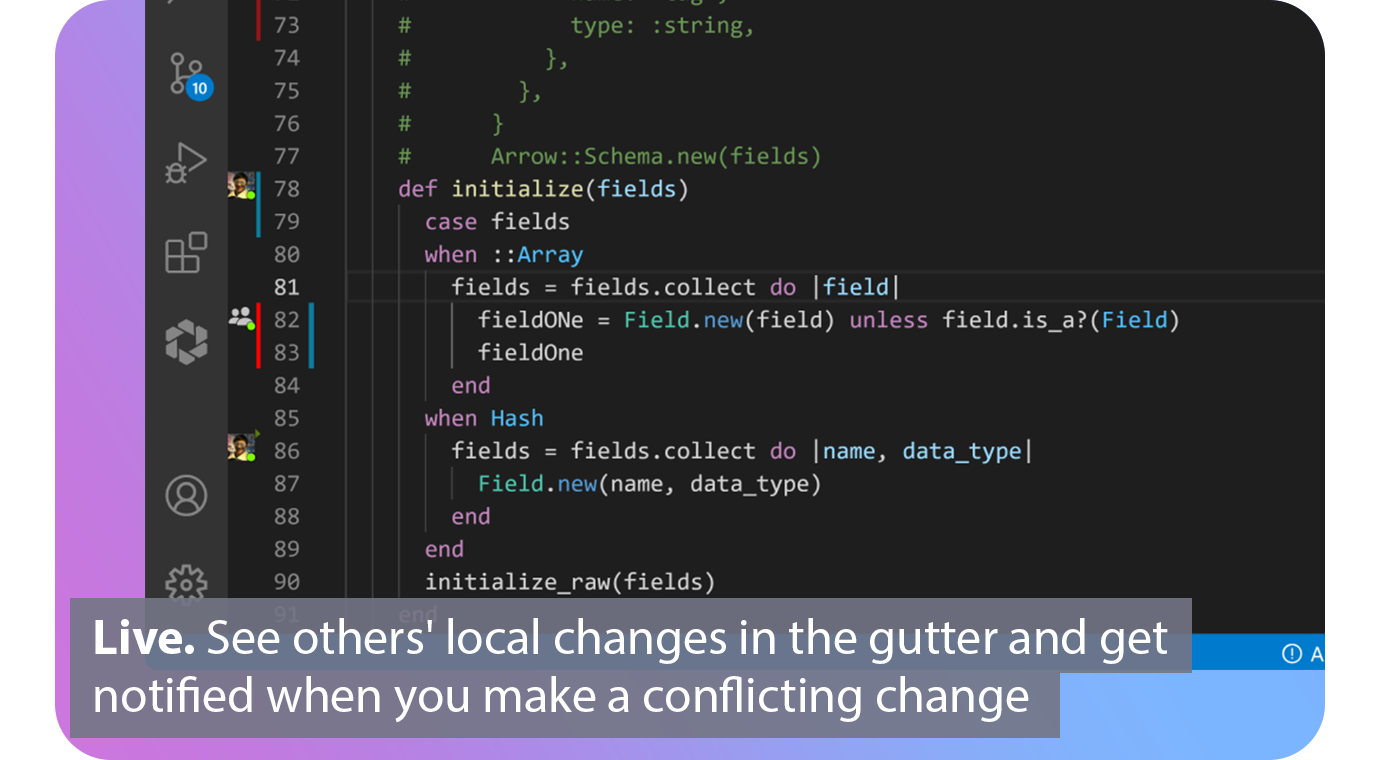
With real-time collaboration superpowers, extend Git. Connect. Connect. Automated. Connect your issue tracker and share the issue you are working with based on your branch. Live. You can see the changes of others in the gutter of the editor and be notified when you make a conflicting one. Patch. View diffs of other contributors local files and cherry-pick individual files, lines, or complete working copies. Codeshare. Codeshare allows you to make voice and video calls from your editor. Agnostic. Edit together simultaneously, interoperable with VS Code and all JetBrains IDEs.
Description
QGit allows users to explore the history of revisions, examine the contents of patches, and identify altered files while visually navigating through various development branches. You can investigate revisions, compare differences, trace file histories, and annotate files, in addition to managing an archive tree. Users can visually commit changes by selectively cherry-picking modified files and can also apply or format patch series from chosen commits. The software supports drag-and-drop functionality for moving commits between two QGit instances, enhancing workflow efficiency. Furthermore, you can associate sequences of commands, scripts, or any executable actions to create custom functions that can be triggered from the menu, with their outputs displayed in a terminal window. QGit provides a graphical interface for frequently used StGIT commands such as push, pop, and applying or formatting patches. Additionally, it is possible to generate new patches or update the current top patch using the same principles as a git commit, allowing for the cherry-picking of individual modified files to streamline your version control process. Overall, QGit simplifies and enhances the management of Git repositories through its intuitive visual tools.
API Access
Has API
No
API Access
Has API
No



Integrations
Android Studio
Yes
Asana
Yes
Git
No
GitHub
Yes
Jira
Yes
Jira Align
Yes
Slack
Yes
Trello
Yes
Visual Studio Code
Yes
Integrations
Android Studio
No
Asana
No
Git
Yes
GitHub
No
Jira
No
Jira Align
No
Slack
No
Trello
No
Visual Studio Code
No
Pricing Details
$0
Free or paid plans available. Team plan starting at $5 per user per month.
Free Trial
No
Free Version
Yes
Pricing Details
No price information available.
Free Trial
No
Free Version
No
Deployment
Web-Based
Yes
On-Premises
No
iPhone App
No
iPad App
No
Android App
No
Windows
No
Mac
No
Linux
No
Chromebook
No
Deployment
Web-Based
No
On-Premises
No
iPhone App
No
iPad App
No
Android App
No
Windows
Yes
Mac
No
Linux
No
Chromebook
No
Customer Support
Business Hours
Yes
Live Rep (24/7)
No
Online Support
Yes
Customer Support
Business Hours
No
Live Rep (24/7)
No
Online Support
Yes
Types of Training
Training Docs
Yes
Webinars
No
Live Training (Online)
No
In Person
No
Types of Training
Training Docs
Yes
Webinars
No
Live Training (Online)
No
In Person
No
Vendor Details
Company Name
GitLive
Founded
2019
Country
United Kingdom
Website
git.live/
Vendor Details
Company Name
QGit viewer
Website
sourceforge.net/projects/qgit/
Product Features
Code Collaboration
Audio Conferencing
No
Chat / Messaging
No
Code Review
No
Discussion Threads
No
IDE Integration
Yes
Remote Control
No
Remote Pair Programming
Yes
Screen Sharing
Yes
Video Conferencing
Yes
