Average Ratings 0 Ratings
Average Ratings 0 Ratings
Similar Products
-
Banker's DashboardAccess your bank's or credit union's financial performance from anywhere, anytime. Secure, cloud-based access gives you insight into your bank's financial performance. With a few clicks, you can access margin components, branch performance, forecasts, and more. The Banker's Dashboard and Credit Union Dashboard integrate seamlessly with your core processor. Easy setup allows you to immediately improve your bottom line. Automate reporting and eliminate errors so you can focus on higher-value tasks. Multiple forecast scenarios can be quickly run and revised, allowing you to analyze variances and other strategies. Compare branch performance. For better results, institute best practices and hold branches accountable.
-
Planview ProjectAdvantagePlanview ProjectAdvantage brings clarity, control, and scalability to enterprise project management by unifying project data, resources, and performance insights in one platform. Built for growing PMOs and complex organizations, it eliminates silos and inefficiencies by connecting teams through a single source of truth. Users can monitor resource allocation, track workloads, and forecast capacity with precision using dynamic dashboards. ProjectAdvantage’s portfolio scoring tools and sandbox environments make it easy to prioritize initiatives and align them with company strategy. Its flexibility supports any methodology—Agile, hybrid, or Waterfall—making it ideal for diverse industries and workflows. Seamless integrations with leading enterprise systems like Jira, ServiceNow, and Microsoft Teams enable cross-functional collaboration and real-time visibility. Backed by AI-driven analytics, Planview Projectadvantage helps accelerate project delivery, improve performance tracking, and ensure continuous strategic alignment. Designed for agility, it’s a transformative solution that turns project chaos into structured, measurable success.
-
EurekosEurekos is the customer training LMS built to educate the world outside your organization – partners, distributors, resellers and the networks beyond. Most companies spend years perfecting their product or service, then hand customers a repurposed employee training course and hope for the best. When those customers churn, the product gets the blame. Usually, the training is the problem. Eurekos fixes that. We help you turn training from a cost into a growth engine. The ability to sell courses, accreditations and learning paths directly through the platform doesn’t just help retain business. It transforms customer education into a revenue stream. The same thinking runs through the entire platform – in how Saga AI adapts every learning journey to the individual, in how training portals can be customized to different customers and regions, and in how we work with you long after you go live. Eurekos Product Features:•Saga AI –Saga AI delivers contextual knowledge discovery, automated content creation and adaptive learning paths that adjust to each learner's behavior and progress. • Learning journeys and adaptive paths – Build any training path imaginable.• Built-in course authoring – 40+ customizable, interactive authoring tools built directly into the LMS. • Certification and accreditation – Create, manage and track complex certification programs with full automation..• Security and compliance – ISO/IEC 27001 & 27701 certified. • Unlimited branded portals – Deploy separate, fully branded learning environments for different cust. segments, partners or regions.• eCommerce • Mobile learning – Native mobile app for iOS and Android.• Global reach – 195+ languages with full localization support. Cloud and on-premise options.• Integrations and API – Open API & 40+ integrations
-
Total ETOTotal ETO is a Totally Better ERP / MRP for Custom Machine Builders, providing better efficiency, accuracy, and profitability. Our system was designed by engineers to match the unique workflow of Engineer To Order manufacturers, including Integrators, Panel Shops & OEMs. Our solution will: -Increase efficiency in engineering by integrating with your CAD. -Allow designers to cost out the BOM before purchases are made. -Track changes to the BOM at any stage of the project and ensure the information is shared across departments. -Save time & money in procurement with your newly Dynamic BOMs. -Capture change order information, including labor, material, and sales price changes so they aren't omitted or forgotten. -Improve accuracy through out your organization, including sales estimates. -Route parts between various tasks, tracking both internal and external processes. -Help ensure parts are inspected and know who completed the inspection. You'll be able to record and follow up on quality issues on the shop floor, from engineering, or for purchased parts with embedded Non-Conformance Reports.
-
Sirion CLMBringing together category-leading innovation, unrivaled Contract Lifecycle Management expertise, and a deep commitment to customer success, Sirion helps the world’s leading businesses contract smarter. Sirion contract lifecycle management (CLM) software revolutionizes contracting—transforming contract data into digital assets and delivering real-time insights for the full contract lifecycle. With industry-best AI, the powerful Sirion CLM platform accelerates contracting processes, reduces risk, cuts costs and delivers 360-degree visibility across the entire contract portfolio. Sirion is trusted by over 200 of the world’s most successful organizations to manage 5 million+ contracts worth more than $450 billion across 70+ countries.
-
Shoplogix Smart Factory PlatformFor over two decades, Shoplogix has helped leading manufacturers worldwide unlock hidden production potential by transforming real-time machine and performance data into actionable insights. The platform automatically captures signals like downtime, scrap, and throughput, delivering visual dashboards that enable teams to identify bottlenecks, reduce losses, and improve continuously—both during shifts and in post-shift analysis. With OneSignal connectivity, Shoplogix integrates with any machine brand or type to deliver real-time, granular insights on slow-running, starved, or idle machines. Its intuitive visual management system allows operators and managers alike to quickly detect and act on issues. Integrated analytics provide powerful, slice-and-dice capabilities similar to leading BI tools, without leaving the platform. Designed for agility, Shoplogix supports scaling from a single line to multi-plant operations across geographies. Continuous improvement tools like Action Plans and Digital Andon alerts keep teams engaged, aligned, and empowered to act—making Shoplogix a powerful ally in the pursuit of operational excellence.
-
OxylabsOxylabs is a market leader in web intelligence, helping businesses worldwide turn public web data into actionable insights with enterprise-grade, ethical, and compliant solutions. Its proxy infrastructure spans one of the largest global networks, offering residential, ISP, mobile, datacenter, and dedicated datacenter proxies, along with Web Unblocker – an AI-driven tool that ensures seamless, block-free access to even the most protected sites. On the scraping side, Oxylabs provides a complete ecosystem. The Web Scraper API manages every stage of large-scale data extraction, from proxy management to parsing, while OxyCopilot, an AI-powered assistant, generates parsing requests from simple natural language prompts. For dynamic, bot-protected websites, the Agent Browser, a headless browser designed to mimic human behavior, ensures uninterrupted access. Oxylabs also pioneers AI-driven tools like AI Studio, which enables natural language scraping and crawling so anyone can extract data without writing code. Its ready-made datasets provide instant, structured information across industries such as e-commerce, real estate, travel, and more – accelerating data projects without custom scraping. With the largest proxy services in the market, Oxylabs offers 177M+ IPs across 195 countries and is trusted by 4,000+ clients worldwide, including Fortune 500 companies. Plus, their 24/7 customer service ensures businesses get support whenever it’s needed.
-
MuukTestYou know that you could be testing more to catch bugs earlier, but QA testing can take a lot of time, effort and resources to do it right. MuukTest can get growing engineering teams up to 95% coverage of end-to-end tests in just 3 months. Our QA experts create, manage, maintain, and update E2E tests on the MuukTest Platform for your web, API, and mobile apps at record speed. We begin exploratory and negative tests after achieving 100% regression coverage within 8 weeks to uncover bugs and increase coverage. The time you spend on development is reduced by managing your testing frameworks, scripts, libraries and maintenance. We also proactively identify flaky tests and false test results to ensure the accuracy of your tests. Early and frequent testing allows you to detect errors in the early stages your development lifecycle. This reduces the burden of technical debt later on.
-
Logiwa IOThe warehouse and inventory management software that scales with your company. Implementing the most flexible warehouse software for online sellers, distributors wholesalers and 3PLs will help you improve your inventory management and warehousing. Logiwa heralds an evolution for high-volume B2B and B2C fulfillment networks, DTC brands, and 3PLs with the industry's leading cloud-native Fulfillment Management System (FMS). More than a WMS, Logiwa IO optimizes operations with a focus on customer-centric, AI-driven technology that ensures efficient and scalable digital warehousing. Logiwa's API-based integrations make it easy to connect your business to ecommerce platforms and streamline your supply chain. Logiwa warehouse management software is the benchmark for cloud-based warehouse inventory management technology. Logiwa IO uses advanced strategies and algorithms to optimize operations and speed up the flow of goods and data to ensure flawless execution across inventory, warehouse space, customers, and resources. Our modern mobile apps help you manage fulfillment efficiently.
-
SBS Banking PlatformSBS Banking Platform is a flexible, cloud-native solution that empowers financial institutions to scale at their own pace, offering seamless, digital-first experiences anytime and anywhere. As a fully integrated, front-to-back platform, it drives innovation across a wide range of sectors, including retail, corporate, and neobanking. Whether it’s digital and open banking, deposits, payments, lending, or compliance, SBS Banking Platform provides the tools and infrastructure needed for financial institutions across EMEA to stay ahead of the competition. The platform’s versatility allows for tailored solutions, enabling banks to innovate and meet evolving customer demands. Trusted by top-tier banks, SBS Banking Platform is widely recognized by industry leaders such as Gartner, Forrester, NelsonHall, and IBS for its transformative impact on the financial services landscape. Recent accolades, including recognition by Omdia for digital banking, Chartis for regulatory reporting, and NelsonHall for Cloud, SaaS & BPaaS, highlight the platform’s role in driving progress and excellence in the financial sector.
Description
GitBunki is a macOS Git client designed in SwiftUI that offers a seamless user experience. This comprehensive Git tool prioritizes simplicity and ease of use, drawing inspiration from the renowned GitX, and features a keyboard-centric, three-pane layout to manage staging, history, branches, tags, stashes, and remotes efficiently. By utilizing the trusted git binary, GitBunki ensures privacy as it operates locally without cloud interaction, delivering a serene native Mac environment that's distinct from typical Electron applications. Users can easily stage portions of code down to hunks, lines, or even words, and they have the convenience of double-clicking to stage or unstage files, shift-clicking to select a range of lines, or amending their last commit, all while committing directly from the message box using Cmd+Enter. The comprehensive commit log is visually represented with a lane-based graph and includes badges for branches and tags, along with search functionality by message, author, or SHA, featuring Gravatar avatars that revert to initials when necessary. Additionally, the right-click menu provides quick access to actions such as cherry-picking, reverting, resetting, and initiating an interactive rebase. Users also benefit from diff review capabilities that offer both unified and side-by-side views, and the file history and blame features provide detailed per-line context, including author information, dates, SHA, and summaries, enhancing the overall workflow and productivity. With these robust functionalities, GitBunki aims to streamline the development process for Mac users significantly.
Description
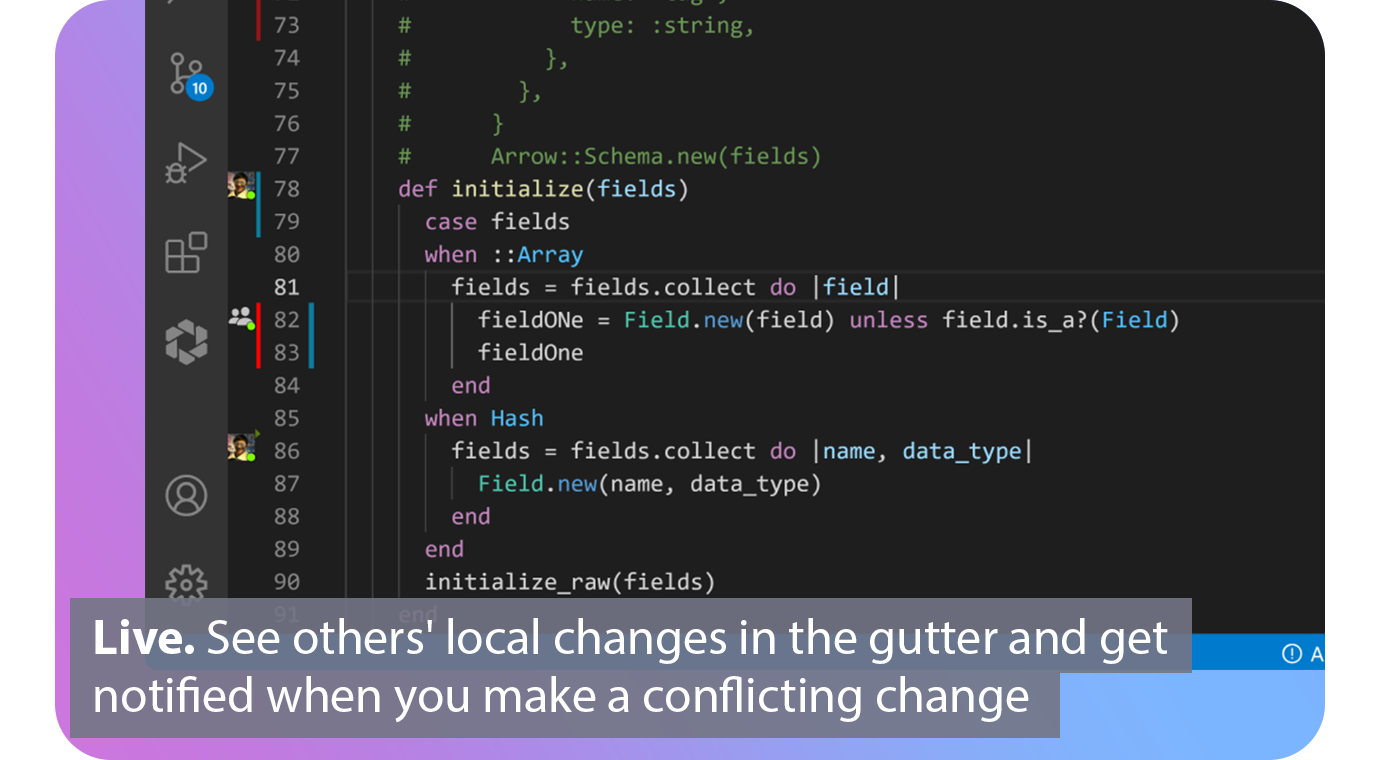
With real-time collaboration superpowers, extend Git. Connect. Connect. Automated. Connect your issue tracker and share the issue you are working with based on your branch. Live. You can see the changes of others in the gutter of the editor and be notified when you make a conflicting one. Patch. View diffs of other contributors local files and cherry-pick individual files, lines, or complete working copies. Codeshare. Codeshare allows you to make voice and video calls from your editor. Agnostic. Edit together simultaneously, interoperable with VS Code and all JetBrains IDEs.
API Access
Has API
No
API Access
Has API
No




Integrations
Android Studio
No
Asana
No
Git
Yes
GitHub
No
Jira
No
Jira Align
No
Slack
No
SwiftUI
Yes
Trello
No
Visual Studio Code
No
Integrations
Android Studio
Yes
Asana
Yes
Git
No
GitHub
Yes
Jira
Yes
Jira Align
Yes
Slack
Yes
SwiftUI
No
Trello
Yes
Visual Studio Code
Yes
Pricing Details
No price information available.
Free Trial
No
Free Version
No
Pricing Details
$0
Free or paid plans available. Team plan starting at $5 per user per month.
Free Trial
No
Free Version
Yes
Deployment
Web-Based
No
On-Premises
No
iPhone App
No
iPad App
No
Android App
No
Windows
No
Mac
Yes
Linux
No
Chromebook
No
Deployment
Web-Based
Yes
On-Premises
No
iPhone App
No
iPad App
No
Android App
No
Windows
No
Mac
No
Linux
No
Chromebook
No
Customer Support
Business Hours
No
Live Rep (24/7)
No
Online Support
Yes
Customer Support
Business Hours
Yes
Live Rep (24/7)
No
Online Support
Yes
Types of Training
Training Docs
Yes
Webinars
No
Live Training (Online)
No
In Person
No
Types of Training
Training Docs
Yes
Webinars
No
Live Training (Online)
No
In Person
No
Vendor Details
Company Name
GitBunki
Country
United States
Website
gitbunki.com
Vendor Details
Company Name
GitLive
Founded
2019
Country
United Kingdom
Website
git.live/
Product Features
Product Features
Code Collaboration
Audio Conferencing
No
Chat / Messaging
No
Code Review
No
Discussion Threads
No
IDE Integration
Yes
Remote Control
No
Remote Pair Programming
Yes
Screen Sharing
Yes
Video Conferencing
Yes
