Average Ratings 0 Ratings
Average Ratings 0 Ratings
Similar Products
-
ParasoftParasoft's mission is to provide automated testing solutions and expertise that empower organizations to expedite delivery of safe and reliable software. A powerful unified C and C++ test automation solution for static analysis, unit testing and structural code coverage, Parasoft C/C++test helps satisfy compliance with industry functional safety and security requirements for embedded software systems.
-
NodeMavenNodeMaven employs a sophisticated filtering mechanism that evaluates IPs in real-time prior to allocation, guaranteeing that you receive high-quality addresses 95% of the time. With access to over 30 million premium, pre-screened residential IPs spanning more than 150 countries and 1,400 cities, NodeMaven facilitates targeted usage at the country, region, and city levels. Their state-of-the-art filtering process ensures that 95% of the IPs maintain clean records, thereby boosting success rates in activities such as web scraping, SEO monitoring, and social media management. The platform allows for unlimited concurrent sessions and features super sticky sessions that can endure for up to 24 hours, ensuring stable and dependable connections. NodeMaven's intuitive dashboard makes the selection of proxies and their integration with popular third-party applications like Selenium, Puppeteer, and various anti-detect browsers a breeze. Additionally, they offer comprehensive onboarding assistance and expert support to help users successfully navigate anti-bot systems, thereby enhancing user experience and efficiency. This combination of features positions NodeMaven as a leading choice for those in need of reliable proxy solutions.
-
OkylineOkyline is an Executable Data Design (EDD) platform focused on executable validation contracts and operational data quality control. Rather than managing separate specifications, validation code, tests, and monitoring dashboards, Okyline centralizes validation and quality supervision around a single readable executable contract acting as the operational reference for enterprise data flows. The same contract powers deterministic validation, advanced business invariant checks, multi-format execution, data quality gates, and historical quality analytics across APIs, events, files, LLM structured outputs, and distributed operational systems. Contracts are designed directly from annotated sample data, making validation rules immediately understandable for developers, architects, QA teams, and business analysts. The Community Edition includes the public specification, a free Java runtime engine, a Claude AI assistant for contract generation, and an online studio supporting executable JSON validation contracts and JSON Schema transpilation. The Enterprise Edition adds native validation for JSONL, XML, CSV, FIXED, and EDI flows together with operational quality dashboards and data quality gates, without requiring databases or centralized infrastructure.erprise Edition supports direct validation of JSON, JSONL, XML, CSV, FIXED, and EDI flows with operational quality dashboards and analytics, without databases.
-
Virtuoso QAVirtuoso QA is a secure, agentic test automation platform for any browser-based application. Touchstone, our agentic assurance layer, turns your business requirements into tests, then runs, fixes and maintains them as your application changes. More than thirty specialised agents author, generate, triage and self-heal your functional and end-to-end tests, while a deterministic engine executes every run and your team approves every decision that matters. Every release comes with evidence of what was tested, what changed and who approved it. Release Insights shows execution risk and requirement coverage across every journey, and teams can export an Evidence Report in minutes rather than assembling one over weeks. That makes the platform a natural fit for regulated industries like financial services, insurance, healthcare, the public sector and more. The mission is to set the standard of proof for software releases. AI generates software. Virtuoso QA generates the evidence to trust it.
-
Checksum.aiEngineering teams shipping with AI have a new bottleneck: validation. Code output has accelerated. Quality hasn't. Checksum closes the gap. Checksum is a continuous quality platform with a suite of AI agents that handle testing end-to-end, at every stage of the development lifecycle. Where most tools wait for a human to trigger them, Checksum runs autonomously in the background, generating tests, executing them, and repairing failures without manual intervention. Seventy percent of test failures are resolved automatically through real-time auto-recovery. The platform covers every layer: end-to-end UI flows via Playwright, API endpoint chains, and targeted CI tests scoped to exactly what changed in a PR. All tests land as real code in your repository and are delivered as standard Playwright, owned by your team. Checksum is fine-tuned on 1.5+ million test runs and integrates natively with Cursor, Claude Code, and 100+ AI coding agents. Type /checksum and your coding agent's output gets tested before it ever reaches review. Generation and healing happen on Checksum's cloud infrastructure which means no LLM tokens consumed, no local resources required. The result: test suites that stay green as the product evolves, fewer regressions reaching production, and release confidence that scales alongside AI output.
-
RAD PDFInstall-free PDF editing, form filling, redaction, signing, viewing, and more on your website with RAD PDF! Packaged as an easy to use library / WebControl (compatible with .NET 3.5+, .NET Core, and .NET 5+), RAD PDF can be used with just about any flavor of ASP.NET including MVC, Razor, Blazor, WebForms, and more. RAD PDF is compatible with 99% of internet browsers, including those on Linux, Mac OS X, Microsoft Windows, and mobile. No plugins. No Adobe Reader. RAD PDF is more than a PDF to HTML converter. It natively supports all the most common PDF features including annotations, bookmarks, form fields, page labels, and more. With advanced PDF options, RAD PDF allows you to selectively enable and disable features not available with Adobe Acrobat Reader, like protecting a PDF from being downloaded while still viewable online. RAD PDF users can use PDF form fields directly from the web browser by enabling PDF form filling and PDF form saving without having to install any software. Integrating directly with ASP.NET, RAD PDF allows your web application to capture input data, build custom workflows, and provide an intuitive graphical user interface (GUI) for just about any online PDF interaction imaginable!
-
FlagsmithFlagsmith gives software engineering teams a self-hosted or fully managed feature flagging platform for controlling releases across web, mobile, and backend systems. Ship code behind a flag, then decide who sees it — by environment, user, or custom segment — without redeploying. Run Flagsmith however fits your infrastructure: our managed cloud, your own private cloud, or fully on-premise. What you get: Progressive rollouts with one-click rollback if something breaks Live config changes — flip features on or off instantly, no redeploy required Segment-based A/B and multivariate testing Project and role-based access control for multi-team organizations Native integrations with the tools already in your stack MCP support and a CLI so AI agents and scripts can manage flags directly Open source at its core, Flagsmith is built for teams that want control over where their configuration data lives.
-
GaffaGaffa is a REST API built for web scraping and browser automation, allowing developers to run real, full browsers at scale with a single API call. It removes the difficulty of managing headless browser frameworks, rotating proxies, CAPTCHA solving, and scaling infrastructure, all of which are handled automatically. JavaScript-heavy and dynamic websites render exactly as they would for a human visitor by default. Beyond standard scraping, Gaffa supports AI-driven structured data extraction (extract data into a defined schema without writing CSS selectors), screenshot and PDF capture, infinite-scroll and form-filling automation, and clean Markdown conversion for feeding webpages directly into LLM and RAG pipelines. A rotating residential proxy network keeps access reliable across regions, and a credit-based pricing model means teams pay only for the browser time and bandwidth they actually use. Gaffa is designed for AI engineers, data teams, and developers who want production-grade web data extraction without having to build and maintain their own infrastructure.
-
ReflectizReflectiz is a web exposure management platform that enables organizations to proactively identify, monitor, and mitigate security, privacy, and compliance risks across their digital environments. It provides comprehensive visibility and control over first, third, and even fourth-party components like scripts, trackers, and open-source libraries—elements that are often missed by traditional security tools. The unique advantage of Reflectiz is that it operates remotely, without embedding code on customer websites. This ensures no impact on site performance, no access to sensitive user data, and no additional attack surface. By continuously monitoring all publicly available components, Reflectiz identifies hidden risks in your digital supply chain, helping to detect vulnerabilities and compliance issues in real-time. With a centralized dashboard, Reflectiz gives businesses a holistic view of their web assets, making it easier to manage risk across all digital properties. The platform allows teams to establish baselines for approved behaviors, swiftly identifying deviations that may indicate threats. Reflectiz is particularly valuable for industries such as eCommerce, healthcare, and finance, where managing third-party risks is crucial. It helps businesses enhance security, reduce attack surfaces, and maintain compliance without requiring any changes to website code, offering continuous monitoring and detailed insights into external component behaviors.
-
OxylabsOxylabs is a market leader in web intelligence, helping businesses worldwide turn public web data into actionable insights with enterprise-grade, ethical, and compliant solutions. Its proxy infrastructure spans one of the largest global networks, offering residential, ISP, mobile, datacenter, and dedicated datacenter proxies, along with Web Unblocker – an AI-driven tool that ensures seamless, block-free access to even the most protected sites. On the scraping side, Oxylabs provides a complete ecosystem. The Web Scraper API manages every stage of large-scale data extraction, from proxy management to parsing, while OxyCopilot, an AI-powered assistant, generates parsing requests from simple natural language prompts. For dynamic, bot-protected websites, the Agent Browser, a headless browser designed to mimic human behavior, ensures uninterrupted access. Oxylabs also pioneers AI-driven tools like AI Studio, which enables natural language scraping and crawling so anyone can extract data without writing code. Its ready-made datasets provide instant, structured information across industries such as e-commerce, real estate, travel, and more – accelerating data projects without custom scraping. With the largest proxy services in the market, Oxylabs offers 177M+ IPs across 195 countries and is trusted by 4,000+ clients worldwide, including Fortune 500 companies. Plus, their 24/7 customer service ensures businesses get support whenever it’s needed.
Description
Gatling Studio is a desktop application designed to seamlessly transform actual user interactions from web browsers into effective load tests that are executable, leveraging the powerful Gatling engine in a Java/Maven project format within a matter of minutes. It allows users to capture a live browsing session or import a previously recorded HAR file, automatically filtering out unnecessary elements like static files, advertisements, and external trackers, while also enabling customization of the user-flow by domain or request type. This process results in the generation of production-ready Gatling code which can be managed through version control and further developed as needed. Users can then open the generated project in an Integrated Development Environment (IDE), commit it to source control, and tailor it with injection profiles or parameterization, facilitating local execution with Gatling Community Edition or scaling up through Gatling Enterprise Edition. The application is compatible with Windows, macOS, and Linux, and integrates well with Chromium-based browsers, making it ideal for performance engineers, QA teams, and developers who want to streamline test creation while adhering to comprehensive “test-as-code” methodologies. With its user-friendly interface and robust functionality, Gatling Studio significantly enhances the efficiency of load testing processes.
Description
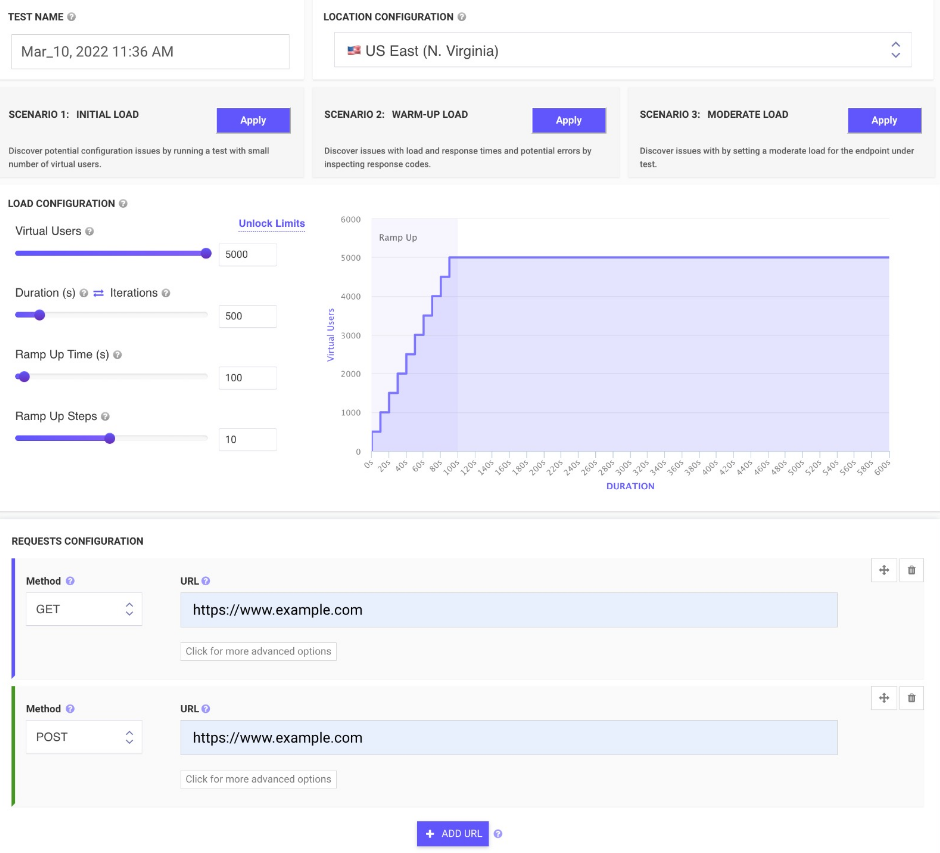
All-in-one cloud testing platform for performance testing, load testing, website speed testing and website UI testing. Mobile applications and API endpoints are all covered.
JMeter testing is easy from multiple cloud locations, with thousands of users. Apache JMeter allows you to see real-time performance metrics of your website and APIs from the cloud.
You can monitor changes over time and receive advice on how to speed up page loading times. We run your tests on cloud instances at set times and notify you if anything goes wrong.
To find rendering issues, invalid HTML, missing or incorrect CSS, load your web pages and websites in mobile emulators. In seconds, schedule runs and inspect the rendered images on all devices. Simulate your site on different screen sizes and resolutions.
Take screenshots of two websites in seconds. To check for differences, you can compare the generated screenshots using a threshold.
API Access
Has API
Yes
API Access
Has API
Yes


Integrations
Chrome DevTools
No
Chromium
Yes
Gatling
Yes
JMeter
No
Java
Yes
JavaScript
Yes
Jenkins
No
Maven
Yes
Integrations
Chrome DevTools
Yes
Chromium
No
Gatling
No
JMeter
Yes
Java
No
JavaScript
No
Jenkins
Yes
Maven
No
Pricing Details
€89 per month
Free Trial
Yes
Free Version
Yes
Pricing Details
$24 per month
Free Trial
No
Free Version
Yes
Deployment
Web-Based
No
On-Premises
No
iPhone App
No
iPad App
No
Android App
No
Windows
Yes
Mac
Yes
Linux
Yes
Chromebook
No
Deployment
Web-Based
Yes
On-Premises
No
iPhone App
No
iPad App
No
Android App
No
Windows
No
Mac
No
Linux
No
Chromebook
No
Customer Support
Business Hours
Yes
Live Rep (24/7)
No
Online Support
Yes
Customer Support
Business Hours
No
Live Rep (24/7)
No
Online Support
Yes
Types of Training
Training Docs
Yes
Webinars
Yes
Live Training (Online)
Yes
In Person
No
Types of Training
Training Docs
Yes
Webinars
Yes
Live Training (Online)
No
In Person
No
Vendor Details
Company Name
Gatling
Country
France
Website
gatling.io/product/studio
Vendor Details
Company Name
LoadFocus
Founded
2014
Country
United Kingdom
Website
loadfocus.com
Product Features
Load Testing
API Load Testing
No
Database Load Testing
No
Load Test Performance Reporting
No
Mail Load Testing
No
Multilocation Load Testing
No
Multiple Protocol Support
No
Test Script Customization
No
Web Application Testing
No
Product Features
Automated Testing
Hierarchical View
Yes
Move & Copy
No
Parameterized Testing
Yes
Requirements-Based Testing
Yes
Security Testing
No
Supports Parallel Execution
Yes
Test Script Reviews
Yes
Unicode Compliance
No
Load Testing
API Load Testing
Yes
Database Load Testing
Yes
Load Test Performance Reporting
Yes
Mail Load Testing
No
Multilocation Load Testing
Yes
Multiple Protocol Support
No
Test Script Customization
Yes
Web Application Testing
No
Performance Testing
API Testing
Yes
Benchmarking
Yes
Cross Browser Testing
No
Debugging
Yes
Historical Reporting
Yes
Load Testing
Yes
Mobile Testing
Yes
Parallel Testing
No
Regression Testing
Yes
UI Testing
No
Web Testing
Yes
Website Monitoring
Availability Testing
No
Event Logs
No
Event-Based Notifications
No
FTP Monitoring
No
Mail Server Monitoring
No
Maintenance Scheduling
Yes
Performance Metrics
Yes
Real Time Monitoring
Yes
Transaction Monitoring
No
Uptime Reporting
Yes
