Average Ratings 0 Ratings
Average Ratings 0 Ratings
Similar Products
-
Files.com6,000+ companies trust Files.com to automate and secure business critical transfers. We obsess about security, compliance, reliability, and performance so your critical business processes just work every time. Easily manage any transfer flow without writing scripts or code, and onboard workloads and partners effortlessly. We support standard file transfer protocols (FTP, SFTP, AS2) for working with external partners and also provide native apps for high performance internal transfers. As a fully Cloud-Native SaaS, there are no servers for you to buy or maintain, there is no installation required, and high availability and redundancy are built in and free. Our InfoSec Program is audited annually by Kirkpatrick Price, a leading information security CPA firm. Our audit covers the scope of the entire Files.com business (not just datacenter operations) and names Files.com specifically. Beware of smaller competitors who try to pass off someone else’s audit as their own. Technical capabilities include encryption at-rest and in-transit, four types of two-factor authentication, nine enterprise identity (SSO) integrations, configurable password and session policies, and a perfect “A+” score from Qualys SSL Labs.
-
JSCAPE MFT ServerJSCAPE by Redwood is a secure managed file transfer (MFT) software that automates complex file workflows, consolidating manual processes, custom scripts and siloed tools into a single, reliable platform. Low-code automation triggers enable IT teams to orchestrate file transfers across Windows, Linux, macOS, Solaris and any other platform, with unlimited users, trading partners and concurrent connections included and no additional middleware required. JSCAPE delivers enterprise-grade security, backed by an unblemished track record since 1999 and active third-party certifications that most MFT providers don't hold: SOC 2 Type 1 and Type 2, ISO 27001, Drummond Certified™, and FIPS 140-2 and 140-3 validated encryption. Quarterly penetration testing and annual third-party audits keep your environment audit-ready year-round. The solution handles any file size and any protocol — SFTP, FTP/S, HTTP/S, AS2, OFTP2, WebDAV, and more — while meeting compliance requirements for HIPAA, PCI DSS, SOX, GDPR and GLBA. It also fits cleanly into any environment (on-premises, cloud, hybrid, containerized or SaaS), with native integrations for Microsoft Azure, AWS, IBM Cloud, CyberArk, Box, Dropbox and leading workload automation solutions like RunMyJobs. Trusted by 1,000+ organizations in 57+ countries, JSCAPE includes 24/7/365 expert technical support with an 8-minute median response time and online training at no extra cost in every plan. Request a personalized demo today.
-
Cerberus FTP ServerCerberus FTP Server provides a secure and reliable file transfer solution for the demanding IT professional. Supporting SFTP and SCP, FTP/S, and HTTP/S, Cerberus is able to authenticate against Active Directory and LDAP, run as a Windows service, has native x64 support, includes a robust set of integrity and security features and offers an easy-to-use manager for controlling user access to files and file operations.
-
PhotonFilePhotonFile serves as a file transfer and private cloud storage solution tailored for individuals and teams managing large files and continuous client or project workflows. It features Photon Transfer, which facilitates live relay between the sender and the recipient while they are connected, in addition to offering a temporary cloud-based delivery option that allows recipients to retrieve files after the upload has finished. Users can access files through a browser link without the need to create an account. Photon Vault ensures that files are stored within distinct client-side encrypted Vaults, allowing for secure ongoing access and sharing. The Vault Intake feature provides upload-only links that enable file collection without revealing the contents of existing Vaults, whereas Vault Sync synchronizes selected desktop folders with their respective Vaults. PhotonFile Desktop is compatible with Windows, macOS, and Linux operating systems. The platform also includes team workspaces that incorporate role-based collaboration features and Vault access controls. Free accounts come with limitations on transfer and Vault usage, while paid subscriptions and one-time File Passes unlock additional features and greater usage capacity. Additionally, the service is designed to accommodate a variety of workflows, making it a versatile tool for both personal and professional use.
-
LALAL.AILALAL.AI helps musicians, producers, video editors, podcasters, and businesses get separate parts out of finished recordings. Upload a song, video, or voice recording, choose what you need, and get back separate tracks: vocals, instrumental, drums, bass, electric and acoustic guitar, piano, synthesizer, strings, wind instruments, or speech without background noise. Beyond music separation, LALAL.AI handles common voice tasks: removing background noise, mic rumble, and plosives from voice recordings, reducing echo and reverb in speech and vocals, splitting lead and backing vocals, and changing a voice with licensed voice packs or a personal voice clone made from your own recordings. You can use the service in a browser, in desktop apps for Windows, macOS, and Linux, and in mobile apps for iOS and Android. Pro subscribers also get three plugins for their DAW: Stem Separator, Speech Cleaner, and Voice Dereverb. They process audio on your own computer, so files are not uploaded. Teams working with large volumes of content can automate stem separation, voice cleaning, and voice changing through the REST API, or request a business solution with high-volume processing and dedicated support. Typical business use cases include localization and dubbing, video production, podcast post-production, and music production. A free Starter plan lets you test the service and preview results. Paid Lite and Pro subscriptions are designed for regular use.
-
FilerevFilerev is a powerful tool that helps you easily find and manage hidden files, duplicate files, large files, and oversized folders, ensuring a streamlined and clutter-free digital workspace. Key features include advanced scanning technology that identifies the unorganized files taking up the most space and cluttering your Google Drive. Filerev enhances productivity by saving time and reducing the frustration of manual file organization. The custom filters and bulk delete tool give you complete control over finding and removing unwanted files in your account. The storage analyzer lets you browse your folders by size to see where the space is being used in your Google Drive. Whether you're an individual, a small business, or a large enterprise, Filerev offers robust solutions tailored to your needs. Visit filerev.com to discover how Filerev can transform your Google Drive experience and boost efficiency.
-
pCloud BusinesspCloud Business is a cloud storage and file synchronization platform designed for teams that need controlled access, cross-platform compatibility, and predictable storage allocation. It provides centralized file management with granular permissions and optional client-side encryption. Founded in 2013 in Switzerland, pCloud operates under EU-aligned privacy standards and offers data residency in Luxembourg (EU) and Dallas, Texas (US). The platform supports over 23 million users globally. Core Functionality : - Per-User Storage Allocation : 1 TB or 2 TB per user, suitable for small to mid-sized teams and distributed environments. - Virtual File System (pCloud Drive) : Mounts as a local drive on Windows, macOS, and Linux. Files are streamed on demand, reducing local disk usage. - File Sync & Sharing : Folder-level sync, link-based sharing, and permission control (view/edit/manage). Supports password-protected and time-limited links. - Admin & Access Control : Centralized user management, role assignment, and storage distribution via admin console. - Versioning & File History : File versioning with up to 180 days retention, enabling rollback and recovery. - Cross-Platform Support : Native clients for Windows, macOS, Linux, iOS, Android, plus web interface. - Client-Side Encryption (Optional) : Zero-knowledge encryption via pCloud Encryption for sensitive data; encryption keys are not stored server-side. Technical Positioning: - Swiss jurisdiction; GDPR-aligned processing - No file size limits - Works without mandatory ecosystem lock-in (no bundled office suite required) - Compatible with heterogeneous environments (Linux included) Trial : 30-day free trial available for up to 10 users.
-
Airlock DigitalAirlock Digital delivers an easy-to-manage and scalable application control solution to protect endpoints with confidence. Built by cybersecurity professionals and trusted by organizations worldwide, Airlock Digital enforces a Deny by Default security posture to block all untrusted code, including unknown applications, unwanted scripts, malware, and ransomware.
-
CodemagicCodemagic’s macOS build environments facilitate the smooth creation of hybrid applications, bolstered by an extensive array of preinstalled software. You can efficiently configure your Cordova Android and iOS application builds and workflows through a single codemagic.yaml file. To maintain the performance of your Android and iOS applications, Codemagic provides automated testing on simulators, emulators, and actual devices, ensuring you receive prompt feedback on your build outcomes. Integration with the Apple Developer Portal streamlines iOS code signing, enabling seamless deployment to App Store Connect and Google Play. Similarly, you can also set up your React Native app builds and workflows in one straightforward codemagic.yaml file. With multiple versions of Xcode, Android SDK, and npm preinstalled, Codemagic’s macOS build machines are designed for effortless Android and iOS builds. Moreover, Codemagic simplifies the automation of testing for your React Native applications across a variety of testing platforms. This comprehensive approach not only boosts productivity but also enhances the overall development experience.
-
Diplomat MFT by Coviant SoftwareDiplomat MFT from Coviant Software is a secure and scalable managed file transfer platform that replaces manual scripts and outdated FTP with reliable, automated file delivery. It supports secure protocols like SFTP, FTPS, HTTPS, and AS2, and integrates easily with cloud services including AWS S3, Azure Blob Storage, Google Cloud, Oracle Cloud, SharePoint, Dropbox, and more. Trusted for over 20 years without a single breach, Diplomat MFT helps organizations meet compliance standards like HIPAA, HITECH, GLBA, PCI/DSS, GDPR, and DORA. Advanced security features include automated PGP encryption, MFA, IP whitelisting, and threat intelligence scanning. Still using insecure or outdated tools for critical file transfers? Diplomat MFT is the smarter alternative. Built to simplify operations, close compliance gaps, and protect your most sensitive data. Start your free trial today.
Description
Folia Files serves as a dedicated file manager for macOS 14 and above, catering to users who require enhanced file management capabilities beyond what Finder provides. This application features a multi-pane window, allowing various views such as list, tree, columns, icons, gallery, and board, which can be saved as customized scenes. Users can also access modules that display file information, previews, notes, photo maps, and version histories adjacent to the panes. It supports connections to various network file systems, including SMB, AFP, NFS, WebDAV, and FTP, along with SFTP, S3, and a broad range of over 50 cloud services through integrated rclone functionality. The search feature is comprehensive, enabling users to locate file names, document text, screenshots, scans, and even image contents. Additionally, the application allows for undoing file operations and resuming interrupted transfers. Among its many utilities are clipboard history management, a screen-edge drawer, an auxiliary panel for macOS Open and Save dialogs, terminal access, text editing capabilities, batch renaming, duplicate file identification, folder comparison tools, PDF manipulation, synchronization, backup options, and disk mapping functionalities. Users can try the software for free with a seven-day trial period, providing them an opportunity to explore its extensive features before committing to a purchase.
Description
Your computer desktop is cluttered and confusing. The files and applications you need are not always in reach.
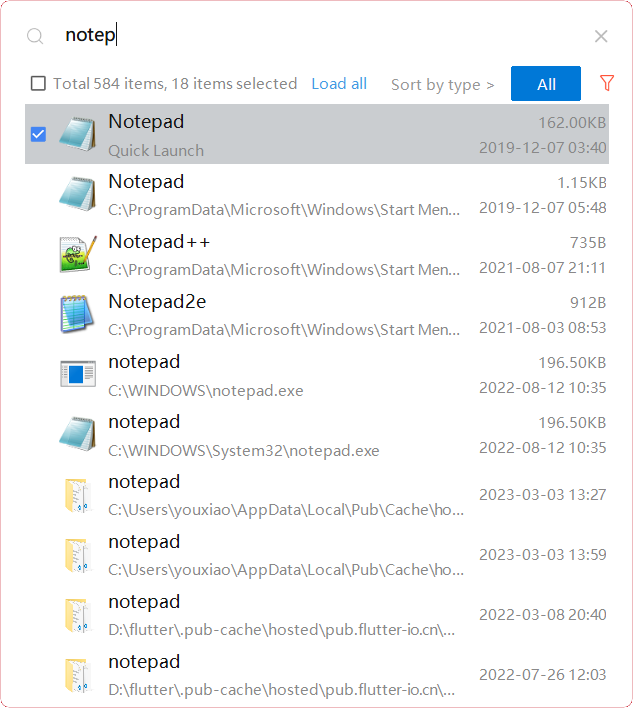
YXFile allows you to tagging file and search file as well as launch apps.
Tag Any File:
YXFile can tag every file type on any file system. The tagging is stored in a data base. YXFile will not alter your file names or create hidden files on your hard disk. You can move or rename files under the same partition. The tags won't be lost
Search for everything:
Search files and folders using their names. as well as file tags, launch items, and file tags.
Launch Apps
Launch App is a favorite feature of YXFile users. You can either type the name of the application or program you wish to open or use a shortcode. Click return and YXFile will open the program.
API Access
Has API
No
API Access
Has API
No



Integrations
Amazon S3
No
Rclone
No
Pricing Details
$49.99 one-time
$49.99 one-time purchase. A seven-day free trial is available.
Free Trial
Yes
Free Version
No
Pricing Details
$39/user
One-time payment for lifetime access to Yfile
Free Trial
Yes
Free Version
No
Deployment
Web-Based
No
On-Premises
No
iPhone App
No
iPad App
No
Android App
No
Windows
No
Mac
Yes
Linux
No
Chromebook
No
Deployment
Web-Based
No
On-Premises
No
iPhone App
No
iPad App
No
Android App
No
Windows
Yes
Mac
No
Linux
No
Chromebook
No
Customer Support
Business Hours
No
Live Rep (24/7)
No
Online Support
Yes
Customer Support
Business Hours
Yes
Live Rep (24/7)
No
Online Support
No
Types of Training
Training Docs
Yes
Webinars
No
Live Training (Online)
No
In Person
No
Types of Training
Training Docs
Yes
Webinars
No
Live Training (Online)
No
In Person
No
Vendor Details
Company Name
Wonderlink SL
Country
Spain
Website
foliafiles.com
Vendor Details
Company Name
ousaa
Founded
2016
Country
China
Website
yxfile.cc/
