Average Ratings 0 Ratings
Average Ratings 0 Ratings
Similar Products
-
Adobe FireflyAdobe Firefly is a versatile AI-powered creative platform designed to help users generate and edit multimedia content with ease. It allows users to create images, videos, and audio using simple text prompts within an interactive and flexible workspace. The platform features tools like generative fill, image editing, and video editing, enabling users to refine and enhance their creations. Firefly also includes quick actions such as background removal, cropping, resizing, and format conversion to streamline workflows. Users can explore an infinite canvas for creative production and experiment with various styles and outputs. The platform encourages creativity by allowing users to remix content from a shared community gallery. With its intuitive design, it reduces the need for advanced technical skills. Firefly integrates AI capabilities to speed up content creation and editing processes. It supports both beginners and professionals in producing high-quality results. Overall, Adobe Firefly provides a powerful and accessible environment for modern digital creativity.
-
LTXMost AI video tools hand you a black box: closed weights, a subscription, and no way to see what is happening under the hood. LTX takes the opposite approach. Built by Lightricks, LTX is an open foundation model that generates and simulates across video, audio, and the physical world, and it puts the weights, the code, and the control in your hands. At the center of the model is LTX-2.5, a 22B-parameter dual-stream diffusion transformer that produces native 4K video at up to 50 frames per second, with audio and video generated together in a single pass rather than stitched together afterward. Artificial Analysis, an independent benchmarking group, currently ranks LTX among the top three AI video models in the world. You choose how you want to use it. Download the open weights and run LTX-2.5 on your own hardware. License the model for on-premise deployment backed by enterprise support. Or build directly on LTX Studio, the production suite that turns the model into a full creative workflow. Companies like ElevenLabs, Asteria Film Co., Magnopus, and NVIDIA already rely on LTX for their own work. LTX is not built for one-off social clips. It is infrastructure for teams that generate motion, audio, and physical environments as part of their own products and pipelines.
-
MuzaicMuzaic.ai is a browser-based tool that scores video automatically. You give it a cut (or a folder of cuts); it returns a finished audio mix — music, SFX, ambience and voiceover as separate layers — mastered to broadcast spec, in roughly 30 seconds per clip. What it actually does The pipeline runs in four stages. First it analyses the video: scenes, objects, pacing, colour and sentiment. From that it builds an audio plan and commits each concept to a clear direction (the site's example: a string quartet under a battle scene) rather than averaging toward something inoffensive. Then it composes every layer to fit the picture and the other layers — SFX land on the action, ambience ducks under speech, the voiceover is drafted from your brief rather than read out. Finally it mixes and masters the result. Existing audio in the source can be kept, replaced or mixed under. Output is three concepts per clip, exported as MP3 or WAV. Layer balance is adjusted inside Muzaic before export; the deliverable is the finished mix, not separate stems. The commercial angle Pricing is metered in minutes of finished audio, not per track or per download; downloads are unlimited. Personal is free for 10 minutes a month, non-commercial only. Creator ($45/month) covers your own brand and paid ads. Studio ($249/month) is for agencies: the licence travels to the client and the legal cover extends to them too. Enterprise adds TV, radio, cinema and OOH, plus a custom contract, DPA and SLA. What it is not It is not a music-generation toy. The free tier exists to test the workflow on your own footage; nothing from it may be published. The target user is a team producing hundreds of ad variants a month, where the audio step is the bottleneck.
-
AI Video CutAI Video Cut is a complimentary tool designed to convert long videos into dynamic short clips that are perfect for platforms such as YouTube Shorts, TikTok, and social media advertisements. By utilizing AI-enhanced prompts, it provides a range of ready-made templates alongside customizable features, enabling users to craft enticing trailers, product showcases, and educational content. The tool boasts advanced smart cropping technology that recognizes faces, a variety of caption styles, and multilingual support, ensuring that the content resonates with a wide array of audiences. Additionally, users have the flexibility to export their videos in different lengths and aspect ratios tailored to various platforms and viewer preferences. Ideal for content creators, digital marketers, social media strategists, e-commerce entrepreneurs, event coordinators, and podcasters, AI Video Cut streamlines the process of enhancing video content, making it accessible and efficient for anyone looking to elevate their visual storytelling. With its user-friendly interface and innovative features, AI Video Cut empowers individuals and businesses alike to make a lasting impact through their video content.
-
DropTrackDropTrack is a music promotion and release management platform for independent artists, labels, managers, DJs, playlist curators, bloggers, radio contacts, and industry influencers. The platform helps users prepare tracks for promotion, pitch the right contacts, and measure how people respond to each release. DropTrack’s Music Analyzer gives artists a readiness score, mood, genre, similar artist references, and practical next steps before they spend money on promotion. Users can also generate release assets such as album art, press releases, artist bios, track versions, and professional campaign materials. The platform supports targeted submissions to labels, DJs, playlist curators, blogs, radio stations, and other contacts that fit a song’s genre and audience. Email campaign tools let users send music to their own lists or use DropTrack’s genre-based contact lists, then track opens, plays, downloads, comments, and follow-up signals. Spotify playlist placement options help artists pursue real playlist exposure while avoiding fake or bot-driven lists. DropTrack also connects with AI assistants such as Claude, ChatGPT, Cursor, and Copilot so users can create weekly label briefs, campaign drafts, contact ideas, and release checklists from account data. By combining track analysis, release preparation, contact lists, submissions, playlist placement, email campaigns, and analytics, DropTrack helps music teams promote smarter and build stronger fan and industry relationships.
-
TheBestPDFWelcome to our state-of-the-art SaaS platform that specializes in online document editing and conversion. Tailored specifically for businesses and entrepreneurs, TheBestPDF offers exceptional file management solutions suitable for teams of any size. You can store your documents in various formats and sizes within our secure vault. Choose from multiple plans designed to help you optimize your resources and expenses. Our platform is accessible across all devices and operating systems, making it highly versatile. Your business data is protected with HTTPS encryption, guaranteeing that every file you create remains secure. Effortlessly redact, insert objects, and sign PDFs, simplifying document management for your organization. With our speedy PDF converter, document conversion is quick and efficient, ideal for busy teams. Setting up your company’s document workflows is a breeze thanks to our intuitive editor interface. We're committed to fostering long-term partnerships by providing 24/7 customer support. By bringing together innovative thinkers, we deliver integrated solutions that effectively address your business challenges while enhancing productivity and collaboration.
-
YodeckNext-generation technology for digital signage professionals Yodeck, a cloud-based digital signage platform, is unbeatable. It powers your screen with dynamic content that instantly engages your target audience. Yodeck makes it easy to create, schedule, and design content from the web. To get your message across to those who matter most to you, use attention-grabbing media such as videos, images and PDF files, Office documents, data dashboards, and social media. It provides enterprise-grade security and control. Yodeck's drag-and-drop editing feature allows users to be creative in organizing content into interesting layouts. Yodeck is proud to offer a unique digital signage solution for businesses of all sizes. This includes local diners as well as global leaders like Delta Airlines, Autodesk and Adobe.
-
FilecampFilecamp is a cloud-based Digital Asset Management (DAM) software solution that helps marketing & creative teams organize and share their digital media such as images, videos, and brand guidelines. Filecamp comes with unlimited users, each user configured with their own set of user-, admin-, and folder permissions. Filecamp's unique custom branding options will make sure your DAM system matches your brand guidelines. The built-in online proofing and commenting tools allow you to review and approve creative work. Prices start at only USD 29/month and their free 30-day trial allows you to test the solution with your files, teammates, and customers.
-
AirConsolidate your team's resources in a well-structured workspace that is organized, version-controlled, and simple to share. While Air securely stores your content, it also offers intelligent search capabilities, guest access, customizable layouts, version tracking, and effortless sharing, enhancing every aspect of the creative journey. Don't let your valuable assets languish in folders and zip files; instead, plan social media campaigns, develop streamlined presentations, and arrange your materials in a workspace that embodies your brand identity. Effortlessly navigate your workspace using features akin to a search engine, where tools like image recognition and smart tags empower all team members to independently find assets. The only challenging element of the feedback process will now be the feedback itself, as you can create public boards that allow guests to upload directly to your workspace. Engage in commentary, initiate discussions, and make selections with context, all while staying updated on new modifications and clearly tracking the most recent version of each asset. This streamlined approach not only boosts collaboration but also fosters creativity within your team.
-
ExtoleExtole is the enterprise offer management platform powering personalized incentive programs at scale for B2C brands. Highly configurable and AI-accessible, Extole fits how your team already works. Marketers build offer programs that motivate customers across the customer lifecycle, product teams can orchestrate digital and real-world experiences that drive engagement and growth, and developers pull Extole's journey management, rules, real-time rewards, and AI into their own systems as ready-to-use services. Behind every offer, Extole combines real-time audience and event data with enterprise-grade infrastructure so your offers are reliable, secure, and easy to support and audit. Leading brands across retail, financial services, telecommunications, and home services trust Extole to power referral, loyalty, promotional, lifecycle, and engagement programs. Build your next offer program with Extole.
Description
Figma Weave is a creative AI platform that combines multiple AI models with professional editing and compositing tools in one node-based workflow. The platform is designed to help creators build repeatable, scalable workflows while preserving the craft and control expected from professional creative software. Users can work with models from Google, Kling, OpenAI, Bytedance, Black Forest Labs, Runway, Luma, LTX, Wan, Grok, Recraft, Bria, and other providers. Figma Weave also includes tools for inpainting, outpainting, cropping, masking, upscaling, depth extraction, channel work, relighting, painting, image description, and matte manipulation. Its compositing features support layers, type, blends, and other controls that help users guide the final outcome. Teams can turn complex workflows into simplified interfaces so others can reuse creative systems without needing to understand every node. The platform is positioned around Artistic Intelligence, combining AI capability with human creative direction. Figma Weave is designed for both collective creative work and enterprise-scale production needs. By combining AI models, node-based workflows, editing tools, compositing power, and reusable tool generation, Figma Weave helps teams create high-quality visual work more efficiently.
Description
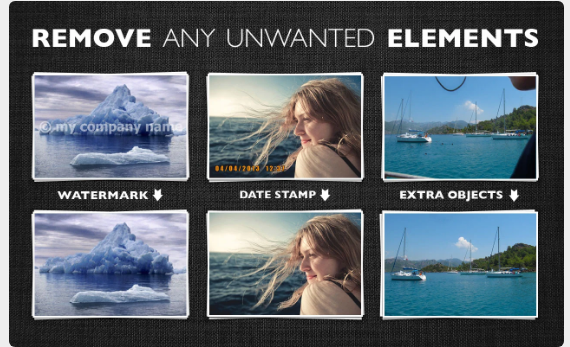
Inpaint effortlessly fills in selected areas with expertly generated textures derived from the surrounding image data. Visit our Tutorials page to discover how straightforward it is for anyone to achieve impressive results in just a few easy steps. You can either drag and drop a file here or click to upload an image, ensuring the format is JPG, PNG, or WebP, with a maximum file size of 10Mb and a resolution limit of 4.2 megapixels. Are pesky tourists constantly interrupting your perfect shots? Eliminate them from your photos using Inpaint! With a few simple actions, you can create stunning images that capture your original vision. Inpaint quickly allows you to highlight unwanted objects or people in your photo, and then you simply let Inpaint take care of the rest. Beyond the desired elements we want to feature in our pictures, there are often many distractions that detract from the overall composition. So, why not clear those away with Inpaint for a cleaner, more focused image? This tool is designed to enhance your photography experience, making it more enjoyable and efficient.
API Access
Has API
Yes
API Access
Has API
No


Integrations
Bria.ai
Yes
FLUX.1 Kontext
Yes
Gen-4
Yes
Gen-4 Turbo
Yes
Hunyuan T1
Yes
Ideogram AI
Yes
Imagen
Yes
Imagen
Yes
Imagen 4
Yes
Kling AI
Yes
Integrations
Bria.ai
No
FLUX.1 Kontext
No
Gen-4
No
Gen-4 Turbo
No
Hunyuan T1
No
Ideogram AI
No
Imagen
No
Imagen
No
Imagen 4
No
Kling AI
No
Pricing Details
$19 per month
Free Trial
No
Free Version
Yes
Pricing Details
$19.99 one-time payment
Free Trial
No
Free Version
No
Deployment
Web-Based
Yes
On-Premises
No
iPhone App
No
iPad App
No
Android App
No
Windows
No
Mac
No
Linux
No
Chromebook
No
Deployment
Web-Based
Yes
On-Premises
No
iPhone App
No
iPad App
No
Android App
No
Windows
Yes
Mac
Yes
Linux
No
Chromebook
No
Customer Support
Business Hours
No
Live Rep (24/7)
No
Online Support
Yes
Customer Support
Business Hours
No
Live Rep (24/7)
No
Online Support
Yes
Types of Training
Training Docs
Yes
Webinars
No
Live Training (Online)
Yes
In Person
No
Types of Training
Training Docs
Yes
Webinars
No
Live Training (Online)
No
In Person
No
Vendor Details
Company Name
Figma
Founded
2012
Country
United States
Website
weave.figma.com
Vendor Details
Company Name
Inpaint
Country
United States
Website
theinpaint.com
