Average Ratings 0 Ratings
Average Ratings 0 Ratings
Similar Products
-
KUKUIKukui's All-in-One success platform is a powerful integrated marketing software solution that allows businesses in the automotive industry to grow their brand, and take it to new heights. Kukui provides tools for conversion rate optimization and POS integration as well as email marketing, retention, and revenue tracking.
-
PayKingsPayKings is a payment processing provider specializing in merchant account solutions for high-risk industries that often face challenges obtaining traditional payment services. The company offers a streamlined approval process powered by automated underwriting, allowing many businesses to gain access to payment processing capabilities within a short timeframe. Businesses can leverage merchant accounts, payment gateways, ACH processing, credit card processing, recurring billing, and virtual terminal solutions through a single provider. PayKings serves a broad range of industries, including adult entertainment, CBD, online gaming, firearms, debt settlement, travel, nutraceuticals, cryptocurrency, and other specialized markets. Fraud prevention tools and chargeback management services help businesses reduce risk while maintaining smooth transaction processing. The platform supports integration with leading gateways, eCommerce platforms, content management systems, and custom APIs. Dedicated account managers provide guidance throughout onboarding and ongoing operations, ensuring merchants receive industry-specific support. Transparent interchange-plus pricing models help businesses understand processing costs without hidden fees or long-term contractual commitments. PayKings enables high-risk businesses to access reliable payment infrastructure while supporting growth and operational stability.
-
DbVisualizerDbVisualizer is a universal database client for anyone who works with data, from indie developers and startups to professional teams managing complex database environments, including developers, DBAs, analysts, and data engineers working across relational and NoSQL databases. Key features: - SQL editor with intelligent autocomplete, visual query builders, variables, and execution tools - AI Assistant for answering questions, explaining errors, and analyzing code - Git integration for managing SQL scripts and team collaboration - Customizable layouts, key bindings, and UI themes - Favorites for frequently used scripts and database objects - Configurable security settings for organizational requirements Connects via JDBC to MySQL, PostgreSQL, SQL Server, Oracle, Snowflake, SQLite, Cassandra, BigQuery, and more. Runs on Windows, macOS, and Linux. Nearly 7 million downloads, with Pro users in 150 countries, scaling from solo projects to enterprise database management.
-
Google Cloud SQLCloud SQL is a fully managed relational database service that supports MySQL, PostgreSQL, and SQL Server. It includes rich extensions, configuration flags, and developer ecosystems. Cloud SQL offers $300 in credits for new customers. You won't pay until you upgrade. Reduce maintenance costs by using fully managed MySQL, PostgreSQL, and SQL Server databases. The SRE team provides 24/7 support for reliable and secure services. Data encryption in transit and at rest ensures the highest level of security. Private connectivity with Virtual Private Cloud, user-controlled network access, and firewall protection add an additional layer of safety. Compliant with SSAE 16, ISO 27001, PCI DSS, and HIPAA, you can trust your data to be protected. Scale your database instances with a single API request, whether you are just testing or need a highly available database in production. Standard connection drivers and integrated migration tools let you create and connect to a database in a matter of minutes. Transform your database management with AI-driven support in Gemini, currently available in preview on Cloud SQL. It enhances development, optimizes performance, and simplifies fleet management, governance, and migration.
-
PeerGFSA Comprehensive Solution for Streamlined File Orchestration and Management across Edge, Data Center, and Cloud Storage PeerGFS presents an exclusively software-based solution designed to address file management and replication challenges within multi-site and hybrid multi-cloud environments. With our extensive expertise spanning over 25 years, we specialize in file replication for geographically dispersed organizations. Here's how PeerGFS can benefit your operations: Enhanced Availability: Achieve high availability through Active-Active data centers, whether located on-premises or in the cloud. Edge Data Protection: Safeguard your valuable data at the Edge with continuous protection to the central Data Center. Improved Productivity: Empower distributed project teams by providing swift, local access to critical file information. In today's world, having a real-time data infrastructure is paramount. PeerGFS seamlessly integrates with your existing storage systems, supporting: High-volume data replication between interconnected data centers. Wide area networks characterized by lower bandwidth and higher latency. Rest assured, PeerGFS is designed to be user-friendly, making installation and management a breeze.
-
RaimaDBRaimaDB, an embedded time series database that can be used for Edge and IoT devices, can run in-memory. It is a lightweight, secure, and extremely powerful RDBMS. It has been field tested by more than 20 000 developers around the world and has been deployed in excess of 25 000 000 times. RaimaDB is a high-performance, cross-platform embedded database optimized for mission-critical applications in industries such as IoT and edge computing. Its lightweight design makes it ideal for resource-constrained environments, supporting both in-memory and persistent storage options. RaimaDB offers flexible data modeling, including traditional relational models and direct relationships through network model sets. With ACID-compliant transactions and advanced indexing methods like B+Tree, Hash Table, R-Tree, and AVL-Tree, it ensures data reliability and efficiency. Built for real-time processing, it incorporates multi-version concurrency control (MVCC) and snapshot isolation, making it a robust solution for applications demanding speed and reliability.
-
SDS ManagerSDS Manager is a premier provider of SDS Management solutions, featuring one of the world’s largest SDS databases with over 14 million Safety Data Sheets in 25 languages. With SDS Manager, employees can access essential SDS information directly from their mobile devices by simply scanning QR code posters in work areas where chemicals are used. This seamless mobile access promotes both safety and regulatory compliance. Our automated data extraction feature lets you effortlessly add SDS files to your library without any manual typing, significantly improving accuracy and streamlining SDS management. Keep your SDS library updated, organized, and ready for quick access in a secure cloud environment.
-
TrafficGuardWith TrafficGuard, you can put an end to the worry of polluted traffic disrupting your campaign success. Our advanced ML/AI-powered technology identifies and blocks both simple and complex fraudulent traffic in real time, ensuring your ad spend targets genuine, high-quality clicks and conversions. This leads to better campaign outcomes and an enhanced return on ad spend (ROAS). This robust solution safeguards every dollar of your advertising budget, allowing you to concentrate on reaching your marketing objectives without stress. Let TrafficGuard handle ad fraud protection, so you can confidently manage your: Google Search (PPC) campaigns Mobile user acquisition campaigns Affiliate spending Social media advertising In addition to our technology, we provide expert campaign management and exceptional customer support, making us a reliable partner for all your ad fraud protection needs.
-
PBRS Power BI Reports DistributionPBRS brings automated report production and distribution to organizations using Microsoft Power BI and SSRS. Developed by ChristianSteven Software, it runs in your Windows environment and coordinates reporting tasks that would otherwise involve manual exports or multiple automation flows. Build workflows for Power BI Service, Power BI Report Server, Power BI Paginated Reports and Microsoft SSRS. Launch them at regular intervals, on custom calendars, after a dataset refresh completes, or in response to supported database, file, email and system events. For personalized (Dynamic) reporting, PBRS reads SQL or JSON instructions to apply each recipient's filters, parameters, output format and delivery details. Report bursting allows a shared report to become separate outputs for customers, branches, departments or individual users. Produce PDF documents, Excel workbooks and CSV files where supported. Use Excel templates and formatting, merge suitable exports into workbook tabs, or collect several reports into a single email, ZIP archive or bookmarked PDF. Passwords and encryption help protect PDF documents. Route finished files to email addresses, Teams, SharePoint, OneDrive, Google Drive, Dropbox, FTP or SFTP servers, network folders, Slack and printers. Deliver exported documents to external audiences without requiring them to access Power BI. Execution records, notifications, retry settings and blank-report handling support unattended operation. A REST API lets developers connect supported scheduling and execution functions to their own applications. PBRS suits reporting operations that need consistent output, recipient-specific content and coordinated delivery across multiple reporting sources.
-
Veeam Data PlatformVeeam Data Platform is a unified data resilience solution that helps organizations recover from cyberattacks and outages, and protect workloads across hybrid and multicloud environments – all without vendor lock-in. The platform includes built-in security capabilities designed to mitigate ransomware and other data-loss threats, including AI-backed threat detection across a broad range of workload types. This is intended to help teams identify and respond to threats before they disrupt operations. Veeam Data Platform supports workload portability across hypervisors, cloud providers, and on-premises environments, allowing organizations to move or recover data across infrastructure without being tied to a specific vendor or platform. For organizations looking to simplify deployment, Veeam Software Appliance provides a pre-built, hardened, and highly available option, reducing the manual setup and maintenance work required from IT teams.
Description
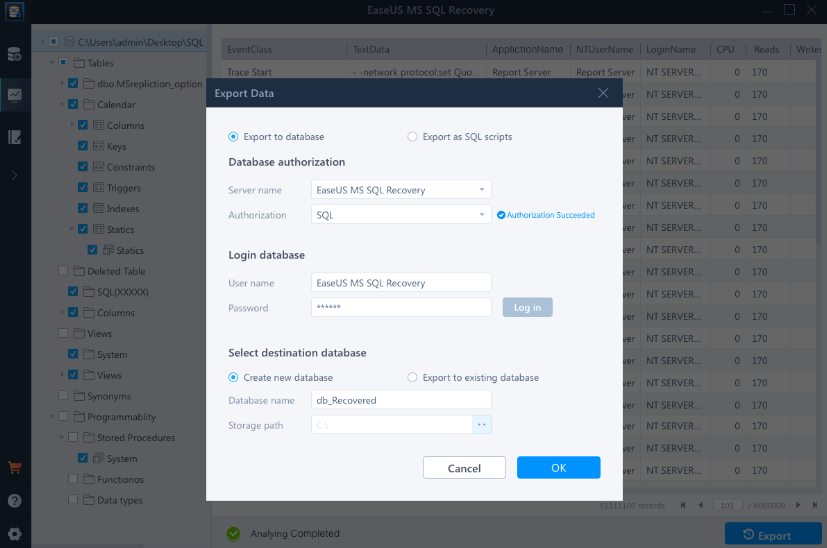
Advanced database repair solutions designed for enterprise settings effectively mend damaged MDF and NDF SQL Server databases, addressing a wide array of SQL database issues. This software proficiently recovers essential database elements such as tables, triggers, indexes, keys, rules, and stored procedures, while also allowing for the deletion of records from the SQL database. It accommodates various versions of MS SQL Server, including 2019, 2017, 2016, 2014, 2012, 2008, and even earlier iterations. When corruption occurs, it typically impacts both primary data (.mdf) and secondary data files (.ndf), but this tool thoroughly scans, identifies, and rectifies affected data files, ensuring that the database is returned to full functionality. Additionally, issues stemming from a corrupted transaction log file (.ldf) can lead to numerous database errors, but EaseUS MS SQL Recovery automatically repairs the damaged log file alongside the rest of the database. After completion, the restored transaction log is conveniently saved in the same directory as the other recovered components, ensuring a seamless recovery process. This comprehensive approach to database repair enhances operational reliability and minimizes downtime for enterprises.
Description
The SQL Database Recovery Tool enables the extraction of information from both MDF (.mdf) and NDF (.ndf) SQL files. It effectively retrieves comprehensive data elements from both primary and secondary databases, including functions, rules, stored procedures, tables, and more, ensuring no data is lost in the process. This MS SQL database repair software is capable of recovering deleted SQL databases while preserving their attributes and maintaining the original data format. Crafted to facilitate data retrieval from commonly utilized commands in SQL Server, the SQL MDF recovery software is user-friendly and efficient. The recovery tool is adept at addressing various scenarios where users encounter difficulties accessing their data. After the full restoration of data from both MDF and NDF files, users have the option to either directly save this information into SQL Server databases or store it in compatible SQL scripts. Additionally, upon scanning the database, the SQL repair tool automatically identifies the version of SQL Server that corresponds to the file in question, enhancing user convenience and streamlining the recovery process. This seamless integration ultimately helps users regain access to their vital data quickly and reliably.
API Access
Has API
No
API Access
Has API
No


Pricing Details
$299 per year
Free Trial
Yes
Free Version
No
Pricing Details
$249 one-time payment
Free Trial
No
Free Version
Yes
Deployment
Web-Based
No
On-Premises
No
iPhone App
No
iPad App
No
Android App
No
Windows
Yes
Mac
No
Linux
No
Chromebook
No
Deployment
Web-Based
No
On-Premises
No
iPhone App
No
iPad App
No
Android App
No
Windows
Yes
Mac
No
Linux
No
Chromebook
No
Customer Support
Business Hours
No
Live Rep (24/7)
Yes
Online Support
Yes
Customer Support
Business Hours
Yes
Live Rep (24/7)
Yes
Online Support
Yes
Types of Training
Training Docs
Yes
Webinars
No
Live Training (Online)
No
In Person
No
Types of Training
Training Docs
Yes
Webinars
No
Live Training (Online)
No
In Person
Yes
Vendor Details
Company Name
EaseUS
Founded
2004
Country
United States
Website
www.easeus.com/data-recovery-software/ms-sql-recovery.html
Vendor Details
Company Name
DataHelp
Founded
2017
Country
India
Website
datahelp.in/sql/recovery.html
Product Features
Data Recovery
Web Access / Restoration
No
Backup Log
No
Backup Scheduling
No
Compression
No
Continuous Backup
No
Encryption
No
Incremental Backup
No
Local Server Options
No
Multiple System Support
No
Remote Server Options
No
Secure Data Storage
No
Product Features
Data Recovery
Web Access / Restoration
No
Backup Log
No
Backup Scheduling
No
Compression
No
Continuous Backup
No
Encryption
No
Incremental Backup
No
Local Server Options
No
Multiple System Support
No
Remote Server Options
No
Secure Data Storage
No
