Average Ratings 0 Ratings
Average Ratings 0 Ratings
Similar Products
-
TeleRayTeleRay is an industry-first telehealth and image management platform. TeleRay cloud-based medical image management platform allows users to securely share images with professionals (specialists, referring, clinicians) and patients. The platform has many features, including the ability to import or convert DICOM or non DICOM images, query and HL7 connectivity. Integrate with any EMR, view images on an FDA approved viewer anywhere on any device. Complete DICOM image migration is available- set up, training, and implementation is included. Live streaming and remote control of modalities are options and great for many use cases to place professionals virtually in a room any where. TeleRay is the most secure platform with peer 2 peer health and data communication. You can use the app to access workflow tools like waiting rooms, multi-calls, call transfer and sharing of images. It's simple and affordable. More than 3000 locations use our service, including 38 of the top medical centers in more than 20 nations. Get started today for free.
-
Adobe FireflyAdobe Firefly is a versatile AI-powered creative platform designed to help users generate and edit multimedia content with ease. It allows users to create images, videos, and audio using simple text prompts within an interactive and flexible workspace. The platform features tools like generative fill, image editing, and video editing, enabling users to refine and enhance their creations. Firefly also includes quick actions such as background removal, cropping, resizing, and format conversion to streamline workflows. Users can explore an infinite canvas for creative production and experiment with various styles and outputs. The platform encourages creativity by allowing users to remix content from a shared community gallery. With its intuitive design, it reduces the need for advanced technical skills. Firefly integrates AI capabilities to speed up content creation and editing processes. It supports both beginners and professionals in producing high-quality results. Overall, Adobe Firefly provides a powerful and accessible environment for modern digital creativity.
-
TinyPNGTinyPNG (by Tinify) is a free image optimization service built for developers and designers. It utilizes smart lossy compression to reduce the file sizes of JPEG, PNG, WebP, and AVIF files by up to 80% with no visible quality loss. That means faster load times, better SEO, and lower bandwidth. You can compress, convert, and resize images via a clean web interface or integrate it into your workflow with the API. The platform also provides an image CDN for fast global delivery of optimized assets. SDKs are available for Python, Node.js, PHP, Java, Ruby, and .NET. WordPress plugin included, plus plenty of community-driven integrations. No tuning, no noise, Tinify just works. Whether you're optimizing a handful of images or processing millions, it scales effortlessly. All plans include a generous free tier, and support is quick when you need it. George the panda 🐼 approves.
-
OptiSignsOptiSigns, your friendly digital signage software! Designed with simplicity and ease in mind, it's the perfect harmony of affordable software and usage with any hardware in the market. Pick from 140+ Apps, Thousands of Templates, and formats like images & videos, playlists, Google Slides, Weather, Instagram, Twitter, YouTube – you name it! Level up your business and start engaging your audience. For just $10/month per screen, use any display to capture your audiences attention! Remotely manage it all from one central portal. Indulge in features, images, videos, playlists, and schedules. Jazz it up with apps like Google Slides, Weather, Instagram, Facebook, Twitter, and more. Oh, and did we mention? We play nice with the most hardware and operating systems in the market like Fire TV Stick, Android, Chrome, Raspberry Pi, Roku, Windows, Linux, and MacOS. Time to unleash your business potential!
-
MobiPDFMobiPDF (formerly PDF Extra) is an intuitive reader and editor that allows you to read, edit, create, OCR, organize, annotate, fill and sign, convert, and share any PDF. This makes MobiPDF an excellent choice for users seeking a budget-friendly alternative to Adobe Acrobat Pro. HERE’S WHAT YOU GET WITH MOBIPDF: Multiple Page View Modes: Enjoy a distraction-free "Read Mode". Advanced Editing Tools: Experience a Word-like PDF editing environment. Two-Way Conversions: Convert PDFs to and from Word, Excel, PowerPoint, or image formats. OCR Support: Make scanned documents searchable. Markup Tools: Highlight, comment, strikethrough, stamp, and more to enhance your documents. Effortless PDF Organizer: Reorder, compress, split, and combine PDFs with ease. Sign & Secure: Add signatures, create and fill forms, and protect your PDFs with passwords, encryption, and digital certificates. Offline Mode: Work freely on your projects, even offline. Seamless translation: One-click translate any PDF into 50+ languages.
-
Google AI StudioGoogle AI Studio is an all-in-one environment designed for building AI-first applications with Google’s latest models. It supports Gemini, Imagen, Veo, and Gemma, allowing developers to experiment across multiple modalities in one place. The platform emphasizes vibe coding, enabling users to describe what they want and let AI handle the technical heavy lifting. Developers can generate complete, production-ready apps using natural language instructions. One-click deployment makes it easy to move from prototype to live application. Google AI Studio includes a centralized dashboard for API keys, billing, and usage tracking. Detailed logs and rate-limit insights help teams operate efficiently. SDK support for Python, Node.js, and REST APIs ensures flexibility. Quickstart guides reduce onboarding time to minutes. Overall, Google AI Studio blends experimentation, vibe coding, and scalable production into a single workflow.
-
4ALLPORTALIf you are looking for a way to easily manage your product data, 4ALLPORTAL is the hub for you. Our software saves resources! Increase sales, reduce costs and get more time for strategy and creativity. Maintain your product data once, link information and media with all products and keep them up-to-date in all sales channels with just a few clicks. Because our platform is highly customizable and scalable, we can create a solution specifically tailored to your needs. Your dedicated account manager will ensure that the software grows with your needs. Interested? Here's how it works: Step 1: In a 30-minute call, you tell us about your current and future needs and the problems you face in your daily work. Step 2: We evaluate your needs and create a customized 4ALLPORTAL, which we present to your team in a live demo. Step 3: You get access to your 4ALLPORTAL for 30+ days to test it extensively and decide if you want to work with us or not. What are you waiting for? Start managing your data efficient today and scale your business with 4ALLPORTAL.
-
Athena SecurityAthena Security uses advanced concealed weapons detection systems to deliver a unified, AI-driven entryway solution for hospitals, K–12 schools, casinos, places of worship, government buildings, and commercial facilities across the U.S. The Apollo 500 enables seamless walk-through screening to detect weapons in real time, giving operators more actionable data points than traditional systems for faster, more confident decisions. Athena’s AI-powered X-ray leverages iPad technology to modernize screening and improve threat detection. Athena’s Hospital Visitor Management System integrates with EPIC to connect identity, access, and screening data. Innovations include the Ambulance Bay WDS for stretcher screening and secondary screening for bags and lower extremities to reduce human error. Designed with compliance in mind, Athena aligns with California AB 2975, which mandates weapons detection screening at key hospital entrances by 2027 to improve safety and reduce workplace violence. DHS-aligned workflows ensure testing, controls, and compliance, while telepresence and AR alert glasses provide real-time support. All systems connect in one platform for centralized monitoring and enterprise reporting.
-
SmartDrawSmartDraw makes professional drawings and diagrams accessible to everyone. Non-technical users can quickly create floor plans, while professionals get the precision and scale they require. With industry-leading floor planning tools and an intuitive interface for traditional diagramming like flowcharts and organizational charts, SmartDraw delivers enterprise-ready power without unnecessary complexity. Key features: - Large collection of symbols and templates - Ability to create custom shapes - Import PDFs, images, Google Maps, Visio files, Visio stencils - Draw to any scale - Enrich drawings with data - Generate manifest and bills of materials - Generate diagrams from data automatically like org charts, AWS, Azure, PI Boards, and more - Use natural language text prompts to generate diagrams with AI - Save files directly to OneDrive, SharePoint, or Google Drive, or other preferred provider - Integrations with the Microsoft and Google enterprise stack plus Confluence and Jira SmartDraw supports a wide range of industries and real-world use cases, helping teams plan, document, and communicate more effectively. Construction professionals use it to create scaled floor plans, site layouts, and electrical and plumbing drawings. Fire departments rely on it for fire pre-planning and incident documentation, while police departments use it for accident reconstruction and crime scene diagrams. IT teams build network diagrams and cloud architectures, HR leaders create organizational charts, and product managers map out processes and workflows. From physical layouts to business processes, SmartDraw provides a single platform that adapts to the needs of each role and industry.
-
RallyFuelRallyFuel bridges the gap between college athletes, fans, and brands by facilitating verified NIL (Name, Image, Likeness) agreements. Our innovative platform simplifies the entire NIL journey, encompassing everything from discovering and negotiating deals to ensuring compliance and managing payment transactions seamlessly. Through our service, athletes can effectively monetize their personal brands via various avenues such as fan engagements, autographs, public appearances, social media promotions, and collaborations with brands. Fans, in turn, enjoy genuine connections with their cherished college athletes through clear and compliant transactions aligned with NCAA regulations. Highlighted features include: - Authentic athlete profiles - Secure payment systems - Tools for NCAA compliance - Standardized deal templates and contracts - Analytics to track performance - A direct marketplace connecting fans and athletes Designed specifically for the evolving landscape of college athletics, RallyFuel guarantees that every interaction is transparent, compliant, and advantageous for athletes, fans, and educational institutions alike, fostering a supportive community around college sports. Our commitment to transparency ensures all parties involved can trust the process and feel empowered in their engagements.
Description
Dolphin imaging software is classified as a class II medical device cleared by the FDA. It allows for seamless management of patient photographs and x-ray images. At the heart of the Dolphin product suite lies ImagingPlus, which has been thoughtfully crafted for ease of learning, enabling users to efficiently capture, organize, and display image records. This software comes equipped with a range of robust and intuitive tools designed for conveying treatment plans and facilitating effective communication of concepts. Users can take sequential photos, and Dolphin will arrange these images automatically into a standard format, which includes composites of extraoral, intraoral, and occlusal pictures. The software provides a single-screen interface for previewing, cropping, rotating, enhancing, and aligning images. Users can adjust various enhancements such as brightness, contrast, gamma, hue, saturation, and red-eye reduction. Images can be easily dragged and dropped from file folders into Dolphin. If you're pressed for time and can't make adjustments immediately, the crop-later feature allows for edits at a later time, with an option to preserve the original images untouched. Additionally, it supports the importation of x-rays, slides, and other image formats, making it a comprehensive tool for various imaging needs. This software truly streamlines the process of managing and enhancing dental images for professionals.
Description
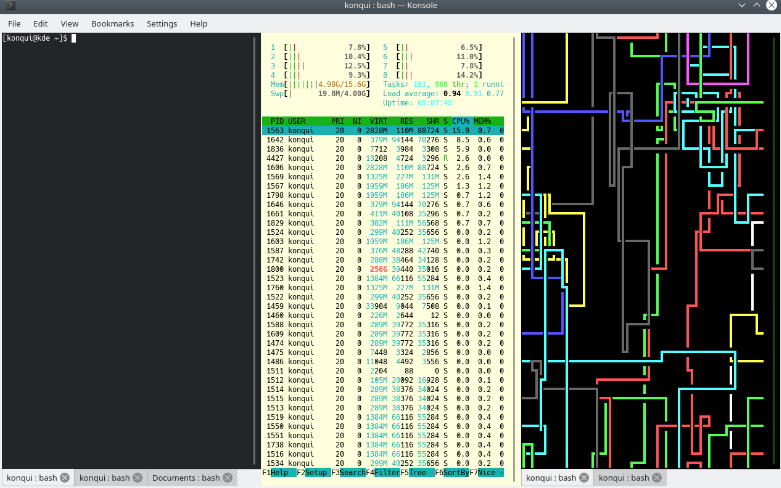
Konsole is seamlessly incorporated into various other KDE Applications, enhancing accessibility and user convenience. Applications like KDevelop, Kate, and Dolphin utilize Konsole as their built-in terminal emulator. If you have ideas to improve Konsole, we invite you to participate in its development and contribute to making it the premier terminal emulator available! Your involvement could lead to innovative features that benefit the entire KDE community.
API Access
Has API
No
API Access
Has API
No




Integrations
Microsoft PowerPoint
Yes
Open Dental Software
Yes
Practice-Web Dental
Yes
Progress OpenEdge
Yes
SQL Server
Yes
Integrations
Microsoft PowerPoint
No
Open Dental Software
No
Practice-Web Dental
No
Progress OpenEdge
No
SQL Server
No
Pricing Details
No price information available.
Free Trial
No
Free Version
No
Pricing Details
No price information available.
Free Trial
No
Free Version
No
Deployment
Web-Based
Yes
On-Premises
No
iPhone App
No
iPad App
No
Android App
No
Windows
Yes
Mac
Yes
Linux
No
Chromebook
No
Deployment
Web-Based
No
On-Premises
No
iPhone App
No
iPad App
No
Android App
No
Windows
No
Mac
No
Linux
Yes
Chromebook
No
Customer Support
Business Hours
Yes
Live Rep (24/7)
No
Online Support
Yes
Customer Support
Business Hours
No
Live Rep (24/7)
No
Online Support
No
Types of Training
Training Docs
Yes
Webinars
Yes
Live Training (Online)
Yes
In Person
Yes
Types of Training
Training Docs
No
Webinars
No
Live Training (Online)
No
In Person
No
Vendor Details
Company Name
Dolphin Imaging & Management Solutions
Founded
1988
Country
United States
Website
www.dolphinimaging.com/product/Imaging
Vendor Details
Company Name
KDE
Founded
1996
Country
Germany
Website
konsole.kde.org
Product Features
Dental Imaging
2D Imaging
No
Calibration Management
No
Data Import / Export
No
Image Analysis
No
Treatment Planning
Yes
Video Support
No
