Average Ratings 0 Ratings
Average Ratings 0 Ratings
Similar Products
-
ScreencaptScreencapt allows you to record the entire screen or a selected area. You can also record a specific window. Screencapt is the ideal screen recorder because of its flexibility. Using the integrated audio recording you can also add your commentary or system sound directly into the screen recording. This is particularly useful when creating explanation videos or presentations. Screencapt's ability to record a webcam is a special feature. You can now add your comments and reactions to the video. This makes your screen recordings more personal and professional. Screencapt offers advanced options to record the cursor. You can choose to hide the cursor or add special effects to highlight specific actions. This is especially useful for software tutorials and demonstrations where a clear cursor view is required.
-
OptiSignsOptiSigns, your friendly digital signage software! Designed with simplicity and ease in mind, it's the perfect harmony of affordable software and usage with any hardware in the market. Pick from 140+ Apps, Thousands of Templates, and formats like images & videos, playlists, Google Slides, Weather, Instagram, Twitter, YouTube – you name it! Level up your business and start engaging your audience. For just $10/month per screen, use any display to capture your audiences attention! Remotely manage it all from one central portal. Indulge in features, images, videos, playlists, and schedules. Jazz it up with apps like Google Slides, Weather, Instagram, Facebook, Twitter, and more. Oh, and did we mention? We play nice with the most hardware and operating systems in the market like Fire TV Stick, Android, Chrome, Raspberry Pi, Roku, Windows, Linux, and MacOS. Time to unleash your business potential!
-
ManageEngine ADManager PlusADManager Plus is an effortless and user-friendly solution for managing and reporting on Windows Active Directory (AD), designed to assist both AD administrators and help desk staff with their daily operations. Featuring a centralized and user-friendly web interface, this software addresses a range of intricate tasks, including the bulk management of user accounts and various AD objects, delegation of role-based access to help desk personnel, and the generation of a comprehensive array of AD reports, many of which are critical for compliance audit purposes. Additionally, this Active Directory tool provides mobile applications that enable AD administrators and technicians to carry out essential user management functions from their smartphones or tablets while on the go. It simplifies the process of creating multiple users and groups in Office 365, managing licenses, establishing Exchange mailboxes, migrating existing mailboxes, setting storage limits, and adding proxy addresses, thereby enhancing overall efficiency. With its robust features, ADManager Plus stands out as a vital asset for organizations aiming to streamline their AD management processes.
-
PDF GuruEasily convert, edit, merge, and compress your PDF files with just a few simple clicks. You can quickly download your document without any hassle, as our PDF converter generates files in mere seconds! To ensure the safety of your digital information, we implement HTTPS encryption while you create PDF files on our site. You can redact PDFs, alter text, insert new elements, and engage in various other tasks, all from a single platform. Our user-friendly interface is designed for seamless navigation, allowing you to utilize our PDF creator with minimal effort. Compatible with every major operating system, our online PDF maker functions flawlessly on Windows, Mac OS, Linux, iOS, and Android. For those who wish to maintain privacy, you have the option to secure your file by locking or restricting access, preventing others from opening, editing, or printing it. This comprehensive tool simplifies your document management and enhances your productivity.
-
CirrusPrintCirrusPrint helps you manage and streamline your printing and document delivery across multiple networks. It solves cloud migration issues related to printing and provides the fastest and most direct way to deliver documents to users. With CirrusPrint, traditional network printing is still possible without any changes to operations. You can also print to your users, email your printers, and send a file from your smartphone to a printer anywhere in the country. CirrusPrint can be used on Windows or Linux, either in the cloud or at your own data center. It can accept print jobs and other documents, compress them, and deliver them to remote printers and users. It is easy to integrate with applications. You can print to it as any network printer, email files, drop files into the device, or use REST API. CirrusPrint jobs are sent quickly and securely to remote printers as exact duplicates of the original job.
-
pCloud BusinesspCloud Business is a cloud storage and file synchronization platform designed for teams that need controlled access, cross-platform compatibility, and predictable storage allocation. It provides centralized file management with granular permissions and optional client-side encryption. Founded in 2013 in Switzerland, pCloud operates under EU-aligned privacy standards and offers data residency in Luxembourg (EU) and Dallas, Texas (US). The platform supports over 23 million users globally. Core Functionality : - Per-User Storage Allocation : 1 TB or 2 TB per user, suitable for small to mid-sized teams and distributed environments. - Virtual File System (pCloud Drive) : Mounts as a local drive on Windows, macOS, and Linux. Files are streamed on demand, reducing local disk usage. - File Sync & Sharing : Folder-level sync, link-based sharing, and permission control (view/edit/manage). Supports password-protected and time-limited links. - Admin & Access Control : Centralized user management, role assignment, and storage distribution via admin console. - Versioning & File History : File versioning with up to 180 days retention, enabling rollback and recovery. - Cross-Platform Support : Native clients for Windows, macOS, Linux, iOS, Android, plus web interface. - Client-Side Encryption (Optional) : Zero-knowledge encryption via pCloud Encryption for sensitive data; encryption keys are not stored server-side. Technical Positioning: - Swiss jurisdiction; GDPR-aligned processing - No file size limits - Works without mandatory ecosystem lock-in (no bundled office suite required) - Compatible with heterogeneous environments (Linux included) Trial : 30-day free trial available for up to 10 users.
-
AdRem NetCrunchNetCrunch is commercial, self-hosted, agentless network and IT infrastructure monitoring software for Windows Server. It monitors network devices, servers, virtualization platforms, cloud services, applications, websites, logs, telemetry, and network traffic across distributed environments. NetCrunch supports 680+ monitoring targets and provides 270+ ready-to-use Monitoring Packs for devices, applications, and operating systems. Policy-based monitoring automatically applies monitoring settings, Monitoring Packs, thresholds, and alerts to matching devices and systems. Licensing is based on monitored nodes and network interfaces rather than individual sensors, checks, or metrics. NetCrunch provides real-time dashboards and automatic Layer 2 and routing topology maps for visibility into network status and performance. Network traffic analysis supports NetFlow, sFlow, IPFIX, and other flow technologies. Its alerting system supports event correlation, dependency-aware suppression, predictive thresholds, escalation, and 40+ automated response actions, including scripts, notifications, API calls, and integrations with external systems. Distributed Monitoring Probes extend monitoring to remote and isolated locations. NetCrunch also provides a REST API for integration and automation with external IT management, service management, and operational systems. NetCrunch is self-hosted on Windows Server and can monitor on-premises, air-gapped, cloud, and hybrid IT environments.
-
ManageEngine Endpoint CentralManageEngine Endpoint Central is a unified endpoint management and security platform designed for IT teams managing diverse and distributed device environments eliminating the need for multiple disconnected products for patching, remote access, mobile management, and security. The platform supports Windows, macOS, Linux, iOS, Android, and Chrome OS. Automated patch deployment covers OS and 1,000+ third-party applications with scheduling, testing, rollback, and compliance reporting. Software can be deployed, updated, or removed across thousands of endpoints simultaneously. OS imaging workflows provision new devices quickly, while continuous asset inventory supports license compliance and audit readiness. Security capabilities are built directly into the platform. Vulnerability assessment identifies and prioritizes endpoint weaknesses by severity. Application control prevents unauthorized software execution. Device control governs USB and peripheral access. Endpoint privilege management removes unnecessary admin rights. EDR delivers behavioral threat detection and incident response, while NGAV blocks malware, ransomware, and zero-day threats. BitLocker and FileVault encryption enforces disk protection across Windows and macOS. Built-in remote desktop allows technicians to connect instantly without third-party software. Integrated MDM covers iOS and Android enrollment, app management, and remote wipe for corporate and BYOD environments. DEX monitoring gives IT teams real-time visibility into device performance enabling proactive issue resolution before productivity is impacted. Available as cloud or on-premises across Free, Professional, Enterprise, UEM, and Security editions.
-
Files.com6,000+ companies trust Files.com to automate and secure business critical transfers. We obsess about security, compliance, reliability, and performance so your critical business processes just work every time. Easily manage any transfer flow without writing scripts or code, and onboard workloads and partners effortlessly. We support standard file transfer protocols (FTP, SFTP, AS2) for working with external partners and also provide native apps for high performance internal transfers. As a fully Cloud-Native SaaS, there are no servers for you to buy or maintain, there is no installation required, and high availability and redundancy are built in and free. Our InfoSec Program is audited annually by Kirkpatrick Price, a leading information security CPA firm. Our audit covers the scope of the entire Files.com business (not just datacenter operations) and names Files.com specifically. Beware of smaller competitors who try to pass off someone else’s audit as their own. Technical capabilities include encryption at-rest and in-transit, four types of two-factor authentication, nine enterprise identity (SSO) integrations, configurable password and session policies, and a perfect “A+” score from Qualys SSL Labs.
-
YodeckNext-generation technology for digital signage professionals Yodeck, a cloud-based digital signage platform, is unbeatable. It powers your screen with dynamic content that instantly engages your target audience. Yodeck makes it easy to create, schedule, and design content from the web. To get your message across to those who matter most to you, use attention-grabbing media such as videos, images and PDF files, Office documents, data dashboards, and social media. It provides enterprise-grade security and control. Yodeck's drag-and-drop editing feature allows users to be creative in organizing content into interesting layouts. Yodeck is proud to offer a unique digital signage solution for businesses of all sizes. This includes local diners as well as global leaders like Delta Airlines, Autodesk and Adobe.
Description
Dealing with multiple windows can often lead to frustration, as it demands careful manipulation of your mouse or trackpad to click, drag, and adjust the windows to your preferred size and location. Despite your efforts, achieving the perfect arrangement can be challenging, resulting in windows being carelessly distributed across your screen. Enter Divvy, an innovative solution for workspace management that streamlines the process of organizing your display. With Divvy, you can effortlessly "divvy up" your screen into precise sections, allowing for a much more efficient workflow. The process is as straightforward as clicking and dragging within the Divvy interface, instantly resizing and relocating your windows to designated areas. If you find this method cumbersome, you have the freedom to create numerous shortcuts that can resize and reposition your windows at a moment's notice. Divvy is crafted to be not only fast and intuitive but also stylish in its simplicity. Our goal is to ensure that it operates unobtrusively while delivering unparalleled window management capabilities, transforming the way you interact with your digital workspace. With Divvy, you can reclaim control over your screen real estate like never before.
Description
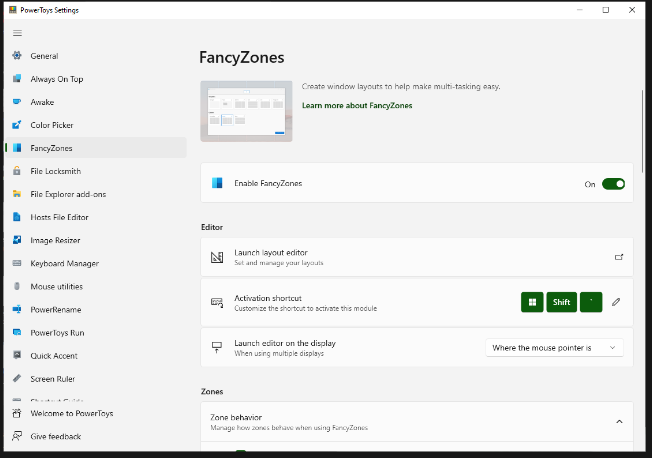
FancyZones serves as a window management tool designed to help users arrange and snap their application windows into optimized layouts, enhancing workflow efficiency and allowing for quick restoration of these layouts. This utility empowers you to specify a series of designated zones on your desktop where windows can be directed. By dragging a window into a predetermined zone or using a designated keyboard shortcut, the respective window automatically resizes and relocates to occupy that zone completely. Additionally, if you have the "Use non-primary mouse button to toggle zone activation" option activated, you can enter zone selection mode by simply clicking the secondary mouse button. When two zones are positioned next to each other, a window can be adjusted to span the combined area of both zones, effectively rounding up to the smallest rectangle that encompasses the two. As you maneuver the mouse cursor close to the shared boundary of two zones, both zones become active at the same time, giving you the flexibility to drop the window into either or both. Moreover, you can drag the window until it activates one zone and then, by pressing and holding the control key while continuing to drag, select multiple zones to expand your layout options. This feature significantly streamlines the process of organizing your desktop workspace efficiently.
API Access
Has API
No
API Access
Has API
No


Integrations
QuickBooks Online
No
Pricing Details
$13.99 one-time payment
Free Trial
Yes
Free Version
No
Pricing Details
Free
Free Trial
No
Free Version
Yes
Deployment
Web-Based
No
On-Premises
No
iPhone App
No
iPad App
No
Android App
No
Windows
Yes
Mac
Yes
Linux
No
Chromebook
No
Deployment
Web-Based
No
On-Premises
No
iPhone App
No
iPad App
No
Android App
No
Windows
Yes
Mac
No
Linux
No
Chromebook
No
Customer Support
Business Hours
No
Live Rep (24/7)
No
Online Support
Yes
Customer Support
Business Hours
Yes
Live Rep (24/7)
No
Online Support
Yes
Types of Training
Training Docs
Yes
Webinars
No
Live Training (Online)
No
In Person
No
Types of Training
Training Docs
Yes
Webinars
Yes
Live Training (Online)
No
In Person
Yes
Vendor Details
Company Name
Mizage
Country
United States
Website
mizage.com/divvy/
Vendor Details
Company Name
Microsoft
Country
United States
Website
learn.microsoft.com/en-us/windows/powertoys/fancyzones